Introduction to Anycubic Kobra 2 Pro
If you’ve been keeping an eye on the consumer 3D printing market lately, you’ve almost certainly heard the buzz around the Anycubic Kobra 2 Pro. Released as part of Anycubic’s ambitious Kobra 2 series rollout on September 1, 2023, this machine quickly caught the attention of hobbyists and professionals alike for one very good reason: it’s incredibly fast — and surprisingly affordable. This Anycubic Kobra 2 Pro review aims to give you an honest, comprehensive, and friendly walkthrough of everything this printer has to offer, from its physical design to its software ecosystem and real-world printing experience.
Anycubic positioned the Kobra 2 Pro as the sweet spot in their Kobra 2 lineup — faster and smarter than the entry-level Kobra 2 Neo, but more compact and focused than the larger Kobra 2 Plus and Kobra 2 Max. If you’re a maker who wants high-speed FDM printing in a desktop-friendly package without jumping to a large-format machine, the Kobra 2 Pro might be exactly what you’ve been waiting for.
What makes this printer stand out at first glance is a combination of cutting-edge motion hardware, an intelligent software stack, and a user-friendly design philosophy that makes it accessible even to beginners. Throughout this review, we’ll dig into the details so you can decide whether the Kobra 2 Pro is the right addition to your workspace.
2. Design and Build Quality
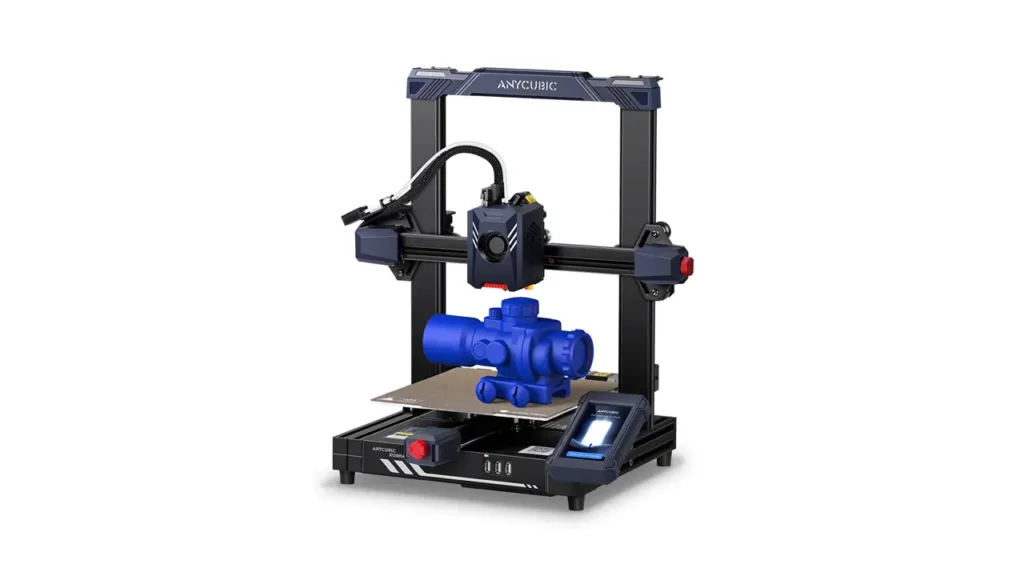
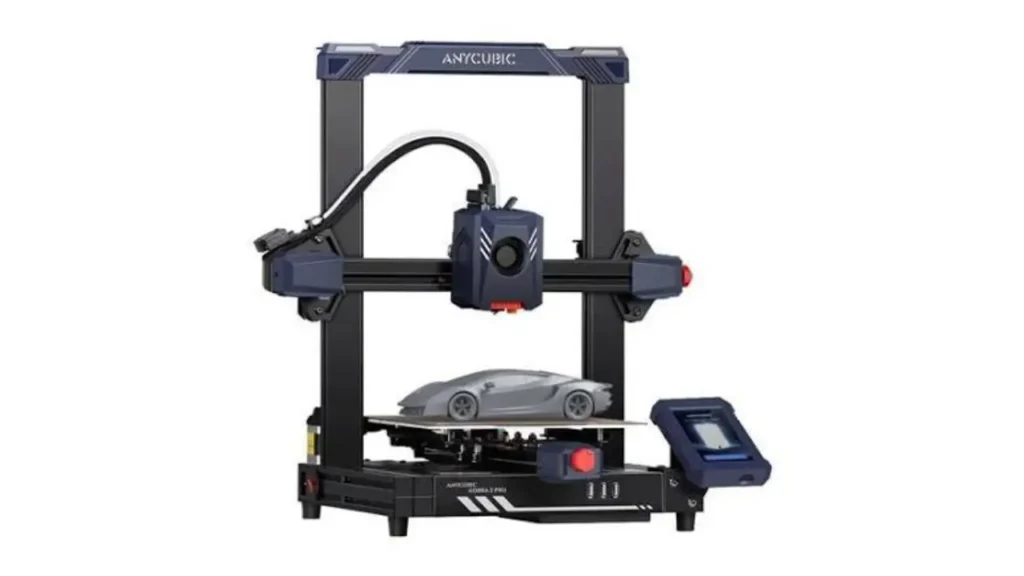
The first thing you’ll notice when you unbox the Anycubic Kobra 2 Pro is how solid it feels. The frame is built with a sturdy metal chassis that keeps wobble to a minimum even at high print speeds. Anycubic made thoughtful structural choices here: a double-guided, synchronized Z-axis and a dual Y-axis system running on SG15 bearings provide the mechanical stability necessary to achieve those eye-watering speeds without sacrificing print quality.
The Anycubic Kobra 2 Pro build volume is 220 × 220 × 250 mm. That’s a standard mid-size footprint — not huge, but more than enough for the vast majority of everyday prints, from functional parts and figurines to decorative items and prototypes. It’s also compact enough to sit comfortably on a desk or workbench without dominating your space, which is a real advantage if you’re working in a smaller studio or home office.
The print bed itself is a PEI magnetic spring steel plate, which has become a genuine standard of quality in the FDM world. It offers excellent adhesion when warm and releases prints effortlessly once it cools down — just a gentle flex of the plate and your model pops right off. No more scraping, no more ruined surfaces.
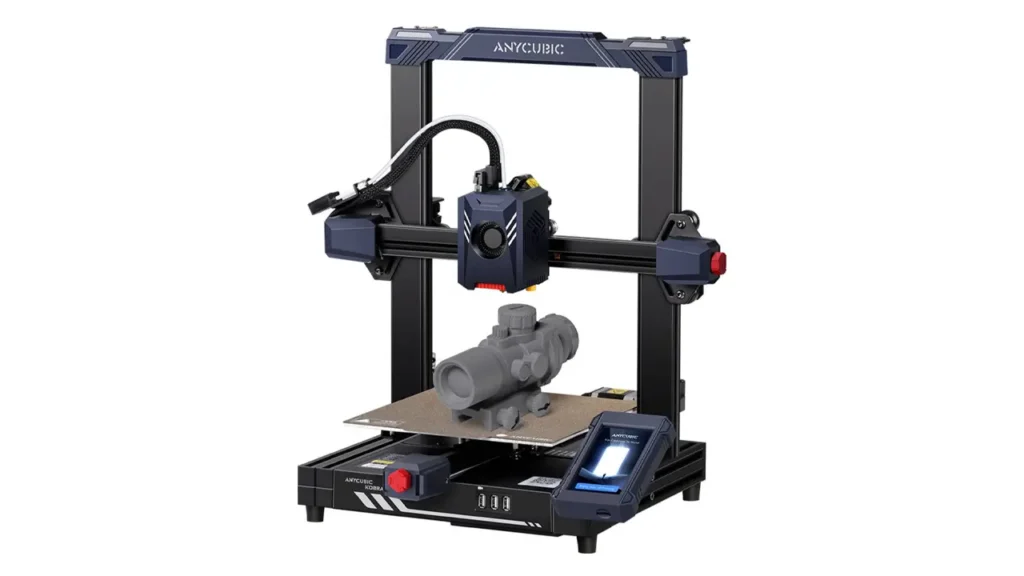
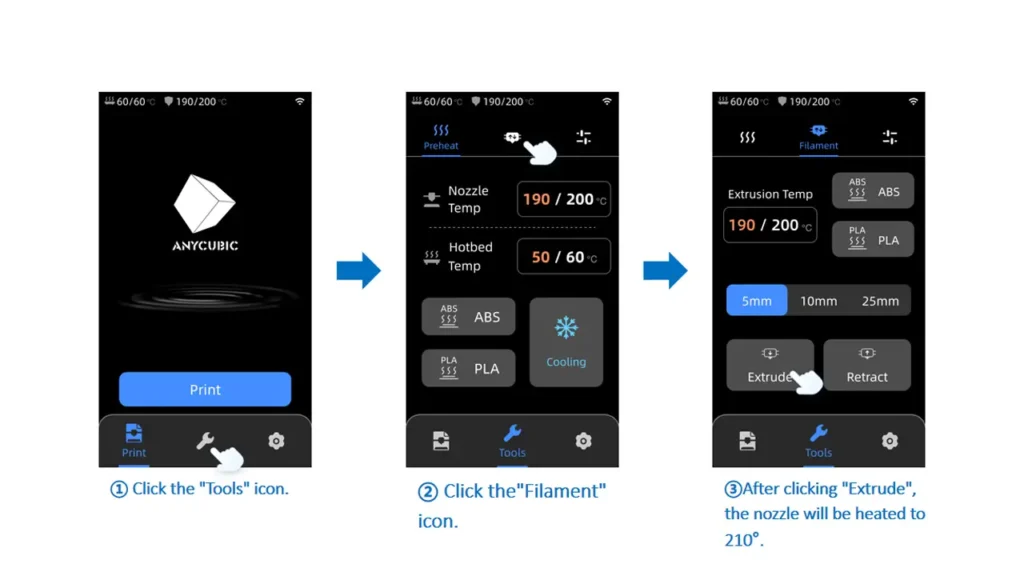
The 4.3-inch full-color LCD touchscreen mounted on the front is responsive and intuitively laid out. Navigation through menus feels smooth, and the display gives you access to all key settings, calibration tools, and print monitoring functions in one clean interface. There are also three USB-A ports on the front panel, which is a genuinely convenient touch — no fiddling with micro SD cards in awkward positions.
Overall, the build quality of the Kobra 2 Pro communicates that Anycubic is serious about delivering a premium experience without the premium price tag.
If you’ve been looking for a 3D printer that delivers speed, stability, and zero calibration drama — take a serious look at Anycubic Cobra 3 Combo.
This isn’t just another iteration in the lineup. It’s a well-engineered system built for real productivity: high-speed printing, automatic leveling, rigid frame stability, and multi-color capability in the Combo version. Whether you’re running a home workshop or scaling a small production setup, this machine is designed to keep up with your workflow — not slow it down.
Cobra 3 Combo means you press “Start” and focus on creating, not troubleshooting.
👉 Click the link to check the current price and full configuration details.
3. Technical Specifications Overview
Let’s get into the numbers. The Anycubic Kobra 2 Pro specs are impressive across the board, especially considering the printer’s price point. Here’s a full breakdown based on official Anycubic specifications:
| Specification | Details |
|---|---|
| Build Volume | 220 × 220 × 250 mm |
| Max Print Speed | 500 mm/s |
| Recommended Print Speed | 300 mm/s |
| Max Acceleration | 20,000 mm/s² |
| Processor | Cortex-A7 dual-core 1.2 GHz |
| Extruder Type | Dual Gear Direct Drive |
| Nozzle Diameter | 0.4 mm (standard) |
| Bed Surface | PEI Magnetic Spring Steel |
| Auto Leveling | LeviQ 2.0 |
| Display | 4.3-inch Color LCD Touchscreen |
| Connectivity | Wi-Fi, USB-A (×3) |
| Z-Axis | Double-guided synchronized |
| Y-Axis | Dual-rail on SG15 bearings |
| Cooling Fan | Up to 7,000 RPM |
| Smart Features | Vibration Compensation, Flow Control |
| Filament Runout Sensor | Yes |
| Power Loss Recovery | Yes |
| Compatible Slicers | Anycubic Slicer, PrusaSlicer, Cura |
These specifications place the Kobra 2 Pro firmly in the “high-performance mid-range” category — a machine that punches well above its weight class.
4. Printing Speed & Performance
Speed is the headline feature of the Anycubic Kobra 2 Pro, and it fully lives up to the hype. Compared to mainstream FDM 3D printers, the Kobra 2 Pro’s printing speed is increased by 10 times, with a maximum printing speed of up to 500 mm/s. That’s extraordinary by any standard. For everyday use, the recommended printing speed is 300 mm/s, which still offers a 10-fold increase compared to other mainstream FDM printers, resulting in time savings and lower energy consumption.
What makes this Anycubic Kobra 2 Pro speed truly usable — rather than just a marketing number — is the intelligent engineering that supports it. With a maximum acceleration of up to 20,000 mm/s² and equipped with a 1.2 GHz Cortex-A7 dual-core processor, the Kobra 2 Pro can execute commands in a moment, allowing printing speeds of 500 mm/s while remaining extremely precise.
Two key smart features work together to ensure quality doesn’t suffer at these speeds. First, Vibration Compensation: this feature allows the control unit to recognize resonance frequencies on the X and Y axes and counteract vibrations through intelligent use of the motion system, eliminating staggered printed lines and improving the precision and stability of 3D models. Second, Flow Control: Flow Control detects irregularities in the material flow and compensates for them through targeted retracting and refilling, resulting in even, fully printed layers that take print quality and detail to a new level.
The result in practice? The Anycubic Kobra 2 Pro is capable of rapidly printing a Benchy model within 15 minutes. That’s a benchmark that speaks volumes — the 3DBenchy, a standard test model for the 3D printing community, typically takes 1–2 hours on conventional printers.
The cooling system is equally impressive. The optimized fan reaches up to 7,000 RPM, ensuring rapid solidification of filament immediately after extrusion, which is critical for maintaining print fidelity at such speeds.
5. Firmware and Software Ecosystem
Understanding the Anycubic Kobra 2 Pro firmware situation is important before you buy, especially if you come from the open-source 3D printing world. The Kobra 2 Pro runs on a Klipper-based firmware, which is fantastic news in principle — Klipper is widely regarded as one of the most capable firmware platforms for high-speed FDM printing.
However, there’s a nuance worth knowing: the Anycubic Kobra 2 Pro Klipper implementation is Anycubic’s own locked version. This means you get all the performance benefits of Klipper under the hood — including the superior motion planning algorithms that enable 500 mm/s speeds — but you don’t get the full open-source Klipper experience out of the box, such as direct access to configuration files or Mainsail/Fluidd interfaces. Some users in the community have explored custom firmware solutions to unlock more of Klipper’s native functionality, but officially the printer ships with Anycubic’s proprietary firmware layer on top.
On the positive side, Anycubic’s firmware layer is well-polished for end users. Firmware updates are seamless — the Anycubic app takes care of firmware updates without needing an SD card or cable connection, handling everything wirelessly.
For slicing software, the Kobra 2 Pro is compatible with the Anycubic Slicer, PrusaSlicer, and Ultimaker Cura — all three are industry standards with strong communities and extensive documentation. Anycubic provides a pre-configured profile file on the included USB stick, making it easy to set up PrusaSlicer or Cura for the Kobra 2 Pro without manual calibration of the slicer settings.
Using the Anycubic app, you can remotely control your printer at any time via Wi-Fi and monitor it in real time, with future updates expected to unlock online slicing, remote printing, time-lapse video recording, and access to a public print model library.
6. Setup and Calibration Process
One of the most pleasant surprises about the Anycubic Kobra 2 Pro is how easy it is to get up and running. The Anycubic Kobra 2 Pro setup follows a modular assembly approach, meaning major components click or bolt together with minimal tools required.
The assembly process typically takes around 15–30 minutes for a first-time user. You’ll need to attach the gantry to the base, install the print head, connect the touchscreen cable, and run a few cable management steps. Anycubic includes clear step-by-step printed instructions, and there are also digital guides available on the included USB stick.
Once assembled, the star of the calibration process is the LeviQ 2.0 automatic bed leveling system. During auto-leveling, the LeviQ 2.0 measures print surface irregularities and compensates for them through Z-offset adjustments on the fly, either automatically or through user-defined values — depending on your requirements, all options are available.
In practice, this means you don’t need to manually level the bed with paper slips under the nozzle — a frustrating ritual that used to accompany every 3D printer setup. The LeviQ 2.0 handles it automatically, and you can fine-tune the Z-offset directly from the touchscreen if needed.
After leveling, the printer performs a Vibration Compensation calibration, which takes just a couple of minutes and dramatically improves print quality at high speeds by compensating for the natural resonance frequencies of the printer’s frame at different motion velocities.
Setting up Wi-Fi is equally painless — you enter your network credentials directly on the touchscreen, and within a minute the printer is connected. Downloading the Anycubic app and pairing it to your printer takes only another minute or two, after which you have full remote monitoring and control capability.
For absolute beginners, this is one of the most approachable setups in the mid-range FDM printer category.
7. Real Test Print Results
When it comes to the Anycubic Kobra 2 Pro test print, the results speak for themselves. Printing a couple of 3DBenchy models from the test files was accomplished in under 14 minutes, with layers described as nice and smooth with good bed adhesion on the PEI plate — impressive out-of-the-box performance.
The included test files on the USB stick are a good starting point — they’re pre-sliced and optimized for the machine, giving you an immediate sense of what the Kobra 2 Pro can do straight out of the box. The PEI spring steel bed ensures excellent first-layer adhesion, and the Dual Gear Direct Drive extruder provides precise filament control, which translates to clean perimeters and well-defined infill patterns.
In real-world printing scenarios, users report consistently clean results at the recommended 300 mm/s speed. At maximum speed (500 mm/s), quality can vary depending on the model geometry, but Vibration Compensation and Flow Control work together to keep artifacts to a minimum. For most functional prints, decorative pieces, and hobby models, the Kobra 2 Pro delivers excellent results without requiring extensive post-processing.
Particularly noteworthy is the cooling performance. With an optimized dissipation design, the cooling fan reaches up to 7,000 RPM, ensuring rapid cooling of models and a fast printing experience. This is especially important for printing overhangs and bridges at speed — good cooling prevents sagging and maintains the crisp edges of your model.
The PEI spring steel plate also earns high marks for ease of print removal — once the plate cools to room temperature, prints release with a simple flex of the plate. No adhesive sprays, no blue tape, no spatula battles.
8. Comparison With the Standard Model
If you’re torn between the Anycubic Kobra 2 Pro vs Kobra 2, here’s a clear-eyed comparison to help you decide.
| Feature | Kobra 2 Pro | Kobra 2 |
|---|---|---|
| Max Print Speed | 500 mm/s | 300 mm/s |
| Recommended Speed | 300 mm/s | 200 mm/s |
| Max Acceleration | 20,000 mm/s² | 3,000 mm/s² |
| Build Volume | 220 × 220 × 250 mm | 220 × 220 × 250 mm |
| Processor | Cortex-A7 1.2 GHz (dual-core) | HDSC HC32F460 (Cortex-M4) |
| Firmware Base | Klipper-based (locked) | Marlin-based |
| Vibration Compensation | Yes | No |
| Flow Control | Yes | No |
| Wi-Fi Connectivity | Yes | No |
| Auto Leveling | LeviQ 2.0 | LeviQ 2.0 |
| Extruder | Dual Gear Direct Drive | Dual Gear Direct Drive |
| Official Price | ~$309 (MSRP) | ~$169–$279 |
The numbers tell a clear story. The Kobra 2 Pro is a substantially more capable machine in every performance category that matters: it’s faster, smarter, and more connected. The addition of Vibration Compensation and Flow Control alone is a major step up, and the move from a Marlin-based firmware to a Klipper-based architecture gives the Pro’s motion system a significant computational advantage.
If speed and print quality are your priorities — and you don’t need a larger build volume — the Kobra 2 Pro is the clear choice over the standard Kobra 2. If budget is the primary constraint, the standard Kobra 2 remains a solid performer, but you will notice the difference in both speed and quality.
9. Price and Market Position
Let’s talk about value. The Anycubic Kobra 2 Pro price is officially listed at $309.00 USD on the Anycubic store, though promotional pricing, regional discounts, and third-party retailer sales can bring this figure down considerably. At the time of writing, the machine has been seen offered at sale prices in the $265 range with discounts applied directly on the Anycubic store.
For what you’re getting — 500 mm/s maximum speed, a Klipper-based processor, Vibration Compensation, Flow Control, LeviQ 2.0 auto-leveling, Wi-Fi connectivity, and a premium PEI build plate — this pricing is remarkably competitive. Just a few years ago, a printer with these capabilities would have cost significantly more.
In the current mid-range FDM market, the Kobra 2 Pro competes directly with machines from brands like Bambu Lab, Creality, and Elegoo. It holds its own confidently, particularly for users who prefer an open-compatible slicer workflow (PrusaSlicer, Cura) over proprietary ecosystems.
Anycubic also backs the Kobra 2 Pro with a solid support package: free express shipping, a 14-day no-reason return policy, a 30-day after-sales guarantee, and a 1-year warranty for the printer. These terms are standard for the industry, but reassuring to see clearly communicated.
For budget-conscious buyers, it’s worth watching the Anycubic store during product launch periods and holiday sales, when the Kobra 2 series has historically offered early-bird pricing and significant discounts.
10. Final Verdict
After spending time with the Anycubic Kobra 2 Pro, the conclusion is straightforward: this is an excellent printer that delivers on its promises. It’s fast — genuinely fast, not just on paper. It’s smart, with Vibration Compensation and Flow Control that make high-speed printing actually reliable. It’s user-friendly, with a painless setup process and an intuitive interface. And it’s priced fairly for what it offers.
This Anycubic Kobra 2 Pro review has covered everything from its 220 × 220 × 250 mm build volume and 500 mm/s top speed, to its Klipper-based firmware, LeviQ 2.0 auto-leveling, seamless Wi-Fi connectivity, and real-world test print results that impress right out of the box. The comparison with the standard Kobra 2 makes clear just how much further the Pro pushes the performance envelope.
Who is it for? The Kobra 2 Pro is ideal for makers, hobbyists, small-studio creators, and educators who want a high-speed, reliable FDM printer in a compact desktop footprint. It’s beginner-friendly enough that newcomers to 3D printing won’t feel overwhelmed, but capable enough to satisfy experienced users who demand quality and speed. Whether you’re printing functional engineering parts, detailed miniatures, cosplay props, or everyday household items, the Kobra 2 Pro handles the job with confidence.
Who might want to look elsewhere? If you’re a hardcore open-source enthusiast who wants full native Klipper access and deep customization without any proprietary layers, you may feel limited by Anycubic’s locked firmware ecosystem. Similarly, if you need a larger build volume, the Kobra 2 Plus or Kobra 2 Max would serve you better.
But for the vast majority of users? The Anycubic Kobra 2 Pro is a genuinely impressive machine that raises the bar for what a mid-range FDM printer can be in 2024 and beyond. Highly recommended.
If you’re interested in cutting-edge technology beyond 3D printing, the innovation doesn’t stop here. The Chinese automotive industry is moving just as fast, with smart EVs and advanced hybrid systems redefining mobility. Explore detailed reviews, comparisons, and market insights at https://autochina.blog/ and stay ahead of the future of driving.
Discover more from bestchina3dprinters.com
Subscribe to get the latest posts sent to your email.