If you’ve been exploring the world of FDM 3D printing and craving something bigger, more capable, and built like a tank, the Creality Ender 5 Plus has probably crossed your radar. This machine sits in a sweet spot between hobbyist convenience and semi-professional performance — and in 2026, it’s still turning heads for all the right reasons. Whether you’re a maker who wants to print full-size cosplay helmets, an educator setting up a lab, or a small studio looking to prototype large parts without sending jobs to a service bureau, this Ender 5 Plus review is written for you.
Let’s dig deep into what the Creality Ender 5 Plus actually offers, how it performs in real conditions, and whether it still deserves a place in your workshop.
1. Introduction to the Creality Ender 5 Plus
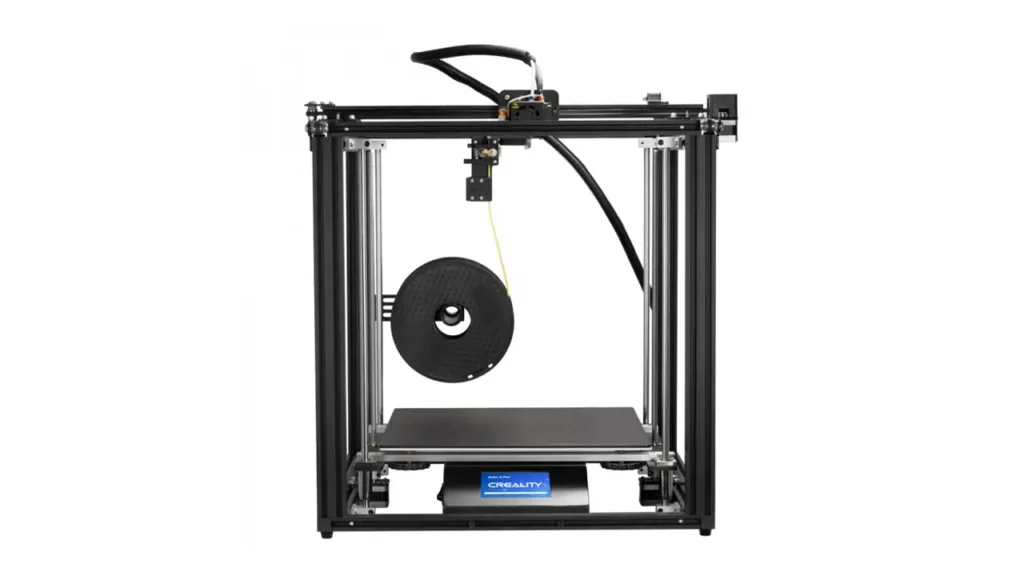
The Creality Ender 5 Plus was introduced as a step-up model in Creality’s popular Ender 5 series — a printer line known for its cube-style frame, rigid construction, and stable print bed movement. While the standard Ender 5 already had a solid following, the Plus variant took everything that worked and expanded it: bigger build volume, added BLTouch auto bed leveling, a dual Z-axis system, and a more robust frame.
In a market crowded with i3-style printers, the Ender 5 Plus positions itself as a large-format workhorse. Its target audience is clear — people who regularly hit the size limits of standard printers and need reliable, repeatable results on a budget that doesn’t require a second mortgage. For context, most entry-level printers max out around 220×220×250 mm. The Ender 5 Plus laughs at those constraints and offers nearly triple the print volume.
Large format printing matters more than people expect. Printing large objects in one piece eliminates the need for gluing segments together, reduces alignment errors, and dramatically cuts post-processing time. For functional prototypes, props, architectural models, or replacement parts, size is not just a luxury — it’s a workflow advantage.
2. Ender 5 Plus Specs Breakdown
Before anything else, let’s look at what you’re actually getting on paper. The Ender 5 Plus specs are well-documented by Creality, and they tell an impressive story.
The printer is built around a rigid cubic aluminum extrusion frame, which by design keeps the printhead motion isolated from the bed. Instead of the bed moving back and forth on the Y-axis like an Ender 3, the Ender 5 Plus moves the bed only on the Z-axis (up and down), while the gantry moves in X and Y. This fundamentally reduces print artifacts caused by bed momentum, especially on large, heavy prints.
The Ender 5 Plus dual Z axis is one of the most talked-about hardware features. Two lead screws drive the bed simultaneously, keeping it perfectly level as it descends — this is especially important over a 400 mm vertical travel range. A single-Z setup can sag or twist over that distance; dual Z keeps things honest.
| Specification | Details |
|---|---|
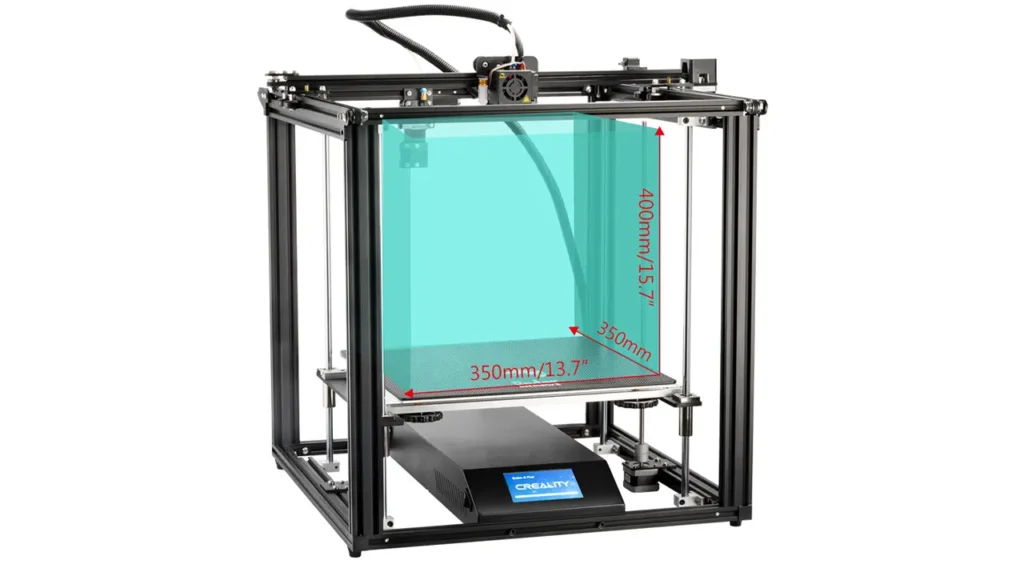
| Build Volume | 350 × 350 × 400 mm |
| Frame Type | Cubic aluminum extrusion |
| Bed Type | Tempered glass heated bed |
| Bed Temperature | Up to 110°C |
| Nozzle Temperature | Up to 260°C |
| Z-Axis System | Dual lead screw |
| Auto Bed Leveling | BLTouch (factory included) |
| Filament Diameter | 1.75 mm |
| Nozzle Diameter | 0.4 mm (standard) |
| Print Speed | Up to 100 mm/s |
| Layer Resolution | 0.1 – 0.4 mm |
| Power Supply | 350W UL Certified |
| Display | 4.3″ color touchscreen |
| Connectivity | SD card, USB |
| Resume Print | Yes (power outage recovery) |
| Filament Sensor | Yes |
| Machine Dimensions | 631 × 627 × 679 mm |
| Machine Weight | ~18.5 kg |
The 350W UL-certified power supply deserves a specific mention — it’s not a throwaway spec. Running a heated bed of that size to 60–80°C takes real wattage, and having a certified power unit means the thermal management is handled properly, reducing fire risk during long overnight prints.
3. Massive Build Volume Explained
The standout feature of the Creality Ender 5 Plus is undeniably its Ender 5 Plus build volume of 350 × 350 × 400 mm. To give you a practical sense of scale: that’s enough space to print a full adult-sized motorcycle helmet shell in one piece, a complete IKEA-style shelf bracket at 1:1 scale, or a large functional housing for electronics or robotics.
As an Ender 5 Plus large format 3D printer, it competes with machines that often cost significantly more. In the large-format FDM segment, you typically start looking at printers above $600–$800 USD for comparable build space. The Ender 5 Plus has consistently offered this capacity at a more accessible entry point.
Real-world use cases for this build volume include cosplay and prop fabrication, architectural scale models, large drone or RC vehicle frames, educational display pieces, full-size product mockups, and industrial jigs and fixtures for workshops.
One thing worth noting is that a larger bed takes longer to heat up. Depending on ambient temperature, reaching 60°C on the 350×350 glass bed can take 5–8 minutes — something to factor into your workflow when running multiple prints in a day.
4. BLTouch Auto Bed Leveling System
Leveling a 350×350 mm glass bed manually is a headache even for experienced users. Creality knew this and included the Ender 5 Plus BLTouch sensor as a factory-installed feature — not an afterthought add-on.
BLTouch, developed by Antclabs, works by deploying a small probe pin to measure the actual height of the bed at multiple points across its surface. The printer builds a compensation mesh that accounts for any warp, bow, or tilt in the glass — and then adjusts the Z-height in real time during printing to compensate. The result is that even a slightly imperfect bed produces a perfect first layer.
On a large bed like the Ender 5 Plus, this feature is not optional — it’s essential. Glass beds of this size almost always have minor warping, especially after repeated heating and cooling cycles. Without BLTouch, you’d be doing manual baby-stepping corrections across a surface roughly the size of a dinner plate.
In practice, the BLTouch implementation on the Ender 5 Plus is reliable. Users report that once the offset is properly calibrated during initial setup, the bed leveling mesh remains consistent for weeks of printing without needing re-probing. Calibration itself takes about 5 minutes and involves running the G29 leveling command from the touchscreen menu.
One practical tip: store your BLTouch mesh using the M500 EEPROM save command after calibrating, so the printer remembers the compensation values even after power cycles. Creality’s firmware supports this out of the box.
5. Printing Performance & Quality
So how does the Creality Ender 5 Plus actually perform when you hit print? This is where the Ender 5 Plus review gets hands-on.
With PLA, the printer excels. At 0.2 mm layer height and 60 mm/s print speed, results are clean, with sharp corners and good surface finish on vertical walls. The cubic frame eliminates the ringing and ghosting artifacts that often appear on i3-style printers when printing fast, because there’s no heavy bed slamming back and forth during the print.
PETG prints well at 230–240°C nozzle and 70–80°C bed. The glass surface with a light spray of hairspray or glue stick provides good adhesion without prints becoming impossible to remove. PETG’s slight flexibility makes removal from the glass satisfying once the bed cools — it practically pops off.
TPU is printable with the Bowden setup, though at slower speeds (20–30 mm/s). Flexible filaments are more challenging through Bowden setups due to the distance between the extruder and hotend, so results vary based on TPU shore hardness. Shore 95A tends to work reasonably well; softer grades may require an upgrade to direct drive.
Noise levels are moderate — not silent, but not disruptive. The fans are the primary sound source during printing. Stock stepper drivers produce some noise during movement, which is one reason the silent board upgrade is popular (more on that in section 9).
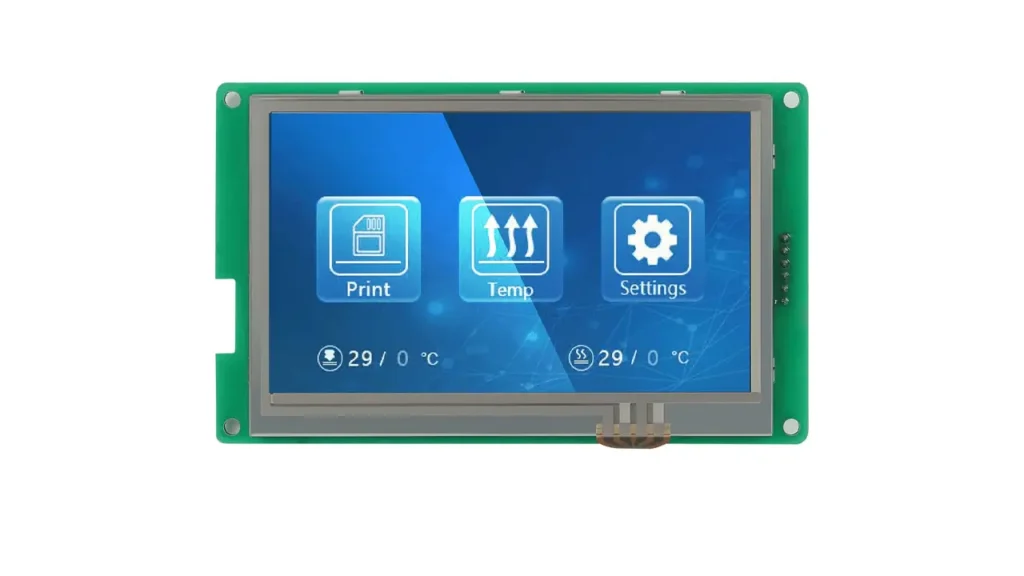
Layer adhesion across all tested materials was strong, indicating the thermistor and heating block are well-tuned from the factory. The 4.3″ color touchscreen is responsive and menu navigation is intuitive — a genuine usability upgrade over the older rotary-dial interfaces found on earlier Creality models.
6. Creality Ender 5 Plus Price in 2026
The Creality Ender 5 Plus price has shifted over its product life, and in 2026 it sits in a competitive position relative to newer machines that have entered the market.
| Retailer / Platform | Approximate Price (USD) |
|---|---|
| Creality Official Store | $379 – $429 |
| Amazon (US) | $399 – $449 |
| Banggood | $359 – $399 |
| Aliexpress (Creality Official) | $349 – $389 |
For the build volume and feature set offered, the price-to-capability ratio remains competitive. Comparable large-format printers from other brands — such as Sovol or Elegoo’s larger FDM machines — sit in a similar or higher price bracket.
From a return-on-investment standpoint, makers and small studios who use the printer for paid projects will recover costs quickly. A single large cosplay commission or a batch of 3D-printed product prototypes for a client can cover the cost of the printer in one or two jobs. For educational labs, the Ender 5 Plus represents an affordable way to bring large-format printing capacity to students without the premium pricing of professional-grade systems.
7. Ender 5 Plus vs Ender 3 Comparison
One of the most common questions newcomers ask is whether to choose the Ender 5 Plus vs Ender 3. They’re both Creality machines, but they serve very different audiences.
| Feature | Ender 5 Plus | Ender 3 V2 |
|---|---|---|
| Build Volume | 350 × 350 × 400 mm | 220 × 220 × 250 mm |
| Frame Style | Cubic (CoreXY-like motion) | Cartesian i3-style |
| Auto Bed Leveling | BLTouch (included) | Manual (CR Touch optional) |
| Dual Z Axis | Yes | No (single Z) |
| Touchscreen | 4.3″ color touch | Rotary color LCD |
| Filament Sensor | Yes | No (stock) |
| Price Range | $379 – $449 | $179 – $249 |
| Best For | Large prints, studios, pros | Beginners, small projects |
| Footprint | Large (631×627×679 mm) | Compact (475×470×620 mm) |
The bottom line: the Ender 3 is an excellent beginner machine for learning 3D printing on a tight budget. The Ender 5 Plus is for users who have outgrown or foresee outgrowing standard-size prints and need the reliability and capacity of a larger platform. If you’re printing miniatures, phone cases, or small mechanical parts — the Ender 3 does the job. If you’re printing large terrain pieces for tabletop gaming, full helmets, large functional brackets, or multi-component assemblies, the Ender 5 Plus is the better tool.
8. Best Ender 5 Plus Cura Settings
Getting great results from any 3D printer requires well-tuned slicer settings, and the Ender 5 Plus Cura settings are worth spending some time on. Ultimaker Cura is the most commonly used slicer for this machine, and fortunately, the community has developed solid recommended profiles over the years.
First, when setting up the machine in Cura, you can use the Ender 5 Plus as a preconfigured machine profile in recent versions of Cura. The build volume is entered as 350×350×400 mm, origin at center is set to disabled, and the heated bed is enabled.
Recommended starting settings for PLA:
| Parameter | Recommended Value |
|---|---|
| Layer Height | 0.2 mm (standard quality) |
| Wall Line Count | 3 |
| Infill Density | 20% (general use) |
| Print Speed | 50–60 mm/s |
| Travel Speed | 120 mm/s |
| Nozzle Temperature | 200–210°C |
| Bed Temperature | 60°C |
| Retraction Distance | 5–6 mm (Bowden) |
| Retraction Speed | 45 mm/s |
| Cooling Fan Speed | 100% (after first layers) |
| Initial Layer Speed | 25 mm/s |
| Support | Tree supports (recommended) |
For beginners, the “Standard Quality – 0.2mm” preset in Cura works as a reliable starting point before fine-tuning. One important customization for the Ender 5 Plus is adjusting the retraction distance — because it uses a Bowden extruder with a longer tube, 5–6 mm retraction is needed to prevent stringing, compared to 1–2 mm for direct drive setups.
For quality-focused prints, dropping print speed to 40 mm/s and layer height to 0.1 mm produces noticeably sharper detail, especially on curved surfaces and text embossing. For speed-focused functional prints, you can push to 80 mm/s with some sacrifice in surface finish but without losing structural integrity.
9. Popular Ender 5 Plus Upgrade Options
One of the joys of owning a Creality printer is the enormous ecosystem of Ender 5 Plus upgrade options available — from community-designed mods on Printables and Thingiverse to commercially available hardware improvements.
Silent Mainboard Upgrade The stock mainboard uses older stepper drivers that produce audible noise during movement. Upgrading to the Creality V4.2.7 or V4.2.2 silent board (featuring TMC2225 or TMC2208 drivers) dramatically reduces operating noise. Many users report the printer becoming library-quiet after this upgrade, making it suitable for office environments or shared spaces. Cost: approximately $25–$40 USD.
Direct Drive Conversion Moving the extruder motor closer to the hotend significantly improves flexible filament printing (TPU, TPE) and reduces retraction distance requirements. Several community-designed direct drive mounts exist for the Ender 5 Plus, compatible with popular extruders like the Bondtech BMG or Creality’s own Sprite extruder. This upgrade also helps with faster printing speeds. Cost: $30–$80 USD depending on extruder choice.
Enclosure The Ender 5 Plus’s cubic frame is naturally well-suited for enclosure addition. A DIY enclosure using foam board, IKEA LACK tables, or acrylic panels helps maintain stable ambient temperature around the print — critical for printing materials like ABS, ASA, or Nylon that warp without consistent thermal environment. Several community enclosure designs are available for free on Printables. A purpose-built enclosure for this size can cost $50–$150 USD depending on materials.
Firmware: Marlin or Klipper Creality’s stock firmware is functional but limited compared to what’s available. Many advanced users flash the printer with the latest open-source Marlin 2.x firmware compiled for the Ender 5 Plus, enabling features like Input Shaping (with sensor addition), Linear Advance, and improved BLTouch mesh bed leveling options. For users comfortable with a Raspberry Pi setup, Klipper firmware paired with Mainsail or Fluidd interface gives extremely granular control over print parameters and dramatically increases tuning capability.
PEI Spring Steel Sheet Replacing the stock tempered glass bed with a PEI-coated spring steel sheet improves first-layer adhesion for most materials and makes print removal effortless — just flex the sheet and prints pop off. Magnetic PEI sheets sized for 350×350 mm are available from vendors like Energetic or Sovol. Cost: $20–$40 USD.
10. Final Verdict – Who Should Buy the Creality Ender 5 Plus?
After this comprehensive Ender 5 Plus review, the answer to “is it still worth it in 2026?” is a qualified but confident yes — for the right user.
Large project creators — cosplayers, prop makers, sculptors, and designers working at human scale — will find the 350×350×400 mm volume genuinely transformative. The ability to print full-size objects without splicing sections together saves hours of post-processing time per project.
Small production studios operating in product prototyping, custom manufacturing, or bespoke fabrication benefit from the Ender 5 Plus’s combination of volume, reliability, and upgrade potential. The dual Z-axis and BLTouch leveling reduce babysitting time, and the robust frame handles extended print runs without mechanical fatigue.
Advanced hobbyists who have grown frustrated with the limitations of standard-size printers and want a platform they can tinker with, upgrade, and push will love everything this machine offers. There’s an upgrade path for nearly every component, extensive community support, and a massive library of compatible accessories and mods.
Educational labs at the high school, community college, or university level benefit from the Ender 5 Plus’s accessible price, reliable operation, large touchscreen interface, and safety features like filament runout detection and power loss recovery. Students can print large multi-day projects knowing the printer will handle interruptions gracefully.
The Creality Ender 5 Plus is not the flashiest printer available in 2026 — there are faster machines with more modern motion systems on the market. But it offers a proven, well-supported, large-format printing platform at a price that still makes it one of the most practical large-bed FDM printers in its class. If you need the space, the Ender 5 Plus still delivers.
If you’re comparing the Creality Ender 5 Plus with other top models on the market, it makes sense to look at the bigger picture. Check out this updated ranking of the best Chinese 3D printers to see how it stacks up against the competition:
https://bestchinagadget.com/best-chinese-3d-printers/
Discover more from bestchina3dprinters.com
Subscribe to get the latest posts sent to your email.