Best 3D Printer for Beginners
So you’ve decided to dive into the exciting world of 3D printing — congratulations! Whether you’ve been inspired by a YouTube video, a friend’s cool prints, or just the sheer curiosity of making real physical objects from a digital file, you’re about to start one of the most rewarding hobbies of the modern era.
But here’s the challenge every newcomer faces: which 3D printer should you actually buy?
A quick search for the best 3D printer for beginners returns hundreds of results, forum debates, and conflicting recommendations. It can be overwhelming. Some machines are too expensive. Some are too complex. Some require engineering-level knowledge just to get a first print off the build plate.
That’s exactly why this guide exists — to cut through the noise and give you a clear, honest, and friendly breakdown of what makes a great beginner 3D printer, and why the Creality Ender 3 V3 SE has earned its reputation as one of the top choices for people just starting out.
3D printing has exploded in popularity over the last decade. What was once reserved for industrial labs and professional design studios is now accessible to hobbyists, students, educators, and makers all around the world. The technology has matured significantly, and today’s entry-level machines offer features that professional printers didn’t have just a few years ago.
If you’re stepping into this world for the first time, you want a machine that is reliable, easy to set up, produces good quality prints, and doesn’t break the bank. You want something that lets you focus on the fun of 3D printing, not the frustration of constant troubleshooting.
Let’s explore what makes a printer beginner-friendly, and then take a deep dive into the Creality Ender 3 V3 SE — a machine that checks nearly every box on the beginner wishlist.
Creality
Shenzhen, China
3D Printers & Accessories
The world’s most popular 3D printer brand. Ender series legends, K1 high-speed models, and reliable budget options for every maker with massive community support.
2. Why a Beginner Needs an Easy to Use 3D Printer
Before we talk about specific models, let’s talk about what actually makes an easy to use 3D printer — because not all “beginner” machines are created equal.
When you’re new to 3D printing, you’re simultaneously learning multiple new skills at once: understanding slicing software, learning about filament types, figuring out bed adhesion, troubleshooting print failures, and calibrating your machine. That’s a lot to take in at once.
An easy to use 3D printer reduces friction at every step of that journey. Here’s what to look for:
Simple Assembly Some printers arrive as a complete kit requiring hours of assembly. Others come mostly pre-assembled and are ready to print in under 30 minutes. For beginners, less assembly time means less opportunity for mistakes, and more time actually printing.
Intuitive Interface A clear touchscreen or dial-based interface with straightforward menus makes a huge difference when you’re learning. You shouldn’t need a manual to navigate basic functions like loading filament, starting a print, or adjusting settings.
Automatic Calibration Bed leveling is one of the most common pain points for new 3D printer users. If the print bed isn’t perfectly level, your first layer won’t adhere properly, and the whole print will fail. Auto-leveling systems eliminate this headache almost entirely.
Reliable Community Support A printer with a large, active user community means there are tutorials, forums, and YouTube videos available for nearly every question or problem you might encounter.
Good Out-of-the-Box Performance Beginners shouldn’t have to tweak dozens of settings to get their first successful print. A good beginner machine should deliver solid results with default or near-default settings.
The Creality Ender 3 V3 SE was designed with exactly these priorities in mind, which is why it consistently appears at the top of beginner 3D printer recommendation lists.
3. Creality Ender 3 V3 SE Overview
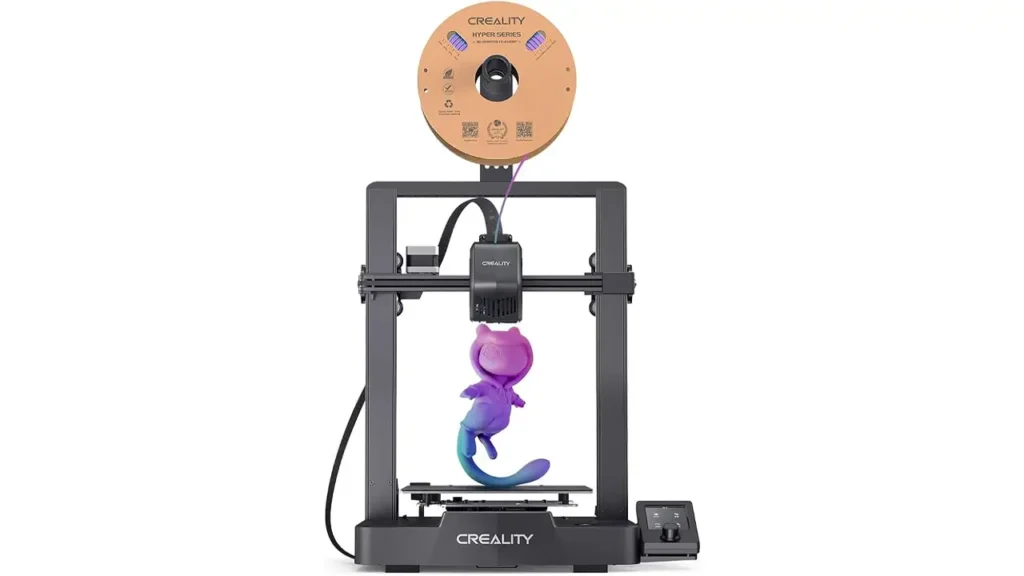
The Creality Ender 3 V3 SE is the latest evolution of the legendary Ender 3 series — arguably the most popular line of consumer 3D printers ever made. Creality, a Shenzhen-based company founded in 2014, has built its reputation on delivering capable, affordable FDM (Fused Deposition Modeling) printers to the masses.
The Ender 3 series has gone through numerous iterations over the years: the original Ender 3, the Ender 3 Pro, Ender 3 V2, Ender 3 S1, and now the V3 SE. Each generation has brought meaningful improvements, and the V3 SE represents a significant leap forward for the entry-level segment.
What makes this Creality Ender 3 V3 SE stand out in a crowded market? In short, it takes the beloved simplicity of the original Ender 3 and upgrades it with modern features like automatic bed leveling, a direct drive extruder, faster print speeds, and an improved user interface — all while keeping the price extremely competitive.
This is not a printer that requires you to be an expert to get started. It was designed for people exactly like you: curious, excited, and ready to make something cool, but without years of 3D printing experience under your belt.
It supports standard PLA filament right out of the box, which is the easiest and most beginner-friendly filament type available. And its setup process, as we’ll discuss later, is refreshingly straightforward.
Let’s get into the technical details.
4. Entry Level 3D Printer Specifications
When shopping for an entry level 3D printer, specs matter — but only if you understand what they actually mean for your everyday printing experience. Here’s a look at the Creality Ender 3 V3 SE’s key specifications:
| Specification | Details |
|---|---|
| Printer Type | FDM (Fused Deposition Modeling) |
| Build Volume | 220 × 220 × 250 mm |
| Max Printing Speed | 250 mm/s |
| Recommended Speed | 150 mm/s |
| Extruder Type | “Sprite” Direct Drive Extruder |
| Nozzle Diameter | 0.4 mm (standard) |
| Layer Resolution | 0.1 – 0.35 mm |
| Leveling System | CR Touch Automatic Bed Leveling (25-point) |
| Bed Surface | PC Spring Steel Magnetic Flex Plate |
| Max Hotend Temp | 260°C |
| Max Bed Temp | 100°C |
| Supported Filaments | PLA, PETG, TPU (flexible) |
| Connectivity | MicroSD card, USB |
| Display | 4.3-inch Color Touchscreen |
| Frame Material | Aluminum Alloy |
| Machine Dimensions | 355 × 355 × 462 mm |
| Machine Weight | Approx. 7.8 kg |
| Power Supply | 350W |
Build Volume: 220 × 220 × 250 mm This is a generous print area for a beginner machine. You can print everything from small figurines and phone stands to larger vases, boxes, and functional brackets. Most beginner projects will fit comfortably within this space.
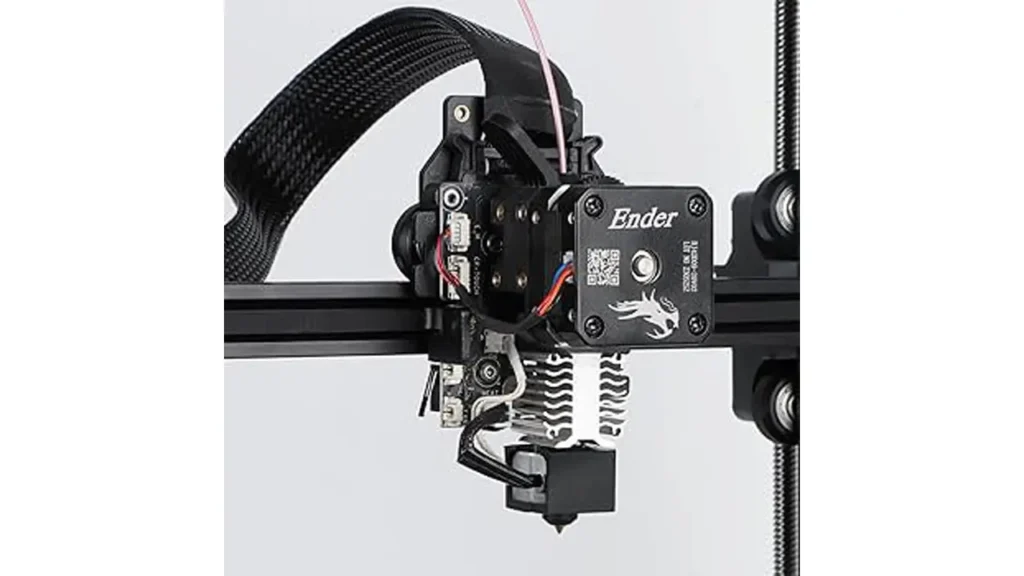
Direct Drive Extruder The Ender 3 V3 SE uses a “Sprite” direct drive extruder, where the motor sits directly above the hotend. This is a significant upgrade over the Bowden-style extruder found in older Ender 3 models. Direct drive systems offer better filament control, especially with flexible materials like TPU, and are less prone to clogging.
Supported Materials The V3 SE handles PLA (the easiest beginner filament), PETG (slightly stronger and more heat resistant), and TPU (flexible filament). For most beginners, PLA will be your go-to material for the first several months.
5. Auto Leveling – A Must-Have Feature
If there is one single feature that separates a frustrating beginner experience from a smooth one, it’s automatic bed leveling. And this is an area where the Creality Ender 3 V3 SE truly shines.
The Ender 3 V3 SE comes equipped with CR Touch automatic bed leveling — a probe-based system that physically touches the print bed at 25 different points before each print begins. Using the data gathered from those 25 points, the printer creates a detailed “map” of the bed surface, including any slight warping or unevenness, and automatically compensates for it during printing.
Why does this matter so much?
The first layer of any 3D print is the foundation of the entire object. If your nozzle is too far from the bed, the filament won’t stick and will just drag around. If it’s too close, it will scrape against the surface and potentially damage both the nozzle and the bed. Getting this distance just right — called “Z offset” — is the single most common source of frustration for new 3D printer users.
On older printers without auto leveling, this had to be done manually by sliding a piece of paper under the nozzle at four corners and adjusting little wheels until the resistance felt right. It was tedious, imprecise, and often needed to be redone every few prints.
With the CR Touch system on the auto leveling 3D printer like the Ender 3 V3 SE, this process is nearly automatic. You do a one-time Z offset calibration when you first set up the machine, and after that, the printer handles the rest every single time you start a print.
The result? Far fewer failed first layers, far less wasted filament, and a much more enjoyable printing experience overall.
The CR Touch probe is also durable and reliable. It uses a metal pin that physically touches the surface rather than optical or inductive sensing, making it accurate across different bed surface types including the V3 SE’s included magnetic flex plate.
For anyone who has struggled with manual bed leveling on an older printer — or for anyone who has heard horror stories about it — the CR Touch system on the Ender 3 V3 SE is genuinely a game-changer.
6. Setup Experience for a First 3D Printer
One of the most common questions beginners ask is: “How hard is it to set up?”
For your first 3D printer, the unboxing and assembly experience can set the tone for your entire relationship with the hobby. A complicated, confusing setup can sap your enthusiasm before you ever print your first layer.
The good news: the Creality Ender 3 V3 SE is designed to be assembled quickly and with minimal technical knowledge.
What’s in the Box When you open the box, you’ll find the printer partially pre-assembled. The main components — the base unit with the Y-axis gantry and the vertical Z-axis uprights — simply need to be joined together with a handful of screws. Creality includes all necessary tools in the package, so you won’t need to hunt for a screwdriver.
Assembly Steps (Simplified)
| Step | Task | Time (approx.) |
|---|---|---|
| 1 | Attach the vertical frame to the base unit | 5 min |
| 2 | Mount the filament spool holder | 2 min |
| 3 | Connect the cable harness (labeled for easy matching) | 5 min |
| 4 | Power on and run auto-leveling wizard | 5 min |
| 5 | Load filament through the direct drive extruder | 3 min |
| 6 | Start your first test print from the included MicroSD card | Ready! |
The cables are clearly labeled, the instruction manual includes illustrations, and Creality also provides a quick-start guide. Most users report being fully assembled and printing their first test object within 30 to 45 minutes of opening the box.
The 4.3-inch color touchscreen interface is intuitive. The main menu is clean and uncluttered, with clear icons for Print, Prepare, Settings, and Info. Navigating to start a print from the SD card is just a few taps away.
Creality also includes a small sample of PLA filament and a pre-sliced test print on the SD card, so you can confirm the machine works properly right away without needing to download and learn slicing software first.
For anyone choosing their first 3D printer, this kind of turnkey experience is exactly what you want.
7. Print Quality and Speed
Now let’s talk about what everyone really wants to know: how good are the actual prints?
The Creality Ender 3 V3 SE positions itself firmly in the beginner friendly 3D printer category, but that doesn’t mean it cuts corners on output quality. In fact, it delivers print quality that would have been remarkable for a mid-range printer just a few years ago.
Speed
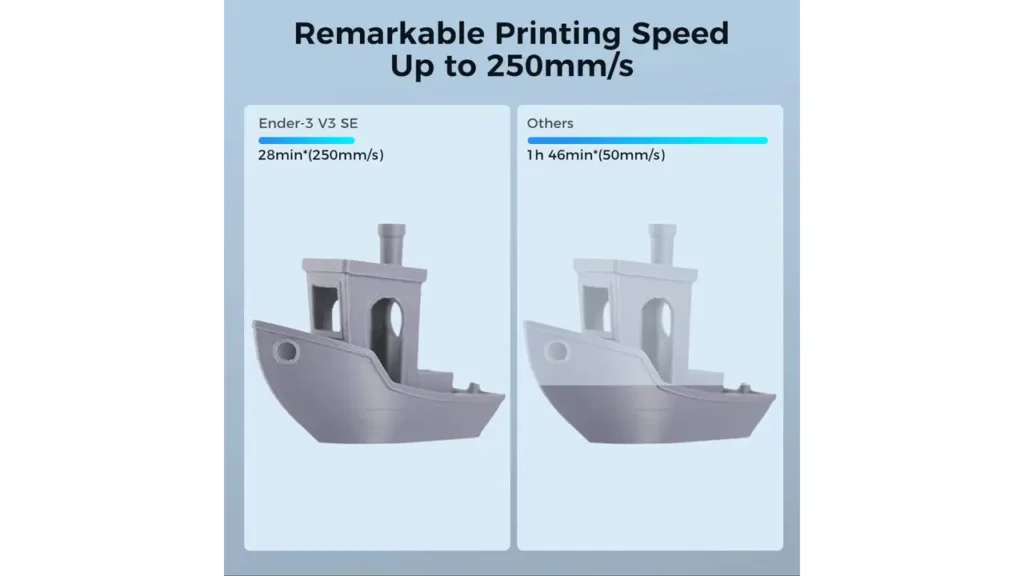
The V3 SE is rated for a maximum print speed of 250 mm/s, with a recommended everyday printing speed of around 150 mm/s. For context, older Ender 3 models typically topped out at 60–80 mm/s in practical use. This means the V3 SE can complete prints in roughly half the time of its predecessors.
Why does speed matter for beginners? Because faster printing means faster feedback. If something goes wrong with a print, you find out sooner and can adjust settings without waiting hours to discover a failed object. It also means less filament wasted on failed prints.
At 150 mm/s, the V3 SE produces smooth, consistent results with standard PLA filament. At maximum speed, print quality can decrease slightly — this is normal for any FDM printer — but the machine handles the increased pace remarkably well for its price point.
Layer Quality and Detail
The V3 SE supports layer heights from 0.1 mm to 0.35 mm. At 0.1–0.15 mm layer heights, prints come out with very fine detail and minimal visible layer lines. At 0.2 mm (the standard “draft” quality), prints are faster and still look great for most practical objects. At 0.3 mm, prints are fast but less refined — suitable for prototypes or structural parts where appearance matters less.
The direct drive extruder contributes meaningfully to print quality. Retraction (the brief pullback of filament to prevent strings and blobs between moves) is far more precise with a direct drive system, resulting in cleaner prints with less post-processing required.
Surface Finish
The included PC spring steel magnetic flex plate has a textured surface that gives the bottom of prints a pleasant matte finish. When a print is complete, you simply flex the plate slightly and the print pops off cleanly — no scraping required. This is a premium feature that eliminates a common beginner frustration.
Noise Level
The V3 SE is reasonably quiet during operation. It’s not completely silent, but it’s far less disruptive than older Ender 3 models and comfortable to run in a home office or bedroom during the day.
8. Why It Is an Affordable 3D Printer for Beginners
Let’s talk money — because for most people starting out, budget is a real consideration.
The Creality Ender 3 V3 SE is priced at approximately $199 USD at retail (price may vary by region and retailer). At this price point, it is one of the best-value propositions in the entire consumer 3D printing market.
To put this in perspective, let’s compare it to some alternatives:
| Printer | Price (approx.) | Auto Leveling | Direct Drive | Max Speed |
|---|---|---|---|---|
| Creality Ender 3 V3 SE | ~$199 | ✅ Yes (CR Touch) | ✅ Yes (Sprite) | 250 mm/s |
| Creality Ender 3 V2 | ~$180 | ❌ Manual only | ❌ Bowden | ~100 mm/s |
| Entry-level resin printer | ~$200–$300 | N/A | N/A | Different tech |
| Mid-range FDM printer | ~$350–$600 | ✅ Yes | ✅ Yes | 300+ mm/s |
As you can see, for around $199, the Ender 3 V3 SE delivers features that mid-range machines at nearly double the price also offer. The gap in value is real and significant.
Beyond the initial purchase price, ongoing costs are also reasonable. Standard 1kg spools of PLA filament typically cost between $15 and $30 depending on brand and quality — and a 1kg spool can produce a substantial number of prints. Replacement nozzles cost just a few dollars. The printer itself requires very little maintenance if used properly.
For an affordable 3D printer for beginners, the V3 SE offers an exceptionally low barrier to entry into a hobby that can last a lifetime. You’re not buying a toy — you’re buying a serious, capable machine at a price point that makes it accessible to students, parents, teens, and anyone on a budget.
9. Who Should Buy This Starter 3D Printer
The Creality Ender 3 V3 SE is an excellent starter 3D printer, but it’s worth thinking about whether it’s specifically the right match for your needs and circumstances.
Hobby Makers and DIY Enthusiasts
If you enjoy making things with your hands — woodworking, electronics, crafting, cosplay — a 3D printer is a natural extension of that creative impulse. The Ender 3 V3 SE lets you design and print custom brackets, enclosures, jigs, tools, and decorative objects. It’s the kind of machine that quickly becomes indispensable once you start using it regularly.
Students and Educators
3D printing is increasingly integrated into STEM education, engineering programs, and design courses. The Ender 3 V3 SE is an excellent machine for students learning CAD software (like Tinkercad or Fusion 360) who need a reliable, affordable printer to bring their designs to life. Its ease of use means students can focus on learning design principles rather than wrestling with hardware.
Parents and Families
Want to encourage a child or teenager’s interest in engineering and technology? A 3D printer is one of the most engaging and educational tools you can introduce to a curious young person. The V3 SE’s straightforward interface and reliable performance make it a good fit for family use, with appropriate supervision for younger children around the heated components.
Remote Workers and Home Office Users
Need custom cable management solutions, monitor stands, drawer organizers, or custom phone holders? The practical applications of a 3D printer in a home office environment are enormous. The V3 SE can pay for itself quickly in printed utility items alone.
Small Business Owners and Prototypers
For entrepreneurs or product designers who want to iterate on physical prototypes quickly without paying for professional printing services, the Ender 3 V3 SE is an accessible entry point. You won’t replace an industrial printer with it, but for concept validation and functional prototypes, it punches well above its weight.
People Who Are Just Curious
And finally, if you’re simply curious about 3D printing and want to explore whether it’s something you’ll enjoy — the V3 SE’s affordable price means the cost of experimentation is low. Many people who buy it “just to try” end up becoming dedicated hobbyists within weeks.
Who Should Look Elsewhere?
The Ender 3 V3 SE is a fantastic printer, but it’s not the right choice for everyone. If you need ultra-high-detail resin prints (for miniature models or jewelry), you should look at MSLA resin printers. If you need to print primarily in engineering-grade materials like ASA, ABS, or Nylon regularly, a printer with an enclosed chamber would serve you better. And if you want a fully plug-and-play, zero-maintenance experience with premium customer service, there are more expensive options designed for that use case.
But for the vast majority of beginners? The V3 SE is an outstanding starting point.
10. Final Verdict – Best Budget 3D Printer
After examining every major aspect of the Creality Ender 3 V3 SE — its specifications, features, ease of use, print quality, and value — it’s time to bring it all together.
Is this the best budget 3D printer for beginners in 2024? We believe it makes a very strong case for that title.
Here’s a quick summary of everything that makes the Ender 3 V3 SE exceptional for beginners:
| Feature | Beginner Benefit |
|---|---|
| CR Touch Auto Leveling (25-point) | Eliminates the #1 beginner frustration |
| Sprite Direct Drive Extruder | Better print quality, fewer clogs |
| 250 mm/s Max Print Speed | Faster prints, faster learning |
| 4.3-inch Touchscreen | Easy, intuitive navigation |
| Magnetic Flex Plate | Prints pop off cleanly, no scraping |
| 30–45 min assembly | Up and running quickly |
| PLA, PETG, TPU support | Room to grow and experiment |
| 220 × 220 × 250 mm build volume | Enough space for most beginner projects |
| ~$199 price point | Accessible to almost any budget |
| Large Creality community | Tons of tutorials, help, and upgrades available |
The Creality Ender 3 V3 SE is proof that you don’t need to spend a fortune to get a serious, capable 3D printer. It removes the most common obstacles that derail beginners — complicated setup, frustrating bed leveling, slow speeds, and limited material support — and replaces them with thoughtful, modern solutions at an honest price.
Is it perfect? No machine is. You may eventually want to upgrade to a faster or larger printer as your skills and ambitions grow. You may want to explore resin printing for ultra-fine detail work. But as your first machine, as your entry point into one of the most creative and rewarding hobbies you can have, the Ender 3 V3 SE is a genuinely excellent choice.
It respects your time. It respects your budget. And most importantly, it respects the fact that you’re new — by making the whole experience as smooth and enjoyable as possible.
If you’ve been on the fence about whether to take the plunge into 3D printing, consider this your friendly nudge: the technology has never been more accessible, the community has never been more helpful, and machines like the Creality Ender 3 V3 SE have never been better value for money.
Start printing. Start creating. And enjoy every layer of the journey.
Polymer Technologies & Industrial Solutions
Discover advanced polymer materials, industrial components, and modern production solutions for engineering and manufacturing.
Discover more from bestchina3dprinters.com
Subscribe to get the latest posts sent to your email.