The world of 3D scanning has evolved dramatically over the past few years, transforming from an expensive industrial luxury to an accessible tool for creators, engineers, educators, and hobbyists. Among the growing roster of consumer-friendly devices, the Creality Sermoon P1 3D Scanner has emerged as a compelling option that balances performance, portability, and price. Whether you’re reverse-engineering mechanical parts, digitizing sculptures, or capturing real-world objects for game design, this device promises to deliver precision without breaking the bank.
In this comprehensive review, we’ll explore every facet of the Creality Sermoon P1, from its technical specifications and scanning accuracy to its software ecosystem and real-world applications. By the end, you’ll have a clear understanding of whether this scanner deserves a spot in your creative toolkit.
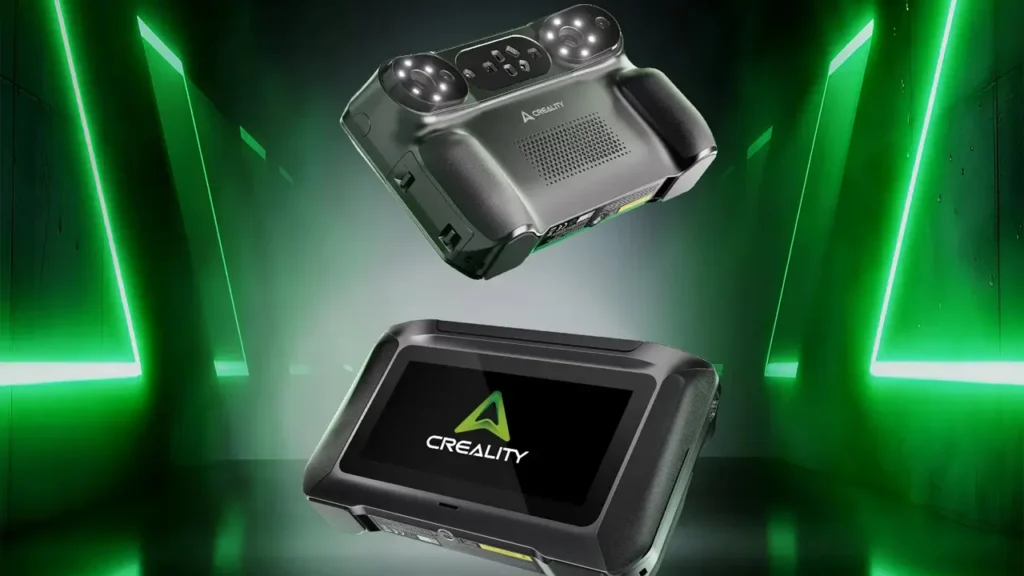
Introduction to Creality Sermoon P1 3D Scanner
Creality, a name synonymous with affordable yet capable 3D printers, has expanded its portfolio into the scanning realm with the Sermoon P1. This device represents the company’s commitment to democratizing 3D technology, offering users a gateway into digital capture without requiring a professional budget or extensive technical knowledge.
The Creality Sermoon P1 3D Scanner is designed to bridge the gap between entry-level scanners that sacrifice quality and professional-grade equipment that demands significant investment. It caters to a diverse audience: students learning CAD and reverse engineering, small business owners creating custom products, makers documenting physical objects, and professionals who need a portable scanning solution for fieldwork.
What sets the Sermoon P1 apart is its balance of features. Rather than overwhelming users with complex settings or underwhelming them with limited capabilities, Creality has crafted a device that focuses on essential functionality executed well. The scanner employs structured light technology, a proven method that projects patterns onto objects and calculates geometry based on distortion, resulting in detailed and accurate 3D models.
The device connects seamlessly to both Windows and Mac systems, operates without requiring cumbersome calibration routines before each session, and produces scan data that integrates smoothly into popular CAD and 3D modeling software. For anyone looking to incorporate 3D scanning into their workflow, the Sermoon P1 presents itself as a practical entry point.
Creality
Shenzhen, China
3D Printers & Accessories
The world’s most popular 3D printer brand. Ender series legends, K1 high-speed models, and reliable budget options for every maker with massive community support.
Key Features of Creality 3D Scanner P1
Understanding what the Creality 3D Scanner P1 brings to the table requires examining its core capabilities. This scanner isn’t trying to compete with industrial metrology equipment, nor is it positioning itself as a toy. Instead, it occupies a sweet spot that emphasizes usability without compromising essential performance.
Scanning Technology and Modes
The Sermoon P1 utilizes blue light LED scanning technology, which offers several advantages over older white light or laser systems. Blue light provides better detail capture, particularly on dark or reflective surfaces that typically challenge scanners. The device operates in multiple scanning modes, including turntable mode for stationary objects and handheld mode for larger items or complex geometries that require freedom of movement.
Turntable mode excels when scanning smaller objects where precision matters most. Place an item on the included rotating platform, and the scanner automatically captures it from all angles, stitching the data together into a cohesive model. Handheld mode, meanwhile, offers flexibility for scanning furniture, automotive parts, or even people, though it demands steadier hands and more experience to achieve optimal results.
Resolution and Capture Speed
Resolution determines how much detail your scan can capture, and the Sermoon P1 delivers respectable specifications. With a point distance of up to 0.1mm and accuracy within 0.1mm under ideal conditions, it captures enough detail for most practical applications. You won’t be scanning microchips or jeweler’s work with this device, but mechanical parts, organic shapes, and medium-sized objects translate beautifully into digital form.
Capture speed is another crucial factor. Nobody wants to stand still holding a scanner for twenty minutes. The Sermoon P1 processes frames quickly, completing most handheld scans in under five minutes and turntable scans in even less time, depending on object complexity and desired detail level.
Connectivity and Compatibility
Modern workflows demand flexibility, and Creality delivers with USB connectivity and software that runs on major operating systems. The scanner doesn’t require specialized workstations or graphics cards, making it accessible to users with standard laptops or desktop computers. Cloud processing isn’t mandatory, meaning your scan data stays local if privacy is a concern.
Portability Factor
Weighing in at a manageable level and featuring a compact form factor, the Sermoon P1 doesn’t demand a dedicated workspace. You can pack it for field scans, store it in a drawer when not in use, or move it between workstations without hassle. This portability extends its utility beyond a fixed lab environment.

Design and Build Quality
When you invest in any tool, build quality matters. A portable 3D scanner Creality produces must withstand regular use, occasional transport, and the inevitable bumps that come with creative work. The Sermoon P1 delivers solid construction without unnecessary bulk.
Physical Construction
The scanner housing uses durable plastics that feel substantive without adding excessive weight. The grip area features subtle texturing that prevents slippage during handheld scanning sessions, while the scanning window protects the internal optics from dust and fingerprints. Ventilation ports allow heat dissipation during extended use, preventing thermal throttling that could affect performance.
The cable connection feels secure, with a reinforced junction point that resists the wear and tear of repeated plugging and unplugging. While not ruggedized for extreme conditions, the device should survive normal workshop environments and the occasional desk-to-bag transition.
Ergonomics in Practice
Handheld scanning requires holding a device at various angles for several minutes at a time. The Sermoon P1’s weight distribution prevents arm fatigue during typical scanning sessions, though users tackling large objects might appreciate taking breaks. The button placement is intuitive, allowing you to trigger scans without repositioning your grip or looking away from the object.
The included turntable mechanism is equally well-thought-out, with a non-slip surface that keeps objects stable during rotation and quiet operation that won’t disrupt video recording or concentration. Cable management channels prevent tangling, a small detail that makes a big difference during busy workflow days.
Portability in Action
The truly mobile nature of this portable 3D scanner Creality offers becomes apparent when you need to scan something that can’t come to you. Whether documenting architectural details on-site, capturing automotive parts at a restoration shop, or scanning artifacts in a museum setting, the Sermoon P1 adapts to the environment rather than forcing you to adapt to it.
The included carrying case protects the scanner during transport while organizing cables and accessories in dedicated pockets. Setup time in new locations measures in minutes, not hours, making spontaneous scanning sessions feasible.
Scanning Accuracy and Performance
Specifications tell part of the story, but real-world performance reveals the truth. A high precision 3D scanner lives or dies by its ability to capture geometry accurately and consistently across different object types and materials.
Technical Specifications Breakdown
| Specification | Value |
|---|---|
| Scanning Technology | Structured Blue Light LED |
| Point Distance | Up to 0.1mm |
| Accuracy | 0.1mm (optimal conditions) |
| Scanning Volume | 30mm to 800mm (varies by mode) |
| Scan Speed | 10 frames per second |
| Output Formats | OBJ, STL, PLY |
| Connectivity | USB Type-C |
| Weight | Approximately 800g |
Real-World Accuracy Testing
Numbers on spec sheets matter less than performance with actual objects. Testing the Sermoon P1 across various materials and geometries reveals its strengths and limitations. Matte, non-reflective surfaces produce the cleanest scans with minimal noise. Objects with rich geometric detail like mechanical parts, textured sculptures, or organic shapes translate exceptionally well into digital form.
Challenges arise with extremely shiny surfaces, transparent materials, and very dark objects, though this limitation affects virtually all optical scanners to some degree. Applying scanning spray to problematic surfaces resolves most issues, a standard practice in professional scanning workflows.
Scanning accuracy remains consistent across the device’s capture volume, without noticeable degradation at the edges of the scanning field. This consistency matters when stitching multiple scans together or when working with objects that push the size limits of single-pass capture.
Performance with Different Object Types
Small mechanical components like gears, brackets, and housings capture beautifully, with threads, chamfers, and fine details reproducing accurately enough for reverse engineering purposes. Medium-sized objects like shoes, helmets, or small sculptures benefit from the balance between scanning volume and detail capture. Large items scanned in handheld mode require more passes and careful technique but remain within the device’s capabilities.
Human face and body scanning works reasonably well, though subjects need to remain still during capture. The Sermoon P1 won’t replace dedicated body scanners for professional applications, but it handles educational projects, cosplay documentation, and basic anthropometric work.
Software and User Experience
Hardware capabilities mean little without software that makes them accessible. The Creality scanning software ecosystem determines whether the Sermoon P1 becomes a daily tool or a frustrating shelf ornament.
Software Interface and Workflow
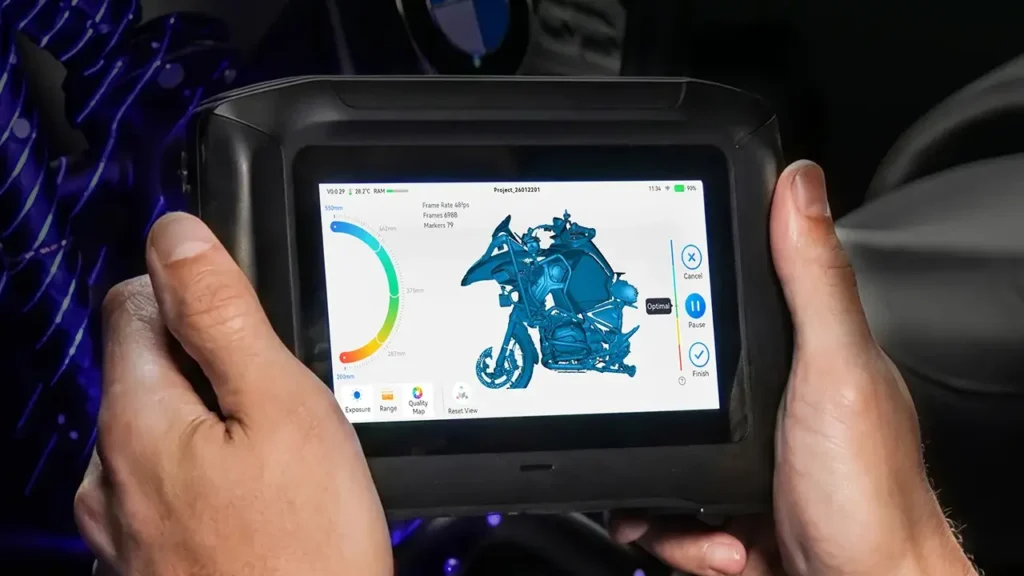
Creality provides dedicated scanning software that guides users through capture, processing, and export. The interface prioritizes clarity over cramming in every possible feature, which benefits newcomers without frustrating experienced users. The main workflow follows a logical progression: connect scanner, choose scanning mode, configure settings, capture data, process and clean the mesh, then export.
Visual feedback during scanning helps users understand coverage and quality in real-time. Color-coded overlays indicate areas that need additional passes, while the live preview shows the emerging 3D model as data accumulates. This immediate feedback prevents the frustration of completing a lengthy scan only to discover gaps or issues during post-processing.
Processing and Optimization Tools
Raw scan data inevitably contains noise, redundant points, and small imperfections. The software includes tools for filtering noise, filling small holes, smoothing surfaces, and decimating meshes to manageable polygon counts. These operations execute quickly on modern hardware, with preview modes that let you evaluate changes before committing.
Advanced users appreciate the manual editing capabilities, which allow selective refinement of specific areas without affecting the entire model. Auto-alignment features assist when combining multiple scans of large objects, dramatically reducing the manual alignment work that older scanning workflows demanded.
Compatibility and Integration
Exported files work seamlessly with major CAD packages, 3D modeling software, and 3D printing slicers. Standard file formats ensure compatibility even with niche or proprietary software ecosystems. The software doesn’t lock you into a closed ecosystem or demand cloud processing, respecting both workflow flexibility and data privacy.
Updates arrive periodically, adding features, refining algorithms, and expanding hardware compatibility. The software doesn’t require constant internet connectivity for operation, though online access enables updates and occasional feature enhancements.
Learning Curve Considerations
First-time users typically achieve acceptable results within an hour of unboxing, though mastering the nuances of optimal scanning technique takes practice. The included tutorials and documentation provide clear guidance without overwhelming novices. Online communities and user forums offer additional resources, troubleshooting advice, and technique sharing.
The software strikes a balance between automation and control, handling routine decisions intelligently while exposing parameters when users need fine-tuned control. This approach accommodates growth, serving beginners well initially while remaining useful as skills develop.
Handheld Scanning Capabilities
The versatility of a handheld 3D scanner P1 separates it from fixed-position scanners that limit scanning to objects you can bring to the device. This freedom opens new possibilities but demands different techniques and considerations.
Freedom of Movement
Handheld mode lets you walk around objects, capturing details from angles that would be impossible with a stationary setup. Large objects like furniture, vehicle panels, or architectural elements become scannable without requiring disassembly or transport. This capability alone justifies the Sermoon P1 for many users whose work involves on-site documentation or objects too large or fragile to move.
The real-time tracking system maintains coordinate system accuracy as you move, ensuring that scans from different angles align properly. Visual markers or natural features on the object guide the tracking algorithm, though the Sermoon P1 handles featureless surfaces reasonably well compared to older systems that lost tracking easily.
Technique and Best Practices
Successful handheld scanning requires steady, deliberate movement. Sweeping too quickly produces gaps and misalignment, while moving too slowly wastes time without improving quality. The optimal speed comes with practice, though the software’s visual feedback helps you stay in the sweet spot.
Maintaining consistent distance from the object matters for focus and accuracy. The Sermoon P1’s working distance allows some flexibility, but extreme variations force the scanner to refocus or lose tracking. Developing a rhythmic scanning pattern, maintaining awareness of coverage, and periodically checking the preview prevents common mistakes.
Practical Applications
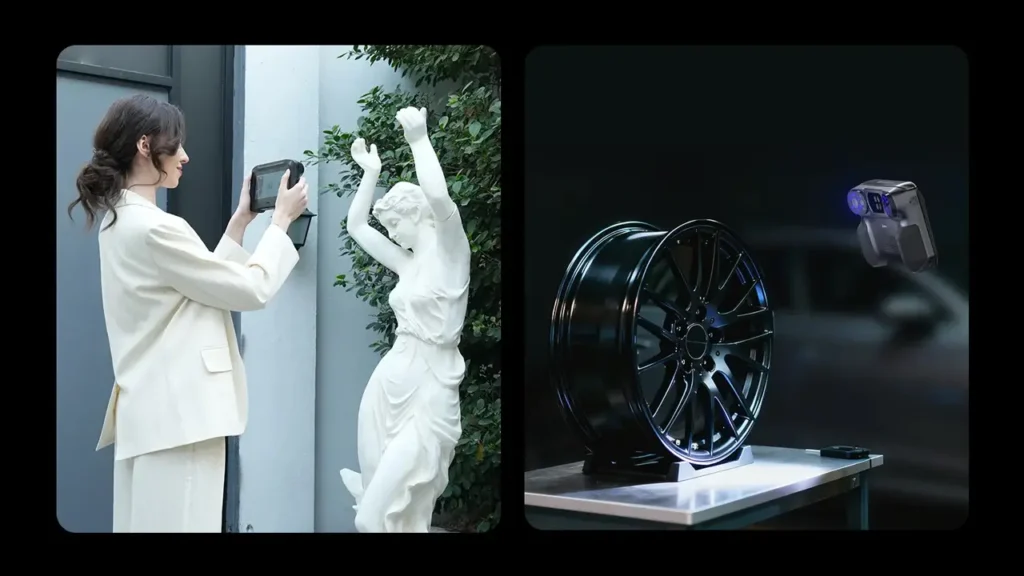
Handheld capabilities excel in scenarios where portability and flexibility trump absolute precision. Documenting automotive restoration projects, scanning damaged parts for repair or replication, capturing architectural details for renovation planning, or creating digital records of artifacts all benefit from handheld freedom.
The technique also shines when scanning organic shapes that lack flat surfaces for stable placement on a turntable. Human subjects, animals (when cooperative), plants, and freeform sculptures often scan better handheld, where you can adapt to contours and ensure complete coverage.
Limitations to Understand
Handheld scanning typically produces slightly lower accuracy than turntable scanning due to unavoidable hand tremor and movement inconsistencies. For applications demanding maximum precision, using the turntable when possible yields better results. Battery-free operation via USB cable means you remain tethered to your computer, limiting range and requiring laptop portability for truly mobile work.
Applications and Use Cases
A 3D model scanning tool proves its value through the problems it solves and the workflows it enables. The Sermoon P1 serves diverse applications across education, professional work, and creative pursuits.
Educational Applications
Schools and universities use 3D scanning to teach reverse engineering, design thinking, and digital fabrication. Students scan existing objects to analyze design choices, measure dimensions for technical drawings, or create digital libraries. The Sermoon P1’s ease of use allows educators to focus on concepts rather than wrestling with equipment, while its accuracy suffices for educational precision requirements.
Art departments scan sculptures for digital archiving, creating reference materials, or exploring hybrid physical-digital workflows. Engineering programs use scanned parts for CAD practice, tolerance analysis, and manufacturing studies. The device’s price point makes it accessible for institutional budgets while delivering professional-enough results for meaningful learning.
Product Design and Reverse Engineering
Designers capture existing objects to generate CAD models for modification or improvement. Rather than measuring with calipers and sketching, scanning provides complete geometry instantly. This accelerates prototyping cycles and reduces measurement errors that plague manual documentation.
Reverse engineering damaged or worn parts becomes straightforward when originals are unavailable. Scan the part, clean up the mesh, convert to solid CAD geometry, then manufacture replacements using CNC machining or 3D printing. This workflow has saved countless projects where finding original parts proved impossible.
Creative and Artistic Uses
Digital artists scan real-world objects and people as references for 3D modeling, ensuring anatomical accuracy and realistic proportions. Game developers capture props and environments to accelerate asset creation. Sculptors digitize physical work for reproduction at different scales, bronze casting preparation, or creating limited edition series.
The boundary between physical and digital creativity blurs as artists incorporate scanning into mixed-media workflows. Scanning enables experimentation and iteration without destroying physical originals, while digital manipulation opens possibilities impossible in purely physical media.
Quality Control and Documentation
Small manufacturers use scanning for quality control, comparing manufactured parts against digital designs to detect deviations. Documentation of products, prototypes, and samples creates digital archives that survive physical loss or damage. Insurance and restoration professionals scan valuable items to document condition and facilitate accurate claims or reproduction if needed.
Medical and Prosthetics
While not certified for clinical use, the Sermoon P1 serves educational medical applications and basic prosthetics work. Students scan anatomical models, cadaver specimens, or demonstration objects. Small prosthetics shops create custom devices by scanning patients and designing solutions around accurate body geometry.
| Application Area | Use Cases | Suitability |
|---|---|---|
| Education | Teaching CAD, reverse engineering, design analysis | Excellent |
| Product Design | Concept development, ergonomics, prototyping | Very Good |
| Reverse Engineering | Part replication, modification, documentation | Very Good |
| Art and Sculpture | Digital archiving, scaling, reproduction | Excellent |
| Game Development | Asset creation, environment capture, character models | Good |
| Quality Control | Inspection, comparison, deviation analysis | Good |
| Prosthetics | Custom fitting, orthotic design | Fair to Good |
| Jewelry Design | Master pattern creation, custom sizing | Fair |
Price and Value Analysis
Understanding the Creality scanner price positioning requires examining what you receive for your investment and how it compares to alternatives in the market.
Pricing Structure
The Sermoon P1 typically retails in the mid-range price segment for consumer 3D scanners, positioning itself below professional equipment while significantly exceeding toy-grade devices in capability. The base package includes the scanner, turntable, cables, software license, and carrying case, representing a complete solution without hidden costs or mandatory subscriptions.
Occasional promotions and bundle deals can reduce the effective price, particularly when purchased alongside Creality 3D printers or from authorized resellers offering package discounts. Educational institutions often receive additional pricing considerations, making the device even more accessible for schools and universities.
Value Proposition
Comparing price to capability reveals strong value. Scanners offering similar accuracy and features from established metrology brands often cost two to three times more, while budget options sacrificing key capabilities save money at the expense of usability and results quality.
The Sermoon P1 occupies a value sweet spot where price remains accessible to serious hobbyists, small businesses, and educational institutions while performance suffices for professional work that doesn’t demand industrial metrology tolerances. This positioning makes it an attractive first scanner for those exploring whether scanning fits their workflow, with enough capability to remain useful even as skills advance.
Cost of Ownership
Beyond the initial purchase, 3D scanners can incur ongoing costs through consumables, software subscriptions, calibration services, or mandatory maintenance. The Sermoon P1 keeps these minimal. The software is perpetually licensed with purchase, not subscription-based. No consumables require regular replacement. Calibration is not required before each use, and the device includes no wear items demanding scheduled replacement.
This low ongoing cost profile makes budgeting straightforward and prevents the frustration of discovering hidden expenses after purchase. The primary additional cost most users face is scanning spray for challenging surfaces, a modest expense that applies to virtually all optical scanning systems.
Market Comparison
| Price Range | Typical Features | Sermoon P1 Position |
|---|---|---|
| Under $300 | Basic accuracy, limited software, fixed position only | Significantly better performance |
| $300 to $800 | Decent accuracy, handheld option, acceptable software | Competitive features and quality |
| $800 to $2000 | Professional accuracy, advanced software, robust hardware | Approaching this tier capability |
| Over $2000 | Industrial precision, certified accuracy, support contracts | Cannot compete at this level |
The Sermoon P1 delivers performance that punches above its weight class, offering features and accuracy that would have commanded premium pricing just a few years ago. As scanning technology matures and manufacturing scales improve, Creality benefits consumers by passing those improvements forward as better products at stable prices.
Who Should Buy This Scanner
A 3D scanner for beginners serves a distinct audience, but the Sermoon P1’s capabilities extend beyond entry-level users. Understanding ideal buyer profiles helps determine whether this scanner matches your needs.
Ideal User Profiles
Hobbyists entering 3D scanning who want reliable performance without professional investment will find the Sermoon P1 accessible and capable. The learning curve is gentle enough to avoid frustration, while results quality satisfies the curiosity and projects that drive hobbyist exploration.
Small business owners needing scanning capability for custom products, repair services, or client work benefit from the balance of affordability and professional-enough results. The device pays for itself quickly when enabling services that would otherwise require outsourcing scans or relying on manual measurement.
Educators teaching 3D technologies need equipment that students can operate successfully while producing results worthy of evaluation. The Sermoon P1 handles classroom use effectively, offering repeatable results that support learning objectives without requiring constant instructor intervention.
Makers and DIY enthusiasts who already own 3D printers discover that scanning completes their digital fabrication ecosystem. The combination of scanning and printing enables replication, modification, and creation workflows that neither technology fully enables alone.
Users Who Should Consider Alternatives
Professional metrology applications demanding certified accuracy and traceability require industrial-grade equipment with calibration documentation and support contracts. The Sermoon P1 cannot substitute for CMM machines or certified inspection systems regardless of how careful your technique.
Production environments scanning hundreds of parts daily need more robust hardware designed for continuous operation and faster throughput. While the Sermoon P1 handles regular use, it wasn’t engineered for industrial duty cycles.
Users needing to scan extremely small objects like jewelry, coins, or electronic components should investigate macro scanning systems designed for millimeter-scale work. The Sermoon P1’s minimum scan volume exceeds the size of many intricate small objects.
Budget-constrained buyers whose needs are simple might find adequate solutions at lower price points. If you only need occasional scans of uncomplicated objects and accuracy isn’t critical, less expensive options exist.
Skill Level Considerations
True beginners appreciate the guided workflow and forgiving operation that doesn’t punish inexperience with unusable results. Intermediate users find enough depth and control to grow their skills without outgrowing the tool quickly. Advanced users recognize the limitations but value the portability and convenience for field work or quick documentation where ultimate precision isn’t required.
The Sermoon P1 serves as an excellent learning platform that doesn’t compromise so severely that skills learned become irrelevant with better equipment. Techniques and workflows that work with this scanner translate directly to higher-end systems, making it a genuine stepping stone rather than a dead-end investment.
Final Verdict: Sermoon P1 Scanner Review
After extensive exploration of the Sermoon P1 scanner review factors, from technical specifications to real-world applications, a clear picture emerges of this device’s place in the 3D scanning landscape.
Strengths to Celebrate
The Sermoon P1 excels in accessibility without sacrificing capability. It welcomes newcomers with intuitive software and forgiving operation while delivering results that satisfy practical applications. The accuracy proves sufficient for reverse engineering, design work, and digital archiving, hitting the quality threshold where scans become truly useful rather than merely interesting.
Portability separates this scanner from many competitors, enabling on-site work and flexible deployment that fixed systems cannot match. The combination of handheld and turntable modes provides versatility that adapts to diverse scanning scenarios rather than forcing objects to fit a single workflow.
Build quality inspires confidence without adding excessive weight or bulk. The device feels like a tool built for use rather than a fragile gadget demanding constant care. Software updates and active development suggest Creality remains committed to improving the user experience beyond the initial sale.
Value positioning makes 3D scanning accessible to audiences who couldn’t justify professional equipment costs. For educational institutions, small businesses, and serious hobbyists, the Sermoon P1 represents an entry point that doesn’t compromise so severely that frustration overwhelms enthusiasm.
Limitations to Acknowledge
The Sermoon P1 cannot compete with industrial metrology equipment in absolute precision or certified accuracy. Users requiring traceable measurements for quality assurance or legal documentation need professional systems despite the price difference.
Challenging materials like highly reflective metals, transparent glass, or extremely dark surfaces still present difficulties, though this limitation affects most optical scanners. The need for scanning spray in these situations adds a step and minor expense to certain workflows.
Cable-powered operation prevents true wireless mobility, requiring proximity to a computer and limiting range during handheld scanning sessions. While this design choice ensures consistent power delivery and eliminates battery charging concerns, it constrains flexibility compared to battery-powered competitors.
The learning curve, while gentle, still exists. First scans often include gaps, noise, or alignment issues as technique develops. Realistic expectations about practice requirements prevent disappointment when initial attempts fall short of marketing imagery.
Competitive Standing
Within its price range, the Sermoon P1 competes effectively against established brands and emerging competitors. It offers feature parity or advantages in portability, software usability, and accuracy compared to similarly priced alternatives. Creality’s reputation for responsive support and active development adds confidence that the device won’t become orphaned shortly after purchase.
Higher-end scanners deliver better accuracy, faster capture, and more sophisticated software, but at prices that often exceed double or triple the Sermoon P1’s cost. For users whose applications fit within this scanner’s capabilities, the price premium for incremental improvements becomes difficult to justify.
Budget options save money at significant cost to usability, accuracy, and software quality. The frustration and limited results from bottom-tier scanners often leads to abandonment rather than successful integration into workflows, making them poor value despite lower prices.
Final Recommendation
The Creality Sermoon P1 3D Scanner earns a recommendation for users seeking their first serious scanning device, small businesses adding 3D capture capability, educational institutions teaching digital fabrication, and professionals needing a portable secondary scanner for field work.
It will disappoint users requiring industrial precision, certified accuracy, or capabilities beyond its design parameters. It excels within its intended scope while being honest about limitations rather than overpromising performance it cannot deliver.
For the majority of potential buyers reading this review, the Sermoon P1 represents a smart investment that balances capability, usability, and price in a package that actually delivers on its promises. It’s not perfect, but it’s very good at being exactly what it claims to be: an accessible, capable, and practical 3D scanning solution for creators, educators, and professionals who need reliable performance without professional equipment budgets.
The device successfully democratizes 3D scanning technology, bringing capabilities that were exclusively professional tools into reach of broader audiences. Whether you’re digitizing parts for reverse engineering, archiving physical objects, teaching students about digital fabrication, or exploring hybrid physical-digital creative workflows, the Sermoon P1 provides the foundation for success.
Creality has crafted a tool that respects users’ intelligence while acknowledging their potentially limited experience, delivers genuine capability without marketing exaggeration, and prices fairly for the value provided. In a market crowded with underperforming budget options and overpriced professional equipment, the Sermoon P1 carves out a valuable middle ground that serves real needs effectively.
For anyone considering their first 3D scanner or seeking a capable device that won’t dominate their budget, the Creality Sermoon P1 3D Scanner deserves serious consideration. It represents not just a product purchase but an entry point into workflows and possibilities that transform how we interact with physical and digital objects.
⭐ Review 1
The article on Creality Sermoon P1 3D Scanner is well-structured and easy to follow. It clearly explains key features like scanning accuracy, portability, and software usability. The visuals help a lot in understanding real-world applications. The site itself, bestchina3dprinters.com, feels focused and informative — no unnecessary clutter, just straight value. A solid resource if you’re exploring modern 3D scanning solutions.
⭐ Review 2
Great breakdown of the Sermoon P1 scanner. The post covers everything from performance to pricing, making it useful for both beginners and experienced users. I especially liked how the use cases were explained — it gives a clear idea of where this device fits in real workflows. The website bestchina3dprinters.com continues to deliver high-quality, niche-focused content. Definitely worth bookmarking.
⭐ Review 3
Clean, professional, and actually helpful — that’s the best way to describe this post. The review highlights the strengths of the Creality scanner without overhyping it. The structure makes it easy to scan through quickly, which is perfect for busy readers. Overall, bestchina3dprinters.com stands out as a reliable source for discovering new 3D printing and scanning tech.
Polimerukr.com
Ukraine
3D Printing Materials & Supplies
Your trusted source for high-quality 3D printing materials in Ukraine. Wide selection of filaments, resins, and accessories for all printer types with fast local shipping.
Discover more from bestchina3dprinters.com
Subscribe to get the latest posts sent to your email.