1. Introduction to the Elegoo Mars 4
If you’ve been keeping an eye on the resin 3D printing scene, you’ve probably noticed that things are moving fast — and the Elegoo Mars 4 is a perfect example of just how far budget-friendly printers have come. This Elegoo Mars 4 review dives deep into everything you need to know about this compact MSLA powerhouse: from its spec sheet and design to how it actually performs when you pour in your first bottle of resin and hit “print.”
The Elegoo Mars series has been a fan favorite since the original model first landed on workbenches around the world. Hobbyists, miniature painters, tabletop gamers, jewelry designers, and even small-business prototypers have long trusted the Mars line for delivering consistent results without the price tag of professional-grade equipment. With the Mars 4 generation, Elegoo took a big swing — moving from the 4K screens of the Mars 3 era to a jaw-dropping 9K mono LCD panel, along with major improvements in speed, light source technology, and software compatibility.
The Mars 4 series itself includes several variants: the standard Mars 4, the Mars 4 Ultra (which adds Wi-Fi, a laser-engraved build plate, and a 4-inch touchscreen), the Mars 4 Max (a larger-format version), and the Mars 4 DLP (which uses a projector-based Digital Light Processing system instead of an LCD). In this review, we’ll focus primarily on the Mars 4 and Mars 4 Ultra — the models most directly relevant to everyday hobbyists and creators — with honest observations across every key category.
Whether you’re considering your first resin printer or upgrading from an older machine, this guide will help you decide if the Elegoo Mars 4 resin printer is the right choice for your workflow and budget in 2026.
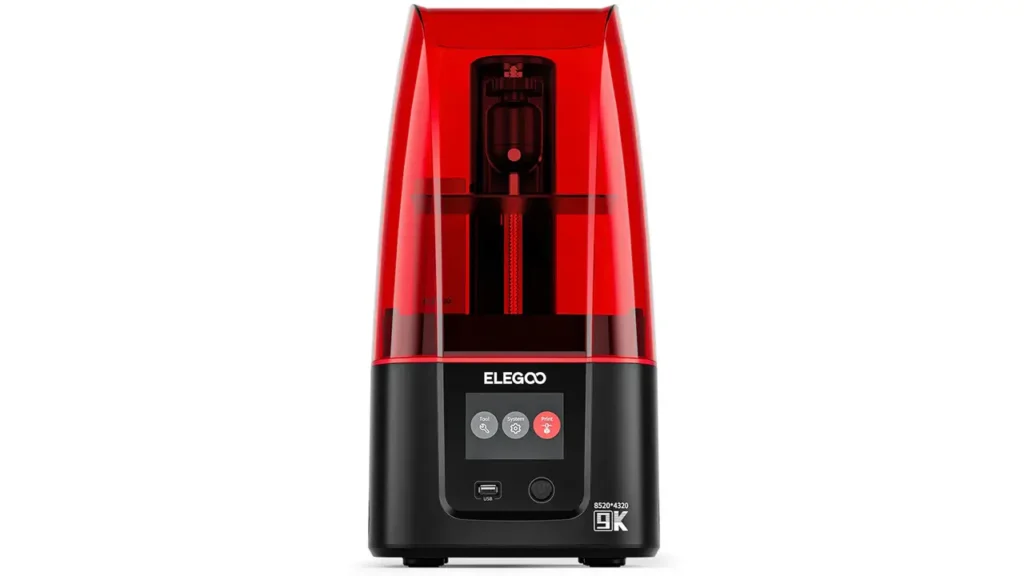
2. Elegoo Mars 4 Specs Overview
Let’s start with the numbers — because the Elegoo Mars 4 specs tell quite a compelling story right out of the gate.
| Specification | Mars 4 | Mars 4 Ultra |
|---|---|---|
| LCD Screen Size | 7 inch | 7 inch |
| Screen Resolution | 9K (8520 × 4320) | 9K (8520 × 4320) |
| XY Resolution | 18 × 18 µm | 18 × 18 µm |
| Build Volume (L×W×H) | 153.36 × 77.76 × 175 mm | 153.36 × 77.76 × 165 mm |
| Z Resolution | 10–200 µm | 10–200 µm |
| Max Print Speed | 70 mm/h | 150 mm/h |
| Light Source | COB LED, 36 LEDs, 405 nm | COB + Fresnel Lens, 405 nm |
| Pixel Density | ~1411 PPI | ~1411 PPI |
| Connectivity | USB | USB + Wi-Fi |
| Touchscreen | 3.5 inch | 4 inch HD IPS |
| Operating System | Standard firmware | Linux, 4 GB RAM |
| File Format | .goo / .stl | .goo / .stl |
| Air Filtration | Carbon filter included | USB air purifier included |
These numbers set a new standard for this price class. The 9K mono LCD with an XY pixel size of just 18 microns is a remarkable achievement — it means every tiny detail of your model is represented by an extraordinarily small light point, resulting in prints that look almost machined rather than layered. The COB (Chip-on-Board) light source consists of 36 LEDs arranged under the LCD screen to illuminate it as evenly as possible, using a 405 nm UV wavelength that is standard across the resin printing industry and compatible with a wide variety of resins.
The Mars 4 Ultra adds a Fresnel collimating lens to this system, narrowing the light angle to just 5 degrees for even greater consistency across the full build area.
Elegoo Mars 4
9K Mono MSLA 3D Printer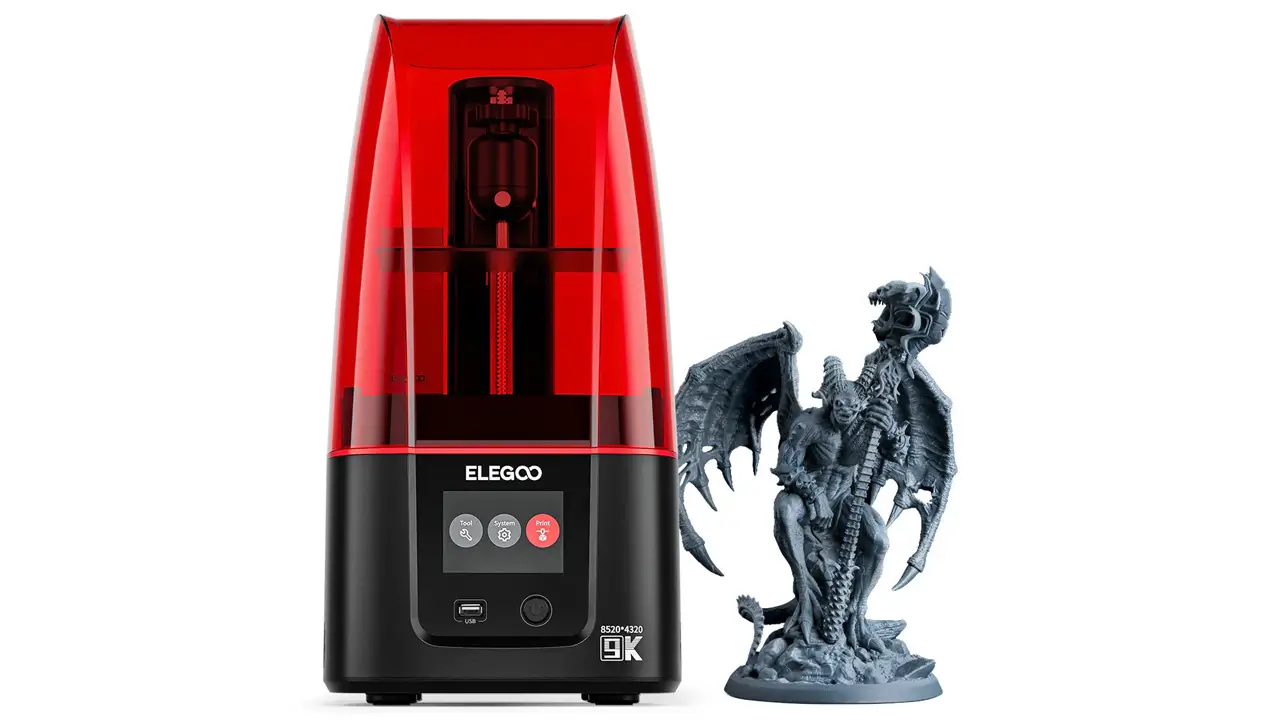
Professional Resin Printer
High-resolution 9K mono MSLA 3D printer from Elegoo. Exceptional detail, reliable performance, and excellent value for miniatures, jewelry, and professional prototyping.
3. Design and Build Quality
First impressions matter, and the Elegoo Mars 4 build quality is reassuringly solid for its price point. The overall form factor follows the familiar Mars series tower design — taller than it is wide, with a UV-protective cover on top and a relatively compact footprint that fits comfortably on a standard desk or workbench.
The housing is primarily plastic, consistent with the rest of the Mars range. While this won’t win any awards for premium feel, the construction is well-executed and the printer shows no signs of wobble or flex during normal use. The step design of the central platform is a thoughtful touch — it prevents any resin that might leak from the vat from flowing into the internal components of the machine, protecting the electronics and light source from accidental contamination.
The Z-axis motion system uses a linear rail, which is a notable quality improvement over older screw-rod-only designs. This rail provides smoother, more stable vertical movement during printing, which directly translates into cleaner layer lines and a more polished final surface. Adjustable foot pads at the base allow you to level the printer itself on uneven surfaces — a practical detail that matters more than it might seem when you’re working with precision printing.
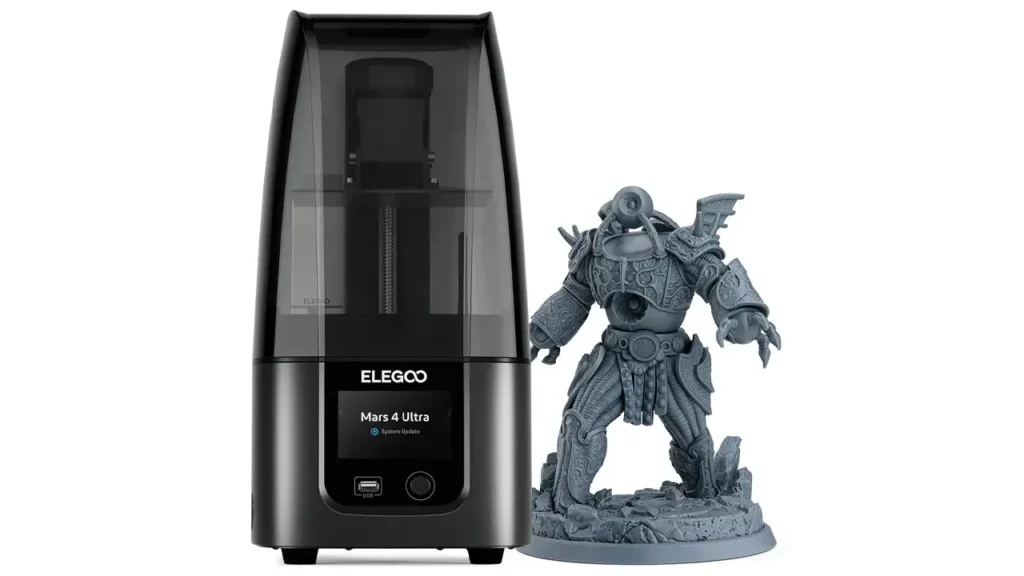
The Mars 4 Ultra takes the design a step further in several meaningful ways. It introduces a metal base in place of the plastic base found on the standard Mars 4, which adds both rigidity and a more premium aesthetic. The UV-protective cover switches from the traditional red color to a modern grey, giving the Ultra a cleaner, more contemporary appearance. The touchscreen is upgraded from a 3.5-inch display to a 4-inch HD IPS capacitive panel, which responds much more fluidly to touch and presents the user interface in a noticeably more polished way. The Linux-based operating system running on 4 GB of RAM ensures the interface loads quickly and handles files without lag.
One small critique: the tank screws on the Mars 4 Ultra are fiddly to clean. A magnetic or clip-based system would make resin changes and cleaning sessions considerably more convenient. This is a minor annoyance in an otherwise well-thought-out design, and something that is commonly noted by users who print frequently and swap resins regularly.
Overall, the Elegoo Mars 4’s physical presence communicates a machine that is purpose-built and competent. It won’t look out of place in a studio or creative workshop, and nothing about the construction feels like it will let you down during a long print session.
4. Print Quality and Detail
This is where the Elegoo Mars 4 print quality really earns its reputation — and where the leap from the previous generation becomes most obvious.
The 9K resolution doesn’t just sound impressive on paper. In practice, it enables the printer to reproduce details that were simply beyond the reach of 4K machines. Miniature faces, fine textures on armor and clothing, sharp lettering, and delicate organic curves all come through with a clarity and fluidity that feels genuinely next-level. At normal viewing distances — the distance at which you’d paint or display a miniature — the layer lines are essentially invisible. It’s only when you get extremely close, or zoom in with a macro camera lens, that the layered nature of the print becomes apparent at all.
Real-world test results consistently praise the Mars 4’s output. Warrior figurines, architectural details, and prototype parts all print with well-defined edges and smooth curves. The COB light source plays a significant role here: by distributing UV light evenly across the entire build plate, it ensures that prints curing at the edges of the plate receive the same exposure quality as those curing in the center. This consistency is harder to achieve than it sounds, and cheaper printers with less sophisticated lighting often produce prints that are slightly under- or over-cured at the edges.
There are a couple of small caveats worth mentioning. Some reviewers have noted that very fine internal details — think the inside of a hollow structure — can occasionally show slight softening, which is a known characteristic of MSLA printing in general rather than a flaw unique to the Mars 4. Support removal can also require some experimentation: out-of-the-box settings may result in supports that are a little difficult to pull away cleanly, but a few small adjustments in your slicing software solve this quickly. Using a raft as the base for your print also eliminates the minor dimensional inaccuracies at the build plate that some users have reported.
In short: for hobbyists, miniature painters, and prototypers working in the compact-to-medium scale range, the Mars 4’s print quality is outstanding at this price point.
5. Resolution and LCD Technology
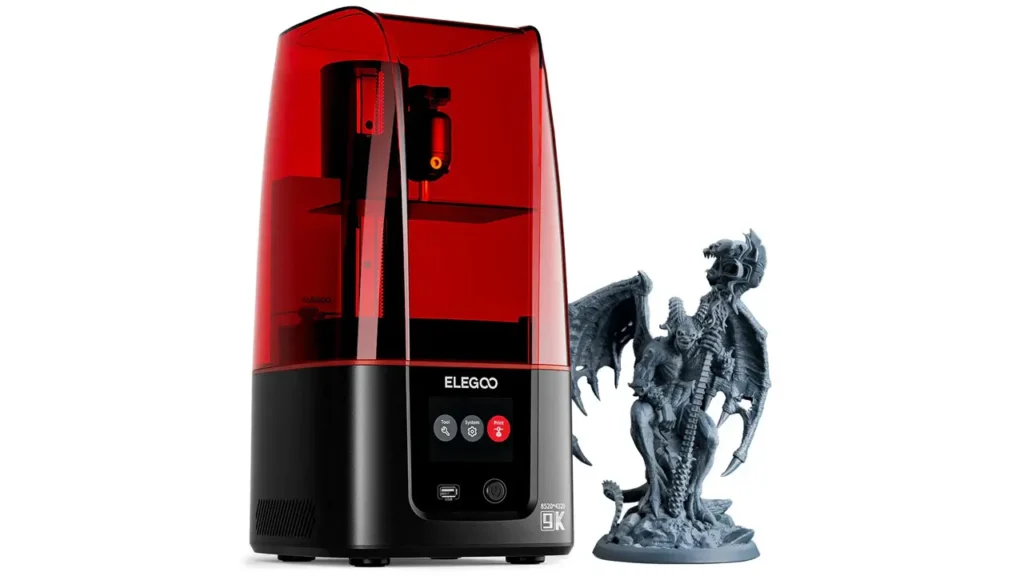
Understanding the Elegoo Mars 4 resolution requires a quick look at how MSLA (Masked Stereolithography) technology works. In an MSLA printer, a UV light source shines through an LCD screen that acts as a mask — blocking or allowing light to pass through pixel by pixel. Each pixel that allows light through cures a tiny square of resin. The smaller the pixel, the finer the detail that can be reproduced.
The Mars 4’s 9K mono LCD sits on a 7-inch panel and packs in 8520 × 4320 pixels. This gives a pixel size of just 18 microns — meaning each individual cured point of resin is a square measuring 0.018 millimeters across. This pixel density of approximately 1411 PPI (pixels per inch) is exceptional, far surpassing older 4K panels that operated at around 35 microns per pixel.
The “mono” in mono LCD refers to monochrome — the screen doesn’t produce color, only shades from black to transparent. This is important because monochrome panels allow significantly more UV light to pass through than older color LCD screens did, resulting in faster curing times and dramatically longer screen lifespan. Where early resin printers with color LCD screens might need replacement after 200–500 hours of use, modern mono LCDs are rated for several thousand hours.
The Mars 4 Ultra adds a Fresnel collimating lens to the already-capable COB light source. This lens focuses the UV light so that it strikes the LCD at a very narrow 5-degree angle, which reduces light scatter and bleed between adjacent pixels. The result is crisper edges, tighter detail, and more consistent exposure uniformity across the entire build plate. The 9H explosion-proof tempered glass screen protector over the LCD protects the panel from resin spills and physical contact — a practical safeguard that saves potentially expensive replacements.
6. Setup and First Print
One of the most pleasant surprises about the Elegoo Mars 4 setup experience is how simple and quick it is, even for someone who has never used a resin printer before.
The printer arrives largely assembled. Unlike FDM (filament) printers that often require significant construction time out of the box, the Mars 4 needs only a few preparation steps before it’s ready to print. Here’s how a typical unboxing and first print session goes:
First, remove all protective packaging and peel the protective films from the LCD screen and build plate. Screw the build plate onto the arm of the Z-axis carriage. Insert the resin vat into the frame. Attach the carbon air filtration unit, which sits in a slot on the machine and helps manage resin fumes during printing. Connect the printer to power, and switch it on.
The touchscreen walks you through a leveling process. On the standard Mars 4, this involves a simple two-point method: loosen the build plate screws, home the Z-axis so the plate rests on the FEP film at the bottom of the vat, slide a piece of paper underneath to check the gap, and tighten the screws. The Mars 4 Ultra uses a more secure four-screw leveling system that, once set correctly, typically never needs to be revisited. This four-point method locks the build plate more firmly and eliminates the slight risk of the plate shifting during long print sessions.
Once leveled, load a pre-sliced file from a USB drive — or via Wi-Fi if you’re on the Ultra — select it from the touchscreen interface, check that resin is filled to the maximum line on the vat, and start the print. Your first print will likely complete without issues. The included test file is a great confidence builder: it showcases the printer’s fine detail capabilities and gives you an immediate sense of the quality you’re working with.
One important reminder for anyone new to resin printing: always use nitrile gloves when handling uncured resin, work in a well-ventilated area, and have isopropyl alcohol (IPA, ideally 95% or higher) ready for washing your prints after they come off the build plate. Resin printing is a little more involved in post-processing than FDM printing, but the results make it absolutely worthwhile.
7. Slicing Software and Workflow
The Elegoo Mars 4 slicing software situation is one of the more user-friendly aspects of owning this printer. Unlike some machines that are locked into a single proprietary slicer, the Mars 4 is compatible with several widely-used options.
Elegoo bundles the Mars 4 Ultra with a license for Voxeldance Tango — a professional-grade slicer that normally costs hundreds of dollars per year as a subscription. The version included with the printer is an Elegoo edition, but it provides a comprehensive set of tools for support generation, exposure calibration, and print mode selection. Tango offers three printing modes: Static mode (uses preset parameters for reliable consistency), Smooth mode (dynamically adjusts speed based on model geometry), and High-Speed mode (pushes print efficiency to its maximum). For most users, Smooth mode strikes the best balance between speed and quality.
Beyond Voxeldance Tango, the Mars 4 uses Elegoo’s open-source GOO file format, which is compatible with both CHITUBOX and Lychee Slicer — two of the most popular resin slicers in the community. CHITUBOX is well-known for its straightforward interface and reliable support auto-generation, making it a solid choice for beginners. Lychee Slicer has a devoted following among more experienced users, particularly miniature painters, who appreciate its detailed support customization and its excellent preview modes. CHITUBOX has a built-in preset for the Mars 4, while Lychee requires the user to manually select and configure the printer profile — a minor extra step that’s well worth taking.
Wi-Fi printing, available on the Mars 4 Ultra, is currently most smoothly implemented through Voxeldance Tango. This feature allows you to send print files directly from your computer to the printer without physically handling a USB drive — a quality-of-life upgrade that becomes genuinely appreciated over time.
The workflow from model to finished print is clean and logical: export your 3D model as an STL file, import it into your slicer of choice, orient it, add supports, configure layer height and exposure settings for your specific resin, export the GOO file, transfer it to the printer, and start the job. Most experienced resin printers develop a preferred set of settings over a few sessions, after which the workflow becomes fast and intuitive.
8. Comparison: Mars 4 vs Mars 3
The Elegoo Mars 4 vs Mars 3 comparison is perhaps the most important question for anyone currently owning an older Mars machine and wondering whether an upgrade makes sense.
| Feature | Mars 3 / Mars 3 Pro | Mars 4 / Mars 4 Ultra |
|---|---|---|
| LCD Resolution | 4K (4098 × 2560) | 9K (8520 × 4320) |
| XY Resolution | 35 µm | 18 µm |
| LCD Size | 6.6 inch | 7 inch |
| Build Volume | 143 × 89 × 175 mm | 153.36 × 77.76 × 175 mm |
| Max Print Speed | ~50 mm/h | 70–150 mm/h |
| Light Source | COB + Fresnel lens | COB + Fresnel lens (upgraded) |
| Wi-Fi | No | Yes (Ultra only) |
| Build Plate | Sandblasted metal | Laser-engraved (Ultra) |
| Leveling System | Ball joint / 2-screw | 4-screw (Ultra) |
| OS / RAM | Standard firmware | Linux, 4 GB RAM (Ultra) |
The single most significant improvement from the Mars 3 to the Mars 4 is the XY resolution jump from 35 microns to 18 microns. This is not a modest incremental step — it essentially halves the size of the smallest printable feature. In side-by-side comparisons of the same model printed on a Mars 3 Pro and a Mars 4 Ultra, the difference is visible at close inspection, particularly on curved surfaces like faces and organic forms, where the Mars 4 produces a smoother, more fluid appearance.
Print speed is also meaningfully faster on the Mars 4 generation, particularly the Ultra variant. The Mars 4 Ultra’s 150 mm/h maximum speed with ACF film and compatible resin is a dramatic step forward. The build volume shifts slightly: the plate on the Mars 4 is a touch longer and narrower than the Mars 3 Pro’s plate, with roughly equivalent total surface area, but 10 mm less build height on the Ultra variant. For users who regularly print tall models, this is worth noting.
Is the upgrade worth it for Mars 3 owners? If detail is your priority — particularly for miniatures or jewelry — the answer is a confident yes. The resolution improvement is the first genuinely significant XY jump the Mars series has seen in years. If you’re happy with your Mars 3 results and rarely push it to its limits, the Mars 4 is a meaningful but not urgent upgrade.
9. Price and Value for Money
The Elegoo Mars 4 price sits comfortably in the budget-to-mid-range segment of the resin printer market, which is exactly where the Mars series has always been positioned — and where it continues to thrive.
| Model | Typical Price (USD) | Key Advantage |
|---|---|---|
| Elegoo Mars 4 | ~$150–$180 | Best entry price, 9K quality |
| Elegoo Mars 4 Ultra | ~$200–$260 | Wi-Fi, Linux OS, faster speed |
| Elegoo Mars 5 Ultra | ~$280–$350 | Auto-leveling, newer generation |
The Mars 4 Ultra in particular delivers remarkable value when you consider what’s included. Alongside the printer itself, the box contains nitrile gloves, a metal scraper, a plastic scraper, a funnel, replacement screws, Allen keys, a USB drive, a USB air purifier, and a lifetime license for Voxeldance Tango slicing software — a professional tool that, on its own, carries a significant commercial subscription price. Getting all of this bundled with a 9K resin printer at the Mars 4 Ultra’s price point is genuinely hard to argue with.
Ongoing consumable costs are also reasonable. The 405 nm resin compatible with the Mars 4 is widely available from Elegoo and third-party manufacturers, in a broad range of formulations including standard, ABS-like, water-washable, flexible, dental, and jewelry resins. The FEP/ACF film in the resin vat will eventually need replacing with use, but replacement parts are affordable and readily available.
Elegoo periodically runs significant discounts during events like Black Friday and Prime Day, where the Mars 4 Ultra has been known to drop to around $180 or below — making an already competitive machine even easier to justify.
Where the value story has a slight blemish is in after-sales support. Customer support outside of China is limited to email correspondence, and response times and detail level have been noted as areas with room for improvement. For most users this won’t be an issue, especially with the strong community of Elegoo users available across forums and social platforms — but it’s worth knowing if you anticipate needing hands-on troubleshooting help.
10. Final Verdict
The Elegoo Mars 4 resin printer is, without question, one of the most compelling offerings in its price class. This Elegoo Mars 4 3D printer review has walked through every major aspect of the machine — and the consistent story is one of impressive capability delivered at an accessible price point.
The 9K mono LCD with 18-micron XY resolution produces prints that genuinely surprise people who are used to older 4K machines. The COB light source with Fresnel lens technology ensures consistent, accurate UV exposure across the full build area. The linear rail Z-axis provides smooth, stable movement. The software ecosystem, led by Voxeldance Tango and supported by CHITUBOX and Lychee, covers the needs of beginners and advanced users alike. Setup is fast, the workflow is logical, and the results — particularly for miniatures, jewelry, and detailed prototypes — are excellent.
The Mars 4 Ultra adds Wi-Fi, a superior touchscreen, a Linux-based OS with 4 GB of RAM, a more secure four-screw leveling system, a laser-engraved build plate, and higher print speeds — all at a price that remains highly competitive. For users who want a smooth, modern experience, the Ultra is the version to choose.
Who should buy the Elegoo Mars 4?
It’s an ideal choice for tabletop miniature painters and gamers who want studio-quality detail from a compact machine. It’s a natural upgrade for Mars 3 or Mars 2 owners looking to meaningfully improve their print resolution. It’s a solid first machine for anyone ready to step into resin printing with a capable, well-supported printer. And it’s a practical tool for jewelry designers, dental modelers, and small-scale prototype creators who need fine, accurate output without spending professional-machine money.
Who might want to look elsewhere?
Anyone who regularly prints large-format objects — full-scale props, large terrain pieces, or oversized figurines — will find the Mars 4’s build volume limiting and should instead explore the Elegoo Saturn series or Jupiter series. And anyone who values immediate phone or live-chat customer support may want to factor in the email-only support situation when making their decision.
Ultimately, the Elegoo Mars 4 earns its place as one of the best-value resin printers available in 2026. It is a machine that respects your budget, respects your creative ambitions, and delivers on its promises every time you lift the UV cover and see a perfectly detailed print waiting for you on the build plate. Highly recommended.
Polimerukr.com
Ukraine
3D Printing Materials & Supplies
Your trusted source for high-quality 3D printing materials in Ukraine. Wide selection of filaments, resins, and accessories for all printer types with fast local shipping.
Discover more from bestchina3dprinters.com
Subscribe to get the latest posts sent to your email.