 Skip to content
 If you’ve been paying attention to the 3D printing world lately, you already know things have changed — fast. CoreXY motion systems, once reserved for high-end machines costing north of a thousand dollars, are now showing up in entry-level printers that fit comfortably in a hobbyist’s budget. And right at the center of that shift in 2026 sits the QIDI Q2C.
Priced at around $379–$399, it’s QIDI’s most accessible CoreXY machine yet — a fully enclosed FDM printer aiming squarely at the budget power-user segment. The promise is compelling: fast, reliable printing with an open-source foundation, a premium-feeling build, and specs that punch well above their price class. But does it actually deliver? Let’s dig in and find out exactly what makes this printer one of the most talked-about releases of 2026.


What Is the QIDI Q2C?
The QIDI Q2C is a fully enclosed, CoreXY motion 3D printer designed for makers who want serious performance without a serious price tag. It sits at the entry point of QIDI’s current enclosed printer lineup — below the QIDI Q2, which adds an actively heated chamber reaching 65°C, and well below the flagship QIDI Plus 4.
QIDI markets this machine as something that can grow from beginner to expert, and that framing holds up. This isn’t the zero-friction plug-and-play experience of a Bambu Lab printer, but it’s also not an intimidating DIY build. It lives in a sweet spot: approachable enough for a motivated beginner, capable enough for a seasoned maker who wants real performance on a budget. The Q2C is designed for DIYers, families, designers, and enthusiasts who want a meaningful step up without crossing into professional-tier pricing.
In the broader 2026 3D printing market, the QIDI Q2C is positioned against the Bambu Lab A1, the Creality K1 SE, and the Flashforge Adventurer 5M — all solid machines, each with their own strengths. What makes the Q2C stand out is its combination of enclosed CoreXY architecture, a high-temperature hotend, open-source Klipper firmware, and a build volume that beats most of its competition.
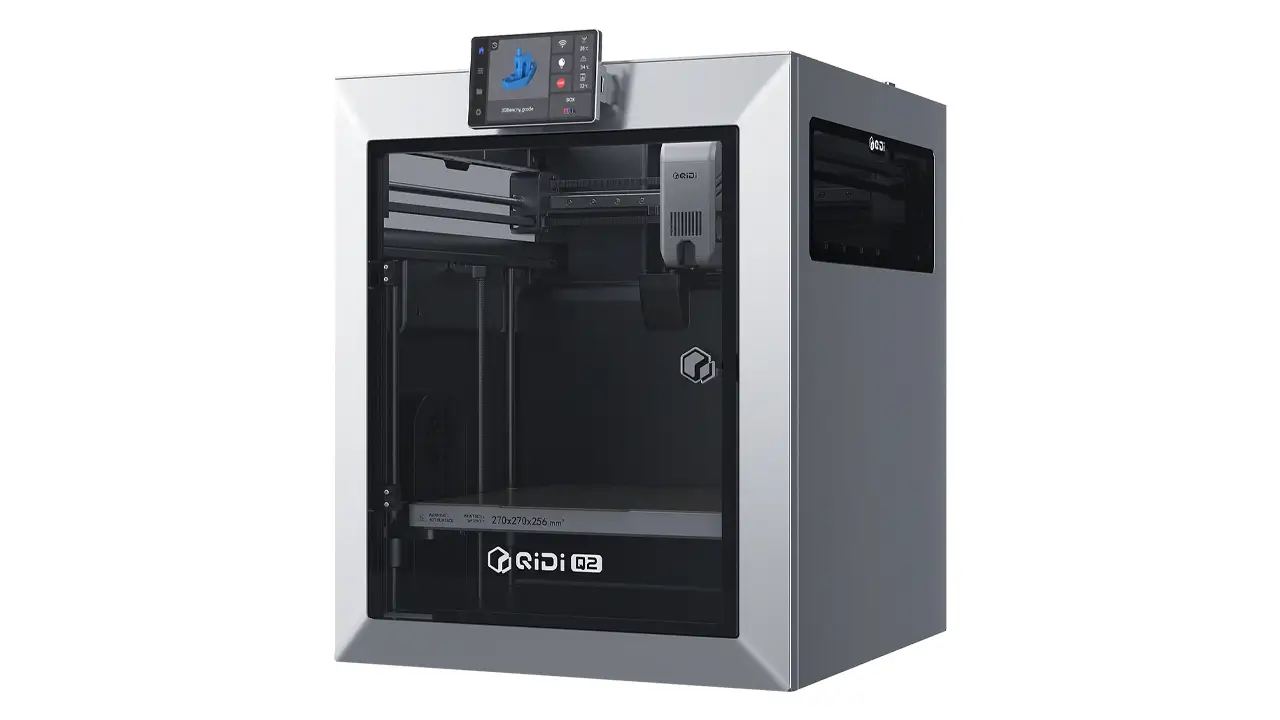
QIDI Q2
High-performance CoreXY 3D printer from QIDI Tech. Advanced mechanics, intelligent features, and reliable performance for professionals and enthusiasts seeking precision and speed.
- • CoreXY Kinematics
- • Auto Bed Leveling
- • 350°C Hotend
- • Smart Features
Key Specifications Overview
Before we talk about real-world performance, let’s look at what you’re actually getting on paper. The spec sheet on the QIDI Q2C is genuinely impressive for its price range.
| Specification | QIDI Q2C |
|---|---|
| Motion System | CoreXY |
| Max Print Speed | 600 mm/s |
| Max Acceleration | 20,000 mm/s² |
| Nozzle Max Temperature | 370°C (bimetal hardened steel) |
| Heated Bed Max Temp | 120°C |
| Build Volume | 270 × 270 × 256 mm |
| Enclosure | Yes (fully enclosed) |
| Active Chamber Heating | No |
| Firmware | Klipper (open source) |
| Auto Leveling | Yes (nozzle-based, zero offset) |
| Belt System | 1.5GT custom belt |
| Connectivity | Wi-Fi 2.4G, Ethernet (LAN), USB, Offline |
| Compatible Slicers | QIDI Studio, OrcaSlicer, Cura, PrusaSlicer |
| Supported Materials | PLA, PETG, ABS, ASA, TPU, PA, PC, PPS-CF |
| External Dimensions | 402 × 438 × 494 mm |
| Price (approx. 2026) | $379 – $439 |
A few things on this list deserve special attention. The 370°C bimetal hardened steel nozzle is genuinely unusual at this price point — most competitors top out at 300°C. The 120°C heated bed means excellent adhesion across a wide range of materials. The 270 × 270 × 256 mm build volume is about 50% larger than the Bambu Lab A1 Mini, which is a meaningful real-world advantage. And the 1.5GT custom belt system — a higher tooth density design compared to standard GT2 belts — contributes directly to smoother motion and reduced vibration artifacts during fast printing.
Performance: Speed and Real Printing Results
Let’s talk honestly about speed, because this is where marketing numbers and reality can diverge significantly. The QIDI Q2C is rated at 600 mm/s maximum speed and 20,000 mm/s² acceleration — numbers that are technically accurate but not the whole story.
In everyday printing, most users run the machine at 150–250 mm/s. That’s where the sweet spot lives: fast enough to dramatically cut print times compared to older machines, but controlled enough to maintain the surface quality you actually want. Practical Benchy test times at quality-oriented settings come in at around 25–35 minutes — a genuinely impressive result that holds its own against similarly-priced competitors.
When pushed harder, the Q2C can absolutely run at elevated speeds, but surface quality degrades proportionally, just like any other machine on the market. The real advantage of the 1.5GT belt system paired with QIDI’s input shaping implementation is that even at higher speeds, vibration frequency artifacts (those faint ripple lines you sometimes see on fast prints) are notably reduced compared to competitors running similar speeds. The surface quality ceiling is genuinely higher on the Q2C.
For PLA prints, the results are clean, dimensionally accurate, and consistent across repeated runs. PETG also performs well. The machine excels in its intended use cases, and as a daily driver for standard hobby and functional printing, it’s hard to criticize.
The one honest caveat on performance: volumetric flow rate is your real throughput limiter, not the top-line speed figure. Like all printers at this tier, maximum quality printing happens at moderate speeds. That’s not a QIDI problem — it’s physics.
Auto Calibration and Ease of Use
One of the QIDI Q2C’s most genuinely impressive features is its leveling system, and it’s worth spending some time here because this is where it separates itself from the competition in a meaningful way.
The Q2C uses a nozzle-based leveling system with zero probe offset. Instead of a separate sensor mounted beside the nozzle (which introduces a potential offset error), the nozzle itself makes direct contact with the build plate, using a load cell sensor for feedback. No probe offset, no guesswork — just precise real contact with the surface you’re actually printing on.
The practical result is excellent first layers with a perfect Z offset, and the system is unaffected by bed surface texture or environmental vibrations that can fool traditional probe-based systems. Leveling and input shaping calibration run as part of the initial setup and at the start of every print, which means the machine is always dialing itself in fresh.
For new users, this is a massive quality-of-life improvement. First-layer failures are one of the most common frustrations in 3D printing, and the Q2C’s approach eliminates a significant portion of that frustration from day one. The machine also includes filament runout detection and power-loss recovery natively — features that have saved countless prints when an unexpected power outage or an empty spool would otherwise mean a complete failure.
Setup out of the box is straightforward. The printer ships mostly assembled. One tip: watch QIDI’s official unboxing video before you start, and carefully check all screws for any remaining protective films. This prevents a common early issue where plastic parts around floating screws can crack during setup if protective packaging isn’t fully removed first.
Noise levels during operation are around 50–55 decibels — comparable to a quiet conversation or soft background music. The enclosed design helps dampen sound, making this a printer that works comfortably in a home office or living space during daytime hours.
Open Source Advantage
Here’s something that matters more than many buyers realize at the time of purchase: what happens to your printer two or three years from now?
The QIDI Q2C runs Klipper firmware — one of the most powerful, well-documented, and actively developed open-source firmware platforms in the 3D printing world. This has practical day-one benefits and long-term strategic advantages that are worth understanding.
On day one, Klipper means you’re not locked into QIDI’s native slicer. The Q2C is fully compatible with OrcaSlicer (the community favorite for refined results), Cura, and PrusaSlicer. Many experienced users actually prefer these third-party slicers over QIDI’s native software, which can occasionally be unstable. The printer accepts standard G-code files, so your workflow is entirely portable.
The open-source nature also means the Q2C can operate completely offline if you choose. Unlike some competitors that require cloud accounts for full functionality, the Q2C works without any cloud dependency. You can connect via Wi-Fi, Ethernet, or simply load files from a USB drive and print with no internet required. For privacy-conscious users, this is a genuine differentiator.
One particularly useful open-source capability: webcam integration. Several users have added USB webcams as an inexpensive upgrade for remote monitoring, which Klipper supports natively. On closed-ecosystem printers, adding features like this means waiting for official accessories. On the Q2C, it’s a community-supported upgrade you can do whenever you’re ready.
Long-term, the open-source foundation means the Q2C community will keep developing improvements, bug fixes, and new features indefinitely. When QIDI eventually releases newer models, a closed-ecosystem printer becomes gradually more obsolete. An open-source machine keeps evolving with its community.
QIDI Q2C vs Bambu A1
This is the comparison that comes up most often, and for good reason — the Bambu Lab A1 is the dominant recommendation for beginners in this price bracket. Both machines target a similar audience and a similar price point, so the differences matter.
Here is a side-by-side look at how they stack up:
| Feature | QIDI Q2C | Bambu Lab A1 |
|---|---|---|
| Motion System | CoreXY (enclosed) | Bed slinger (open) |
| Build Volume | 270 × 270 × 256 mm | 256 × 256 × 256 mm |
| Max Nozzle Temp | 370°C | 300°C |
| Enclosure | Yes | No |
| Firmware | Klipper (open source) | Bambu OS (closed) |
| Cloud Dependency | Optional (offline capable) | Required for full features |
| Multi-Color Support | Via QIDI Box (addon) | Via AMS Lite (addon) |
| Ecosystem | Open (Klipper-based) | Closed (proprietary) |
| Upgrade Potential | High (community-driven) | Limited (proprietary parts) |
| Approximate Price | $379 – $439 | ~$299 – $399 |
The summary here is straightforward. The Bambu A1 wins on day-one simplicity — it’s easier to set up, more polished from a software standpoint, and backed by Bambu’s well-refined user experience. If your priority is getting beautiful prints as quickly as possible with minimal learning curve, Bambu delivers that.
The QIDI Q2C wins on architecture (CoreXY vs bed slinger), enclosure, build volume, nozzle temperature capability, repairability, and long-term flexibility. The bed slinger design of the A1 is a genuine limitation for printing tall, heavy objects at speed, because the print bed moves back and forth — which introduces vibration and reduces accuracy as prints get taller and heavier. CoreXY moves the toolhead, not the bed, which is fundamentally more stable.
If you’re comfortable with a slight learning curve and want more long-term flexibility and a machine that keeps growing with the community, the QIDI Q2C is the stronger machine overall.
Polimerukr.com
Ukraine
3D Printing Materials & Supplies
Your trusted source for high-quality 3D printing materials in Ukraine. Wide selection of filaments, resins, and accessories for all printer types with fast local shipping.
Is It Better Than Creality K1 SE?
Where the Bambu A1 comparison is about ecosystem philosophy, the Creality K1 SE comparison is a more direct architectural battle. Both are enclosed CoreXY machines targeting budget-conscious users, and they often appear at similar price points.
The QIDI Q2C has clear edges in three specific areas. First, build quality: user feedback consistently rates the Q2C’s construction higher, with a full metal frame and less variation between units. Second, the nozzle-integrated leveling system outperforms the K1 SE’s standard probe approach, especially for first-layer consistency. Third, the 370°C hotend versus the K1 SE’s 300°C maximum means the Q2C opens up more material options, particularly for users who want to experiment with engineering-grade filaments like carbon fiber composites.
The K1 SE can compete on price — it’s occasionally slightly cheaper — and Creality’s very large user community provides extensive modification guides and troubleshooting resources accumulated over years.
However, Creality’s quality control has historically been inconsistent. The Q2C offers a more predictable out-of-box experience. For a maker who wants reliability and build quality with long-term upgrade potential, the Q2C is the more sensible investment in this head-to-head.
Upgrade Path: From Ender 3 to Q2C
If you’re currently printing on a Creality Ender 3 — or any of its many variants — and wondering whether the QIDI Q2C is the right next step, the answer is a confident yes for a specific type of maker.
The Ender 3 is a Cartesian printer. It’s slow by 2026 standards, typically capping out at practical speeds of 50–80 mm/s for quality prints. Auto leveling on base variants requires manual intervention or upgrades. The frame flexes at higher speeds. It’s a machine that taught a generation of makers how 3D printing works, but it has genuine ceilings that the hobby has largely outgrown.
The QIDI Q2C represents a fundamental architecture upgrade, not just an incremental one. You’re moving from Cartesian to CoreXY, from open-frame to fully enclosed, from manual leveling to automated nozzle-based calibration, and from a 260°C maximum nozzle to 370°C. The jump in print speed alone — from 50–80 mm/s daily use to 150–250 mm/s — cuts print times dramatically. A model that takes three hours on an Ender 3 might take 45 minutes on the Q2C.
The learning curve is real but gentle. Ender 3 users are already comfortable with basic 3D printing concepts — bed leveling, slicer settings, filament handling. That foundation transfers directly. What’s new is Klipper firmware and the expanded material possibilities. Both are learnable quickly, especially with QIDI’s wiki documentation and the active community on Reddit’s r/QIDItech and the QIDI Users Group on Facebook, which has grown to over 15,000 members.
For someone who started on an Ender 3, outgrew it, and now wants a machine that matches their ambition, the Q2C is genuinely one of the best-value entry points into serious CoreXY printing available in 2026.
Final Verdict: Who Should Buy the QIDI Q2C?
The QIDI Q2C is a genuinely strong machine. It delivers real CoreXY performance, a zero-offset leveling system that works as advertised, a 370°C hardened steel hotend that punches above its price class, and an open-source Klipper foundation that gives long-term flexibility and customization potential. The 1.5GT belt system and input shaping produce noticeably cleaner surfaces than competitors at similar speeds.
Is it perfect? Not quite. There is no active chamber heating, which means ABS and Nylon printing is situational rather than reliable — if advanced engineering filaments are your primary goal, the QIDI Q2 (with its 65°C heated chamber) is the smarter buy. There’s also no built-in camera, so remote visual monitoring requires a DIY addition. And it’s not quite as frictionless as a Bambu Lab printer for absolute beginners who want to print straight out of the box with zero learning involved.
But for its intended audience — makers upgrading from older Cartesian printers, enthusiasts who want CoreXY performance on a budget, and users who value long-term repairability and community-driven upgrades over a polished closed ecosystem — the QIDI Q2C is one of the best budget CoreXY 3D printers available in 2026.
Here’s a quick breakdown of who this printer is — and isn’t — for:
| Buy the QIDI Q2C if… | Look elsewhere if… |
|---|---|
| You’re upgrading from an Ender 3 or similar Cartesian machine | You need reliable ABS/Nylon printing (consider QIDI Q2 instead) |
| You want CoreXY speed without a $500+ budget | You want zero learning curve and maximum plug-and-play (consider Bambu A1) |
| You value open-source firmware and long-term upgradeability | Built-in camera for remote monitoring is a must-have for you |
| You primarily print PLA and PETG with occasional ABS in a controlled environment | You need carbon fiber composites or polycarbonate as daily materials |
| You want a large build volume at this price point | You prefer a cloud-connected, fully managed ecosystem |
| You want a machine that evolves with community updates | Your entire budget is under $300 |
At $379–$439, the QIDI Q2C represents one of the strongest value propositions in the budget CoreXY category in 2026. If the description — motivated hobbyist, open firmware, real speed, room to grow — sounds like you, this printer will serve you well for a long time.
QIDI Q2
High-performance CoreXY 3D printer from QIDI Tech. Advanced mechanics, intelligent features, and reliable performance for professionals and enthusiasts seeking precision and speed.
- • CoreXY Kinematics
- • Auto Bed Leveling
- • 350°C Hotend
- • Smart Features
🇬🇧 English
Great review of the QIDI Q2C! The article is clear, well-structured, and actually useful for comparing it with Bambu A1. I like how the specs and real-world performance are explained without fluff. Definitely bookmarking this site for future 3D printer research.
🇪🇸 Español
Excelente análisis del QIDI Q2C. El contenido es muy claro y fácil de entender, incluso para quienes están empezando en impresión 3D. Me gustó la comparación con Bambu A1. Este sitio se ve muy profesional y confiable.
🇸🇦 العربية
مراجعة رائعة لطابعة QIDI Q2C. المقال منظم ويشرح المواصفات والأداء بشكل واضح. أعجبني التركيز على السرعة ونظام CoreXY. الموقع مفيد جدًا لكل من يبحث عن طابعات ثلاثية الأبعاد حديثة.
🇨🇳 中文 (Chinese)
这篇关于QIDI Q2C的评测非常专业,内容详细且易于理解。对比Bambu A1的部分很有帮助。网站整体质量很高,是了解3D打印机的好资源。
🇫🇷 Français
Très bon article sur la QIDI Q2C. Les informations sont précises et bien présentées. J’ai particulièrement apprécié la comparaison avec d’autres imprimantes comme la Bambu A1. Le site semble fiable et moderne.
🇩🇪 Deutsch
Sehr gute Bewertung des QIDI Q2C. Der Artikel ist übersichtlich und liefert alle wichtigen Informationen. Besonders hilfreich fand ich den Vergleich mit anderen Druckern. Die Website wirkt professionell und vertrauenswürdig.
Discover more from bestchina3dprinters.com
Subscribe to get the latest posts sent to your email.
