 Skip to content
 In this QIDI X Smart 3 review, we’re going to walk you through everything: design, speed, ease of use, auto leveling, technical specs, price, and how it stacks up against the Bambu Lab A1 Mini. By the end, you’ll know exactly whether this is the right printer for you.
If you’ve been thinking about getting into 3D printing but didn’t want to spend a fortune or deal with a steep learning curve, the QIDI X-Smart 3 might just be the machine you’ve been waiting for. This compact CoreXY 3D printer packs an impressive list of features into a small, beginner-friendly package — and at a price that won’t make your wallet cry.


Let’s dive in!
Design & Build Quality — Compact by Design
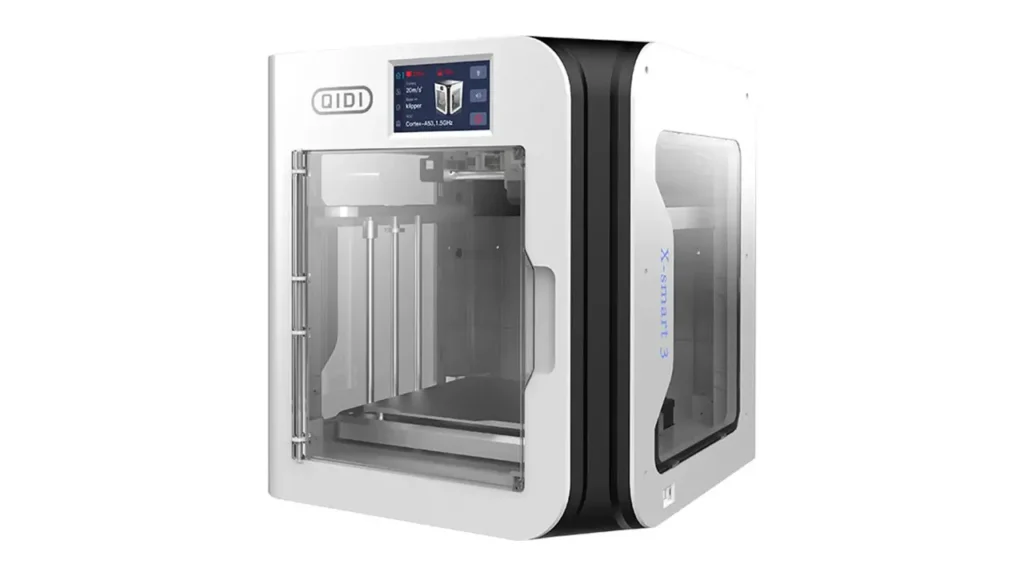
The first thing you notice about the QIDI X-Smart 3 is just how tidy and well-thought-out it looks. This is a genuinely compact CoreXY 3D printer, and QIDI has done a great job making the most of every centimeter.
The overall dimensions of the machine come in at 370 × 362 × 397 mm, and the net weight is just 10.5 kg, which means you can comfortably place it on a desk, a bookshelf, or even take it to a makerspace without any real hassle. For reference, that’s roughly the footprint of a large microwave oven — very manageable for most home setups.
The printer features a fully enclosed frame, which serves two important purposes: it keeps drafts away from your prints (which matters a lot for materials like ABS and ASA), and it adds a layer of safety by containing any loose filament. The enclosure also contributes to a cleaner, more professional aesthetic compared to open-frame printers that tend to collect dust and look cluttered on a desk.
Build quality feels solid for the price range. The frame uses a combination of metal and reinforced components, giving you a machine that stays stable during high-speed operation without unnecessary flex or vibration. The dual Z-axis structure further contributes to print consistency and reduces the risk of layer shifts on taller objects.
The double-sided flexible magnetic build plate is one of those features you’ll appreciate every single day. Just flex the plate slightly after a print is done, and your finished parts pop right off. No scraping, no soaking, no drama. For beginners especially, this is a genuinely satisfying quality-of-life touch that makes the whole process feel smooth and professional.
CoreXY System Explained — Why It Matters
You’ll see the term “CoreXY” mentioned a lot in 3D printing circles, but what does it actually mean and why should you care about it?
In a traditional Cartesian 3D printer, the print head moves along one axis while the bed moves along another. The bed itself — which can be quite heavy — is constantly accelerating and decelerating. At higher speeds, this causes wobble, ghosting (a rippling artifact visible in prints), and puts a real ceiling on how fast you can realistically print without sacrificing quality.
CoreXY changes that equation entirely. In a CoreXY setup, the bed only moves vertically on the Z-axis, while the print head handles all of the X and Y movement using two motors connected by a crossed belt system. Because the print head assembly is much lighter than a moving bed, it can accelerate and decelerate far more quickly without introducing vibration artifacts into the print.
The X-Smart 3’s CoreXY structure reduces motion inertia to enable greater acceleration and speed — which is exactly why QIDI can achieve the impressive performance figures we’ll explore in the next section. This architecture was previously found mainly in premium or professional printers, and the fact that it shows up at the X-Smart 3’s price point is genuinely exciting for the broader 3D printing community.
For users upgrading from an entry-level Cartesian printer, the difference in print quality at speed will be immediately noticeable. Corners will be sharper, curves will be smoother, and you’ll be able to push print speeds much higher before quality starts to degrade. In short, CoreXY isn’t just a marketing term here — it’s a real, meaningful upgrade that affects every single print you make.
Qidi Tech
Shenzhen, China
Engineering Printers
Professional-grade printers for engineering materials. Enclosed chambers, high-temperature hotends, and industrial reliability for demanding applications.
Speed Performance — What Does 500mm/s Actually Mean?
Let’s talk about the headline number: 500mm/s print speed. It sounds incredible, and in the world of consumer 3D printers, it genuinely is impressive — but it’s worth understanding what this figure means in practice.
The QIDI X-Smart 3 is powered by an RK3328 quad-core Cortex-A53 64-bit processor running at 1.5GHz, backed by 8GB eMMC storage and 1GB DDR3 memory. This powerful onboard computer handles the complex real-time motion calculations that Klipper firmware demands, enabling the machine to reach a maximum print speed of 500mm/s with a maximum acceleration of 20,000mm/s² and an extruder flow rate of 30mm³/s.
Now, 500mm/s is the theoretical maximum speed. In real-world printing, your actual speed depends on several factors: the complexity of the model, the filament you’re using, and the quality settings you choose. For everyday PLA prints at good quality, most users will find themselves running somewhere between 150mm/s and 300mm/s — still dramatically faster than the 40–80mm/s that older budget printers manage.
The machine also comes with Input Shaper (resonance compensation) enabled through Klipper. This is a genuinely clever system that analyzes the vibration characteristics of your specific printer and automatically compensates for them during printing. The result is that even at high speeds, you avoid the ghosting and ringing artifacts that plague faster prints on less sophisticated machines.
Pressure Advance is another Klipper feature baked in here. It compensates for the slight delay between when the extruder pushes filament and when that filament actually reaches the nozzle tip — which becomes increasingly important at higher speeds. Together, Input Shaper and Pressure Advance are what separate a machine that claims 500mm/s from one that can actually use that speed usefully.
The bottom line: real-world print speeds on the X-Smart 3 are genuinely faster than most entry-level printers. You’ll print everyday objects noticeably quicker, and the quality at those speeds remains commendably clean thanks to the software and hardware working together intelligently.
Ease of Use for Beginners — Plug, Level, and Print
One of the biggest selling points of the QIDI X-Smart 3 is how accessible it is for people who are new to 3D printing. QIDI has clearly put thought into making this a beginner-friendly machine from the moment you open the box.
The printer arrives approximately 95% pre-assembled. There’s very little for you to do out of the box beyond removing the shipping ties that hold components in place during transit and attaching a couple of minor parts. Most users report being up and running within 10 to 15 minutes of opening the package — which is a refreshingly low barrier compared to kit printers that can take hours to put together and calibrate.
Once powered on, the X-Smart 3 walks you through an on-screen setup process via its 4.3-inch full-color touchscreen (480 × 272 resolution). The guided setup covers bed leveling, running the Input Shaper calibration, and cleaning the carbon fiber rods — basically everything you need to do before your first print. It’s intuitive enough that you don’t need to consult any external guides or watch tutorials just to get started.
The QIDI Studio slicer software (based on the popular and well-regarded PrusaSlicer) comes with both a Normal mode and an Expert mode. Normal mode gives beginners a simplified interface with pre-tuned profiles for common filaments, while Expert mode unlocks the full depth of controls for those who want to fine-tune every aspect of their prints. This dual-mode approach means the software grows with you as your skills develop — you’re not locked into a simplified interface forever.
Wi-Fi connectivity lets you send print jobs wirelessly from your laptop or desktop, which is a genuinely convenient feature that adds to the plug-and-play feel of the machine. USB connectivity is also available for those who prefer a wired connection or are printing in an environment where Wi-Fi isn’t reliable.
For families, students, educators, and first-time 3D printing enthusiasts, the X-Smart 3 removes most of the traditional friction points that make 3D printing feel intimidating. It’s set up to succeed from the very first print.
Auto Calibration & Smart Features — Less Fiddling, More Printing
Bed leveling is historically one of the most frustrating aspects of 3D printing for beginners. Getting the first layer right is critical — too far from the bed and prints won’t stick; too close and you’ll damage the surface or block the nozzle. The QIDI X-Smart 3 largely takes this headache away with its automatic bed leveling system.
The printer uses a capacitive probe sensor that scans 16 points across the print bed surface. By measuring the height at each of these points, the firmware builds a detailed map of the bed’s actual shape and automatically compensates for any unevenness during printing. In practice, this means your first layer is consistently good without manual adjustment sessions.
The 16-point mesh leveling is more comprehensive than the basic 4-point or 9-point systems found on some cheaper printers. A denser mesh means the compensation is more accurate, especially toward the edges of the bed where leveling tends to drift. Once the initial leveling is done, you typically don’t need to repeat it before every print — the system remembers and applies the mesh automatically.
Klipper’s KAMP feature (Klipper Adaptive Meshing and Purging) takes this one step further by only probing the area of the bed that’s actually going to be used for your specific print. If you’re printing a small object in the center of the bed, there’s no need to probe all 16 points across the entire surface — KAMP intelligently limits the probing to the relevant area, saving you time at the start of every print.
The filament detection sensor is another thoughtful addition. If your filament runs out mid-print, the printer pauses automatically and alerts you, giving you the chance to load a new spool and continue the print from where it left off. This is a small feature that can save hours of work on longer prints.
The flexible magnetic build plate also contributes to the ease-of-use story here. Its special HF coating provides excellent first-layer adhesion for a wide range of filaments without needing glue sticks or hairspray on most materials, while still releasing prints cleanly once the plate cools down.
Technical Specifications — Everything in One Place
Here’s a full breakdown of the official QIDI X-Smart 3 specs, formatted clearly for easy reference:
| Parameter | Specification |
|---|---|
| Print Technology | FDM (Fused Deposition Modeling) |
| Motion System | CoreXY |
| Build Volume | 175 × 180 × 170 mm |
| Max Print Speed | 500 mm/s |
| Max Acceleration | 20,000 mm/s² |
| Extruder Flow Rate | 30 mm³/s |
| Extruder Type | Direct Drive, 9.5:1 gear ratio |
| Max Nozzle Temp | 300 °C |
| Max Bed Temp | 120 °C |
| Bed Leveling | Automatic, 16-point capacitive probe |
| Firmware | Klipper (with KAMP, Input Shaper, Pressure Advance) |
| Processor | RK3328 Quad-Core Cortex-A53, 1.5 GHz, 64-bit |
| Memory / Storage | 1 GB DDR3 RAM / 8 GB eMMC |
| Display | 4.3-inch color touchscreen, 480 × 272 px |
| Connectivity | Wi-Fi, USB, Ethernet |
| Standard Nozzle | 0.4 mm brass (optional: 0.2 / 0.6 / 0.8 mm) |
| Supported Filaments | PLA, ABS, ASA, PETG, TPU, Nylon, PC and more |
| Build Plate | Double-sided flexible magnetic HF plate |
| Filament Detection | Yes |
| Slicer Software | QIDI Studio (Normal + Expert mode), Fluidd Console |
| Machine Dimensions | 370 × 362 × 397 mm |
| Net Weight | 10.5 kg |
| Warranty | 1 year + lifetime technical support |
Price & Value Proposition — What Do You Actually Get for Your Money?
Let’s talk about the part that matters a lot when you’re choosing your first printer: price. The QIDI X-Smart 3 is positioned as an entry-level machine, and its price reflects that — but the feature set absolutely does not.
At launch, the X-Smart 3 was priced at approximately $319–$419 USD depending on the retailer and region, with QIDI’s official stores typically being the most competitive. For that price, you’re getting a CoreXY motion system, Klipper firmware with advanced features like Input Shaper and KAMP, a 16-point auto-leveling system, a direct drive extruder with a 9.5:1 gear ratio, Wi-Fi connectivity, Ethernet support, a touchscreen interface, and a fully enclosed frame.
Just a few years ago, getting even half of these features in a single machine would have cost significantly more. The 3D printing market has become incredibly competitive, and QIDI has clearly responded by packing maximum value into the X-Smart 3’s price point.
It’s worth noting that the machine comes with a 1-year warranty and QIDI’s commitment to lifetime technical support — which is a meaningful promise for a first-time buyer who may need guidance on filament settings, software troubleshooting, or hardware questions down the road.
For pure value per dollar, the X-Smart 3 is hard to beat in the compact enclosed printer segment. You’re not paying for a brand name premium — you’re paying for hardware and features that genuinely deliver.
Polimerukr.com
Ukraine
3D Printing Materials & Supplies
Your trusted source for high-quality 3D printing materials in Ukraine. Wide selection of filaments, resins, and accessories for all printer types with fast local shipping.
QIDI X-Smart 3 vs Bambu Lab A1 Mini — Which One Should You Choose?
This is the comparison question that comes up most often, so let’s tackle it head-on. Both the QIDI X-Smart 3 and the Bambu Lab A1 Mini are compact printers aimed at the home and beginner market, but they have meaningfully different personalities.
| Feature | QIDI X-Smart 3 | Bambu Lab A1 Mini |
|---|---|---|
| Motion System | CoreXY | CoreXY |
| Build Volume | 175 × 180 × 170 mm | 180 × 180 × 180 mm |
| Max Print Speed | 500 mm/s | 500 mm/s |
| Enclosure | Fully enclosed | Open frame |
| Heated Chamber | Yes (passive warm chamber) | No |
| Firmware | Klipper (open source) | Bambu proprietary |
| Connectivity | Wi-Fi + USB + Ethernet | Wi-Fi + USB |
| Multi-Color Printing | Not native (single color) | Yes (with AMS Lite) |
| Max Nozzle Temp | 300 °C | 300 °C |
| Slicer Software | QIDI Studio / Fluidd / OrcaSlicer | Bambu Studio |
| Price (approx.) | ~$319–$419 USD | ~$299–$399 USD |
| Open Source Friendly | Yes (Klipper-based) | Limited (proprietary ecosystem) |
So what does this tell us in practice?
The Bambu Lab A1 Mini wins on software polish and multi-color printing. Bambu Studio is a beautifully integrated slicer, and if you want to print colorful, multi-material objects with the optional AMS Lite add-on, it’s a compelling package. The ecosystem is seamless and the out-of-box experience is excellent.
However, the QIDI X-Smart 3 has its own strong arguments. The fully enclosed frame is a significant advantage for printing ABS, ASA, and other materials that are sensitive to drafts and ambient temperature changes. The open-frame A1 Mini struggles with these materials. The QIDI also offers Ethernet connectivity alongside Wi-Fi, which matters in school or office environments where wireless networking can be restricted. And because the X-Smart 3 runs Klipper — an open-source firmware — it’s far more customizable and not locked into a proprietary ecosystem.
For pure beginners who mostly want to print PLA and love colorful results, the Bambu A1 Mini is a fantastic choice. For users who want an enclosed, material-versatile, open-source machine with more connectivity options, the QIDI X-Smart 3 makes a compelling case.
Final Verdict — Who Should Buy the QIDI X-Smart 3?
After going through everything this machine offers, one thing is clear: the QIDI X-Smart 3 punches well above its price class. It’s a genuinely capable compact CoreXY 3D printer that delivers features and performance usually reserved for machines costing significantly more.
So who exactly is this printer for?
It’s a fantastic first 3D printer for anyone who wants to start their printing journey with a machine that won’t frustrate them with constant calibration headaches. The auto-leveling, guided setup, dual-mode slicer, and near-instant out-of-box readiness make it one of the most accessible entry points into serious 3D printing available in 2026.
It’s also a superb gift idea. Whether it’s for a student, a hobbyist, a young maker, a designer, or someone who’s been curious about 3D printing but hasn’t taken the plunge, the X-Smart 3 removes all the typical barriers. It looks neat, fits on any desk, and produces great results without requiring hours of tinkering before the first successful print.
For people working in small apartments, student dorms, or shared workspaces, the compact footprint is a serious advantage. At 370 × 362 × 397 mm, it takes up no more space than a countertop appliance — yet it’s a fully capable production machine.
Engineers and functional prototypers will appreciate the enclosed frame, the high nozzle temperature (up to 300°C), the broad material compatibility, and the Klipper firmware’s ability to be fine-tuned to very precise requirements. This isn’t a toy — it’s a real tool capable of producing strong, dimensionally accurate parts in a wide range of engineering materials.
Educators and schools will value the Ethernet connectivity, the safe enclosed design, the quiet enough operation for a classroom environment, and the reliability of the KAMP auto-leveling system that means prints succeed consistently for students regardless of experience level.
To summarize the QIDI X-Smart 3 in a single sentence: it’s one of the best starter 3D printers of 2026 — compact, fast, smart, beginner-friendly, and genuinely versatile.
If you’ve been on the fence about diving into 3D printing, this QIDI Tech X-Smart 3 review should give you the confidence to make your move. The machine is ready to print from almost the moment you open the box — and that’s exactly what a great first printer should be.
🇺🇸 English
This review of the QIDI X-Smart 3 is incredibly well-structured and informative. I liked how clearly the specs, speed, and beginner-friendly features were explained. The website is easy to navigate and feels very professional. Definitely a reliable source for 3D printer research.
🇪🇸 Español
Excelente artículo sobre la QIDI X-Smart 3. La información está muy bien organizada y es fácil de entender, incluso para principiantes. El sitio web se ve moderno y confiable. Me ayudó mucho a decidir mi primera impresora 3D.
🇸🇦 العربية
مقال رائع عن طابعة QIDI X-Smart 3، الشرح واضح ومنظم بشكل احترافي. الموقع سهل الاستخدام ويوفر معلومات مفيدة للمبتدئين والمحترفين. أنصح به لكل من يبحث عن طابعة ثلاثية الأبعاد مناسبة.
🇨🇳 中文
这篇关于QIDI X-Smart 3的评测非常详细且专业。内容结构清晰,重点突出,非常适合新手阅读。网站设计简洁,信息丰富,是了解3D打印机的优质资源。
🇫🇷 Français
Très bon article sur la QIDI X-Smart 3. Les explications sont claires et bien structurées, parfaites pour les débutants. Le site est rapide, professionnel et agréable à parcourir. Une excellente source d’information.
🇩🇪 Deutsch
Ein sehr informativer Artikel über den QIDI X-Smart 3. Alles ist klar erklärt, besonders für Einsteiger. Die Website wirkt professionell und übersichtlich. Ich werde definitiv weitere Reviews hier lesen.
Discover more from bestchina3dprinters.com
Subscribe to get the latest posts sent to your email.
