 Skip to content
 If you’ve been keeping an eye on the 3D printing world lately, you’ve almost certainly heard the buzz around the Creality K2 3D printer. And honestly? The hype is well-deserved. This Creality K2 review will walk you through everything you need to know — from its impressive technical specs and CoreXY motion system to its real-world performance with carbon fiber filaments and how it stacks up against Bambu Lab. Whether you’re a maker, an engineer, or a small business owner looking to level up your production capabilities, this guide has you covered.

1. Introduction to the Creality K2 3D Printer
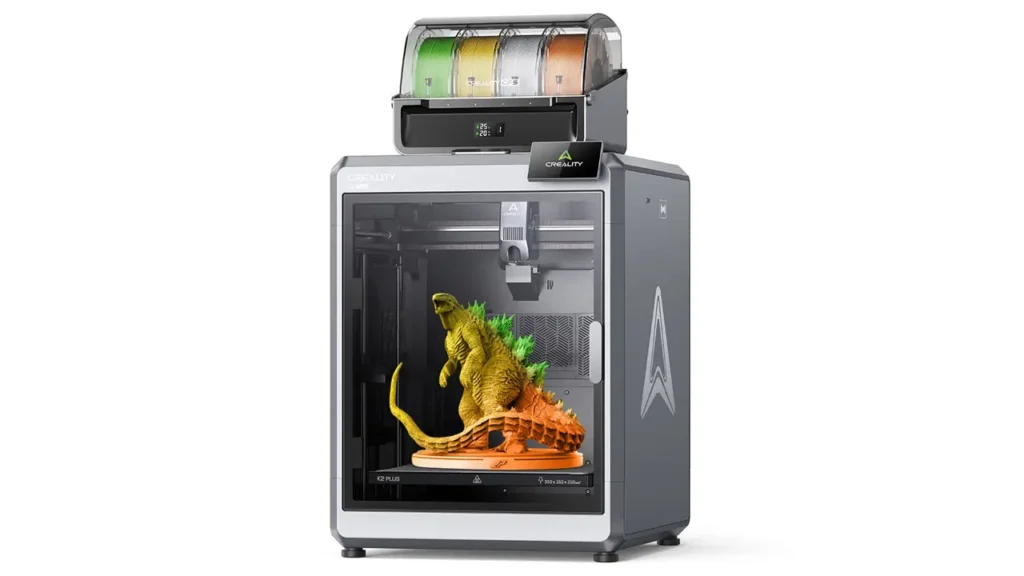
The Creality K2 3D printer marks a bold new chapter for one of the world’s most recognized 3D printing brands. Launched in August 2025, the K2 series was designed from the ground up to compete directly in the prosumer and semi-professional market — a space long dominated by Bambu Lab. In this Creality K2 review, we’ll be honest about what the machine does brilliantly and where it still has room to grow.
The K2 is actually the entry-level model in Creality’s new K2 flagship lineup, sitting below the K2 Pro and the K2 Plus. Don’t let the word “entry-level” fool you, though — this Creality K2 3D printer comes loaded with features that would have seemed futuristic just a few years ago: step-servo motors, a 600 mm/s top speed, multi-color printing with up to 16 colors, an AI monitoring camera, and a fully enclosed CoreXY frame. Priced accessibly and aimed squarely at makers who want serious capability without a five-figure investment, the Creality K2 3D printer is one of the most exciting machines of 2026.
2. Creality K2 Specs Overview
Let’s get into the numbers. The Creality K2 specs are genuinely impressive for the price point, and understanding them is key to appreciating what this machine can do.
| Specification | Creality K2 |
|---|---|
| Build Volume | 260 × 260 × 260 mm |
| Motion System | CoreXY |
| Max Print Speed | 600 mm/s |
| Max Acceleration | 20,000 mm/s² |
| Extruder Type | Direct Drive, Dual Hardened Steel Gear |
| Max Nozzle Temperature | 300°C |
| Max Bed Temperature | 100°C |
| Chamber Heating | Passive (no active chamber heater) |
| Build Plate | PEI-Coated Flexible Magnetic Steel |
| Frame Material | Die-cast Aerospace-Grade Aluminum Alloy |
| Motors | 3× Step-Servo Motors |
| AI Camera | 1× Chamber-Mounted |
| Firmware | Creality OS (Klipper-based) |
| Connectivity | Wi-Fi, Ethernet |
| Onboard Storage | 32 GB |
| Multi-Color Support | Up to 16 Colors (with 4× CFS units) |
| Compatible Materials | PLA, PETG, ABS, ASA, PET, PLA-CF |
| Price (Standard) | $549 |
| Price (Combo with CFS) | $699 |
(Source: Creality Official Store & 3D Printing Industry)
These Creality K2 specs paint the picture of a seriously capable machine. Three step-servo motors — positioned in the extruder and on the X/Y-axis — work in concert to deliver extrusion consistency that traditional stepper motors simply can’t match. The die-cast aerospace-grade aluminum alloy frame keeps everything rigid at high speeds, which is critical when you’re pushing 600 mm/s.
3. CoreXY Architecture Explained
One of the biggest selling points of the Creality K2 3D printer is its Creality K2 CoreXY motion system, and for good reason. CoreXY is a type of motion system where the print head moves on both the X and Y axes simultaneously using a crossed belt arrangement, while the build plate only moves up and down on the Z-axis. The result? Less moving mass, which means faster speeds and better dimensional accuracy.
The Creality K2 CoreXY implementation uses a steel linear rail on the X-axis to minimize wear over time — a thoughtful engineering choice that separates the K2 from cheaper machines that rely on smooth rods. Combined with the three step-servo motors, the motion system delivers a level of precision and consistency that’s remarkable for a machine at this price point.
Why does CoreXY matter for you practically? Because when a printer moves its entire bed back and forth (like older Cartesian printers), inertia limits how fast you can go before print quality suffers. The CoreXY design on the Creality K2 3D printer sidesteps this problem by keeping the heavy bed stationary in the XY plane. The result is that you get high-speed printing without the ringing artifacts and dimensional errors that plague cheaper, fast-moving bed-slingers.
The step-servo motors are another key part of the story. Unlike standard stepper motors, which run open-loop (they don’t know if they’ve skipped a step), step-servo motors use encoder feedback to verify their position constantly. This is why the Creality K2 3D printer can maintain extrusion consistency and printing accuracy even at its top speed of 600 mm/s.

4. Build Volume & Enclosure
Creality K2 Build Volume
The Creality K2 build volume is 260 × 260 × 260 mm — a generously cubic work envelope that comfortably accommodates the vast majority of everyday 3D printing projects. Creality specifically notes that this volume is large enough to print many objects as a single piece, eliminating the need to split models or redesign parts to fit a smaller bed.
It’s worth putting this in context: 260 mm per side is very close to the 256 × 256 × 256 mm offered by the Bambu Lab X1 Carbon, so users coming from Bambu’s ecosystem will feel right at home in terms of usable print space.
Enclosure Design
The Creality K2 enclosed 3D printer design is a major functional advantage. The full enclosure serves several important purposes: it traps heat to keep the printing environment stable, reduces the impact of room drafts on print quality, dampens noise, and keeps dust out of the internal mechanisms. For materials like ABS and ASA that are prone to warping when exposed to temperature fluctuations, an enclosure is practically a necessity.
The Creality K2 3D printer features top frame parts die-cast from tough aerospace-grade aluminum alloy, giving the enclosure structural rigidity that prevents vibration from distorting the frame at high speeds. An auxiliary cooling fan is mounted on the side of the chamber, directing airflow onto extruded filament to enhance interlayer adhesion — a clever feature that helps improve the mechanical strength of finished parts.
One important note: unlike the K2 Pro and K2 Plus in the same family, the standard Creality K2 does not include active chamber heating. The K2 Pro adds a chamber heater capable of maintaining up to 60°C, which is needed for PA-CF and PPA-CF materials. For the K2’s supported material range (PLA, PETG, ABS, ASA, PET, PLA-CF), passive enclosure temperature is sufficient for excellent results.
5. High Speed Printing Performance
When Creality says Creality K2 high speed printing, they mean it. The machine’s step-servo motor system enables print speeds of up to 600 mm/s with acceleration reaching 20,000 mm/s². For context, many popular 3D printers still operate at 150–300 mm/s, so the K2 represents a dramatic leap in potential throughput.
In real-world printing, you won’t always run at maximum speed — and you shouldn’t. Print quality, layer adhesion, and surface finish all benefit from dialing speeds back somewhat depending on the material and geometry. However, Creality K2 high speed printing really shines on infill patterns, travel moves, and simpler geometries where full speed can be maintained without sacrificing quality.
The step-servo motors play a critical role here again. Because they provide closed-loop position feedback, the printer can push hard without losing steps, maintaining consistency even through demanding acceleration and deceleration cycles. The dynamically balanced fans inside the K2 also contribute to a surprisingly quiet operation — Creality describes it as running “as quietly as typing on a laptop,” which is a remarkable claim for a printer moving this fast.
The built-in run-out sensor and automated magnetic filament cutter further support high-throughput workflows by handling filament transitions automatically, reducing the need for user intervention during long multi-color print jobs.
6. Klipper Firmware & Smart Features
One of the most appealing aspects of the Creality K2 Klipper firmware approach is the combination of accessibility and power. The machine runs Creality OS, which is derived from Klipper — the popular open-source 3D printer firmware beloved by the maker community for its flexibility and performance.
Creality OS on the K2 retains Klipper’s core strengths: fast input shaping, pressure advance, and the ability to fine-tune virtually every aspect of the print process. Crucially, expert mode and root access are available, meaning experienced users can go deep into configuration files if they want to. For those who prefer a simpler experience, the Creality K2 Klipper firmware also integrates with the Fluidd web interface, allowing users to control and monitor the printer from any web browser on their local network.
Smart features don’t stop at firmware. The Creality K2 3D printer includes:
- AI Camera — a chamber-mounted camera that monitors prints in real time, detecting common failures like “spaghetti” (collapsed prints) and alerting users before a job is ruined
- Auto Bed Leveling — strain sensor built into the nozzle mount handles contact-based leveling automatically, only measuring points where the model will actually be printed (saving time)
- Touchscreen Interface — all K2 models come pre-assembled; users just install the touchscreen and follow the boot-up calibration wizard
- Remote Monitoring — via Wi-Fi or Ethernet and the Creality app, users can start prints, monitor camera feeds, and manage files from anywhere
- 32 GB Onboard Storage — plenty of space for large, complex print files
The Creality K2 3D printer also integrates seamlessly with Creality Print, the brand’s own slicer software, which has matured significantly and now offers a streamlined interface with deep integration for the K2’s AI features and CFS multi-color system.

7. Carbon Fiber & Advanced Materials
Creality K2 carbon fiber printing is one of the machine’s key differentiators in its price segment. The standard K2 officially supports PLA-CF (carbon fiber reinforced PLA) alongside PLA, PETG, ABS, ASA, and PET. The hardened steel nozzle tip is essential for CF printing — softer brass nozzles wear out quickly against abrasive carbon fiber particles, so having hardened steel as standard is a genuine value-add.
Carbon fiber reinforced filaments offer several advantages over standard plastics: they’re significantly stiffer and stronger, they have a lower coefficient of thermal expansion (reducing warping in certain scenarios), and they produce parts with an attractive matte, textured surface finish that looks almost professional-grade right off the printer.
For users who need to go further into engineering-grade territory — PA-CF (nylon with carbon fiber) and PPA-CF (polyphthalamide with carbon fiber) — Creality K2 carbon fiber printing at that level requires the K2 Pro, which adds active chamber heating up to 60°C and a higher-temperature nozzle capable of 300°C. These materials demand a stable thermal environment to prevent warping during longer prints. The standard K2 is the right choice if your CF needs are met by PLA-CF; step up to the Pro if your workflow demands true engineering composites.
| Material | Creality K2 | Creality K2 Pro |
|---|---|---|
| PLA / PETG | ✅ Yes | ✅ Yes |
| ABS / ASA | ✅ Yes | ✅ Yes |
| PLA-CF | ✅ Yes | ✅ Yes |
| PA-CF / PPA-CF | ❌ No | ✅ Yes (active chamber) |
| TPU (Flexible) | ❌ Not compatible | ❌ Not compatible |
(Source: Creality Official Store)
8. Creality K2 vs Bambu Lab
The Creality K2 vs Bambu Lab debate is one of the most common conversations in 3D printing communities right now, and it’s a genuinely interesting comparison. Let’s break it down clearly.
The most direct Bambu Lab competitor for the standard K2 is the Bambu Lab P1S or the X1 Carbon. Both are enclosed CoreXY machines with similar speed targets and multi-material capability through their AMS system. Here’s how they stack up on paper:
| Feature | Creality K2 | Bambu Lab X1 Carbon |
|---|---|---|
| Price (standard) | $549 | ~$1,199 |
| Build Volume | 260 × 260 × 260 mm | 256 × 256 × 256 mm |
| Max Print Speed | 600 mm/s | 500 mm/s |
| Max Acceleration | 20,000 mm/s² | 20,000 mm/s² |
| Chamber Heating | Passive | Passive |
| Multi-Color System | CFS (up to 16 colors) | AMS (up to 16 colors) |
| Firmware | Creality OS (Klipper-based, open) | Proprietary (closed) |
| LiDAR Calibration | No | Yes |
| Ecosystem Maturity | Newer (2025) | Mature (2022+) |
(Sources: Creality Official Store, 3D Printing Industry, 3DPros)
In the Creality K2 vs Bambu Lab matchup, the Creality K2 3D printer wins decisively on price — it’s less than half the cost of the X1 Carbon. It also edges out Bambu on raw maximum speed (600 vs. 500 mm/s) and offers a similarly cubic build volume.
Where Bambu Lab maintains an advantage is in software ecosystem maturity. Bambu Studio, the brand’s slicer, is widely regarded as one of the best in the business, with particularly smooth integration with the AMS multi-material system. The X1C’s LiDAR-based first-layer calibration is also a proven, polished feature that the K2 doesn’t replicate. Bambu’s closed ecosystem can frustrate tinkerers, but for users who want everything to “just work,” it remains a compelling choice.
For the Creality K2 vs Bambu Lab decision, the simple answer is: if you’re budget-conscious, want an open firmware environment, or plan to grow into a larger K2 Plus later, go Creality. If seamless out-of-box reliability and a mature software stack are your top priorities and budget isn’t a concern, Bambu Lab remains a safe bet.
9. Creality K2 Price & Value Analysis
Understanding the Creality K2 price is crucial for figuring out where it fits in your workflow and budget. Creality officially lists the K2 at $549 for the standard version and $699 for the Combo package, which includes one CFS (Creality Filament System) unit with four filament slots. Orders are available through Creality’s official store, Amazon, and authorized partners.
For context, here’s how the K2 price compares across the K2 family and its closest competitors:
| Printer | Standard Price | Combo Price | Build Volume |
|---|---|---|---|
| Creality K2 | $549 | $699 | 260 × 260 × 260 mm |
| Creality K2 Pro | $849 | $1,049 | 300 × 300 × 300 mm |
| Creality K2 Plus | $1,299 | $1,499 | 350 × 350 × 350 mm |
| Bambu Lab P1S Combo | — | ~$849 | 256 × 256 × 256 mm |
| Bambu Lab X1 Carbon | ~$1,199 | ~$1,449 | 256 × 256 × 256 mm |
(Sources: Creality Official Store, 3D Printing Industry, Anton Mansson)
The Creality K2 price proposition is straightforward: you get a fully enclosed, CoreXY, high-speed, multi-color-capable machine with an AI camera and open Klipper-based firmware for under $700 (Combo). That’s a genuinely competitive offer.
From an ROI standpoint, the K2 Combo becomes especially attractive for hobbyists who want multi-color printing without paying a Bambu Lab premium, and for small businesses that need to run prototyping or short production runs. The CFS Combo package adds immediate multi-material value, and because up to four CFS units can be daisy-chained (16 colors total), the system scales well as needs grow.
10. Final Verdict: Is the Creality K2 3D Printer Worth It?
After going through every aspect of the Creality K2 3D printer, the verdict is clear: yes, this is a genuinely excellent machine for its price category — with a few important caveats you should know before buying.
What the Creality K2 3D Printer Does Best
The K2 3D printer is a standout performer in terms of speed, structural engineering, and value. The CoreXY motion system, step-servo motors, and aerospace-grade aluminum frame add up to a machine that punches well above its weight class. At 600 mm/s with 20,000 mm/s² acceleration, the Creality K2 3D printer belongs in the same speed bracket as machines costing twice as much. The open Klipper-based firmware is a genuine advantage for power users who want configurability, and the multi-color CFS system opens the door to creative projects that would have been impossible or hugely expensive just a couple of years ago.
Where to Be Aware
The Creality K2 3D printer lacks active chamber heating, which means it’s not the right tool for PA-CF or PPA-CF engineering composites — you’ll need the K2 Pro for that. The Bambu Lab ecosystem, while more expensive, offers a more polished and mature out-of-box experience, particularly in slicer software integration and LiDAR-based calibration. The CFS multi-material system is also newer and has less of a track record than Bambu’s AMS.
Who Should Buy the Creality K2 3D Printer?
The Creality K2 3D printer is an excellent fit for makers and hobbyists who want high-speed, multi-color printing without a large budget. It’s also compelling for educators running 3D printing labs, small design studios doing rapid prototyping with PLA/PETG/ABS, and enthusiasts who value open firmware and the ability to deeply customize their setup.
It’s less ideal for complete beginners who want maximum “just works” simplicity, and for engineers who specifically need to print PA-CF or PPA-CF (step up to the K2 Pro for those use cases).
Pros:
- Exceptional price-to-performance ratio
- High-speed CoreXY with step-servo motors
- Open Klipper-based firmware with root access
- Up to 16-color printing with CFS
- AI camera for print monitoring
- Solid enclosed frame (aerospace-grade aluminum)
Cons:
- No active chamber heating (K2 Pro needed for PA-CF/PPA-CF)
- Newer ecosystem vs Bambu Lab’s maturity
- No LiDAR first-layer calibration
In 2026, the Creality K2 3D printer stands as one of the best value propositions in the prosumer 3D printer market. If your material needs align with what it supports, it’s very hard to find a better machine for the money.
All specifications and pricing based on official Creality sources and verified third-party coverage from 3D Printing Industry, Tom’s Hardware, and 3DPros.
Looking for the best Chinese 3D printers right now? We’ve compiled a carefully selected list of the most reliable, high-performance models dominating the market. From budget-friendly options to advanced professional machines, explore detailed comparisons, specs, and expert insights here:
https://bestchinagadget.com/best-chinese-3d-printers/
Discover more from bestchina3dprinters.com
Subscribe to get the latest posts sent to your email.
