1. Introduction — Why the KP5L Pro Stands Out
If you’ve been searching for a solid, large-format FDM 3D printer that doesn’t cost a fortune but still brings some genuinely impressive hardware to the table, the Kingroon KP5L Pro deserves a serious look. This KP5L Pro 3D printer sits in a sweet spot that’s getting harder and harder to find: a big build volume, a proper direct drive extruder, and industrial-grade linear rails — all in one package, at a price that won’t make your wallet cry.
Kingroon is a brand that’s quietly built a loyal following among hobbyists and makers. They started with the compact KP3S and iterated their way up to the KP5L, and then refined it further into the Pro version we’re looking at today. The “Pro” label here isn’t just marketing fluff — there are real, tangible upgrades over the standard KP5L that we’ll break down in detail later.
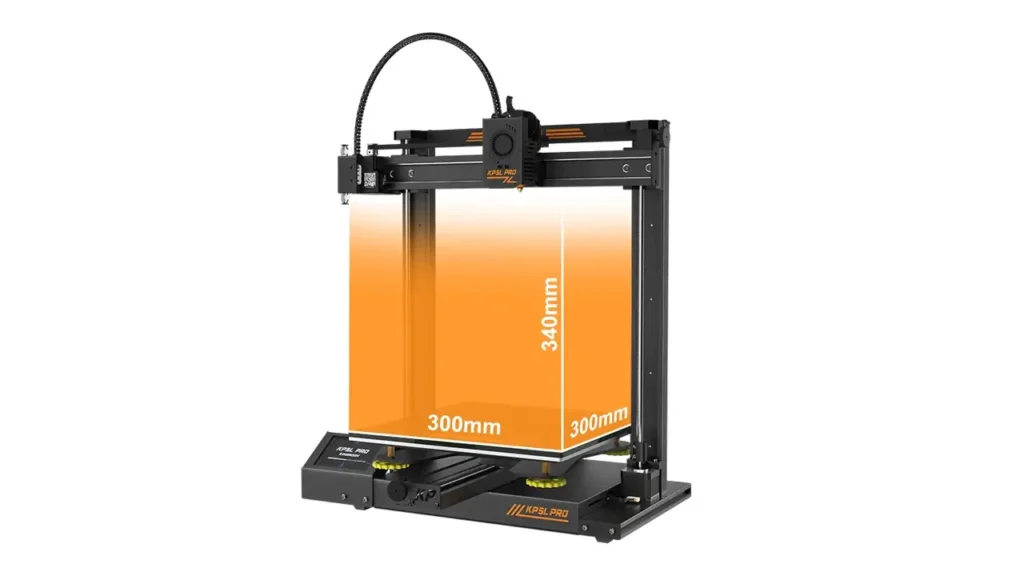
What makes this machine particularly interesting is the combination it offers: you get SGR15 linear guide rails running on all three axes (X, Y, and Z), a Titan direct drive extruder with a 3:1 gear ratio, dual Z-axis lead screws, a 32-bit motherboard, TMC2225 silent stepper drivers, and a 300×300×340 mm build volume. For most competing printers in a similar price range, you’d be lucky to get one or two of these features — the KP5L Pro bundles them all together.
Whether you’re a beginner ready to step up from a smaller machine, or an intermediate maker who wants more build space without jumping into the four-figure price range, this review is for you. Let’s dig in.
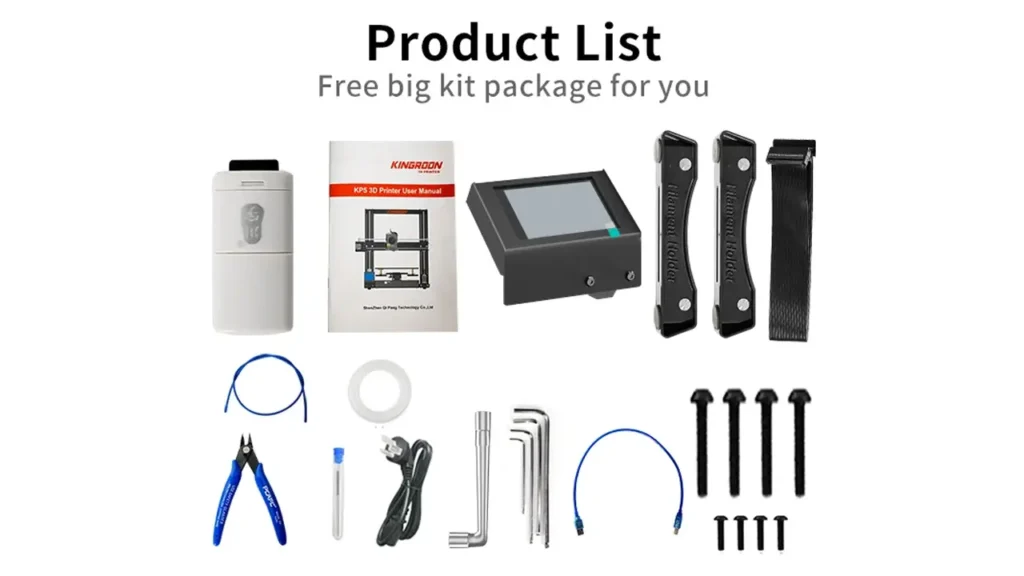
2. Full Specifications at a Glance
Before we get into the hands-on stuff, here’s everything you need to know about the Kingroon KP5L Pro specs. These figures come directly from Kingroon’s official product page.
| Parameter | Value |
|---|---|
| Technology | FDM (Fused Deposition Modeling) |
| Build Volume | 300 × 300 × 340 mm |
| Print Accuracy | ±0.1 mm |
| Print Speed | 30 – 150 mm/s |
| Nozzle Diameter | 0.4 mm (standard) |
| Max Nozzle Temp | 260 °C |
| Max Bed Temp | 90 °C |
| Extruder Type | Titan Direct Drive (3:1 gear ratio) |
| Motion Rails | SGR15 Linear Guide Rails — X, Y, Z axes |
| Motherboard | 32-bit with TMC2225 drivers |
| Power Supply | Mean Well (Pro upgrade), 300 W |
| Rated Voltage | 115 / 230 V AC, 50/60 Hz |
| Display | 3.5-inch LCD Touch Screen (lateral) |
| UI Languages | EN / RU / JP / FR / ES / DE / IT / KR / CN |
| Print Surface | Carborundum (carbon-crystalline silicon) glass |
| Connectivity | USB / TF (microSD) card |
| Resume Print | Yes (power failure recovery) |
| Filament Sensor | Yes (runout & break detection) |
| Z-Axis Design | Dual Z lead screws with dual motors |
| Assembly Level | ~95% pre-assembled |
| Machine Size | 465 × 455 × 550 mm |
That’s a genuinely strong spec sheet. Now let’s go beyond the numbers and understand what each of these features actually means for your daily printing experience.
3. Build Volume: 300×300×340 mm in Real-World Terms
Numbers on paper are one thing — but what does a 300×300×340 mm build volume actually let you do? Quite a lot, it turns out. This is firmly in large build volume FDM printer territory, and it opens up a whole world of projects that simply aren’t possible on the smaller, more common 220×220 mm machines.
To put it in perspective: the standard Ender 3 series gives you roughly 220×220×250 mm. The KP5L Pro’s build plate is more than 85% larger in surface area. That’s the difference between printing a half-helmet and printing a full one. It’s the difference between printing a phone stand and printing a full-size cosplay chest piece in a single job.
Here are some practical examples of what fits comfortably in a 300×300 footprint:
- Full-size cosplay helmet halves or face shields
- Large architectural scale models
- Drone frames and body shells
- Functional industrial brackets and jigs
- Batch printing of smaller parts (think 20–30 miniatures at once)
- RC car body panels
- Large figurines and display pieces
The 340 mm of Z-height (10 mm more than the base KP5L’s 330 mm) adds meaningful extra room for tall objects — vases, figurines, structural columns, and anything that grows upward more than outward.
In the large-format FDM space, the KP5L Pro competes favorably. Machines like the Artillery Sidewinder X1 offer 300×300×400 mm, but they typically cost more and don’t bundle linear rails on all axes at the same price point. The KP5L Pro’s value here is genuinely hard to beat.
4. Motion System — SGR15 Linear Rails on X, Y, and Z
This is where the Kingroon KP5L Pro really earns its reputation, and it’s one of the features that most budget machines simply skip to cut costs. The entire motion system is built on SGR15 linear guide rails — on the X axis, the Y axis, and the Z axis.
Why does this matter so much? Let’s compare the two main approaches to motion in FDM printers:
| Feature | V-Slot Wheels | SGR15 Linear Rails |
|---|---|---|
| Friction type | Rolling contact (wheels on extrusion) | Recirculating ball bearings |
| Play / backlash | Increases as wheels wear | Minimal, consistent over time |
| Maintenance | Regular tightening required | Occasional light lubrication |
| Print quality impact | Ringing/ghosting as wear progresses | Consistent, low vibration |
| Load capacity | Moderate | Higher, more rigid |
| Cost | Lower | Higher (usually reserved for pricier machines) |
The SGR15 (15 mm wide rail) is an industrial-grade component. On the KP5L Pro, having these rails across all three axes means the print head carriage moves with far less wobble and vibration than you’d see on a wheel-based system. The result is noticeably sharper layer lines, reduced ringing artifacts, and better dimensional accuracy on fine details.
According to Kingroon’s official product documentation, the SGR15 rails provide “more stable movement and higher print accuracy.” In practice, this translates to prints that look cleaner, especially on diagonal faces and curved surfaces where motion consistency matters most. For a machine at this price point, the inclusion of full-axis linear rails is genuinely exceptional.
5. Titan Direct Drive Extruder — Performance & Flexibility
The extruder is the heart of any FDM printer — it’s the component that feeds, controls, and pushes filament into the hot end. The KP5L Pro uses a Titan direct drive extruder with a 3:1 gear ratio, and this choice has real, practical consequences for what you can print and how well.
First, let’s clarify the “direct drive” part. In a direct drive setup, the extruder motor sits directly above the hot end, meaning the distance between the drive gear and the melt zone is very short — just a few millimeters. In a Bowden setup (used by many budget printers), the motor sits on the frame and pushes filament through a long PTFE tube before it reaches the hot end. That extra tube length makes flexible filaments like TPU extremely difficult to print reliably.
The Titan extruder with its 3:1 gear reduction gives the motor significantly more mechanical advantage over the filament. According to Kingroon’s official description, it is “more forceful during the feeding process, more effectively improving the printing effects.” This means less slipping on flexible materials, better retraction control, and more consistent extrusion across a wider range of materials and speeds.
The double-gear feeding system in the Titan design grips the filament from both sides, further reducing the chance of skipping or grinding — a common frustration with single-sided feeding mechanisms. For long prints with dozens of retractions, this consistency adds up to noticeably better surface quality.
6. Filament Compatibility — PLA, PETG, TPU and More
One of the biggest practical advantages of the Titan direct drive setup is expanded KP5L Pro filament compatibility. Where Bowden-equipped printers struggle or outright fail with flexible materials, the KP5L Pro handles TPU and PETG with confidence.
Here’s what the machine officially supports:
| Filament | Print Temp | Bed Temp | Notes |
|---|---|---|---|
| PLA | 190–220 °C | 50–60 °C | Easiest to print, great detail |
| PETG | 230–250 °C | 70–85 °C | Tough, chemical resistant |
| TPU | 220–240 °C | 30–60 °C | Flexible, direct drive required |
| ABS | 230–250 °C | 90–110 °C* | *Bed max is 90 °C; enclosure recommended |
| Wood-fill PLA | 190–220 °C | 50–60 °C | Great aesthetic finish |
One practical note on ABS: the KP5L Pro’s bed maxes out at 90 °C, which is on the lower end for reliable ABS adhesion. For best results with ABS, you may want to add a simple enclosure (even a cardboard box works surprisingly well) to retain chamber heat and prevent warping on large parts. For PLA, PETG, and TPU — which cover the vast majority of hobbyist printing needs — the machine handles everything beautifully right out of the box.
The carborundum (carbon-crystalline silicon) glass print surface is another win here. Per Kingroon’s official documentation, it “has a microporous structure, which not only makes the model easier to disassemble but also makes the hotbed flatter.” In practice, this means good first-layer adhesion while the bed is warm, and easy part removal once it cools down — no scraping, no spatula battles.
7. Electronics & Silent Printing — TMC2225 & 32-bit Board
Open the hood of the KP5L Pro and you’ll find electronics that are more sophisticated than most printers in this class bother to include. The TMC2225 silent driver 3D printer setup here is genuinely quiet — the kind of quiet that lets you run overnight prints in an apartment without worrying about complaints from neighbors or family members.
The TMC2225 stepper drivers work by using interpolation to smooth the motor movement into 256 microsteps, even when the firmware commands fewer. The result is dramatically reduced mechanical noise — described by Kingroon as “both silent printing and precise voltage output control, which ensures a more accurate and silent printing.” If you’ve ever listened to an older printer sound like it’s chewing gravel, you’ll appreciate the difference immediately.
The 32-bit motherboard is now a standard expectation for modern FDM printers, and the KP5L Pro delivers. A 32-bit processor enables faster computation of movement paths, smoother acceleration curves, and better compatibility with community firmware like Marlin 2.x.
Dual Z-axis is another standout feature. Both Z-axis lead screws have independent motors — meaning the gantry is driven evenly on both sides simultaneously. This eliminates the gantry twist and X-axis lean that can plague single-motor Z designs. The result? Layers stay consistent from the bottom of the print to the top, even on that full 340 mm of Z travel.
The filament runout sensor is worth highlighting too. During a long print — say, an 18-hour cosplay prop — the printer will pause automatically and alert you if the filament runs out or breaks. You refill the spool and resume exactly where you left off. No wasted hours, no failed prints due to an empty spool you didn’t notice. Combined with the power failure recovery feature, you’re well protected against two of the most common causes of ruined long prints.
The Mean Well power supply is a Pro-specific upgrade. Mean Well is a well-regarded Taiwanese power supply brand, widely trusted in industrial and professional equipment. Swapping the generic PSU for a Mean Well unit means more stable voltage output, better thermal management inside the electronics bay, and a longer operational lifespan.
Flashforge
Jinhua, China
Industrial Stability
Industrial stability with intuitive controls. Reliable mechanics, enclosed enclosures for stable ABS and nylon printing, high-quality assembly for education and professional use.
8. Kingroon KP5L Pro vs KP5L — What’s Actually Different
If you’re considering both versions, here’s an honest Kingroon KP5L Pro vs KP5L breakdown. The standard KP5L is a solid machine — but the Pro version addresses several real-world pain points that users reported with the original.
| Feature | KP5L (Standard) | KP5L Pro |
|---|---|---|
| Build Volume | 300 × 300 × 330 mm | 300 × 300 × 340 mm |
| Power Supply | Standard switching PSU | Mean Well (premium) |
| Touch Screen | Standard LCD | 3.5-inch lateral LCD (wider menu) |
| Extruder Casing | Standard housing | Enhanced with more ventilation openings |
| Linear Rails | SGR15 on X, Y, Z | SGR15 on X, Y, Z |
| Extruder | Titan Direct Drive | Titan Direct Drive |
| Motherboard | 32-bit, TMC2225 | 32-bit, TMC2225 |
| Filament Sensor | Yes | Yes |
| Resume Print | Yes | Yes |
The three real differences are the Mean Well PSU, the improved touch screen (laterally mounted for a wider interface), and the enhanced extruder casing with better heat dissipation. The 10 mm extra Z height is a smaller but welcome bonus.
Is the Pro upgrade worth it? If you plan to print long and often, the Mean Well power supply alone is worth the peace of mind — it’s a more reliable, longer-lasting component. If you’re a casual user who prints occasionally, the standard KP5L will serve you well. But for anyone doing regular multi-hour sessions, the Pro makes the better long-term investment.
9. Value for Money — Budget 300×300 Printer Comparison
Let’s put the KP5L Pro in context within the budget 300×300 3D printer market. At its price point, the competition includes machines like the Creality Ender 3 V3 Plus, the Artillery Sidewinder X1 V4, and the Sovol SV03.
| Printer | Build Volume | Extruder | Linear Rails | Dual Z |
|---|---|---|---|---|
| Kingroon KP5L Pro | 300×300×340 | Titan Direct | SGR15 — X/Y/Z | Yes |
| Ender 3 V3 Plus | 300×300×330 | Direct (Sprite) | X only | Yes |
| Artillery Sidewinder X1 V4 | 300×300×400 | Direct (Titan-style) | X only | Yes |
| Sovol SV03 | 300×300×350 | Direct | X only | Yes |
What immediately stands out in this comparison is the rail coverage. The KP5L Pro is unique in its class for running SGR15 linear rails on all three axes — X, Y, and Z. Most competitors limit rails to the X axis only and use V-slot wheels elsewhere. For motion quality and long-term print consistency, the KP5L Pro’s full-rail configuration is a meaningful hardware advantage that’s genuinely rare at this price level.
Couple that with the Titan direct drive, dual Z motors, TMC2225 drivers, the Mean Well PSU, and the carborundum glass bed, and you have a machine that punches well above its weight class. It may not have auto bed leveling or the fastest print speed on paper, but the mechanical foundation it’s built on is solid and precise.
10. Verdict — Who Should Buy the Kingroon KP5L Pro?
After going through every spec, every feature, and every hardware choice, the picture is clear: the Kingroon KP5L Pro is a thoughtfully engineered dual Z-axis 3D printer that offers an unusually complete feature set for its price point.
The KP5L Pro is ideal for:
- Hobbyists stepping up from small printers who want more build volume without complexity
- Cosplay and prop makers who need the 300×300 footprint for helmets, shields, and large panels
- Functional part makers who need TPU and PETG compatibility from a reliable direct drive setup
- Makers who value print consistency — the full SGR15 rail system and dual Z motors make a real difference on tall and detailed prints
- Anyone who runs long prints — the filament sensor, power failure recovery, and Mean Well PSU give you strong protection against wasted time and material
Where the KP5L Pro has limitations:
- No automatic bed leveling (manual tramming required — not difficult, but worth knowing)
- ABS can be challenging without an enclosure due to the 90 °C bed ceiling
- Print speed tops out at 150 mm/s — not the fastest by 2025 standards, but perfectly capable for quality-focused printing
- No built-in WiFi — you’ll be working with TF card or USB
Final Verdict:
The Kingroon KP5L Pro delivers on its promises. It’s a machine built around solid mechanical choices — SGR15 rails on all axes, Titan direct drive, dual Z with independent motors, TMC2225 drivers, and a premium power supply — rather than flashy features that look good on spec sheets but don’t affect print quality. If you want a large-format FDM printer that will produce consistent, accurate results across PLA, PETG, TPU, and wood-fill materials without requiring constant tinkering, the KP5L Pro is one of the most complete packages available at this price point.
It’s the kind of machine you set up once, calibrate properly, and then just use — and that’s exactly what a great 3D printer should be.
AndreevWebStudio.com
Professional web development and design services. Custom WordPress sites, landing pages, e-commerce solutions, and 3D printing content creation for businesses and creators.
- • WordPress Development
- • Custom Web Design
- • E-Commerce Solutions
- • 3D Printing Content
Discover more from bestchina3dprinters.com
Subscribe to get the latest posts sent to your email.