Introduction and First Impressions
The Artillery Sidewinder X4 Pro arrived at a time when the desktop 3D printing market was being reshaped by speed. A few years ago, a printer that could push past 100 mm/s without ringing was considered impressive. Today, buyers expect hundreds of millimeters per second, smart motion control, and software that makes tuning easier rather than harder. Artillery answered that shift by moving its Sidewinder line from the familiar Marlin firmware to Klipper, and the X4 Pro is the compact, affordable model that introduced the change.
Priced well below most of the fast machines in its class, it has a strong claim to being the best budget 3D printer for hobbyists who want modern features without paying flagship money. It has a 240 x 240 x 260 mm build volume, a 300°C all-metal hotend, a dual-gear direct drive extruder, and metal linear rails on the X and Y axes.
Speed numbers on a box tell only part of the story. A printer has to be easy to set up, mechanically sound, and consistent over hundreds of hours, and it has to produce parts you are happy to hold. This review goes through those questions step by step: unboxing, specifications, build quality, extrusion, firmware, print results, software, strengths and weaknesses, and finally who should buy it.
If you are comparing budget machines right now, read the sections on Klipper and print quality closely. They explain why this printer feels different from the entry-level models that came before it.


Unboxing and Initial Setup
What Is in the Box
The X4 Pro ships in a sturdy cardboard carton with dense foam inserts. Compared with the loose, flimsy packaging common on cheap printers a few years ago, the protection here is a clear improvement. The machine arrives mostly pre-assembled, so you are not building a printer from a pile of extrusions. You are attaching a few major parts and checking that everything is secure.
The accessory kit covers the basics. You get flush cutters, a scraper, Allen keys, a flat wrench, a tube of grease, plate adhesive, spare consumables, a USB flash drive, and a quick start guide. The flash drive carries test files, so you can start printing without hunting for a model. A small sample of high-speed PLA is usually included as well, which is a nice touch for a first print.
A Practical Sidewinder X4 Pro Setup Guide
A short Sidewinder X4 Pro setup guide looks like this. Remove all transit protection and foam. Attach the spool holder and the touchscreen if they are not already mounted. Check that the gantry moves freely by hand, and plug in the power cable. Then run the on-screen leveling routine and load filament.
Take your time with the transit screws and the foam blocks. Missing one of them is the most common beginner error, and it leads to strange motion problems that people often blame on the firmware. The official unboxing video is worth watching once, because a few steps are easier to understand visually than in a printed manual.
Leveling is largely automatic. The printer probes the bed at 36 points and builds a mesh. Like many budget machines, it rewards a clean nozzle and a clean bed surface. If the first layer looks inconsistent, wipe the nozzle, check that the plate sits flat on its magnets, and rerun the routine before touching any settings.
After the first leveling pass, set your Z offset carefully with a thin piece of paper or a test square. This one adjustment affects first-layer quality more than anything else you will do in the first week. Most owners get through the whole process in well under an hour.
Technical Specifications
Key Numbers at a Glance
Here are the headline Sidewinder X4 Pro specs. Rather than hunting through a manual, you can see the important values in one table.
| Parameter | Value |
|---|---|
| Build volume | 240 x 240 x 260 mm |
| Machine footprint | 453 x 431 x 260 mm (base unit) |
| Maximum print speed | 500 mm/s |
| Default print speed | 300 mm/s |
| Maximum acceleration | 12,000 mm/s² |
| Maximum nozzle temperature | 300°C |
| Extruder | Dual-gear direct drive |
| Motion system | Metal linear rails on X and Y |
| Mainboard | Quiet Klipper board, ARM 64-bit quad-core, 1.5 GHz |
| Display | 4.3-inch touchscreen |
| Bed surface | Magnetic PEI spring steel plate |
| Bed leveling | Automatic, 36-point |
| Connectivity | USB, USB-C, 2.4 GHz Wi-Fi |
| Power | 300 W, 100–240 V |
| Lighting | Built-in LED |
What the Numbers Mean
The 240 x 240 x 260 mm volume is mid-sized. It is large enough for most functional parts, cosplay pieces, enclosures, and household items. If you routinely print oversized models, Artillery sells a larger sibling, but for most people this volume is plenty.
The 300°C nozzle limit is important. It means you can print PLA, PETG, ABS, and ASA, and in principle some nylon blends, without being capped at the low temperatures of older budget hotends. The 12,000 mm/s² acceleration figure is not an everyday setting. Think of it as headroom, since real quality is determined by how well input shaping and pressure advance are tuned.
The processor deserves a mention. A quad-core 1.5 GHz ARM chip is a big step up from the 8-bit and basic 32-bit boards found in older machines. That extra computing power is what allows Klipper features to run smoothly while the printer handles fast moves.
AndreevWebStudio.com
Professional web development and design services. Custom WordPress sites, landing pages, e-commerce solutions, and 3D printing content creation for businesses and creators.
- • WordPress Development
- • Custom Web Design
- • E-Commerce Solutions
- • 3D Printing Content
Frame, Design, and Build Quality
Why the Artillery Sidewinder X4 Pro Feels Solid
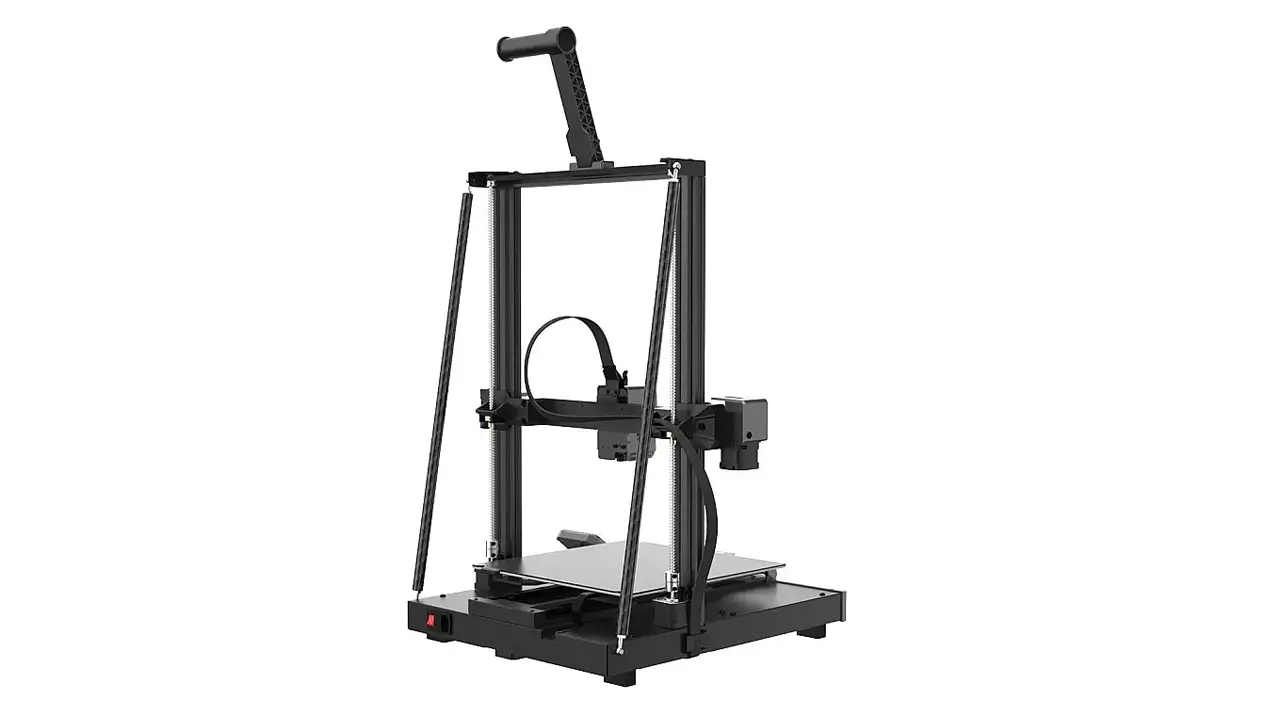
The first thing you notice when you lift the Artillery Sidewinder X4 Pro out of the box is that it feels like a proper machine. The frame uses a rigid metal structure with a dual-rod fixed design that keeps the gantry stable under quick direction changes. The X and Y axes run on metal linear rails with ball-bearing carriages, which gives smoother and more precise motion than the plastic wheels used on cheaper printers.
Stability matters most when you push the speed. Rails and a stiff frame reduce vibration, and less vibration means fewer ripples on the surface of your prints. This is where the X4 Pro earns its spot above entry-level machines, and where much of the extra cost over a basic printer goes.
Aesthetics and Cable Management
The design is clean and functional. The dark finish, the compact footprint, and the built-in LED light give it a tidy look on a desk or workbench. The lighting is a small feature, but it makes inspecting first layers easier, especially in a dim room.
Cable routing is reasonable for the price. Wires run through protective sleeves and follow predictable paths along the gantry. A few cable ties are included in the box, and it is worth using them. Take a few minutes to confirm that nothing can snag during a long move, particularly on the Y axis. A neat cable run prevents the kind of intermittent faults that are hard to diagnose later.
Bed and Surface
The magnetic PEI spring steel plate is a quality-of-life upgrade. After a print, you remove the plate, flex it slightly, and the part pops off. This saves scraping, protects the surface, and makes cleaning simpler. Parts stick well to PEI when it is clean, so a quick wipe with isopropyl alcohol between prints keeps adhesion consistent.
Extruder and Filament Feeding
A Capable Direct Drive 3D Printer
The X4 Pro is a direct drive 3D printer. The extruder sits right on top of the hotend rather than being mounted away from it on the frame. That shortens the path the filament must travel, which gives you sharper control over how much plastic goes through the nozzle at any moment.
Artillery uses a dual-gear design, where two toothed gears grip the filament from both sides. That grip reduces slipping, and it is especially helpful at high flow rates, when the extruder has to push a lot of plastic quickly.
Flexible Filaments and Retraction
Direct drive extruders are friendlier to flexible filaments than long Bowden setups, because there is less room for the filament to bend and jam. With a tight filament path, TPU becomes a realistic option. Slow down, reduce retraction, and expect good results with moderately soft materials. Very soft filaments such as those below 85A can still be challenging at any speed, so treat TPU as a material that rewards patience.
Retraction is also more precise with a direct drive system. That cuts stringing and blobs on travel moves, which are two of the most common quality complaints on fast prints.
Feeding Stability
Stable feeding is the foundation of every good print. The X4 Pro delivers consistent extrusion when you use dry filament of decent quality. The usual advice applies: keep your spools in sealed bags or a dry box, check that the spool turns freely, and replace worn PTFE tubing if you see grinding. Most extrusion problems on any printer come from wet or poorly wound filament, not from the hardware itself.
Klipper Performance and Speed
Klipper Out of the Box
The biggest reason to consider this model is that it is a Klipper 3D printer from the start. Klipper moves the heavy calculations to a faster processor and gives the printer features that older firmware struggles with. The two important ones are input shaping and pressure advance.
Input shaping measures the vibration patterns of the machine and compensates for them, reducing ringing at high accelerations. Pressure advance adjusts extrusion during acceleration and deceleration, producing crisper corners and more even lines. Together they make high speeds practical rather than theoretical.
Interface and Daily Use
The 4.3-inch touchscreen is responsive, and you can control the machine through a web interface over Wi-Fi as well. From a browser, you can start prints, adjust temperatures, watch progress, edit configuration, and review logs. If you have used Klipper before, the layout will feel familiar. If you have not, it is a gentle introduction, and the community documentation is extensive.
Reviewers have noted that Artillery’s Klipper integration still has rough edges. Some advanced options may need a few edits, and certain conveniences, such as a default filament-change macro, are not present out of the box. This is not a dealbreaker, but it is honest to say that the system rewards users who are happy to read a forum thread or two.
Fast 3D Printing in Practice
Fast 3D printing is not about setting the speed slider to its maximum. It is about finding the speed at which your chosen filament, nozzle, and model still produce a clean result. The default 300 mm/s profile is a realistic everyday speed for many models, while the 500 mm/s ceiling is best reserved for simple geometry and well-tuned filament.
The most noticeable benefit is time saved. A part that takes six hours on an older Marlin printer can often be finished in a fraction of that. Fewer hours per print means you can iterate faster, test more designs, and run small batches without tying up the machine all weekend.
Noise is also better than you might expect. The quiet Klipper board and well-chosen stepper drivers keep motor noise modest. Fans will still be audible at high speed, so this is not a silent printer, but it is not unpleasant in a shared room either.
Print Quality and Test Results
Artillery X4 Pro Print Quality Overview
The most important question is whether the parts look good. Artillery X4 Pro print quality is strong for the price, particularly once you have spent an hour tuning. With sensible profiles, you can expect clean walls, accurate dimensions on functional parts, and even top surfaces on standard PLA.
Benchmark models tell you where a printer’s strengths and weak points lie. Use a calibration cube to check dimensional accuracy and corner sharpness. A benchy shows how well the machine handles overhangs, bridges, and small details. A temperature tower helps you choose a nozzle setting for each spool, and a retraction test tells you whether stringing is under control.
Geometry, Overhangs, and Layers
Overhangs improve noticeably when the part cooling fan is working properly and the layer height matches your nozzle. At 0.2 mm layers, you can expect smooth vertical walls and reasonably clean bridges. Fine details such as text, small holes, and thin walls benefit from slower outer-wall speeds, which you can set separately in your slicer.
Layer consistency is where the rails and the Klipper tuning pay off. Because input shaping reduces vibration, the visible ringing around sharp corners is lower than on comparable machines using older firmware. If you see ghosting, run the input shaping calibration again, and check that the belts are properly tensioned.
A High Speed 3D Printer That Rewards Tuning
As a high speed 3D printer, the X4 Pro shows its best side when you adjust settings for each material. PLA is forgiving and prints beautifully at fast speeds with a well-cooled part. PETG needs a little more patience and a slightly lower speed to avoid stringing. ABS and ASA benefit from an enclosure or at least a draft-free room, because warping is mostly a thermal problem, not a speed problem.
A useful rule is to change one variable at a time. Test speed first, then temperature, then retraction. Keep notes, and save the profiles that work. After a few prints, you will have a reliable library of settings and the machine will feel far more consistent.
Artillery
Reliable and high-quality 3D printers from Artillery. Known for robust construction, excellent print quality, and great value for both beginners and advanced makers.
- • Robust Construction
- • Excellent Print Quality
- • Great Value for Money
- • User-Friendly Features
Software and Ecosystem
Slicer Compatibility
The X4 Pro works with the major slicers. Artillery provides its own slicer profile, which is the easiest starting point because the values are pre-configured for this machine. Cura and PrusaSlicer are both popular alternatives, and they allow more detailed control once you are comfortable. With any slicer, make sure the start G-code matches the Klipper macros on the printer, otherwise leveling or purge routines may not run as intended.
Check the slicer’s acceleration and jerk settings as well. Klipper manages many motion parameters internally, so values that made sense on Marlin may need to be revised. Conservative defaults are a good starting point.
Remote Access and Wi-Fi
Wi-Fi support lets you send files to the printer wirelessly and monitor jobs without standing next to it. For a machine that can finish a print in a couple of hours, being able to glance at progress from another room is genuinely handy. The built-in 2.4 GHz connection is enough for browser access and file transfer. USB and USB-C remain available for anyone who prefers a wired workflow or an offline drive.
A webcam is a worthwhile add-on if you plan to leave the printer running. It adds peace of mind for long jobs and lets you catch a failed first layer early.
Useful Artillery 3D Printer Features
Several Artillery 3D printer features stand out. Auto leveling takes the pain out of bed preparation, the resume-after-power-loss function saves long prints from an unexpected outage, and the built-in lighting helps with inspection. The dual-rod fixed structure improves stability, while the quiet mainboard keeps noise down.
Beyond hardware, the Klipper ecosystem provides macros, plugins, and a large community. If you want to customize your workflow, you have a long runway. If you simply want to print, the default profiles are good enough to get started.
Pros and Cons
Strengths
The Artillery Sidewinder X4 Pro offers a very attractive mix of speed, rigidity, and modern firmware at a low price. Here are its strongest points:
- Excellent value for the hardware you get
- Preinstalled Klipper with input shaping and pressure advance
- Metal linear rails on the X and Y axes
- Dual-gear direct drive extruder with a 300°C all-metal hotend
- Magnetic PEI spring steel plate that makes part removal easy
- Automatic bed leveling with a 36-point mesh
- Fast processor and responsive touchscreen
- Wi-Fi remote access and built-in LED lighting
Weaknesses
No printer is perfect, and honesty is part of a useful review. These are the main drawbacks:
- Klipper integration is functional but not as polished as on premium machines
- No filament-change macro by default
- Automatic leveling works well but needs a clean nozzle and a little care
- Fans become audible at high speeds
- No internal storage for prints
- The open frame is not ideal for warp-prone materials like ABS without added protection
- A slightly steeper learning curve for people who have never used Klipper
How the Trade-Offs Balance Out
For most buyers, the weaknesses are manageable and the strengths are significant. The issues are mostly about polish rather than fundamentals. If you are comfortable with a little tinkering, they will rarely get in your way. If you want a fully turnkey experience with zero configuration, a more expensive brand may suit you better.
Verdict: Who Should Buy It?
The Bottom Line
The X4 Pro is a compelling choice for anyone who wants fast, capable printing without spending much. It gives beginners a way into modern Klipper features, and it gives experienced users a rigid, upgradeable platform with room to grow. The build volume is enough for the majority of projects, the hardware feels solid, and the speed improvement over older budget machines is real.
It is best suited to hobbyists, students, makers, and small-batch sellers who value speed and are willing to spend a little time learning the system. It is less ideal for people who need a very large build area, who print warp-prone filaments daily without an enclosure, or who expect a perfectly refined software experience from day one.
Final Thoughts
Our Artillery Sidewinder X4 Pro review comes down to this: the printer delivers far more than its price suggests. Speed, rigid motion hardware, and a flexible firmware make it one of the most interesting budget options available. Set it up carefully, tune your profiles, keep your filament dry, and you will be rewarded with quick, reliable, good-looking prints.
If you are ready to move beyond slow entry-level machines and want to experience what modern desktop printing feels like, the X4 Pro deserves a place on your shortlist.
Discover more from bestchina3dprinters.com
Subscribe to get the latest posts sent to your email.
