 Skip to content
 Introduction to Adventurer 5M
If you’ve been keeping an eye on the desktop 3D printing world lately, you’ve probably noticed that speed has become the new battleground. Manufacturers are racing to deliver faster, smarter, and more reliable machines — and Flashforge has entered that race with serious ambition. The Adventurer 5M is one of the most talked-about releases in the mid-range segment, and for good reason.
The Adventurer 5M review conversation started heating up the moment Flashforge announced this printer as a direct response to the CoreXY speed revolution sparked by competitors like Bambu Lab and Creality. Rather than sticking with the older Bowden-style setups, Flashforge redesigned the motion system from the ground up, introducing a CoreXY architecture that pushes print speeds far beyond what previous models could achieve.
From an Adventurer 5M price standpoint, this printer targets the sweet spot between budget entry-level machines and premium enthusiast printers. It’s positioned for makers, educators, small business owners, and hobbyists who want genuine performance without spending over $1,000. Whether you’re upgrading from an older Flashforge model or switching from a competitor, the Adventurer 5M deserves a serious look.
In this review, we’ll walk through everything you need to know — specs, speed, print quality, setup experience, enclosure design, and how it stacks up against the older Adventurer 4. Let’s dive in.

2. Adventurer 5M Specs Overview
Before we get into real-world performance, let’s look at what the Adventurer 5M specs actually tell us on paper. Flashforge has packed a lot into this machine, and understanding the hardware helps explain why it behaves the way it does.
| Specification | Details |
|---|---|
| Build Volume | 220 × 220 × 220 mm |
| Motion System | CoreXY |
| Max Print Speed | 600 mm/s |
| Recommended Print Speed | 300 mm/s |
| Max Acceleration | 20,000 mm/s² |
| Nozzle Diameter | 0.4 mm (standard), quick-swap system |
| Max Nozzle Temperature | 280°C |
| Max Bed Temperature | 110°C |
| Auto Leveling | Fully automatic (11-point compensation) |
| Connectivity | Wi-Fi, USB, LAN |
| Display | 4.3-inch color touchscreen |
| Filament Compatibility | PLA, PETG, ABS, ASA, TPU |
| Layer Resolution | 0.05 – 0.35 mm |
| Slicer Software | FlashPrint 5 (Orca Slicer compatible) |
| Machine Dimensions | 388 × 340 × 430 mm |
| Machine Weight | ~9.9 kg |
The build volume of 220 × 220 × 220 mm is generous enough for most everyday printing projects and competitive with machines at similar price points. The quick-swap nozzle system is a standout feature — instead of the old-fashioned hot-end swap that requires tools and patience, Flashforge implemented a tool-free mechanism that lets you change nozzles in seconds. Combined with a maximum nozzle temperature of 280°C, you get decent material flexibility, though truly exotic high-temp materials like polycarbonate at higher temps are pushing the edge of capability here.
3. Print Speed & Performance
Let’s talk about the headline number: Adventurer 5M speed. Flashforge advertises a maximum speed of 600 mm/s with an acceleration of up to 20,000 mm/s². These are numbers that would have seemed impossible just three years ago on a machine in this price class.
To put that into real-world context, the classic entry-level print speed most people use is around 50–80 mm/s. A well-tuned speed-optimized printer of the previous generation might push 150–200 mm/s. The Adventurer 5M’s recommended everyday speed of 300 mm/s means you’re operating at roughly 4–6× the pace of conventional printing workflows.
In practice — and this is important to understand — the maximum speed of 600 mm/s is a hardware ceiling, not a typical operating point. Printing at max speed with standard PLA will often produce artifacts, stringing, or reduced layer adhesion if you’re not careful with your settings. The recommended 300 mm/s sweet spot, however, delivers legitimately impressive real-world times. A benchy — the classic 3D printing benchmark boat — that takes about 1.5–2 hours on a standard printer can complete in approximately 16–20 minutes at tuned 300 mm/s settings on the Adventurer 5M.
The CoreXY motion system is what makes this possible. Unlike bed-slinger designs where the entire heated bed moves back and forth (adding mass and limiting acceleration), CoreXY keeps the bed stationary on the Z-axis and moves only the lightweight print head in X and Y directions simultaneously. Less mass moving at speed means less ringing, less ghosting, and dramatically better results at high acceleration.
Flashforge has also implemented input shaping (resonance compensation) and pressure advance features in the firmware, which are the same technologies that allow machines like the Bambu Lab X1 to maintain quality at extreme speeds. These aren’t just marketing terms — they measurably reduce the rippling artifacts (called “ringing” or “ghosting”) that appear in fast prints near sharp corners.
4. Auto Leveling System Explained
Bed leveling has historically been one of the biggest pain points in 3D printing, especially for beginners. The Adventurer 5M auto leveling system addresses this head-on with a fully automated 11-point mesh bed compensation system.
Here’s how it works: before every print (or on demand), the printer’s probe touches the bed surface at 11 different points across the build plate. It maps any slight warping, tilt, or unevenness in the bed surface and stores a compensation mesh. When printing begins, the firmware dynamically adjusts the Z-height at each point in real time, ensuring the nozzle maintains the correct distance from the bed regardless of any physical imperfections.
This is a significant upgrade over manual leveling systems and even basic single-point automatic systems. With an 11-point mesh, even a moderately warped bed can be compensated effectively, and first layers come out clean and consistently adhered without the user touching a single knob.
In testing, the auto leveling system performs reliably out of the box. First-layer adhesion is strong on PLA and PETG without requiring any adjustments, and the system handles the flexible PEI-coated magnetic build plate well. The PEI spring steel sheet is a great addition — PLA and PETG pop off easily once the plate cools down, making part removal effortless.
For beginners, this single feature might be the most important reason to choose the Adventurer 5M over a cheaper machine without it. Failed first layers are the number one cause of print failures, and eliminating that variable dramatically improves the overall experience.

5. Print Quality Results
Speed means nothing if the output looks rough — so how does Adventurer 5M print quality hold up under scrutiny?
The short answer is: impressively well for the speed it achieves. When printing PLA at the recommended 300 mm/s with proper temperature settings (typically 200–220°C nozzle, 60°C bed), the Adventurer 5M produces clean, smooth surfaces with minimal visible layer lines and good dimensional accuracy.
Wall quality is consistent, overhangs up to about 50–55 degrees come out clean without support structures, and bridging performance is solid for a machine running at this pace. At 0.2 mm layer height — the standard most people use for everyday prints — results are genuinely comparable to what you’d get from a slower printer at the same settings.
PETG performance is also commendable. This material is trickier to work with due to its tendency to string and stick aggressively to surfaces, but the Adventurer 5M handles it well with appropriate slowing (around 150–200 mm/s recommended for PETG) and proper retraction tuning. The enclosed optional design and stable thermal environment help keep PETG layers consistent.
Where you’ll start to notice limitations is in ultra-fine detail work at very high speeds. Printing miniatures or highly detailed models at 0.1 mm layer height and maximum speed will show more artifacts than printing at a more moderate pace. The machine can do fine detail — just don’t expect to run that detail work at 600 mm/s.
| Material | Recommended Speed | Nozzle Temp | Bed Temp | Quality Rating |
|---|---|---|---|---|
| PLA | 300 mm/s | 200–220°C | 55–65°C | Excellent |
| PETG | 150–200 mm/s | 230–250°C | 70–85°C | Very Good |
| ABS | 150–200 mm/s | 230–250°C | 90–110°C | Good (enclosure recommended) |
| TPU | 80–120 mm/s | 220–240°C | 30–60°C | Good |
| ASA | 150–200 mm/s | 240–260°C | 90–110°C | Good (enclosure recommended) |
6. Setup & User Experience
One of the most pleasant surprises in this Adventurer 5M setup process is just how streamlined Flashforge has made it. Out of the box, the machine comes largely pre-assembled. You’re essentially attaching the gantry to the base, connecting a couple of cables, and powering it on. Most users report being up and running within 15–20 minutes of opening the box — including first-time 3D printer owners.
The 4.3-inch color touchscreen interface is clean and intuitive. The menu structure makes logical sense: you can load filament, start the auto leveling routine, adjust temperatures, and monitor prints all from the same screen without digging through nested menus. It’s not quite as polished as Bambu Lab’s interface experience, but it’s significantly better than older Flashforge generations and comfortable for beginners.
Wi-Fi connectivity works reliably for sending print files wirelessly from your computer or phone, and the FlashPrint 5 slicer (Flashforge’s own software) has improved meaningfully over the years. It supports all the standard features you’d expect — support generation, layer preview, speed profiles — and comes with preset profiles for the Adventurer 5M that work well out of the box.
For those who prefer more advanced slicing control, the Adventurer 5M is also compatible with Orca Slicer, which is an open-source slicer with a vast library of features and community-maintained printer profiles. This compatibility gives power users full access to fine-tuning tools without being locked into Flashforge’s ecosystem.
Filament loading and unloading is assisted by the machine — you insert the filament, the printer detects it, and guides the loading process automatically. Filament runout detection is included, so mid-print filament exhaustion won’t ruin your job; the printer pauses and waits for a new spool.
7. Enclosure & Safety Features
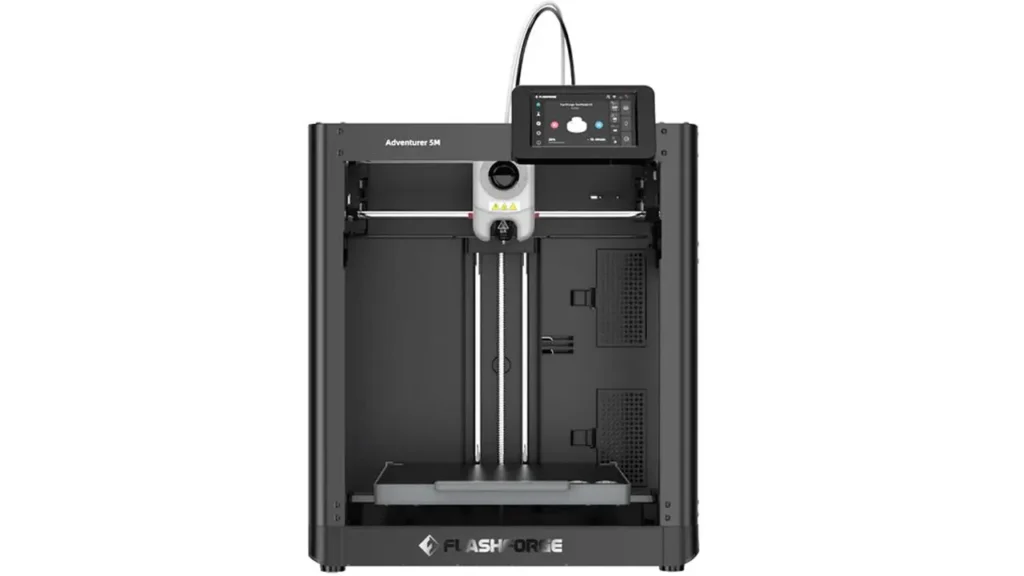
The Adventurer 5M enclosure situation is worth discussing carefully, because it’s a point where Flashforge’s design philosophy shows clearly.
The base Adventurer 5M is a semi-open design — it has a frame and partial side panels but is not a fully sealed enclosure like the original Adventurer 4 or Bambu Lab’s X1. The top is open, and airflow moves freely around the print area. This design choice prioritizes cooling for PLA printing (which benefits from cool ambient air) and keeps the cost down for the base model.
For users printing primarily PLA, PETG, and similar materials, the open design is actually an advantage. These materials don’t require a thermally stable enclosed environment, and the active cooling on the print head does an excellent job keeping overhangs sharp and bridges clean.
However, if you want to print ABS, ASA, or other engineering materials that warp when exposed to drafts and temperature fluctuations, the lack of a full enclosure becomes a real consideration. Flashforge offers the Adventurer 5M Pro variant, which includes a full enclosure with HEPA and activated carbon filtration — important for materials that off-gas fumes during printing (ABS being the most notable). The Pro model is naturally priced higher, but it opens up engineering-grade material printing in a safe indoor environment.
Safety features across both models include thermal runaway protection (the printer shuts down if it detects unexpected temperature drops that could indicate a hardware failure), filament runout detection, power loss recovery (the printer can resume after a power outage), and the heated bed automatically cools before the printer reports completion. These are modern safety standards and welcome inclusions.
8. Adventurer 5M vs Adventurer 4
If you’re an existing Flashforge user or considering both options, the Adventurer 5M vs Adventurer 4 comparison is one of the most practical questions you can ask.
| Feature | Adventurer 4 | Adventurer 5M |
|---|---|---|
| Motion System | Cartesian (bed slinger) | CoreXY |
| Max Print Speed | 150 mm/s | 600 mm/s |
| Enclosure | Fully enclosed (standard) | Semi-open (Pro = enclosed) |
| Build Volume | 220 × 200 × 250 mm | 220 × 220 × 220 mm |
| Max Nozzle Temp | 265°C | 280°C |
| Auto Leveling | Automatic | Automatic (11-point mesh) |
| Slicer | FlashPrint | FlashPrint 5 / Orca Slicer |
| Input Shaping | No | Yes |
| Target User | Quality-focused, ABS/ASA printing | Speed-focused, PLA/PETG rapid printing |
The Adventurer 4 remains a valid choice if your primary materials are ABS or ASA and you need a fully enclosed machine for fume containment from day one without paying Pro pricing. Its sealed design creates a stable thermal environment that those materials demand.
But if your workflow is dominated by PLA and PETG, or if you simply want to print faster and produce more output in less time, the Adventurer 5M is a generational leap forward. The CoreXY motion system, input shaping, pressure advance, and 4× speed improvement over the Adventurer 4 represent a genuine step change in capability — not just incremental improvement.
9. Pricing & Value Analysis
So what does the Adventurer 5M price look like in the current market, and does it represent good value?
As of 2026, the Adventurer 5M is positioned in the $399–$499 range for the standard model, with the Adventurer 5M Pro (enclosed with HEPA filtration) typically running $499–$599. Prices can vary by region and retailer, so always check Flashforge’s official website or authorized dealers for current pricing.
| Printer | Approx. Price | Max Speed | Enclosure | Motion |
|---|---|---|---|---|
| Adventurer 5M | ~$399–$499 | 600 mm/s | Semi-open | CoreXY |
| Adventurer 5M Pro | ~$499–$599 | 600 mm/s | Fully enclosed | CoreXY |
| Bambu Lab A1 Mini | ~$299–$399 | 500 mm/s | Open | CoreXY |
| Creality K1 | ~$299–$399 | 600 mm/s | Fully enclosed | CoreXY |
| Bambu Lab X1 Carbon | ~$1,199+ | 500 mm/s | Fully enclosed | CoreXY |
Looking at this landscape, the Adventurer 5M sits in an honest middle position. It’s not the cheapest option — the Creality K1 offers similar raw specs at a lower price and includes a full enclosure. However, the Adventurer 5M’s strengths lie in Flashforge’s reliability reputation, the quality of its auto leveling implementation, its beginner-friendly setup process, and its ecosystem of support and accessories.
For small businesses using 3D printing for rapid prototyping or small-batch production, the value proposition is clear: cutting print time by 4× or more directly translates to more output per day. If a business can produce 4× more prototypes or products in the same working hours, the printer pays for itself remarkably quickly compared to older-generation machines.
For hobbyists, the value depends on how much they value their time versus their upfront budget. If waiting 2 hours for a print has been a frustration, the Adventurer 5M genuinely changes the workflow in a meaningful way.

10. Final Verdict
After working through all the details, the Adventurer 5M review conclusion is a genuinely positive one — with some important nuances to keep in mind.
Who should buy the Adventurer 5M?
This printer is an excellent fit for beginners who want a machine that works reliably from day one without a steep learning curve. The auto leveling, assisted filament loading, Wi-Fi connectivity, and clean touchscreen interface remove most of the friction that puts new users off 3D printing. It’s also a great fit for intermediate users upgrading from older Cartesian-style machines who want to experience CoreXY speed without jumping to premium-tier pricing. Educators, makerspaces, and small business owners who primarily print PLA and PETG and need to maximize output volume per day will find the Adventurer 5M a workhorse that delivers consistent results.
Who might want to look elsewhere?
If you primarily print engineering materials like ABS, ASA, or nylon and need a fully enclosed machine without buying the Pro version, the Creality K1 or Bambu Lab P1S might be better base-model choices. If budget is the primary concern and you’re comfortable with a bit more setup effort, alternatives like the Creality Ender 3 S1 Pro offer solid fundamentals at lower price points, though without the speed advantages. And if money is no object and you want the absolute best ecosystem, Bambu Lab’s X1 Carbon is the benchmark — though at 2–3× the price.
The Adventurer 5M hits a genuine sweet spot: it’s fast enough to genuinely transform your printing workflow, reliable enough for daily use without babysitting, beginner-friendly enough to not require extensive 3D printing knowledge, and priced reasonably enough to make sense for most home and light professional use cases.
Flashforge has made smart, purposeful upgrades here rather than just chasing spec sheet numbers. The CoreXY motion system, input shaping, improved auto leveling, quick-swap nozzle system, and modernized slicer compatibility all work together to create a machine that feels coherent and well-considered. That thoughtfulness in design is what separates a great printer from one that merely looks good on a spec sheet.
If you’ve been sitting on the fence about upgrading your 3D printer setup, the Adventurer 5M makes a compelling case for taking the leap in 2026.
If you’re fascinated by how modern hardware and software ecosystems evolve, don’t miss this deep dive into advanced system visualization. Understanding architecture is the key to building faster, smarter solutions. Explore the full breakdown here: https://aiinovationhub.com/tach-code-visualization-tool-architecture/ and see how intelligent design transforms complex code into clear, strategic structure.
Discover more from bestchina3dprinters.com
Subscribe to get the latest posts sent to your email.
