 Skip to content
 Bambu Lab P1S Review: Fast CoreXY 3D Printer
If you’ve been searching for a 3D printer that truly delivers on its promises — fast, reliable, and capable of handling serious materials — then this Bambu Lab P1S review is exactly where you need to start. The Bambu Lab P1S 3D printer has been making waves in the maker community since its launch, and for good reason. It sits at a sweet spot between approachability and raw capability, bringing a fully enclosed, high-speed CoreXY machine to a market that was starving for exactly that.
Whether you’re a hobbyist leveling up from a basic open-frame printer, an educator looking for a classroom-ready machine, or a maker who’s tired of tinkering and just wants reliable prints, the P1S deserves a close look. In this review, we’ll walk through everything from the technical specs and real-world print speed to multi-color AMS printing, the enclosure’s impact on material compatibility, and how the P1S stacks up against its sibling, the X1 Carbon.
Let’s get into it.
1. Introduction – Why This Bambu Lab P1S Review Matters
The 3D printing landscape has changed dramatically over the past few years. Gone are the days when you had to spend hours calibrating, tweaking, and manually leveling a bed just to get a halfway-decent first layer. Bambu Lab stormed onto the scene and flipped the script — and the Bambu Lab P1S 3D printer is one of the clearest examples of what modern 3D printing can look like when engineering and user experience are taken seriously.
What makes this Bambu Lab P1S review particularly relevant is the printer’s broad appeal. It’s not just a speed machine. It’s a fully enclosed, smart, multi-material-ready printer that works straight out of the box. The P1S bridges the gap between the budget-conscious user and the professional-grade market, and it does so at a price point that’s tough to argue with.
Throughout this guide, we’ll lean entirely on official Bambu Lab data and verified third-party benchmarks so you can trust every claim you read here. No fluff, no exaggeration — just an honest, thorough look at what this machine can do.
2. Bambu Lab P1S Specs Breakdown
Before anything else, let’s lay out the Bambu Lab P1S specs so we’re all working with the same foundation. These figures come directly from Bambu Lab’s official product documentation.
| Specification | Detail |
|---|---|
| Technology | Fused Deposition Modeling (FDM) |
| Motion System | CoreXY |
| Build Volume (W × D × H) | 256 × 256 × 256 mm |
| Max Print Speed | 500 mm/s |
| Max Acceleration | 20,000 mm/s² |
| Max Hotend Temperature | 300 °C |
| Max Bed Temperature | 100 °C |
| Extruder Type | Direct Drive |
| Nozzle (Default) | 0.4 mm Stainless Steel |
| Nozzle Options | 0.2 mm, 0.4 mm, 0.6 mm, 0.8 mm |
| Layer Resolution | 0.05 – 0.35 mm |
| Enclosure | Fully Enclosed with Glass Door |
| Air Filtration | Activated Carbon Filter |
| Camera | Built-in 720p (Timelapse Supported) |
| Connectivity | Wi-Fi (2.4GHz & 5GHz), Bambu-Bus |
| Display | 2.8-inch Monochrome LCD + D-pad |
| AMS Compatible | Yes (up to 16 colors with 4 AMS units) |
| Power Consumption (Max) | 350 W |
| MSRP (Base) | $699 |
These Bambu Lab P1S specs paint a clear picture: this is a machine built for speed and versatility, not just for pushing PLA around a print bed. The 300 °C hotend means you can work with demanding materials, and the fully enclosed chamber is central to making that possible. The direct-drive extruder is another highlight — it gives you much better control over flexible filaments compared to Bowden-style setups.
The firmware is handled through Bambu Studio (desktop slicer) or the Bambu Handy mobile app, both of which are regularly updated by Bambu Lab. Auto bed leveling and vibration compensation are handled automatically before each print.
3. CoreXY Architecture Explained
If you’re coming from a traditional cartesian or bed-slinger printer, the Bambu Lab P1S CoreXY system is going to feel like a revelation. So let’s break it down in plain language.
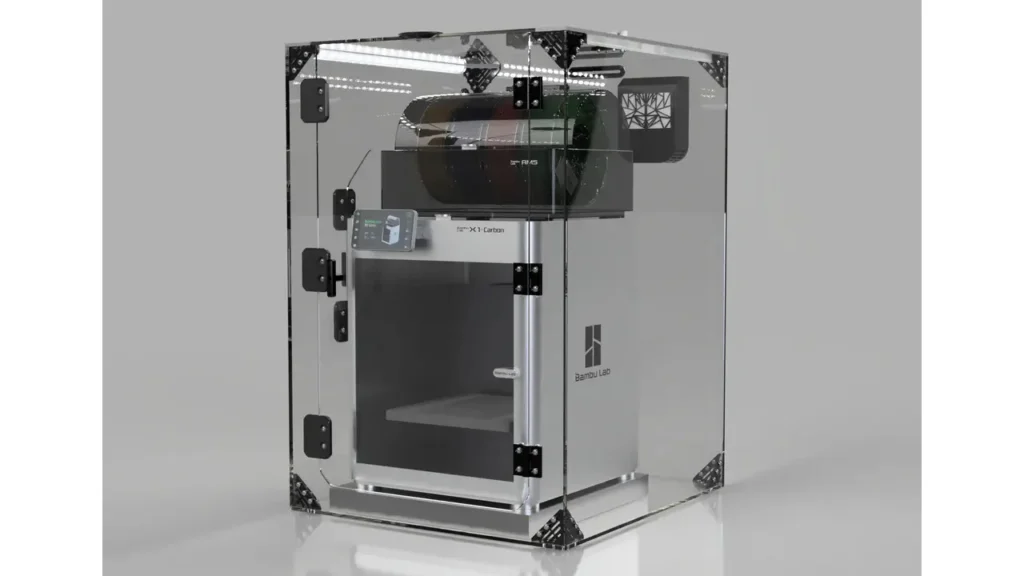
In a CoreXY motion system, both stepper motors work together to move the print head along the X and Y axes simultaneously. Instead of one motor handling X and another handling Y independently, the forces are distributed across a clever belt arrangement that allows for much more precise, high-speed movements with less vibration. The print head stays suspended at the top of the machine while the build plate moves only on the Z axis — straight down with each layer.
This has several major advantages over bed-slinger designs (where the bed moves forward and backward for Y travel). First and most importantly, speed. With a lighter moving mass and more balanced forces, CoreXY printers can accelerate much harder without the bed oscillating and ruining layer adhesion. This is exactly why the Bambu Lab P1S CoreXY setup can reach 20,000 mm/s² acceleration — the kind of figure that was unthinkable on consumer printers just a few years ago.
Second, print quality at speed improves dramatically. On a bed-slinger, fast moves cause the bed to shake, which introduces artifacts into your prints (commonly called “ringing” or “ghosting”). The P1S combats this with active vibration compensation (input shaping), which the firmware runs automatically at the start of each print. The result is that even at higher speeds, the surface quality remains surprisingly clean.
For heavy, tall prints in particular, the fixed gantry design is a significant advantage — there’s simply no bed wobble to worry about as your model grows taller.
4. Bambu Lab P1S Print Speed in Real Life
Let’s talk about what everyone really wants to know: does the Bambu Lab P1S print speed live up to the marketing?
Bambu Lab officially rates the P1S at a top travel speed of 500 mm/s with 20,000 mm/s² acceleration. The acceleration from zero to 500 mm/s happens in just 0.025 seconds according to the company’s own documentation. Those are exceptional numbers on paper.
In practice, the P1S ships with three speed modes accessible right from the printer interface or Bambu Studio:
- Standard — the default, optimized for quality
- Sport — 124% faster than standard
- Ludicrous — 164% faster than standard
Real-world testing consistently confirms these modes make a measurable difference. A standard Benchy (the 3D printing benchmark boat) that takes roughly 2 hours on an entry-level printer completes in approximately 18 minutes at Ludicrous speed on the P1S. At Standard speed, the same model takes around 26 minutes — still dramatically faster than most consumer alternatives.
It’s worth being transparent about one thing: peak speed of 500 mm/s is a travel speed, not always the sustained print speed across every segment of a complex model. Short perimeters and small features will naturally be printed more slowly due to the distance constraints. But for typical hobby-scale prints — functional parts, figurines, household items — the real-world speed advantage over budget printers is genuinely substantial. Most common prints finish in one to two hours, roughly four times faster than entry-level machines.
The vibration compensation and pressure advance algorithms are the unsung heroes here. They work behind the scenes to ensure that increasing speed doesn’t mean accepting garbage print quality. The combination is what makes the P1S feel so different from trying to “overclock” a cheaper printer.
5. Enclosure and Material Capabilities
The Bambu Lab P1S enclosure is one of its most defining features — and one of the most practical reasons to choose it over the open-frame P1P.
The enclosure on the P1S consists of plastic side panels (rather than the aluminum used on the X1 Carbon), a glass front door for easy print monitoring, and a glass top panel. This design keeps the internal chamber temperature stable during long prints, which is critical for materials that are prone to warping when exposed to ambient air.
The three-fan cooling system is a key part of the package:
- Auxiliary Part Cooling Fan — actively cools the print as it builds up
- Chamber Regulator Fan — maintains stable chamber temperature
- Control Board Fan — keeps the electronics cool under heavy use
Paired with an activated carbon filter, the enclosure doesn’t just trap heat — it also captures odors and potentially harmful fumes that some filaments emit during printing. This makes the P1S a much more home-office and classroom-friendly machine than an open printer.
In terms of Bambu Lab P1S filament compatibility, the P1S can handle a wide range of materials:
- PLA — Optimal, the most common and beginner-friendly filament
- PETG — Great adhesion on the textured PEI plate, excellent for functional parts
- TPU — Flexible materials handled well thanks to the direct-drive extruder
- ABS — The enclosure makes ABS printing genuinely reliable, reducing warp dramatically
- ASA — Similar to ABS with improved UV resistance, works well in the enclosed chamber
- Nylon (PA) — Supported with the enclosure keeping moisture-sensitive nylon at stable temperatures
- PC (Polycarbonate) — High-temp material supported by the 300 °C hotend and 100 °C bed
One important caveat from Bambu Lab’s own documentation: carbon fiber and glass fiber reinforced filaments are not recommended in the stock configuration without upgrading the extruder and hotend to hardened steel variants first. The standard stainless steel nozzle will wear quickly with abrasive composite filaments. Bambu Lab sells upgrade kits for this purpose, and the process is user-serviceable.
6. Multi-Color Printing with AMS
The Bambu Lab P1S AMS (Automatic Material System) is one of those features that genuinely changes how you think about 3D printing. If you’ve ever wanted to print multi-color models without painting them by hand, the AMS is the answer.
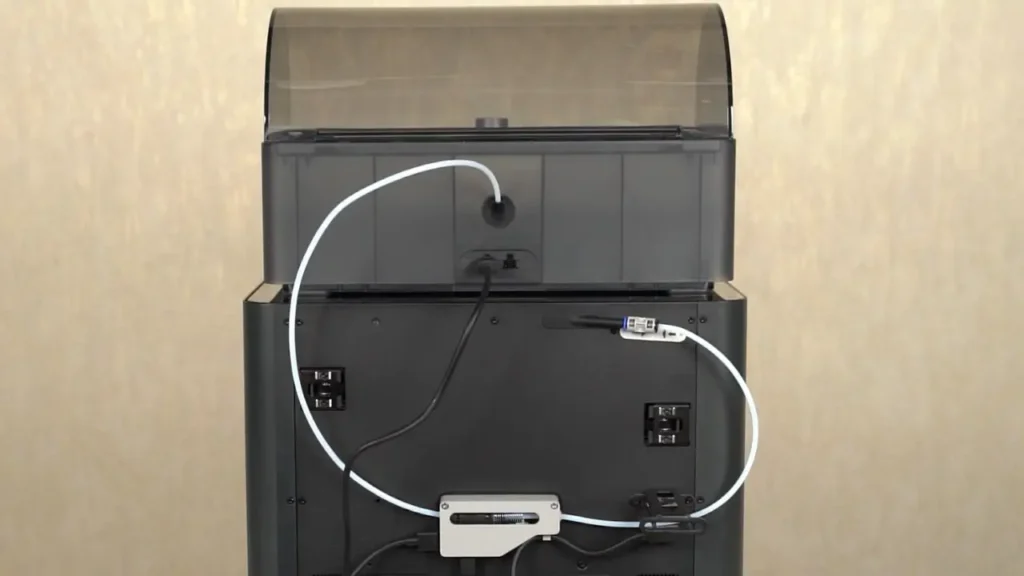
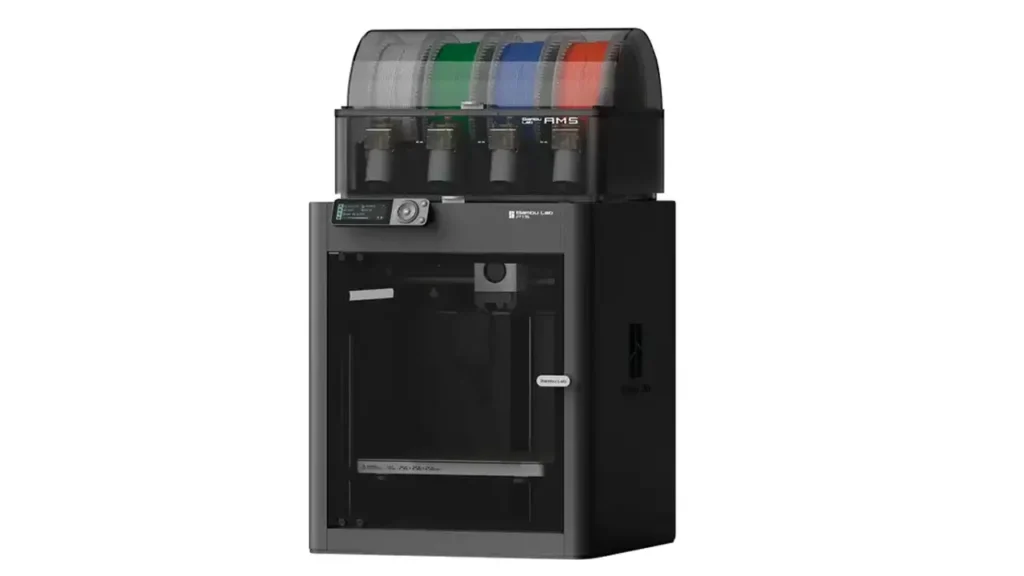
The AMS unit sits on top of the P1S (using the glass top panel as a platform) and connects via the Bambu-Bus cable. It holds up to four spools of filament and handles automatic material switching during a print. Want to print a model in red, white, blue, and black? Just load four spools into the AMS, assign colors in Bambu Studio, and hit print. The machine takes care of the rest.
By daisy-chaining up to four AMS units, you can expand the system to a total of 16 simultaneous colors — a capability that’s remarkable at this price point. Each color change involves purging the old filament and loading the new one, which generates a small amount of waste (Bambu Lab calls this the “purge tower” or humorously, the “poop chute” in the community). This is a normal part of multi-material FDM printing and the amount of waste is predictable and manageable.
The AMS also works as a filament monitoring system. It tracks how much filament remains on each spool and can detect tangles before they cause a failed print. For single-color prints, you can still use the AMS for automated filament runout detection and switching — so if one spool runs out mid-print, the machine can seamlessly continue from another loaded spool.
The AMS is sold separately from the base P1S unit, but it’s also available as a Combo package alongside the printer. The Bambu Lab AMS 2 Pro, a newer version with enhanced multi-material performance, is also now compatible with the P1S.
7. Setup Experience
One of the most refreshing things about the Bambu Lab P1S setup process is how short it is. Bambu Lab designs their printers to be genuinely plug-and-play, and the P1S lives up to that promise in a big way.
Out of the box, the P1S comes partially pre-assembled. The main structure arrives in one piece; you don’t need to build a frame or route cables. The box includes a spare hotend assembly, a flexible textured PEI spring steel build plate, nozzle wiping pads, an unclogging pin tool, a scraper, a sample spool of PLA, and a microSD card with test models pre-loaded.
First-time setup involves placing the printer, connecting power, and following the on-screen guide on the 2.8-inch LCD display. The printer walks you through connecting to Wi-Fi and registering with Bambu Cloud if you want remote monitoring features. This takes roughly 10–15 minutes from the moment you open the box to having the printer ready.
Calibration is fully automatic. The P1S runs its own auto bed leveling, vibration compensation (input shaping), and pressure advance calibration before the first print — and before every print thereafter if needed. There is no manual Z-offset adjustment required. The bed leveling system is highly sensitive and consistently produces excellent first layers.
For slicing, Bambu Studio is the recommended software. It’s free, well-designed, and comes pre-loaded with optimized profiles for Bambu Lab filaments. Many users find that default PLA profiles work perfectly right out of the box with minimal or zero adjustments.
The Bambu Handy smartphone app lets you monitor prints remotely through the built-in 720p camera, start and stop prints, and manage your printer from anywhere with an internet connection.
8. Bambu Lab P1S vs X1 Carbon
The Bambu Lab P1S vs X1 Carbon comparison is one of the most common questions in the Bambu community. Both are enclosed CoreXY printers with the same build volume and motion system — so what actually separates them?
| Feature | Bambu Lab P1S | Bambu Lab X1 Carbon |
|---|---|---|
| Price (Base) | $699 | ~$1,199 |
| Build Volume | 256 × 256 × 256 mm | 256 × 256 × 256 mm |
| Motion System | CoreXY | CoreXY |
| Max Print Speed | 500 mm/s | 500 mm/s |
| Enclosure | Plastic sides + Glass door | Aluminum sides + Glass top |
| Display | 2.8-inch Monochrome LCD | 5-inch Color Touchscreen |
| Bambu Micro LiDAR | No | Yes |
| First Layer Inspection (AI) | No | Yes |
| Nozzle (Stock) | Stainless Steel 0.4 mm | Hardened Steel 0.4 mm |
| CF Filament (Stock) | Not recommended (upgrade req.) | Yes, supported out of box |
| Camera | 720p Chamber Camera | 1080p Camera + Nozzle Cam |
| AMS Compatible | Yes | Yes |
The bottom line on the Bambu Lab P1S vs X1 Carbon comes down to this: the X1 Carbon adds a LiDAR sensor for AI-assisted first layer inspection and flow calibration, a superior color touchscreen, a higher-resolution camera system, and hardened steel extruder components for printing abrasive materials out of the box. These are real, meaningful upgrades — but they come at a significant premium.
For users who primarily print standard and engineering-grade materials (PLA, PETG, ABS, ASA, Nylon) and don’t specifically need CF/GF composite printing from day one, the P1S delivers the same motion system, the same speed, the same build volume, and the same AMS compatibility at a much more accessible price. The P1S is also upgradeable: hardened steel hotend and extruder components are available for purchase through the Bambu Lab store.
Who should upgrade to the X1 Carbon? Users who print abrasive composites regularly, who want the most advanced AI-assisted quality monitoring, or who prefer a more premium build and larger touchscreen interaction model.
9. Bambu Lab P1S Price and Value
The Bambu Lab P1S price of $699 for the base unit (as of its original launch MSRP) positions it as a mid-tier investment that punches well above its weight class. The P1S Combo with AMS typically runs around $949–$1,099 depending on the configuration and regional availability.
To put that in context, let’s look at where the P1S sits in the market:
| Printer | Price (Approx.) | Enclosure | Max Speed | AMS/MMU |
|---|---|---|---|---|
| Bambu Lab P1S | $699 | Yes (Full) | 500 mm/s | Yes (Optional) |
| Bambu Lab P1P | $599 | No (Open Frame) | 500 mm/s | Yes (Optional) |
| Bambu Lab X1 Carbon | ~$1,199 | Yes (Premium) | 500 mm/s | Yes (Optional) |
| Creality K1 | ~$599 | Yes | 600 mm/s | No |
| Prusa Core One | ~$799 | Yes (Heated) | N/A published | Compatible |
The P1S’s value proposition becomes clearest when you consider the full package: a fully enclosed machine with activated carbon filtration, multi-color AMS capability, an integrated camera, Wi-Fi connectivity, and an auto-calibrating motion system — all at $699. Competitors at similar prices either lack the enclosure, the multi-material system, or both.
For most users, the P1S hits the optimal sweet spot. The $100 savings over the P1P buys you a proper enclosure and better cooling — features that meaningfully expand what materials you can print. And the $500 you save over the X1 Carbon can go toward an AMS unit and filament.
10. Final Verdict – Should You Buy It?
This Bambu Lab P1S review has covered a lot of ground, and the conclusion is probably not a surprise if you’ve been reading closely: the Bambu Lab P1S 3D printer is an exceptional machine that earns its reputation.
It’s fast — genuinely fast, with 500 mm/s top speed and 20,000 mm/s² acceleration that makes real-world print times dramatically shorter than what most people are used to. It’s smart — the auto calibration, vibration compensation, and remote monitoring work reliably and remove the most frustrating parts of 3D printing for beginners and experts alike. It’s capable — the fully enclosed chamber with activated carbon filtration unlocks ABS, ASA, Nylon, and PC printing that an open-frame printer simply can’t do as reliably.
And it’s ready to grow with you. Start with PLA, work up to engineering materials, add an AMS unit when you’re ready for multi-color printing, and upgrade nozzle components when you want to tackle carbon fiber composites. The P1S is designed to evolve alongside your skills.
Is there a catch? A few minor ones. The 2.8-inch monochrome LCD screen feels modest for a machine at this price point. You can’t directly upgrade a P1S to an X1 Carbon later — the electronics aren’t compatible. And if you regularly need to print carbon fiber or glass fiber reinforced filaments from day one, the X1 Carbon is the more practical choice.
But for the vast majority of makers — hobbyists, educators, creatives, small-batch product creators — the Bambu Lab P1S 3D printer delivers a printing experience that’s fast, reliable, and genuinely fun to use. If your budget is anywhere in the $400–$900 range and you want an enclosed CoreXY printer with multi-color potential, the P1S should be at the very top of your shortlist.
Score: Highly Recommended.
If you’re exploring more machines from this brand, don’t stop at one model. Discover the full lineup of advanced, high-speed systems designed for precision and reliability. Compare features, performance, and innovations across the range here:
https://bestchinagadget.com/category/chinese-3d-printers/bambu-lab-3d-printers/
Discover more from bestchina3dprinters.com
Subscribe to get the latest posts sent to your email.
