Introduction to Creality Ender 3 V3
If you’ve spent even a few minutes in the world of desktop 3D printing, you’ve almost certainly heard the name Creality Ender 3. It is arguably the most iconic budget 3D printer family ever made — a series that turned hobbyists into makers and made FDM printing accessible to millions. Now, with the launch of the Creality Ender 3 V3, the company has done something remarkable: it has taken everything people loved about the classic Ender 3 and rebuilt it almost from scratch with a brand-new motion system, professional-grade firmware, and a host of smart upgrades that were previously reserved for machines costing two or three times the price.
Released in early 2024, the Ender 3 V3 quickly became one of the most talked-about machines in the 3D printing community. It is trending not just because of its name recognition, but because it genuinely delivers — a printer that brings CoreXZ motion architecture, Klipper firmware, direct drive extrusion, and one-touch auto leveling to a form factor and price point that everyday users can actually afford. For anyone searching for the best budget 3D printer in 2026, the Ender 3 V3 is one of the first names that comes up in every community discussion, forum thread, and YouTube comparison video.
In this full Creality Ender 3 V3 review, we will walk through everything you need to know — from the hardware design and real-world print speed, to the build volume, the direct drive system, the leveling technology, the price, and how it stacks up against competitors. Whether you are a complete beginner or an experienced maker looking to upgrade, this guide is for you.
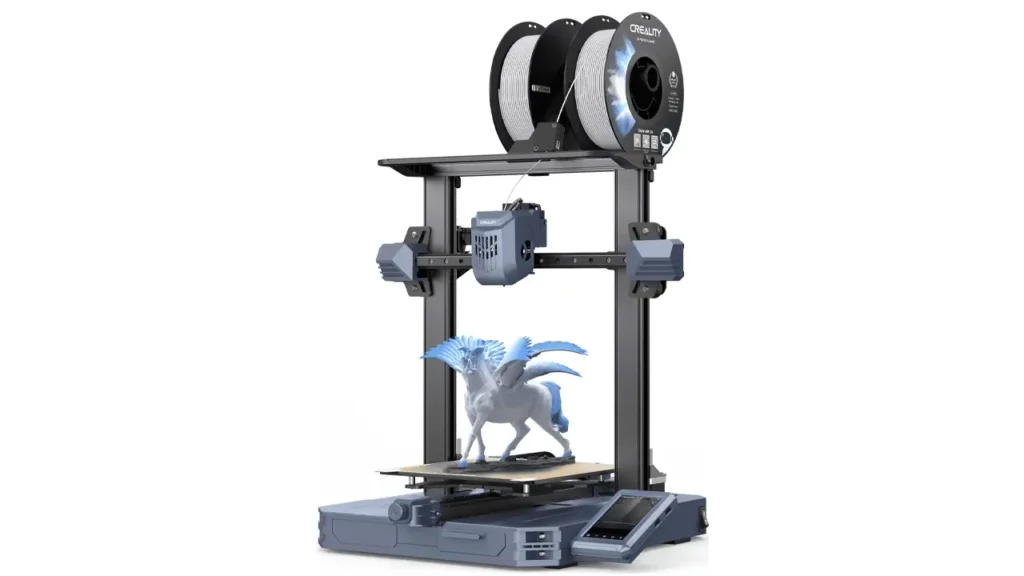
2. Creality Ender 3 V3 Features
Let’s start with the big picture. The Ender 3 V3 is not just another incremental update to the V3 lineup — it is a fundamentally different kind of machine compared to the SE or KE variants that came before it. The headline feature is the CoreXZ motion system, which Creality has borrowed directly from its flagship K1 series and adapted here for a bedslinger format.
In a traditional i3-style Ender 3, the X-axis print head moves left and right while the Z-axis gantry rises vertically using lead screws. In the Ender 3 V3, both the X and Z axes are connected and controlled together using timing belts driven by two high-torque stepper motors positioned at the base of the machine. This configuration dramatically reduces the weight of the moving gantry, which in turn allows the printer to move faster and more precisely without the vibration and wobble that plagued earlier designs.
The frame itself is constructed from die-cast aluminum, a significant upgrade over the extruded aluminum profiles of older Ender models. This gives the printer excellent rigidity and a strikingly clean, modern appearance — it barely looks like a traditional DIY kit printer at all. Cable routing is thoughtfully managed: most wiring is hidden inside the frame, and all cables leading to the hot end are bundled into a single sleeved cable with proper stress relief.
Additional notable Creality Ender 3 V3 features include:
- Automatic spring-tensioned belts — no manual adjustment ever needed
- Linear rods on Z-axis — replacing the old lead screw system to eliminate Z-banding
- Flexible magnetic PEI print surface — prints pop off easily when cooled
- 4.3-inch HD color touchscreen — same high-definition display found on the K1
- Wi-Fi connectivity — print wirelessly via your home network or Creality Cloud
- USB drive support — for offline printing and AI camera compatibility
- Klipper-derivative firmware — enabling input shaping, pressure advance, and vibration compensation
The spool holder mounts to the side of the printer rather than on top, which keeps the center of gravity low and eliminates print quality issues caused by the weight of a heavy filament roll swinging during fast movements. It is a small detail but a smart one.
3. Ender 3 V3 Specs Breakdown
Here is a full breakdown of the official Ender 3 V3 specs, sourced from Creality’s official documentation:
| Specification | Value |
|---|---|
| Printing Technology | FDM (Fused Deposition Modeling) |
| Motion System | CoreXZ with Linear Rods |
| Build Volume | 220 × 220 × 250 mm |
| Max. Print Speed | 600 mm/s |
| Max. Acceleration | 20,000 mm/s² |
| Nozzle Type | Tri-metal Unicorn Nozzle (copper + titanium + hardened steel) |
| Max. Nozzle Temperature | 300 °C |
| Max. Bed Temperature | 100 °C |
| Extruder Type | Direct Drive (K1-series hot end) |
| Leveling System | Fully Automatic (load cells on all 4 corners) |
| Build Surface | Flexible Magnetic PEI Sheet |
| Firmware | Klipper-derivative (Input Shaping, Pressure Advance) |
| Display | 4.3-inch HD Color Touchscreen |
| Connectivity | Wi-Fi, USB Drive |
| Supported Filaments | PLA, PETG, TPU, ABS (with enclosure), Polycarbonate blends, Carbon Fiber |
| Part Cooling | Dual-fan system |
| Layer Height | 0.1 – 0.35 mm |
| Nozzle Diameter | 0.4 mm (standard) |
| Slicing Software | Creality Print, Cura, Simplify3D |
| File Formats | STL, OBJ, 3MF, AMF |
| Power Loss Recovery | Yes |
| Rated Voltage | 100–240 V, 50/60 Hz |
One spec that really stands out here is the 300 °C nozzle temperature. Combined with the tri-metal Unicorn nozzle, this opens the door to printing engineering-grade and composite filaments that most budget printers simply cannot handle.
4. Ender 3 V3 Print Speed Performance
Speed is perhaps the most impressive headline upgrade in the Ender 3 V3, and it is where the CoreXZ architecture really pays off. The Ender 3 V3 is rated for speeds of up to 600 mm/s — 100 mm/s faster than any other Ender 3 V3 variant. That is an extraordinary number for a machine at this price point.
How is such speed possible? The answer lies in the combination of the lightweight gantry design and the Klipper firmware’s advanced motion compensation features. The removal of stepper motors from the gantry creates a very lightweight hot end that makes it much easier for the motion system to move at high speeds. When there is less mass to accelerate and decelerate, the printer can push its movement speed much higher before print quality begins to suffer.
In practice, 600 mm/s is a theoretical maximum that you would only use for non-critical inner fill areas. Real-world quality printing typically happens in the 200–350 mm/s range for outer perimeters and detailed sections, where the machine still dramatically outpaces older printers. Everyday prints that might have taken 3–4 hours on a classic Ender 3 can be completed in under 90 minutes on the V3 — a transformative difference for anyone who prints regularly.
Helping with all of this is the dual-fan part cooling system. The hot end is designed with a dual-fan part cooling system that will quickly cool down prints — mandatory for high-speed printing, leading to improved overhangs on tricky prints. Rapid cooling keeps freshly extruded layers solid before the next layer is deposited, which is exactly what you need when printing fast. The Klipper firmware’s input shaping feature also works in the background to cancel out resonance vibrations that would otherwise appear as ringing artifacts (ghosting) in the printed surface at high speeds.
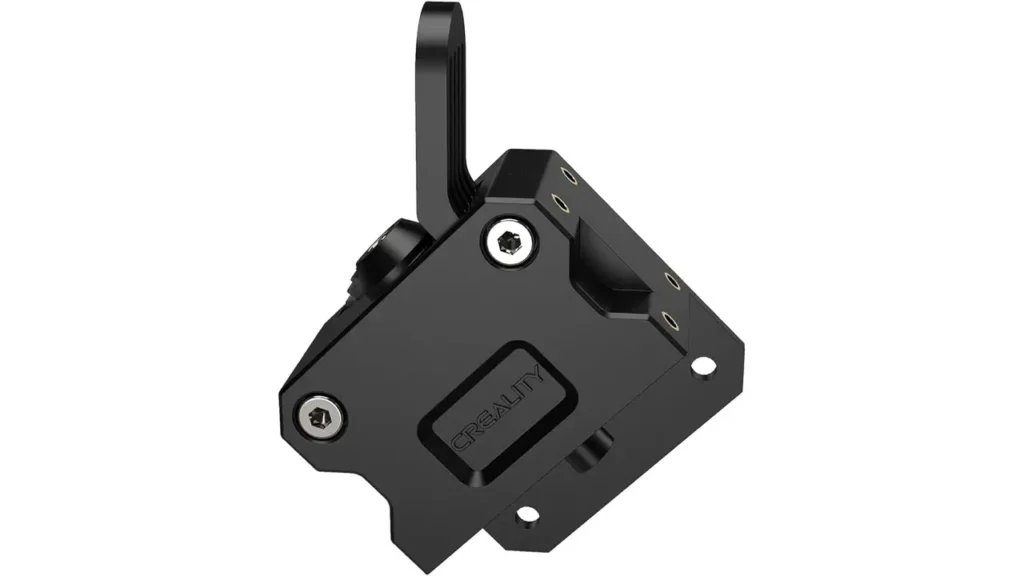
5. Direct Drive Extruder Upgrade
The Ender 3 V3 direct drive extruder is directly inherited from Creality’s K1 flagship series, and it is one of the biggest functional upgrades over older Ender 3 models. The hot end assembly is very similar to the K1 printer, with the same quick-swappable capabilities — unlike the K1, the V3 has separated the electronics in the hot end, making it much easier to disassemble and make necessary repairs when needed.
The key advantage of a direct drive system over the older Bowden setup is the short, direct path between the extruder gear and the nozzle. With a Bowden extruder, filament travels through a long PTFE tube before reaching the hot end, which creates lag in retraction response and makes flexible filaments like TPU extremely difficult to print reliably. A direct drive system eliminates most of that lag. Retraction distances can be reduced dramatically — typically from 5–7 mm down to just 1–2 mm — which means fewer stringing issues and cleaner, crisper parts.
The Unicorn nozzle system is worth special attention. It is a tri-metal design combining a copper alloy body (for excellent thermal conductivity and fast heat-up times), a titanium alloy heat break (to prevent heat creep and maintain a sharp melt zone boundary), and a hardened steel nozzle tip (for durability with abrasive filaments). This Unicorn nozzle is capable of achieving temperatures of 300 °C and is designed for high-speed printing.
For users interested in printing carbon fiber reinforced filaments, wood-fill composites, or abrasive engineering materials, the hardened steel tip is essential — soft brass nozzles wear out rapidly when exposed to these materials. Getting this capability out of the box at this price range is genuinely impressive.
6. Auto Leveling System
Bed leveling is the thing that has frustrated new 3D printer users for years — getting that perfect first layer has historically required patience, paper sheets, manual knob adjustments, and trial and error. The Ender 3 V3 auto leveling system changes that equation completely.
The Ender 3 V3 uses all of the latest leveling sensors, similar to those found on Creality’s K1 printers. With a single press of a button, the machine goes through all of the steps necessary to level every axis in preparation for prints, utilizing load cells placed on all four corners of the print bed for the initial leveling process.
This load-cell approach is particularly clever. Rather than using a probe that physically touches the bed at set points (like the older CR-Touch system), load cells detect the tiny mechanical force when the nozzle itself makes contact with the surface. This means the measurement point is the nozzle tip itself — exactly the component that actually prints. The accuracy is therefore intrinsically tied to the printing surface rather than to an offset that needs to be configured separately.
After the four-corner leveling is complete, the printer also performs a full mesh bed scan, mapping any warps or imperfections across the entire build plate. During printing, the firmware actively compensates for these variations in real time, ensuring that the first layer is deposited at a consistent height everywhere. For beginners, this is transformative — it effectively removes one of the most common causes of failed prints entirely. For experienced users, it saves the time and frustration of manual intervention every time the printer is used.
7. Build Volume and Practical Usage
The Ender 3 V3 build volume measures 220 × 220 × 250 mm, which translates to roughly 8.7 × 8.7 × 9.8 inches. This is the same footprint that has been standard across the Ender 3 family for years, and it remains highly practical for the vast majority of hobbyist and maker use cases.
To put it in context: 220 × 220 mm is large enough to print a standard keyboard wrist rest in one piece, a full-size helmet visor, most tabletop gaming terrain tiles, functional brackets and enclosures for electronics projects, and decorative household items without needing to split models. The 250 mm height is ample for tall figurines, vase-mode prints, and architectural models.
Where you will feel the constraint is with very large structural objects — things like full-face cosplay masks, drone frames larger than 200 mm, or long straight components like rails or channels. For these, the print still needs to be split into sections and glued, just as it would on any printer in this class.
What makes the V3’s build volume feel more useful than on previous models is the improved speed. A 200 mm object that used to take 8 hours on an older Ender 3 might now print in 3–4 hours. That effectively multiplies your output capacity without changing the physical print volume at all. For people who run multiple print jobs per day, this is a significant quality-of-life upgrade.
The PEI spring steel magnetic surface works beautifully with all common filaments. PLA and PETG adhere firmly during printing and release cleanly once the plate cools and flexes. The surface is durable and easy to maintain — periodic cleaning with isopropyl alcohol keeps adhesion consistent over hundreds of print hours.
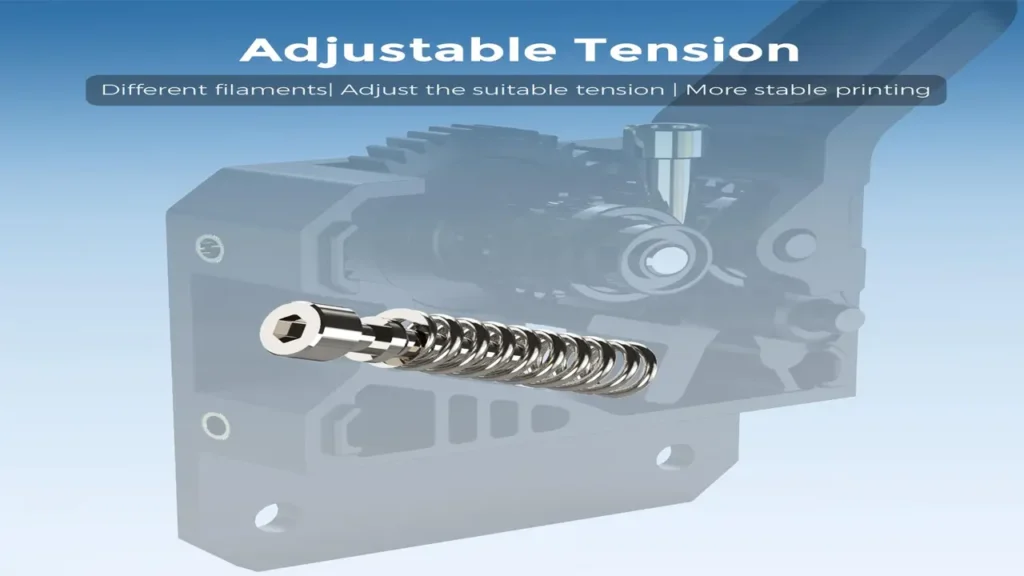
8. Ender 3 V3 Price Analysis
The Ender 3 V3 price sits in the $400–$425 USD range at major retailers, which places it in an interesting position in today’s 3D printer market. It is not the cheapest machine available — the Ender 3 V3 SE can be found for around $200, and the V3 KE typically lands around $280–$300. However, the jump in capability from those models to the full Ender 3 V3 is substantial.
Consider what $400–$425 gets you: a CoreXZ motion system, K1-grade direct drive hot end, 300 °C nozzle temperature, 600 mm/s max print speed, Klipper firmware with input shaping, load-cell auto leveling, Wi-Fi connectivity, and a large HD touchscreen. As recently as 2022, a printer with this feature set would have cost well over $700. The pace at which Creality and the broader industry have driven down prices is genuinely remarkable.
For comparison, Bambu Lab’s A1 Mini — often mentioned as a benchmark for this price class — retails around $350–$400 but uses a smaller 180 × 180 × 180 mm build volume and a more closed ecosystem. If build volume and material versatility matter to you, the Ender 3 V3 represents very strong value. Promotions and sales on official Creality channels and major online retailers regularly bring the price closer to $350, making it even more compelling.
9. Ender 3 V3 Comparison with Competitors
Here is how the Ender 3 V3 comparison looks across the key machines in its competitive landscape:
| Feature | Ender 3 V3 | Ender 3 V3 KE | Bambu A1 Mini | Anycubic Kobra 2 Pro |
|---|---|---|---|---|
| Price (approx.) | $400–$425 | ~$280–$300 | ~$350–$400 | ~$200–$250 |
| Build Volume | 220×220×250 mm | 220×220×240 mm | 180×180×180 mm | 220×220×250 mm |
| Max Print Speed | 600 mm/s | 500 mm/s | 500 mm/s | 500 mm/s |
| Motion System | CoreXZ | Cartesian (bedslinger) | CoreXY | Cartesian (bedslinger) |
| Direct Drive | Yes (K1-grade) | Yes (Sprite) | Yes | Yes |
| Max Nozzle Temp | 300 °C | 300 °C | 300 °C | 260 °C |
| Auto Leveling | Full (load cells) | CR-Touch + strain gauge | Full (strain gauge) | CR-Touch |
| Wi-Fi | Yes | Yes | Yes | Yes |
| Firmware | Klipper-derivative | Klipper-derivative | Bambu proprietary | Marlin |
| Ecosystem Openness | Open (community/mods) | Open | Partially closed | Open |
The comparison reveals a few key takeaways. The Ender 3 V3 leads the pack in max print speed and has the largest build volume among the machines listed. Where the Bambu A1 Mini has an edge is in ease of use out of the box and a more polished first-time experience — Bambu’s ecosystem is tightly integrated and user-friendly from the moment you plug in. However, it comes with a significantly smaller build volume, a more closed ecosystem, and a higher dependency on proprietary materials and software.
The Anycubic Kobra 2 Pro is the obvious budget alternative — but it tops out at 260 °C, uses an older CR-Touch leveling approach, and runs Marlin firmware, which lacks input shaping and pressure advance by default. The Ender 3 V3 KE sits between the two Creality models and is a very capable machine at its price, but the full V3’s CoreXZ system, higher nozzle temperature, and faster max speed justify the price premium for users who want to push the machine further.
10. Final Verdict – Is It Worth It?
After going through every aspect of this Creality Ender 3 V3 review, the answer comes down to one simple question: what do you actually need from a 3D printer?
If you are a complete beginner looking for the most affordable way to get into 3D printing, the Ender 3 V3 SE at around $200 might be the better starting point — it still offers auto leveling, a direct drive extruder, and solid print quality. But if you have even a little experience, or if you know that 3D printing is going to be a serious hobby, the Ender 3 V3 is worth every extra dollar.
What makes it genuinely great:
The CoreXZ motion system is a real engineering achievement that delivers noticeably smoother, faster prints with less vibration. The K1-series hot end running at up to 300 °C gives you access to a wide range of materials that cheaper printers cannot handle. The one-touch auto leveling is the most reliable and beginner-friendly implementation Creality has ever shipped. And Klipper firmware unlocks a level of tuning and optimization that was previously the domain of custom-built machines.
Where to be realistic:
The machine is still a bedslinger, which means the print bed moves back and forth during printing. At very high speeds on tall prints, this can introduce some wobble in the Y direction. An enclosure is still recommended for ABS and engineering materials. And the initial assembly, while straightforward, still requires 30–60 minutes and some confidence with basic tools.
The bottom line: For makers, educators, small businesses, and enthusiastic hobbyists looking for the best budget 3D printer in 2026, the Creality Ender 3 V3 is one of the most compelling machines on the market. It punches well above its weight class in speed, material capability, and print quality. If you have been on the fence about upgrading from an older printer — or buying your first serious machine — the Ender 3 V3 deserves to be at the very top of your shortlist.
If you’re also into powerful tech beyond 3D printers, don’t miss our latest deep dive into the Realme GT 8 Pro. Flagship performance, next-gen chipset, and serious camera upgrades — all analyzed in detail. Read the full review here: https://bestchinagadget.com/realme-gt-8-pro-review/
Discover more from bestchina3dprinters.com
Subscribe to get the latest posts sent to your email.