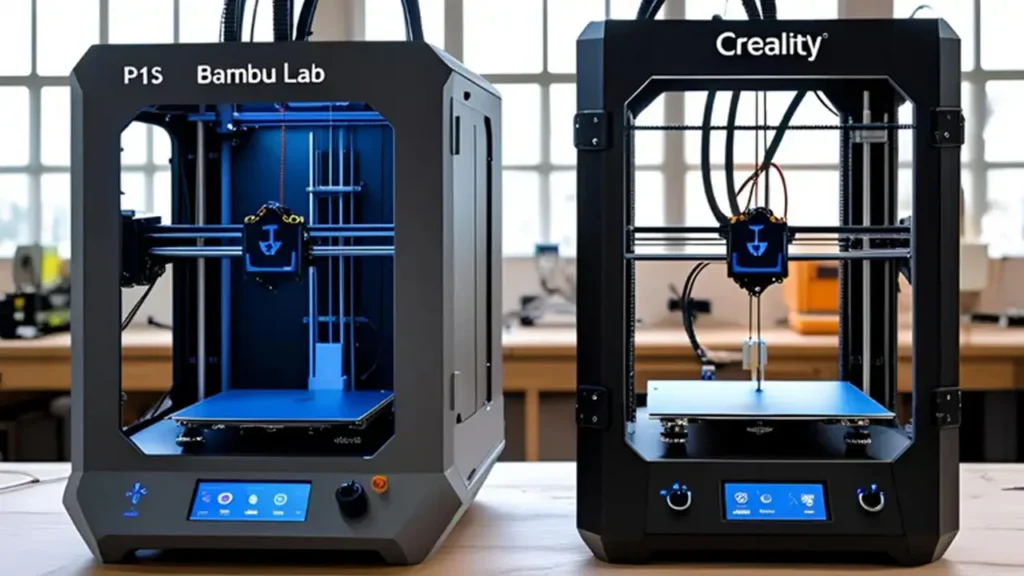
When diving into the world of 3D printing, the Bambu Lab vs Creality comparison becomes inevitable. These two manufacturers represent different philosophies in desktop 3D printing: Bambu Lab emerged as the innovative disruptor with cutting-edge automation and speed, while Creality built its reputation on accessible, hobbyist-friendly machines with massive community support. Whether you’re a beginner exploring your first printer or an experienced maker upgrading your workshop, understanding the Bambu Lab 3D printers vs Creality differences helps you make the right investment decision.
This comprehensive guide examines everything from CoreXY motion systems to multi-material capabilities, software ecosystems, and real-world performance. By the end, you’ll know exactly which brand aligns with your printing goals.
Brand Background: Bambu Lab & Creality Origins
Creality’s Journey: The People’s Printer
Founded in 2014, Creality quickly became synonymous with affordable 3D printing. Their Ender 3 series revolutionized the hobbyist market by offering functional printers at breakthrough price points. Creality focused on open-source principles, encouraging community modifications and upgrades. This strategy created a massive ecosystem of aftermarket parts, firmware mods, and user-generated improvements.
Creality’s product line expanded from budget Ender models to professional-grade machines like the CR-10 series and the K1 CoreXY printers. Their philosophy centers on accessibility—getting printers into as many hands as possible while allowing users to tinker and customize.
Bambu Lab: The Premium Innovator
Bambu Lab launched in 2022 with a radically different approach. Their X1 Carbon immediately challenged industry standards with features previously found only in industrial machines: multi-material printing, automatic calibration, built-in cameras, and exceptional speed. Bambu Lab targeted users who valued plug-and-play reliability over endless customization.
The company’s background in robotics and automation shows in their products. Every Bambu Lab printer emphasizes closed-loop systems, precision sensors, and software integration. While Creality democratized 3D printing through affordability, Bambu Lab democratized professional-grade features through intelligent automation.
The Bambu Lab Ecosystem vs Creality Ecosystem Philosophy
These origin stories define each brand’s ecosystem. Creality offers flexibility and community-driven innovation—you can modify nearly everything. Bambu Lab provides a curated, streamlined experience where everything works together seamlessly but with less room for DIY modifications. Neither approach is inherently superior; they serve different user priorities.
Core Technology: CoreXY and Motion Systems
Understanding CoreXY Architecture
Both brands now offer Creality CoreXY printers and Bambu Lab’s entire lineup uses CoreXY motion systems. This design places motors in a stationary position, moving the print head via a belt arrangement that distributes movement across two motors. Benefits include reduced moving mass, higher acceleration, and improved print quality at speed.
Creality’s K1 and K1 Max adopted CoreXY architecture to compete with Bambu Lab. However, implementation details matter significantly.
Bambu Lab’s Motion System Refinement
Bambu Lab printers feature exceptionally rigid frames, typically carbon fiber or metal construction, with precision-machined components. Their X1 series and P1 series use:
- Input shaping and vibration compensation: Advanced algorithms that reduce ringing and ghosting artifacts
- Active chamber temperature control: The X1 Carbon maintains consistent temperatures for engineering materials
- Dual-axis tension monitoring: Sensors detect belt tension issues before they affect prints
The A1 mini, despite being Bambu’s entry model, still includes basic input shaping and automatic calibration that rivals many competitors’ flagship features.
Creality’s CoreXY Implementation
The Creality CoreXY printers like the K1 series offer impressive specifications on paper—600mm/s maximum speeds and 20,000mm/s² acceleration. In practice, Creality’s approach prioritizes:
- Larger build volumes: The K1 Max offers 300x300x300mm versus Bambu’s X1 at 256x256x256mm
- Open customization: Standard components that experienced users can modify
- Cost efficiency: CoreXY performance at lower price points
However, Creality’s motion systems sometimes require more manual tuning to achieve optimal results. Belt tension, frame rigidity, and resonance compensation may need user adjustment.
Motion System Verdict
Bambu Lab delivers more refined, automated motion control out of the box. Creality offers comparable hardware at lower prices but may require user intervention to maximize performance. For beginners, Bambu’s “it just works” approach wins. For tinkerers who enjoy optimization, Creality’s tunability is appealing.
Speed Performance Comparison: Printing Speed and Acceleration
The 3D printer printing speed Creality Bambu debate focuses on real-world capabilities, not just marketing specifications.
Maximum Speeds vs Practical Speeds
Bambu Lab advertises speeds up to 500mm/s on the X1 Carbon, while Creality’s K1 claims 600mm/s. These numbers represent maximum travel speeds under ideal conditions with specific materials. Real printing happens at lower speeds for quality reasons.
Practical Speed Comparison Table:
| Model | Advertised Max Speed | Typical Print Speed (Quality) | Acceleration |
|---|---|---|---|
| Bambu Lab X1 Carbon | 500mm/s | 200-300mm/s | 20,000mm/s² |
| Bambu Lab P1S | 500mm/s | 200-300mm/s | 20,000mm/s² |
| Bambu Lab A1 Mini | 500mm/s | 150-250mm/s | 10,000mm/s² |
| Creality K1 | 600mm/s | 150-250mm/s | 20,000mm/s² |
| Creality K1 Max | 600mm/s | 150-250mm/s | 20,000mm/s² |
| Creality Ender-3 V3 | 250mm/s | 80-150mm/s | 5,000mm/s² |
Quality at Speed: The Real Performance Metric
Speed means nothing if quality suffers. The Creality vs Bambu Lab performance comparison reveals differences in how each brand achieves fast, quality prints.
Bambu Lab’s approach:
- Pressure advance calibration automatically adjusts for material behavior at speed
- Lidar-based first layer scanning ensures perfect bed adhesion before printing
- Closed-loop motor feedback detects and corrects layer shifts instantly
Creality’s approach:
- Manual pressure advance tuning available for optimization
- Traditional mesh bed leveling with solid reliability
- Open-source firmware allows community-developed speed enhancements
In practical terms, Bambu Lab printers consistently produce clean prints at advertised speeds with minimal user intervention. Creality machines can match these speeds after proper calibration, but the learning curve is steeper.
Real-World Time Savings
A standard Benchy boat (a popular test print) takes approximately 30-45 minutes on a properly tuned Bambu Lab X1 Carbon at speed settings. The same print on a Creality K1 might take 40-60 minutes depending on user optimization. The gap narrows with experience but never fully disappears due to Bambu’s automation advantages.
For production environments or users printing multiple objects daily, Bambu Lab’s time savings compound significantly. For hobby users printing occasionally, the difference matters less.
Multi-Material Printing Capabilities
Bambu Lab multi-material printing represents one of the brand’s most significant advantages, though Creality has responded with its own solutions.
Bambu Lab Automatic Material System (AMS)
The AMS is a four-spool automatic filament changer that enables:
- Multi-color prints: Swap colors automatically during prints without user intervention
- Multi-material prints: Combine materials like PLA, PETG, and TPU in single objects (with compatible temperatures)
- Soluble support structures: Use PVA or HIPS supports that dissolve away for complex geometries
The AMS Lite (for A1 series) offers similar functionality at a lower price point with slightly reduced speed. Bambu’s system includes automatic purge tower generation, filament runout detection, and tangle sensors.
Key AMS Features:
- Tool-free filament loading with automatic detection
- RFID tags on Bambu filament for automatic temperature and flow settings
- Humidity control when paired with dryboxes
- Support for third-party filaments with manual settings
Creality’s Multi-Material Solutions
Creality offers the CFS (Creality Filament System) for K1 series printers, a four-spool system similar in concept to AMS. However, implementation differences are significant:
- Manual filament loading process is more involved
- No automatic material detection—users input settings manually
- Purge tower tuning requires more user calibration
- Compatible only with specific Creality printer models
The Ender series lacks official multi-material support, though community members have adapted MMU (Multi-Material Unit) systems from other manufacturers.
Multi-Material Comparison Table
| Feature | Bambu Lab AMS | Creality CFS |
|---|---|---|
| Number of Spools | 4 (expandable to 16 with hub) | 4 |
| Automatic Filament Detection | Yes (RFID) | No |
| Loading Process | Automatic, tool-free | Manual insertion |
| Setup Complexity | Minimal (plug and print) | Moderate (requires calibration) |
| Compatibility | All Bambu Lab models | K1 series only |
| Third-party Filament Support | Yes (manual settings needed) | Yes |
| Purge Waste | Moderate (optimized algorithms) | Moderate to high |
Multi-Material Verdict
Bambu Lab clearly leads in multi-material convenience and reliability. The AMS represents the most user-friendly multi-color system available in consumer 3D printing. Creality’s CFS works but requires significantly more user knowledge and patience. For users prioritizing multi-material capabilities, Bambu Lab is the obvious choice. For those occasionally experimenting with color changes, Creality’s manual approach might suffice.
Build Volume & Practical Use Cases
Creality build volume comparison reveals one area where Creality often wins: physical printing space.
Build Volume Specifications
| Printer Model | Build Volume (mm) | Build Volume (inches) | Total Volume (liters) |
|---|---|---|---|
| Bambu Lab X1 Carbon | 256 x 256 x 256 | 10.1 x 10.1 x 10.1 | 16.8L |
| Bambu Lab P1S | 256 x 256 x 256 | 10.1 x 10.1 x 10.1 | 16.8L |
| Bambu Lab A1 Mini | 180 x 180 x 180 | 7.1 x 7.1 x 7.1 | 5.8L |
| Creality K1 | 220 x 220 x 250 | 8.7 x 8.7 x 9.8 | 12.1L |
| Creality K1 Max | 300 x 300 x 300 | 11.8 x 11.8 x 11.8 | 27L |
| Creality Ender-3 V3 | 220 x 220 x 250 | 8.7 x 8.7 x 9.8 | 12.1L |
| Creality CR-10 Smart Pro | 300 x 300 x 400 | 11.8 x 11.8 x 15.7 | 36L |
Practical Size Considerations
Build volume determines what you can print in one piece. Larger volumes seem better on paper, but practical considerations matter:
Bambu Lab’s approach:
- Standardized 256mm cubed volume across premium models ensures consistency
- Smaller footprint printers fit on more desks and workbenches
- Enclosed chambers on all models mean better temperature control for engineering materials
- Most functional prints fit comfortably in 250mm space
Creality’s approach:
- K1 Max’s 300mm volume handles larger costume parts, helmet prints, and tall vases
- CR-10 series offers even larger volumes for specialized applications
- Open-frame designs on budget models save costs but limit material options
- Modular approach—choose the size you need, pay only for that
Which Size Do You Actually Need?
Most hobbyist prints rarely exceed 200mm in any dimension. Popular applications like miniatures, functional parts, prototypes, and home organization items fit easily in Bambu’s standard volume. However, specific use cases benefit from Creality’s larger options:
- Cosplay armor and props: Often require 300mm+ dimensions
- Large mechanical parts: Industrial prototyping or replacement parts
- Tall vases and artistic sculptures: Height becomes the limiting factor
- Multiple small parts simultaneously: Larger beds fit more objects per print
If you’re printing predominantly smaller items and value speed and automation, Bambu Lab’s volume suffices. If you regularly need maximum size or want the flexibility for future large projects, Creality’s options provide more headroom.
Software Ecosystem: Slicer Tools and UX
The Creality slicer vs Bambu software debate highlights fundamentally different philosophies in user experience.
Bambu Studio: Integrated Excellence
Bambu Lab developed Bambu Studio, a fork of PrusaSlicer optimized specifically for their hardware. Key advantages include:
Hardware Integration:
- Automatic printer detection over network or USB
- Real-time status monitoring with built-in camera feeds
- Cloud-based project storage and mobile app control
- Firmware updates delivered seamlessly through the interface
User Experience:
- Preset profiles for all Bambu materials with optimized settings
- One-click color painting for multi-material prints
- AI-powered support generation that minimizes material waste
- Plate arrangement tools that maximize build volume usage
Advanced Features:
- Tree supports that reduce print time and material compared to traditional supports
- Arachne wall generator for precise part dimensions
- Integrated calibration wizards for pressure advance, flow rate, and temperature
- Time-lapse video generation with synchronized layers
Bambu Studio represents a curated, cohesive experience where software and hardware work as a unified system.
Creality Slicer Options: Flexibility and Complexity
Creality supports multiple slicer paths, reflecting their open ecosystem philosophy:
Creality Print (Official Slicer):
- Basic profiles for Creality printers pre-installed
- Simplified interface for beginners
- Limited advanced features compared to alternatives
- Free but less frequently updated than competitors
Cura Integration:
- Many Creality users prefer Ultimaker Cura with custom profiles
- Massive plugin ecosystem for specialized needs
- Complete control over every print parameter
- Steeper learning curve but more powerful for advanced users
Other Options:
- PrusaSlicer works well with custom Creality profiles
- SuperSlicer and OrcaSlicer offer enhanced features
- Community-shared profiles provide tested starting points
Software Comparison Table
| Aspect | Bambu Studio | Creality Print | Third-party (Cura, etc.) |
|---|---|---|---|
| Setup Difficulty | Minimal | Low | Moderate |
| Hardware Integration | Excellent | Good | Manual setup required |
| Material Profiles | Extensive, optimized | Basic coverage | User-dependent |
| Remote Monitoring | Built-in with camera | Via Creality Cloud | Requires plugins |
| Customization Depth | Moderate | Low to moderate | Extremely high |
| Update Frequency | Regular | Periodic | Varies by software |
| Learning Curve | Gentle | Gentle | Steep |
Software Verdict
For beginners and users who value simplicity, Bambu Studio provides an unmatched integrated experience. The software “just works” with minimal configuration, letting users focus on designing rather than troubleshooting slicer settings.
For advanced users who want complete control, Creality’s flexibility to use any slicer offers more power. If you enjoy diving deep into custom profiles, experimenting with cutting-edge slicer features, or optimizing every parameter, Creality’s open approach provides that freedom.
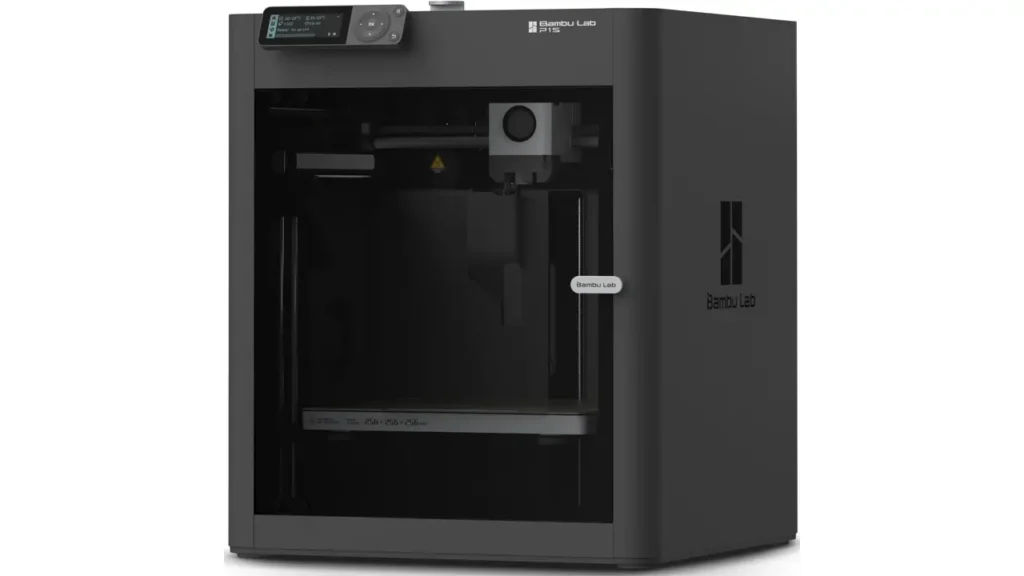
Ecosystem Comparison: Accessories & Community
The Bambu Lab ecosystem vs Creality ecosystem extends beyond hardware to include accessories, community resources, and third-party support.
Bambu Lab’s Curated Ecosystem
Bambu Lab controls their ecosystem tightly, similar to Apple’s approach:
Official Accessories:
- AMS and AMS Lite for multi-material printing
- Hardened nozzles and high-flow hotends designed specifically for each model
- Textured PEI plates, smooth PEI plates, and engineering plates
- Enclosure upgrades and air filtration systems
- RFID-enabled filament spools with automatic settings
Community Resources:
- Growing but smaller community compared to Creality
- Official forums moderated by Bambu staff
- MakerWorld platform for sharing models and profiles
- Official social media channels with responsive support
Third-party Limitations:
- Proprietary components limit generic upgrades
- Closed firmware prevents community modifications
- Limited nozzle options from third parties
- Fewer aftermarket hotend alternatives
Bambu’s ecosystem emphasizes quality control and compatibility. Everything is designed to work together seamlessly, but you’re largely limited to official or officially-approved accessories.
Creality’s Open Ecosystem
Creality embraced open-source principles, resulting in one of 3D printing’s largest ecosystems:
Community Resources:
- Massive Reddit communities (r/ender3, r/Creality) with hundreds of thousands of members
- Extensive YouTube tutorial libraries covering every conceivable modification
- Community-maintained firmware like Klipper and Marlin configurations
- GitHub repositories with custom profiles, macros, and tools
Third-party Market:
- Hundreds of manufacturers produce Creality-compatible upgrades
- Nozzle options from 0.2mm to 1.2mm from multiple vendors
- Complete hotend replacements (E3D, Micro Swiss, Phaetus)
- Linear rail upgrades, direct drive conversions, automatic bed leveling systems
- Enclosure kits from budget to premium
Modification Culture:
- Users routinely upgrade cooling fans, part cooling ducts, and extruders
- Custom firmware unlocks advanced features
- 3D-printed upgrades designed by community members
- Extensive troubleshooting knowledge base from years of users solving problems
Creality’s ecosystem offers unparalleled flexibility and cost-effective upgrades, but requires users to research compatibility and quality.
Material Compatibility
Bambu Lab:
- Official filament line with RFID integration
- Works excellently with third-party filaments (manual settings required)
- Extensive material profiles for common brands pre-installed
- Handles engineering materials (PETG-CF, PA-CF, ABS) in enclosed models
Creality:
- No official filament line (partner with various brands)
- Works with all standard filaments
- Generic profiles require user tuning for optimal results
- Open-frame budget models limit high-temperature materials
Both brands handle the standard PLA, PETG, TPU range equally well. Bambu’s enclosures give advantages with temperature-sensitive engineering materials.
Ecosystem Verdict
Choose Bambu Lab’s ecosystem if you value simplicity, reliability, and want everything to work together without research. Choose Creality’s ecosystem if you enjoy tinkering, want maximum upgrade potential, or prefer choosing from dozens of options for each component.
Best Use Case Scenarios (By User Type)
Who should choose which brand? The best 3D printers 2026 Bambu vs Creality depends entirely on your use case and experience level.
Absolute Beginners: First 3D Printer Purchase
Bambu Lab A1 Mini wins for complete novices:
- Automatic calibration removes common beginner frustrations
- Enclosed design provides safety and consistent results
- Clear documentation and responsive official support
- Multi-material capability (with AMS Lite) allows growth
- Small footprint fits apartments and dorm rooms
Alternative Creality choice: Ender-3 V3 offers a budget-friendly entry with decent features, but expect a steeper learning curve with manual bed leveling and more troubleshooting.
Hobbyists and Enthusiasts
For plug-and-play convenience: Bambu Lab P1S provides the best balance of features, speed, and reliability without excessive cost. Perfect for hobbyists who want to spend time designing and printing rather than maintaining machines.
For tinkerers: Creality K1 offers excellent performance potential at a lower price, with room to customize and optimize. The learning process becomes part of the hobby.
Educational Settings
Bambu Lab X1 Carbon excels in classrooms and makerspaces:
- Minimal supervision required due to automation
- Reliable operation reduces downtime
- Camera monitoring allows remote supervision
- Multi-material capabilities support diverse projects
Creality alternatives: Budget constraints may favor multiple Ender-3 models over fewer premium Bambu printers, allowing more students simultaneous access.
Professional and Small Business Use
Bambu Lab X1 Carbon or P1P for production environments:
- Print farm capability with remote monitoring
- Consistent quality reduces failed prints and wasted materials
- Speed advantages compound across many jobs
- Enclosed operation handles engineering materials for functional parts
Creality K1 Max for size-dependent professional work:
- Larger parts without assembly
- Competitive speeds at lower cost
- Open ecosystem allows custom tooling and modifications
Cosplay and Large Format Printing
Creality CR-10 series or K1 Max dominates:
- 300mm+ build volumes accommodate helmet-sized pieces
- Tall prints for props and costume elements
- Lower per-cubic-centimeter cost for material-intensive projects
Bambu Lab’s smaller volumes require splitting large models into multiple parts, though their speed helps offset assembly time.
Multi-Material and Multi-Color Focus
Bambu Lab (any model with AMS) is the clear winner:
- Most reliable multi-color system available
- Minimal waste compared to competitors
- Easy setup and consistent results
- Soluble support compatibility
Creality’s CFS functions but requires significantly more user intervention and patience.
Final Verdict: Which Should You Choose?
The Bambu Lab vs Creality comparison reveals that neither brand is universally superior—they excel in different areas and serve different user needs.
Choose Bambu Lab If You Value:
Automation and Ease of Use: Bambu Lab’s automatic calibration, lidar scanning, and smart features eliminate most setup headaches. Prints succeed reliably without deep technical knowledge.
Multi-Material Printing: The AMS system remains the most user-friendly and reliable multi-material solution in consumer 3D printing. If colorful prints or soluble supports matter to you, Bambu Lab is worth the premium.
Speed with Quality: While both brands offer fast printing, Bambu Lab achieves high-quality results at speed more consistently out of the box. The time savings compound for frequent users.
Integrated Ecosystem: If you prefer a curated experience where hardware, software, and accessories work together seamlessly—similar to Apple’s approach—Bambu Lab delivers this vision.
Professional or Production Use: The reliability, remote monitoring, and print farm capabilities make Bambu Lab printers excellent for professional environments where time is money.
Choose Creality If You Value:
Build Volume: When you need to print large objects in one piece, Creality’s K1 Max and CR-10 series provide significantly more space than Bambu’s offerings.
Budget Considerations: Creality generally offers more features per dollar, especially in the budget segment. The Ender series provides functional printing at minimal cost.
Customization and Tinkering: If you enjoy modifying your equipment, learning firmware configuration, and optimizing every parameter, Creality’s open ecosystem provides endless possibilities.
Community Resources: The massive Creality community means solutions to almost any problem are a Google search away. Years of accumulated knowledge help troubleshoot issues.
Future Upgrade Path: Creality machines support extensive aftermarket upgrades, allowing you to improve capabilities over time without replacing the entire printer.
The Hybrid Approach
Many serious hobbyists and small businesses end up with both brands. A common setup includes a Bambu Lab printer for reliable, fast production and multi-material work, alongside a Creality machine for large-format projects or as a experimental/backup unit. This combination covers most bases while managing costs.
2026 Market Position
As of 2026, Bambu Lab continues leading in innovation, automation, and premium features. They’re pushing the industry forward with advanced sensors, AI-driven features, and seamless integration. Creality maintains strong positions in affordability, size options, and community engagement. They’re increasingly competitive in speed and features while preserving their open, accessible philosophy.
The best 3D printers 2026 Bambu vs Creality landscape offers excellent options for every user type. Your ideal choice depends on your priorities: simplicity versus flexibility, automation versus customization, premium integration versus budget accessibility.
For first-time buyers, start by honestly assessing your priorities. Would you rather tinker and optimize, or would you prefer to focus on creating? Do you need to print large objects, or will standard sizes suffice? Is multi-color printing essential or occasionally interesting? Your answers to these questions will point clearly toward one brand or the other.
Both Bambu Lab and Creality represent the current state of consumer 3D printing excellence—just from different philosophical directions. Either brand will serve you well when matched appropriately to your needs, experience level, and printing goals.
If you’re considering Bambu Lab in this comparison, it’s worth taking a closer look at one of their most advanced machines. The X1 Carbon and P1S Combo push performance and automation even further. See detailed specs, real-world results, and insights here:
https://bestchinagadget.com/bambu-lab-x1-carbon-p1s-combo-review/
Discover more from bestchina3dprinters.com
Subscribe to get the latest posts sent to your email.
Good day! I know this is kinda off topic but I was wondering if you knew where I could locate a captcha plugin for my comment form?
I’m using the same blog platform as yours and I’m having trouble finding one?
Thanks a lot!
Pingback: Bambu Lab vs Creality: Qual Impressora 3D Vale Mais a Pena em 2026? - Refúgio Invertido