Introduction to Bambu Lab A1 Mini
If you’ve been keeping an eye on the 3D printing world lately, you’ve probably noticed one name popping up again and again — Bambu Lab. And right at the heart of their growing lineup sits the Bambu Lab A1 Mini, a compact, capable, and surprisingly polished machine that’s been turning heads since its release.
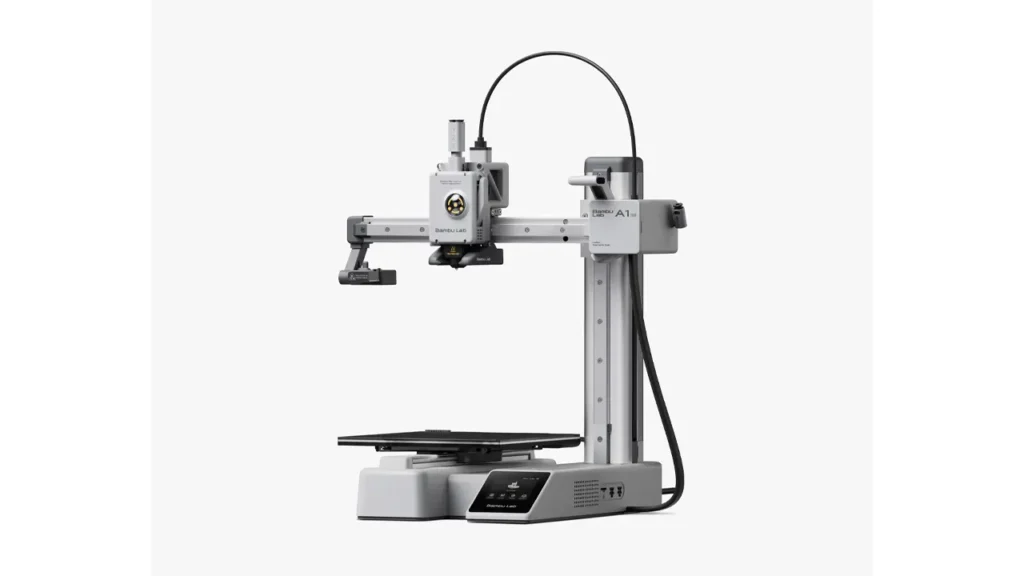
So what exactly is the Bambu Lab A1 Mini? In short, it’s a bed-slinger (cartesian-style) 3D printer designed to bring high-speed, high-quality printing to a wider audience — including beginners who might feel intimidated by more complex machines. Unlike some entry-level printers that ask you to compromise on features or quality, the A1 Mini arrives with a full suite of smart tools: automatic calibration, vibration compensation, flow calibration, and even support for multicolor printing via the AMS Lite system.
What makes it especially exciting is who it’s built for. Whether you’re a first-time 3D printer buyer who wants something that “just works,” a hobbyist tired of endless tinkering, or even a seasoned maker looking for a reliable secondary machine — the Bambu Lab A1 Mini is beginner friendly without feeling dumbed down. It respects your time. And in the 3D printing world, that’s genuinely rare.
Throughout this review, we’ll walk you through everything — specs, real-world print quality, speed benchmarks, multicolor capabilities, setup experience, price, and how it stacks up against its bigger sibling, the Bambu Lab A1. Let’s get into it.
2. Bambu Lab A1 Mini Specs Breakdown
Before we talk about what this printer feels like to use, let’s ground ourselves in the numbers. Here’s a full breakdown of the official Bambu Lab A1 Mini specs, sourced directly from Bambu Lab’s official product page.
| Specification | Details |
|---|---|
| Build Volume | 180 × 180 × 180 mm |
| Print Speed (Max) | 500 mm/s |
| Acceleration (Max) | 10,000 mm/s² |
| Hotend Temperature (Max) | 300°C |
| Heated Bed Temperature (Max) | 80°C |
| Nozzle Diameter (Default) | 0.4 mm (hardened steel) |
| Filament Diameter | 1.75 mm |
| Layer Resolution | 0.05–0.35 mm |
| Motion System | CoreXY-inspired bed slinger (XY head, Z bed) |
| Auto Bed Leveling | Yes (automatic, 49-point) |
| Vibration Compensation | Yes (Input Shaping) |
| Connectivity | Wi-Fi, USB-C (local) |
| Compatible Filaments | PLA, PETG, TPU, PLA-CF, PETG-CF |
| AMS Lite Support | Yes (up to 4 colors) |
| Display | 2.7-inch touchscreen |
| Machine Dimensions | 347 × 315 × 365 mm |
| Machine Weight | ~9.7 kg |
A few things worth highlighting here. The hotend maxes out at 300°C, which means it handles engineering-grade filaments like PLA-CF and PETG-CF without breaking a sweat. The 49-point automatic bed leveling is genuinely impressive at this price point, and input shaping (vibration compensation) is the technology that allows it to print so fast without producing ringing artifacts in your prints. That’s a feature you’d normally expect on much more expensive machines.
The motion system deserves a mention too. While technically a bed slinger — meaning the bed moves on the Y-axis while the print head handles X and Z — Bambu Lab has engineered it to an unusually high standard, keeping the bed movement tight, controlled, and vibration-free enough to sustain those headline speeds.
3. Design & Build Quality
Open the box and your first impression is likely going to be: this looks serious. The Bambu Lab A1 Mini has a clean, industrial aesthetic that feels modern without being flashy. It’s compact — genuinely compact — with a footprint that fits comfortably on a desk or a small shelf. At 347 × 315 × 365 mm, it’s smaller than many mid-range printers while packing considerably more performance.
The frame is constructed from a combination of aluminum extrusions and reinforced polymer components. It doesn’t feel hollow or cheap. When you push on the frame, there’s no flex — it’s solid, and that matters because frame rigidity directly impacts print quality at higher speeds. Bambu Lab clearly put thought into this.
The print bed itself is a PEI-coated spring steel plate that snaps magnetically onto the heated base. This design choice alone makes a huge difference in day-to-day usability — once your print is done, you simply flex the plate slightly and parts pop right off. No scraping, no fighting, no damaged prints. It’s one of those small quality-of-life features that you quickly wonder how you lived without.
Up front, the 2.7-inch touchscreen is responsive and intuitive. It runs Bambu Lab’s own firmware, which is clean and well-organized. You can start prints, monitor progress, adjust settings, and check filament status all from the screen — or from your phone via the Bambu Handy app.
Cable management is tidy and mostly hidden, which adds to the overall impression of a carefully thought-out product. This isn’t a printer that looks like a prototype — it looks like a finished consumer product.
4. Print Quality Test Results
This is where things get really interesting. Bambu Lab A1 Mini print quality in real-world tests — not just marketing renders — is consistently impressive, particularly for the price range.
Using standard PLA at a 0.2mm layer height with Bambu Lab’s default “Quality” profile in Bambu Studio, the results are clean. Surface finishes on flat walls are smooth, with no visible ghosting or ringing — a direct result of the input shaping calibration doing its job. Overhangs hold up well past 45 degrees, and the cooling system keeps things under control even on challenging geometries.
Layer consistency is where the A1 Mini really earns its reputation. Prints show tight, uniform layers from bottom to top, with no obvious layer shifting or Z-banding (a common artifact in cheaper printers caused by inconsistent Z-axis movement). The all-metal hotend with hardened steel nozzle contributes to consistent extrusion, and the flow rate calibration system — which runs automatically — ensures you’re not over or under-extruding from the start.
Bridging performance is solid. Spans of up to 60mm print cleanly without support under typical PLA conditions, which is a good benchmark for hotend cooling efficiency.
One area where some users notice limitations is in very tall prints — remember, the build height is capped at 180mm. And because it’s a bed slinger, taller prints do introduce slightly more vibration than a CoreXY system would, though the input shaping compensation handles this well in practice.
For PETG, results are similarly strong. The 300°C hotend cap means you have solid headroom for more demanding materials, and the PEI plate handles PETG adhesion well with a very light adhesion spray if needed.
Overall: for an open-frame printer at this price, the print quality is genuinely competitive with machines that cost significantly more.
5. Printing Speed & Performance
Speed is one of the Bambu Lab A1 Mini’s most talked-about features — and for good reason. The official max speed of 500 mm/s and acceleration of 10,000 mm/s² are headline numbers that would have seemed unbelievable for a consumer printer just a few years ago.
But let’s be real about what those numbers mean in practice. Maximum speed is rarely the speed you’ll actually print at — it’s the ceiling. Real-world printing typically runs at 200–300 mm/s for quality prints, and even at those speeds, the A1 Mini is dramatically faster than budget competitors running at 60–150 mm/s.
A practical benchmark: a standard 3DBenchy (a common test model) prints in roughly 17–20 minutes on the A1 Mini using Bambu Lab’s “Speed” preset — versus 45–90 minutes on a conventional budget printer. That’s a real, meaningful time saving, especially if you’re printing multiple objects or iterating on a design.
The magic behind these speeds is a combination of technologies: input shaping (which cancels out the vibrations that high speed would otherwise cause), pressure advance (which compensates for filament lag in the extruder), and a well-tuned motion system that’s mechanically capable of following through on those accelerations without losing steps or precision.
What’s impressive is that speed doesn’t come at a serious cost to quality. At 200mm/s, prints look nearly identical to those made at 100mm/s on a conventional machine. There’s a trade-off at absolute maximum speeds (surface quality does take a minor hit), but Bambu Lab’s presets are intelligently balanced to give you the best of both worlds.
6. Multicolor Printing with AMS Lite
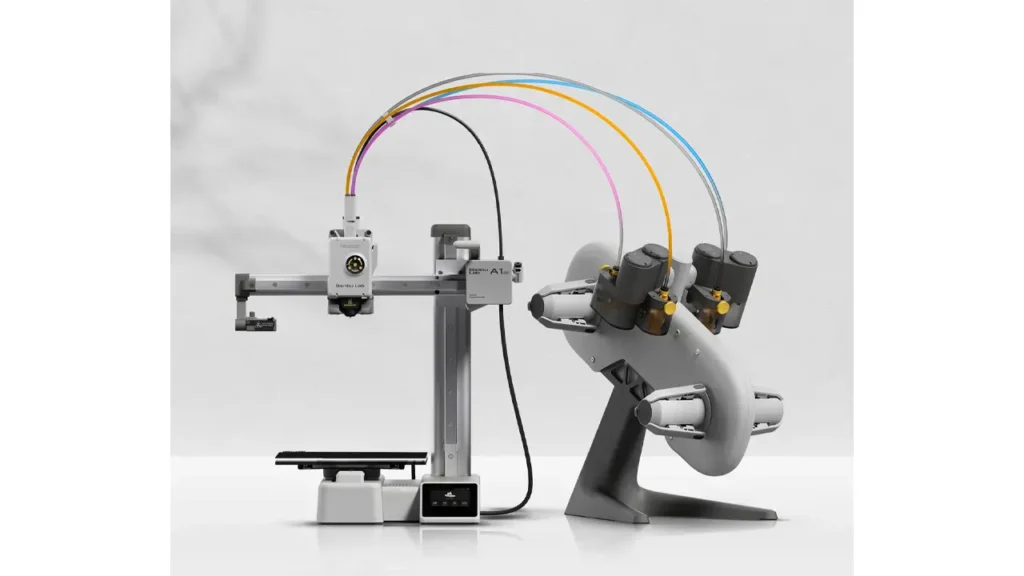
One of the most exciting features of the Bambu Lab A1 Mini is its support for the AMS Lite — the Automatic Material System, Lite edition. This is what separates the A1 Mini from virtually every other printer in its price class.
The AMS Lite is an external filament hub that connects to the printer and feeds up to 4 different filament spools automatically. The printer can switch between them during a print job, enabling Bambu Lab A1 Mini multicolor printing without any manual intervention. You load your spools, set up your colors in Bambu Studio, slice your model with the color assignments, and hit print. That’s it.
The color-switching mechanism works via a purge system — when the printer changes filaments, it extrudes a small amount of the old color into a “purge tower” (a small sacrificial block printed alongside your model) to clean the nozzle before applying the new color. The purge tower does consume some filament and adds a bit of time to your prints, but the results are genuinely multicolor parts coming off an open-frame printer under $400. That’s remarkable.
The AMS Lite connects via a PTFE tube and a magnetic connector at the printer’s extruder. It’s designed to be lightweight and low-friction to work with the A1 Mini’s bed-slinger system without adding excessive weight or drag. Compatible filaments with AMS Lite include PLA, PETG, and TPU (with some limitations on flexible filaments).
It’s worth noting that the AMS Lite is a simplified version of the AMS found on Bambu Lab’s larger X-series machines. It doesn’t support automatic spool weight monitoring or humidity sensing, but for most users the core multicolor printing functionality is what matters — and it delivers.
If you buy the A1 Mini Combo, the AMS Lite is included. If you buy the standard A1 Mini, you can add the AMS Lite separately at a later point.
7. Setup & User Experience
Let’s talk about what it’s actually like to get the Bambu Lab A1 Mini setup and running for the first time — because this is an area where the printer truly shines.
Unboxing is a pleasure. The packaging is thoughtful, with everything organized and protected. Pulling the printer out and setting it up takes most people under 15 minutes. There’s no frame assembly required, no belt tensioning ritual, no manual bed leveling with a piece of paper. The printer arrives essentially pre-assembled.
Once powered on, the setup wizard walks you through Wi-Fi connection and account registration (a Bambu Lab account is needed for cloud-connected features, though local network printing is also supported). The first-time calibration — including auto bed leveling, vibration compensation measurement, and flow calibration — runs automatically and takes about 10–15 minutes. You don’t touch anything. The printer figures itself out.
Software-wise, Bambu Studio is the companion slicer, and it’s genuinely excellent. Based on the open-source PrusaSlicer, Bambu Lab has built a polished, feature-rich interface with preset profiles for all their supported materials and machines. For beginners, the default presets produce great results out of the box. For advanced users, full manual control is available for every parameter. The transition from “plug it in” to “first print done” can realistically happen in under 30 minutes.
The Bambu Handy mobile app lets you monitor prints remotely, receive notifications, and even view a live camera feed (on supported models/configurations). It’s well-designed and adds a nice layer of convenience for anyone who wants to keep an eye on a print without sitting next to the machine.
The touchscreen on the printer itself is snappy and well-organized. You can navigate menus, adjust temperatures, and manage files stored on the built-in memory — all without needing to be at your computer. The overall user experience is, by 3D printer standards, remarkably friction-free.
8. Bambu Lab A1 Mini vs A1 – Key Differences
So how does the A1 Mini compare to its bigger sibling? Here’s a side-by-side breakdown of the Bambu Lab A1 Mini vs A1, based on official Bambu Lab specifications.
| Feature | A1 Mini | A1 |
|---|---|---|
| Build Volume | 180 × 180 × 180 mm | 256 × 256 × 256 mm |
| Max Print Speed | 500 mm/s | 500 mm/s |
| Hotend Max Temp | 300°C | 300°C |
| Bed Max Temp | 80°C | 80°C |
| AMS Lite Support | Yes | Yes |
| Auto Bed Leveling | Yes (49-point) | Yes (49-point) |
| Machine Footprint | 347 × 315 × 365 mm | 432 × 400 × 450 mm |
| Machine Weight | ~9.7 kg | ~13.4 kg |
| Base Price (Approx.) | ~$299 USD | ~$399 USD |
| Combo Price (Approx.) | ~$459 USD | ~$559 USD |
| Best For | Beginners, desk use, small prints | Makers needing larger volume |
The key takeaway here is that both machines share the same core technology — same speed ceiling, same hotend, same bed leveling system, same AMS Lite compatibility. The A1 is essentially the A1 Mini scaled up. If your projects regularly exceed 180mm in any dimension, the A1 is worth the extra investment. If you mostly print smaller objects — miniatures, functional parts, household items, decorative pieces — the A1 Mini handles virtually everything the A1 does while taking up less space and costing less.
For beginners especially, the A1 Mini is the smarter starting point. It’s less intimidating, easier to place in a home or apartment, and the build volume limitation rarely matters in day-to-day use.
9. Price & Value Analysis
Let’s talk money. The Bambu Lab A1 Mini price sits at approximately $299 USD for the standard version (printer only) and around $459 USD for the Combo version, which includes the AMS Lite for multicolor printing. Prices may vary slightly depending on your region and current promotions on the official Bambu Lab website.
| Version | Approx. Price (USD) | What’s Included |
|---|---|---|
| A1 Mini (Standard) | ~$299 | Printer only |
| A1 Mini Combo | ~$459 | Printer + AMS Lite (4-color) |
| AMS Lite (Add-on) | ~$149 | AMS Lite unit only |
Is the price justified? Let’s put it in context. At $299, the A1 Mini competes with printers that offer a fraction of its feature set. Input shaping, automatic bed leveling, flow calibration, a hardened steel nozzle, a modern slicer, Wi-Fi connectivity, and a touchscreen — bundled together at this price point — represents genuine value. A few years ago, a machine with these features would have cost two to three times as much.
The Combo at $459 is where it gets really compelling. Getting a multicolor-capable printer for under $500, from a brand with solid firmware support and an active community, is frankly unprecedented at the time of writing. Competing multicolor setups (like adding an MMU to a Prusa printer) cost significantly more and require more user expertise to maintain.
Value for money on the A1 Mini is high, with one caveat: Bambu Lab’s ecosystem is relatively closed. You’re encouraged to use their filaments (Bambu Lab brand), their slicer, and their cloud services. Third-party filaments work fine in practice, but Bambu Lab’s RFID-based material recognition system integrates most seamlessly with their own products. That’s a trade-off worth being aware of, though it’s rarely a dealbreaker for most users.
10. Final Verdict – Is the Bambu Lab A1 Mini Worth It?
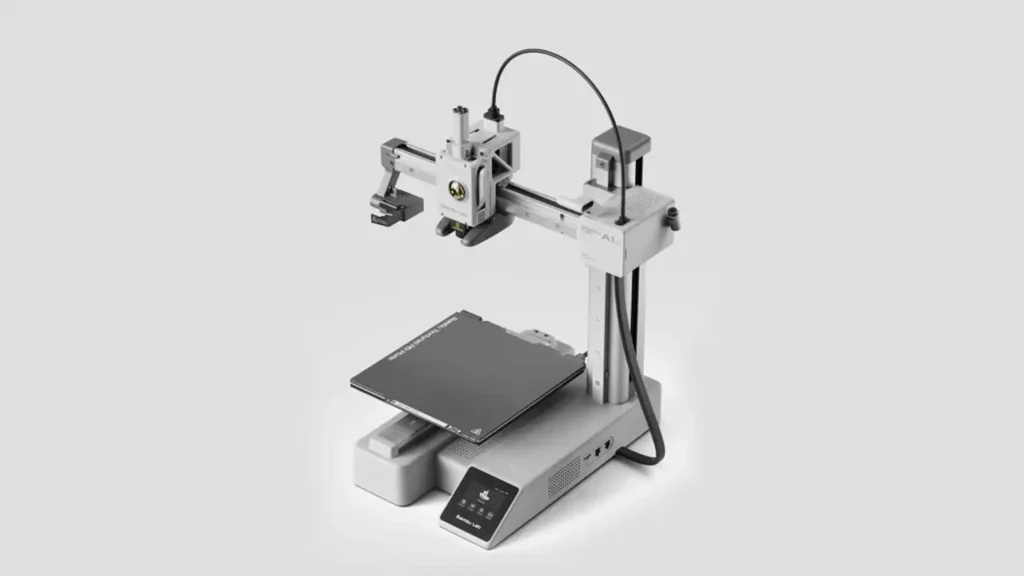
After putting the Bambu Lab A1 Mini through its paces across specs, print tests, multicolor experiments, and day-to-day use, the verdict is clear: yes, it’s worth it — for the right person.
The A1 Mini delivers on its core promises. It prints fast, it prints well, it’s genuinely easy to set up, and the AMS Lite multicolor system is a category-defining feature at this price. Bambu Lab has managed to take the complexity and frustration that traditionally came with 3D printing and replace it with a largely automatic, reliable, approachable experience.
Who is the Bambu Lab A1 Mini best for?
It’s an ideal machine for beginners who want a high-quality entry point without a steep learning curve. It’s excellent for hobbyists and makers who print small-to-medium objects regularly and want speed and reliability without babysitting their machine. It’s great for people who want to explore multicolor printing without spending a fortune. And it’s a solid secondary or desktop machine for experienced makers who want a compact, capable workhorse alongside a larger printer.
Who might want to look elsewhere?
If you regularly need to print objects larger than 180mm in any dimension, the A1 Mini’s build volume will be a real limitation — look at the Bambu Lab A1 or the P1S instead. If you’re strongly committed to open-source ecosystems and want maximum flexibility with third-party tools and firmware, the more closed nature of Bambu Lab’s platform may frustrate you over time.
But for the vast majority of 3D printing enthusiasts — especially those just getting started — the Bambu Lab A1 Mini hits a sweet spot that’s hard to argue with. It’s smart, it’s fast, it’s fun to use, and it produces prints you’ll be proud to show off. At $299, it’s one of the best value propositions in the 3D printing market right now.
Bottom line: The Bambu Lab A1 Mini is a genuinely great printer that makes high-quality, high-speed, even multicolor 3D printing accessible to everyone. Highly recommended.
Looking for more Bambu Lab innovations and detailed comparisons? Explore the full collection of Bambu Lab 3D printers, including specs, performance insights, and latest releases here:
https://bestchinagadget.com/category/chinese-3d-printers/bambu-lab-3d-printers/
Stay updated with new models, upgrades, and expert analysis in one dedicated section.
Discover more from bestchina3dprinters.com
Subscribe to get the latest posts sent to your email.