Introduction to Elegoo Neptune 4 Pro
If you’ve been keeping an eye on the budget 3D printing space lately, you’ve probably noticed that things are moving fast — and we mean that literally. The Elegoo Neptune 4 Pro is one of those machines that makes you do a double-take when you first read the spec sheet. A printer that claims 500mm/s print speeds, runs Klipper firmware out of the box, and comes in at a price point that doesn’t require selling a kidney? That’s worth paying attention to.
The Elegoo Neptune 4 Pro review conversation has been buzzing across forums, YouTube channels, and maker communities since the printer launched, and for good reason. Elegoo has been steadily building a reputation for delivering solid hardware at competitive prices, and the Neptune 4 Pro represents their most ambitious step yet in the consumer FDM printer segment.
This isn’t just another incremental upgrade. The Neptune 4 Pro brings a genuinely different hardware and software philosophy compared to its predecessors — one that puts Klipper firmware front and center, embraces high-speed printing as a real feature rather than a marketing gimmick, and packages it all into a familiar CoreXY-adjacent design that intermediate users will feel comfortable with almost immediately.
Whether you’re a beginner looking for your first serious machine, an experienced maker wanting to speed up your workflow, or someone running a small print farm, the Elegoo Neptune 4 Pro 3D printer deserves a close look. Let’s break it all down.
2. Elegoo Neptune 4 Pro Specs Overview
Before we dive into the hands-on stuff, let’s get the numbers on the table. Here’s a full breakdown of the Elegoo Neptune 4 Pro specs sourced from official Elegoo documentation:
| Specification | Details |
|---|---|
| Printer Type | FDM (Fused Deposition Modeling) |
| Build Volume | 225 × 225 × 265 mm |
| Max Print Speed | 500 mm/s |
| Typical Print Speed | 250 mm/s |
| Acceleration | Up to 8000 mm/s² |
| Firmware | Klipper (pre-installed) |
| Extruder Type | Direct Drive, Dual-Gear Metal |
| Max Hotend Temp | 300°C |
| Max Bed Temp | 110°C |
| Bed Leveling | Automatic (49-point) |
| Bed Surface | PEI Magnetic Spring Steel |
| Motion System | CoreXY with linear rails |
| Input Shaping | Yes (ADXL345 accelerometer) |
| Display | 4.3″ Touchscreen |
| Connectivity | Wi-Fi, USB |
| Supported Filaments | PLA, PETG, TPU, ABS, ASA |
| Layer Resolution | 0.05 – 0.35 mm |
| Machine Dimensions | 475 × 445 × 515 mm |
| Machine Weight | ~9.8 kg |
These are strong numbers across the board. What’s particularly impressive is the combination of Klipper firmware, input shaping hardware, and the 300°C hotend — all standard on the Pro variant, not as expensive add-ons.
3. Build Volume & Design
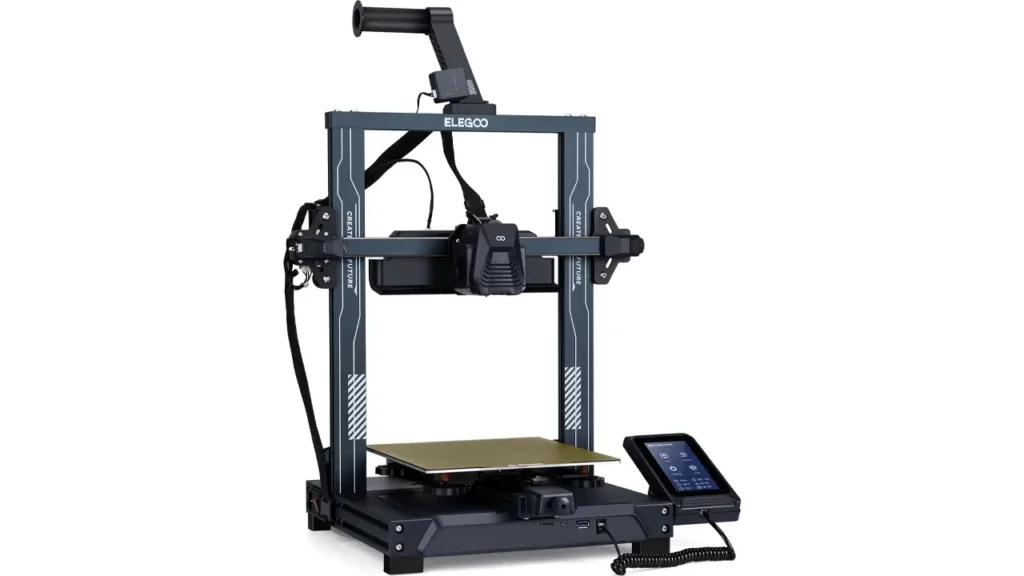
The Elegoo Neptune 4 Pro build volume sits at 225 × 225 × 265 mm, which is a solid mid-range print area. It’s not the largest you’ll find on the market, but it covers the overwhelming majority of everyday printing needs — from functional parts and cosplay props to home organization items and tabletop gaming accessories.
What’s more noteworthy than the raw dimensions is how Elegoo has structured the machine around that build space. The Neptune 4 Pro uses a CoreXY motion system combined with linear rails on the X and Y axes. This is a meaningful design choice. Linear rails reduce wobble, improve repeatability, and are fundamentally better suited to high-speed movement than the V-slot roller systems found on older or budget machines.
The overall frame is built from aluminum extrusions and feels genuinely sturdy out of the box. There’s minimal flex in the structure, which matters a lot when you’re pushing speeds north of 200mm/s — any frame slop at those velocities translates directly into print quality degradation.
The PEI magnetic spring steel bed is another welcome inclusion. PEI has become the gold standard for print bed surfaces in the enthusiast community for good reason: it grips well when hot and releases prints easily when cooled, requires no glue stick or hairspray rituals, and holds up to repeated use without significant degradation. The magnetic attachment makes swapping beds fast and easy.
The 4.3-inch color touchscreen sits at the front of the machine and runs the Mainsail interface native to Klipper, meaning the UI is already familiar to anyone who has used Klipper before. Newcomers will find the layout intuitive enough to navigate after a few minutes of exploration.
In terms of aesthetics, the Neptune 4 Pro looks like a serious machine — clean lines, a mostly black and silver palette, and a compact footprint that fits comfortably on a standard desk or workshop bench.
4. Klipper Firmware & Performance
This is where the Elegoo Neptune 4 Pro Klipper integration becomes a genuine differentiator. Many printers at this price point still ship with Marlin — a perfectly functional firmware, but one that has architectural limitations when it comes to high-speed printing and advanced tuning.
Klipper is different. Rather than running entirely on the printer’s microcontroller, Klipper offloads computation to a separate host processor (in this case, a built-in ARM-based board). This allows for far more sophisticated real-time calculations, which is what makes features like Input Shaping and Pressure Advance practical on consumer hardware.
The Neptune 4 Pro ships with Klipper pre-installed and pre-configured — a detail that matters more than it might seem. Historically, installing Klipper required navigating Linux commands, flashing firmware, and editing configuration files by hand. Elegoo has done the heavy lifting for you here. You power on the machine, complete a quick initial calibration, and you’re printing.
Input Shaping deserves special mention. The printer includes an ADXL345 accelerometer mounted on the toolhead. This sensor measures vibration resonance frequencies specific to your machine and automatically calculates compensation values that suppress the ringing artifacts (also called ghosting) that appear in prints at high speeds. The result is dramatically cleaner output at speeds that would look terrible on a machine without this compensation.
Pressure Advance (Klipper’s equivalent of Linear Advance in Marlin) similarly fine-tunes how the extruder behaves during acceleration and deceleration, reducing bulging at corners and improving line consistency throughout a print.
Together, these features create a situation where the printer is actively compensating for its own physical limitations in real time — and that’s a genuinely impressive thing to have in a machine at this price.
The Klipper interface is also accessible via Wi-Fi through the Mainsail web interface, meaning you can monitor and control your prints from any browser on your local network. No extra software needed.
5. Print Speed & Real-World Testing
Let’s be upfront about the Elegoo Neptune 4 Pro print speed claims. The advertised 500mm/s maximum is a peak figure — it reflects the mechanical capability of the motion system under ideal conditions, not a recommended everyday printing speed.
In practice, here’s how speed reality breaks down:
| Speed Setting | Print Quality | Best Used For |
|---|---|---|
| 100 – 150 mm/s | Excellent | Detail models, miniatures, high-quality parts |
| 200 – 250 mm/s | Very Good | General purpose printing, everyday objects |
| 300 – 400 mm/s | Good | Functional parts, draft prints, farm use |
| 500 mm/s | Acceptable (basic geometry) | Simple shapes, stress testing, benchmarks |
The honest sweet spot for the Neptune 4 Pro is 200–300 mm/s. At this range, with Input Shaping calibrated and Pressure Advance dialed in, prints come out with quality that genuinely rivals much slower printers running at 60–80mm/s on older firmware. That’s the real story here — not that you’ll be printing everything at 500mm/s, but that you’ll print good parts at 2–3x the speed of traditional machines.
For PLA at 250mm/s with standard settings, expect print times to be roughly 40–60% shorter than an equivalent Marlin-based machine running at 80–100mm/s. Over weeks and months of regular printing, that time saving is substantial.
With flexible filaments like TPU, you’ll want to dial back to 30–50mm/s regardless, as direct drive systems still have practical limits with elastic materials at speed.
6. Direct Drive Extruder System
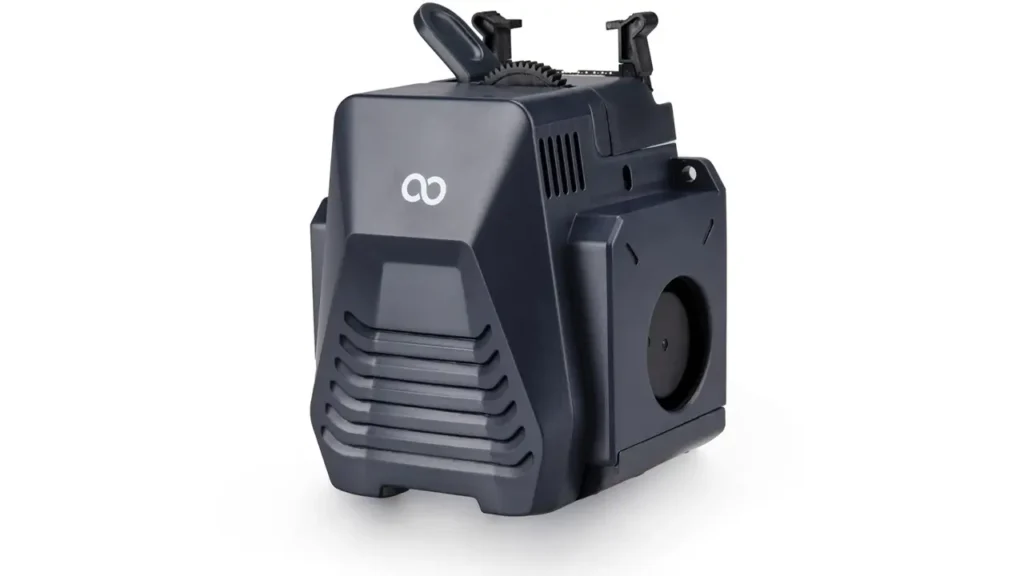
The Elegoo Neptune 4 Pro direct drive extruder is one of the most practically impactful upgrades over previous Neptune generations. The move from Bowden to direct drive means the filament path from the drive gears to the hotend nozzle is as short as possible — typically just a few centimeters.
Why does this matter? In a Bowden setup, filament travels through a long PTFE tube before reaching the hotend. Any flex or slack in that tube creates a delay between what the extruder motor commands and what actually happens at the nozzle. At higher speeds and with flexible materials, this delay becomes increasingly problematic.
The direct drive system on the Neptune 4 Pro features:
Dual-gear metal drive system — Two hardened metal gears grip the filament from both sides, providing significantly more traction than single-sided grip designs. This reduces skipping under high-speed retraction and improves reliability with abrasive filaments.
300°C maximum hotend temperature — This is hot enough for most engineering-grade filaments. Standard materials like PLA print comfortably at 190–230°C, PETG at 230–250°C, and ABS/ASA at 240–260°C. The 300°C ceiling opens the door to materials like PA (Nylon) and some blended composites.
Optimized retraction settings — Because of the short filament path in direct drive, retraction distances are much shorter than Bowden equivalents (typically 0.5–1.5mm vs 4–7mm for Bowden). This means less filament movement per retraction event and, combined with Pressure Advance, dramatically reduced stringing artifacts.
The toolhead assembly also incorporates a part-cooling fan setup designed to provide airflow on multiple sides of the printed part — important for PLA and PETG, which need rapid cooling after each layer to maintain dimensional accuracy.
7. Setup & Calibration Process
The Elegoo Neptune 4 Pro setup experience is genuinely pleasant compared to what 3D printer assembly used to look like even a few years ago. The machine ships partially pre-assembled, and most users report completing the physical build in 20–40 minutes with no special tools required beyond what’s included in the box.
Assembly steps in brief:
The gantry arrives pre-built and needs to be mounted to the base frame — typically four bolts. The touchscreen, filament runout sensor, and a handful of cable connections complete the electrical side of things. Elegoo includes clear printed instructions and a QR code linking to video guides.
Automatic bed leveling:
Once assembled, the 49-point automatic bed leveling routine is where the machine starts to shine. You tap the leveling option in the menu, the probe scans a 7×7 grid across the entire bed surface, and Klipper builds a detailed mesh of the bed’s actual geometry. Future prints then dynamically compensate for any unevenness across that mesh — so even if your bed isn’t perfectly flat (and most aren’t), prints still adhere evenly across the entire surface.
Input shaping calibration:
After bed leveling, the next step is running the Input Shaping calibration routine. The printer moves the toolhead through a series of controlled vibration patterns while the ADXL345 accelerometer records the resonance data. Klipper processes this automatically and writes the optimal compensation values to the printer’s configuration. The whole process takes about 10 minutes and makes a noticeable difference in print quality at speed.
First print:
Elegoo includes a test print on the SD card. It’s a reasonable benchmark that lets you verify the machine is performing correctly before diving into your own files. Most users report a successful first print with no additional adjustment needed beyond the leveling and shaping calibration.
The overall Elegoo Neptune 4 Pro setup experience is well within reach for someone with no prior 3D printing experience — though some comfort with technology in general is helpful when navigating the Klipper web interface.
8. Price & Market Position
The Elegoo Neptune 4 Pro price sits in the $250–$320 USD range depending on the retailer and any active promotions. In the EU market, pricing typically lands in the €270–€350 range, accounting for VAT and import considerations.
| Region | Typical Price Range | Main Retail Channels |
|---|---|---|
| United States | $250 – $320 | Elegoo Official, Amazon US |
| European Union | €270 – €350 | Elegoo Official, Amazon EU |
| United Kingdom | £240 – £300 | Amazon UK, Elegoo Official |
From a value perspective, the Neptune 4 Pro punches well above its weight. Consider what you’re getting at this price point: Klipper firmware pre-installed, hardware input shaping, a direct drive system with 300°C capability, CoreXY linear rail motion, PEI spring steel bed, and Wi-Fi connectivity. Each of those features, if added individually to a base machine, would represent significant additional cost and technical effort.
The closest competitors in this price bracket — machines from Bambu Lab’s entry tier and Creality’s K-series — offer some similar capabilities, but the Neptune 4 Pro is often priced more aggressively, especially during sales events. For users who want an open Klipper ecosystem with full customization access rather than a more closed (if polished) alternative, the value equation firmly favors the Neptune 4 Pro.
It’s also worth noting that Elegoo frequently runs promotions through their official store and via Amazon listings, and bundle deals including extra filament or replacement nozzles are common.
9. Comparison: Neptune 4 Pro vs Neptune 3 Pro
The Elegoo Neptune 4 Pro vs Neptune 3 Pro comparison is one of the most common questions from people upgrading within the Neptune ecosystem. Here’s a clear breakdown of what changed:
| Feature | Neptune 3 Pro | Neptune 4 Pro |
|---|---|---|
| Firmware | Marlin | Klipper (pre-installed) |
| Max Print Speed | ~100 mm/s | 500 mm/s |
| Motion System | Cartesian (bed slinger) | CoreXY with linear rails |
| Extruder | Direct Drive | Direct Drive (upgraded dual-gear) |
| Input Shaping | No | Yes (ADXL345) |
| Max Hotend Temp | 260°C | 300°C |
| Auto Bed Leveling | Yes (manual-assist) | Yes (49-point full auto) |
| Wi-Fi Connectivity | No | Yes |
| Build Volume | 225 × 225 × 280 mm | 225 × 225 × 265 mm |
| Bed Surface | PEI Magnetic | PEI Magnetic Spring Steel |
The upgrade from Neptune 3 Pro to Neptune 4 Pro is not a minor spec bump — it’s a fundamentally different class of machine. The switch from a Cartesian bed-slinger to CoreXY alone is significant: in a bed-slinger design, the print bed moves back and forth for Y-axis motion, which physically shakes the print during production and limits safe operating speeds. CoreXY moves only the lightweight toolhead on X and Y, leaving the bed to move only on Z — which is far slower and smaller in magnitude.
The firmware switch from Marlin to Klipper represents a similar generational leap. Neptune 3 Pro users who upgrade to the 4 Pro consistently report that it feels like a different category of product, not just a newer version of the same thing.
The only specification where the Neptune 3 Pro technically leads is build height — 280mm vs 265mm. For the vast majority of users, that 15mm difference will never matter in practice.
10. Final Verdict – Who Should Buy the Elegoo Neptune 4 Pro?
After going through everything the Elegoo Neptune 4 Pro brings to the table, the clearest way to summarize it is this: Elegoo has taken features that were exclusive to enthusiast-built or premium-priced machines 18 months ago and packaged them into a printer that costs around $280.
The Neptune 4 Pro is an excellent choice if you are:
A beginner who wants room to grow — The machine is approachable enough for a first-time user while being technically capable enough that you won’t outgrow it. The pre-configured Klipper setup removes the intimidating parts of that firmware while leaving the door open for deeper customization as your skills develop.
An intermediate user who has been frustrated by speed limitations — If you’re currently running a Marlin-based printer at 80–100mm/s and constantly watching print time countdowns, the Neptune 4 Pro’s 200–300mm/s practical speeds will feel transformative. Projects that used to take an evening now take an hour or two.
A small print farm operator — The combination of speed, reliability, Wi-Fi monitoring through Klipper’s Mainsail interface, and competitive price per unit makes the Neptune 4 Pro a compelling farm machine. Multiple units can be monitored simultaneously through browser-based dashboards, and the print speed means higher throughput per unit of floor space.
Someone who values open ecosystems — Unlike some competitors that lock you into proprietary slicers or cloud platforms, Klipper is fully open source. You can slice in Cura, PrusaSlicer, OrcaSlicer, or any other compatible tool. You can modify configuration files directly. You own your machine’s behavior entirely.
The Neptune 4 Pro may not be the best fit if you:
Need an absolutely plug-and-play experience with zero configuration — machines from Bambu Lab’s ecosystem are more closed but offer a slightly more turnkey experience for users who genuinely want to never look at a settings file.
Require a significantly larger build volume — 225 × 225 × 265mm covers most use cases, but if you regularly print large-format objects, a larger machine may be worth the premium.
Bottom line: The Elegoo Neptune 4 Pro represents one of the most complete feature-to-price ratios in consumer FDM printing. Klipper out of the box, hardware Input Shaping, CoreXY linear rails, a 300°C direct drive hotend, and solid construction — all for around $280. Whether you’re just starting out or you’re a seasoned maker looking to upgrade your production speed without spending big, this printer belongs on your shortlist.
If you’re interested in more cutting-edge tech beyond 3D printers, explore the latest smart devices, AI gadgets, and innovative electronics at https://bestchinagadget.com/. We regularly review trending products, compare features, and highlight the best value picks to help you stay ahead in the fast-moving world of modern technology.
Discover more from bestchina3dprinters.com
Subscribe to get the latest posts sent to your email.