 Skip to content
 1. Introduction to the TwoTrees SK1
If you’ve been keeping a close eye on the 3D printing world in 2025–2026, you’ve probably noticed that the race for speed has gone from niche enthusiasm to mainstream expectation. Not long ago, printing a decent Benchy in under an hour felt like a minor miracle. Today, machines are quoting travel speeds of 700 mm/s and accelerations that would make your head spin — and more importantly, they’re doing it at prices that actually make sense for hobbyists and small studios alike.
Enter the TwoTrees SK1. This high speed 3D printer positions itself squarely at the intersection of serious performance and serious affordability. It isn’t trying to be a premium brand flagship — it’s going after the user who wants near-prosumer results without a prosumer budget. And in a market where competing machines can easily set you back over $1,000, the SK1 arrives with a retail price around $499–$599, depending on where and when you purchase it.
This TwoTrees SK1 review is going to walk you through everything — the architecture, the speed, the build quality, the leveling system, the touchscreen interface, and ultimately whether this machine deserves a place in your workshop. Let’s dive in.
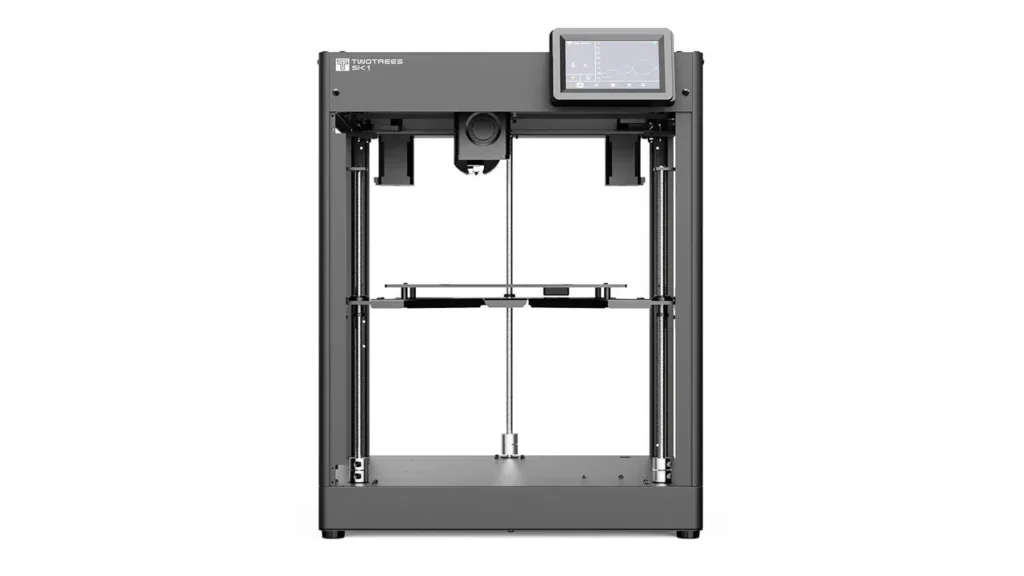
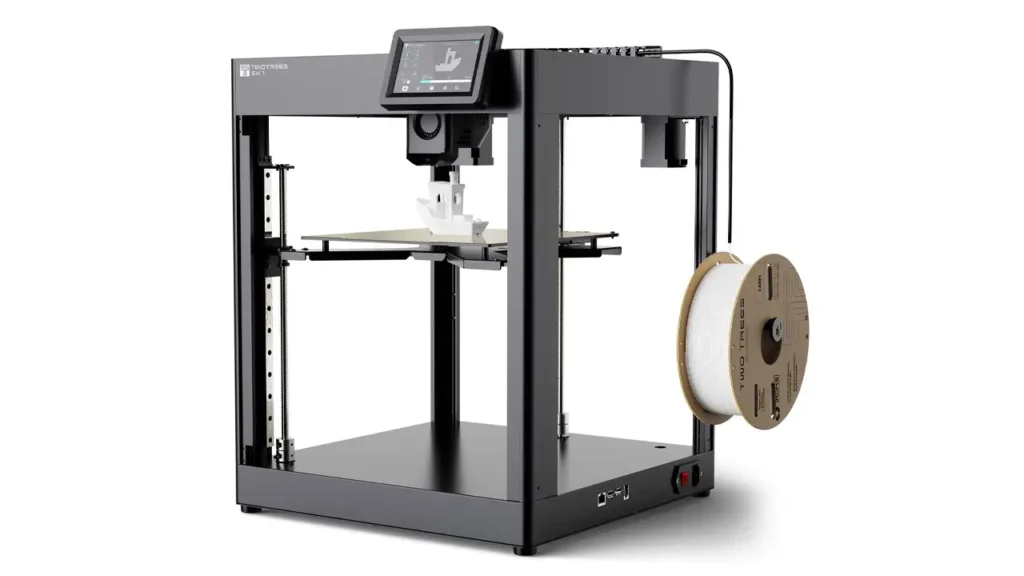
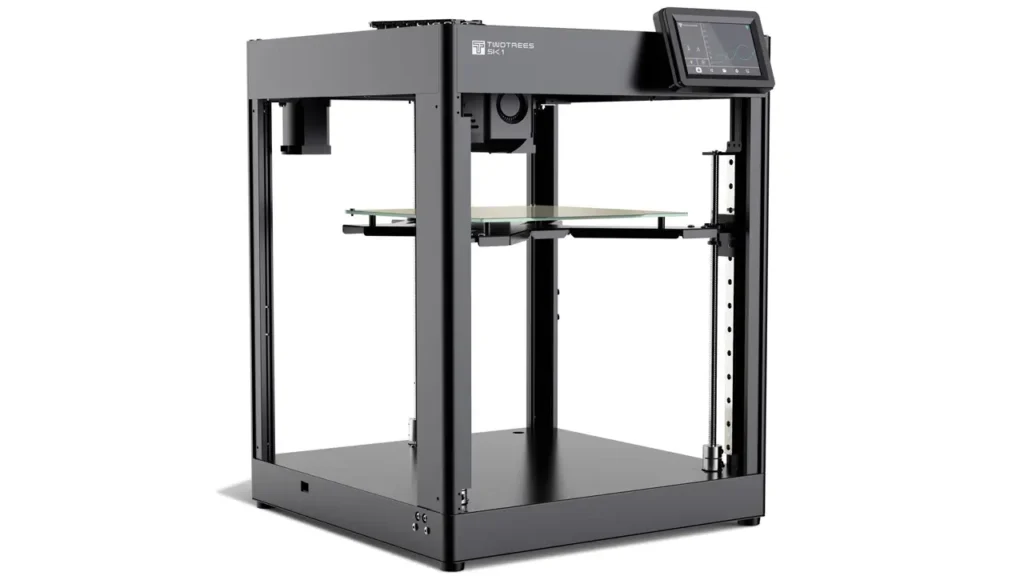
2. CoreXY Architecture Explained
Before we get into the specifics of the SK1, it’s worth taking a moment to understand why CoreXY matters — because this choice of motion system is at the very heart of everything the SK1 claims to do well.
In a traditional Cartesian 3D printer, the print head moves along one axis (usually X), the bed moves along another (Y), and the Z axis handles vertical lift. The problem with this setup is that moving a heavy print bed back and forth at high speeds introduces vibration and limits how fast you can push the machine before quality starts falling apart.
CoreXY flips this logic entirely. In a CoreXY printer, movements are achieved by moving two motors simultaneously, which means the print head handles all X and Y movement while the bed only moves vertically. Because the bed only ever moves up or down — slowly and steadily — you can push the printhead to extraordinary speeds without the whole machine shaking itself loose.
This CoreXY system allows the SK1 to print three to five times faster than a typical 3D printer. That’s not a marginal improvement — that’s a genuine step change in what’s possible during a printing session.
The TwoTrees SK1 takes the CoreXY concept and implements it with an all-metal frame and linear guide rails on every axis — X, Y, and Z — that support high-speed movement. This is important because linear rails, as opposed to simple rod-and-bushing setups, provide much tighter tolerances, lower friction, and better repeatability at high speeds. You’ll find this same hardware choice on machines costing two or three times as much.
It’s also worth noting that the SK1’s design draws inspiration from the open-source Voron Trident community printer, featuring three independently driven Z-axis screws — a configuration that gives the machine its impressive automatic bed leveling capability. More on that shortly.
Polimerukr.com
Ukraine
3D Printing Materials & Supplies
Your trusted source for high-quality 3D printing materials in Ukraine. Wide selection of filaments, resins, and accessories for all printer types with fast local shipping.
3. Speed & Acceleration Performance
This is the section most people come for, and rightfully so. Speed is the SK1’s headline feature, and the numbers are genuinely impressive on paper.
The TwoTrees SK1 CoreXY printer achieves a maximum printing speed of 700 mm/s and a peak acceleration of 20,000 mm/s². The recommended print speed sits at 300 mm/s, which is where most users will find the best balance between throughput and quality. The travel speed — meaning the movement when the head is not extruding — tops out at 700 mm/s.
To put that in context: a standard entry-level FDM printer typically operates at 40–80 mm/s. Even mid-range machines rarely push past 150–200 mm/s in practical use. The SK1’s 300 mm/s recommended speed is already in a completely different league for a machine at this price point.
The 20,000 mm/s² acceleration figure is what enables this kind of speed to actually be useful. Acceleration determines how quickly the print head can reach its target speed and how quickly it can stop or change direction. Low acceleration means the machine spends most of its time ramping up and slowing down, never actually reaching top speed. High acceleration means it hits peak velocity quickly and covers ground efficiently.
In real-world testing, a Benchy — the classic 3D printing benchmark boat — can be completed in approximately 18 minutes at a 0.2 mm layer height. For reference, that same print on a standard Cartesian machine might take 90 minutes to two hours. Even compared to other budget CoreXY options, that’s a strong result.
That said, it’s important to set expectations honestly. The 700 mm/s figure is a travel speed — the speed at which the head moves when it isn’t depositing material. Actual print speeds for complex models with lots of direction changes and fine detail will be lower. Most users printing detailed functional parts or miniatures will find 200–300 mm/s a more practical sweet spot. The machine is capable of the headline figure, but the best quality-to-speed ratio for daily use lands closer to the recommended setting.
The SK1 uses Klipper firmware — more on the software side later — which includes input shaping and pressure advance features. These compensate for the natural resonance and ringing that high-speed movement introduces, helping maintain print quality at speeds that would produce ugly artifacts on a machine without these tools.
4. Build Quality & Design
Pick up any discussion about the TwoTrees SK1 specs and you’ll quickly notice that reviewers are generally impressed by what you get for the money when it comes to physical construction.
The frame is all-metal — aluminum extrusion throughout — which gives the machine the rigidity it needs to handle rapid direction changes at high speed without flexing or vibrating excessively. This matters enormously in CoreXY printing, where the printhead is constantly reversing direction and any frame flex translates directly into print quality loss.
The printer arrives almost fully assembled, which is a welcome touch for users who don’t want to spend an afternoon with an instruction booklet and a bag of screws. Basic setup — unpacking, attaching the gantry, connecting cables — can be completed in well under an hour.
Cable management is handled cleanly through a drag-chain system that routes power and filament lines to the extruder in an organized way, keeping cables out of the print area and preventing snagging at high speeds. This kind of detail is often overlooked on budget machines and appreciated when it’s done properly.
The build plate is a PEI-coated magnetic sheet mounted to a heated bed that reaches up to 100°C. The PEI surface provides excellent first-layer adhesion across a wide range of materials, and the magnetic mounting makes it easy to pop off once printing is complete and flex the plate to release finished parts cleanly — no tools, no scraping.
A rear anchor system keeps the magnetic plate properly aligned, which is a small but smart detail that prevents the plate from shifting during prints. The bed reaches printing temperature quickly, and combined with the Z-Tilt leveling system, first-layer adhesion is consistently reliable.
The hotend is an all-metal design capable of reaching 300°C, and it gets there quickly — approximately 30 seconds from cold to 300°C, which is a genuinely impressive thermal performance figure. This rapid heat-up time means less waiting around before a print can begin, which compounds into meaningful time savings over a day of heavy use.
One area worth flagging is noise. The SK1 runs with multiple cooling fans, and at high speeds the acoustic profile is noticeable. It’s not unusually loud for its class, but this is not a machine you’d want running beside you during a video call without some acoustic separation.
5. Auto Leveling System
Bed leveling has historically been the bane of 3D printing beginners — and a persistent annoyance for experienced users too. Nothing kills the joy of a new printer faster than spending an hour manually tramming the bed only to watch the first layer peel up 20 minutes into a print.
The TwoTrees SK1 tackles this with one of its most distinctive features: Z-Tilt automatic leveling. This system uses the three independently driven Z-axis screws to physically tilt and adjust the bed until it is perfectly parallel to the gantry plane. Rather than simply mapping the bed surface and compensating in software, the SK1 actually corrects the physical position of the bed itself.
This is paired with a 36-point mesh bed leveling scan, which maps the surface at 36 individual points to account for any subtle warping or irregularity in the PEI sheet. The combination of physical Z-Tilt correction and mesh compensation gives the SK1 one of the most comprehensive automatic leveling setups in its price class.
For the user, the practical result is straightforward: run the leveling routine, let the machine do its work, and start printing. The Z-Tilt sequence typically completes in a couple of minutes and requires no manual intervention. For beginners especially, this is a significant quality-of-life feature that removes one of the most common sources of frustration in 3D printing.
It’s worth noting that the SK1 was among the first 3D printers on the market to be equipped with this automatic Z-Tilt leveling function at a budget price point — a genuine differentiator that separates it from many competitors in its range.
6. User Interface & Touchscreen
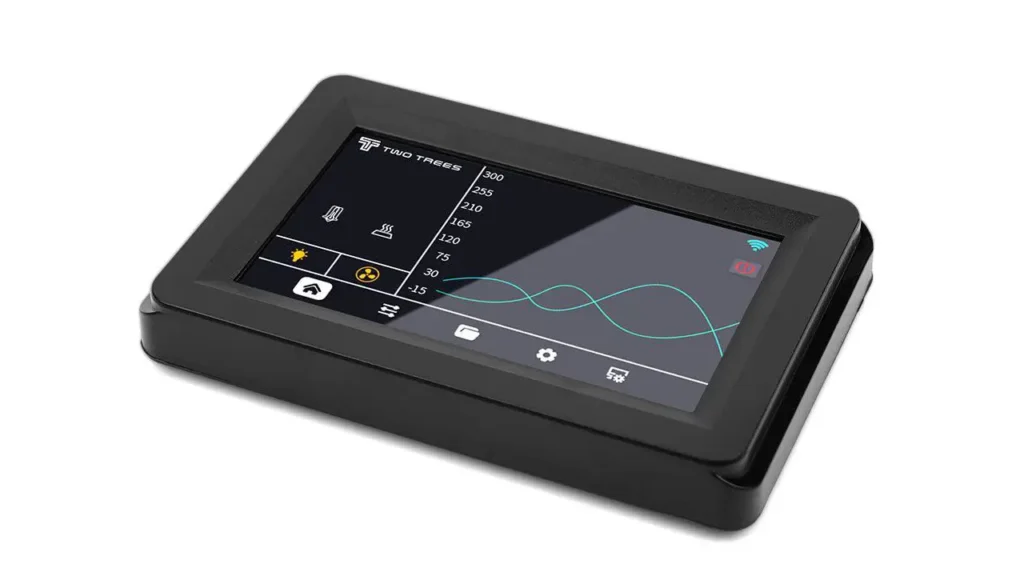
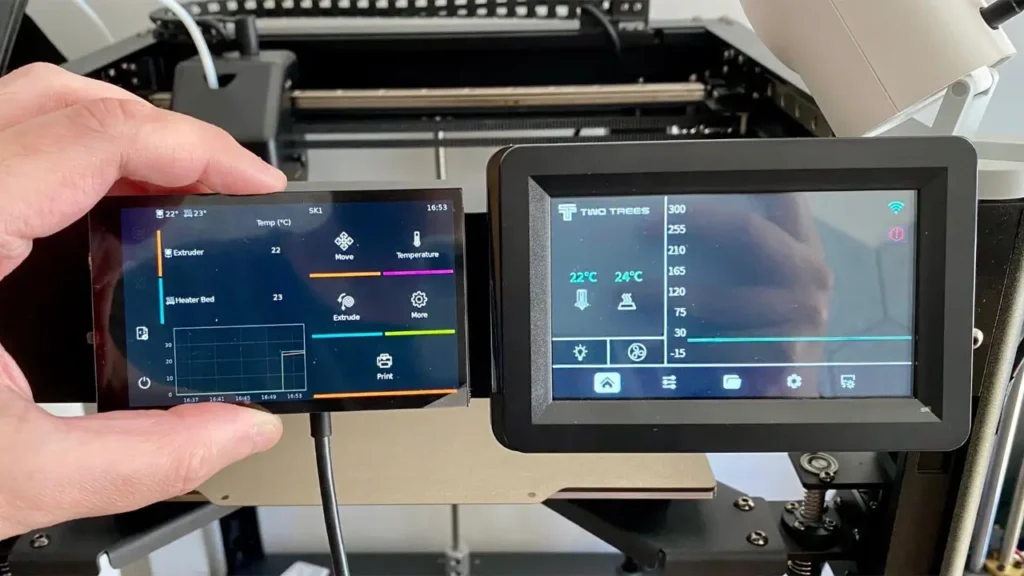
Operating a 3D printer used to mean navigating clunky rotary encoders and small monochrome screens with menus three levels deep. The TwoTrees SK1 moves well past that experience with a 4.3-inch color touchscreen that makes day-to-day operation genuinely pleasant.
The touchscreen interface is capacitive — meaning it responds to a light finger touch rather than requiring deliberate pressure — which makes it feel responsive and modern. Menu navigation is logical, with clearly organized sections for controlling temperatures, running calibration routines, launching prints, and monitoring progress.
Beyond the physical screen, the SK1 runs Klipper firmware with Fluidd as its web interface. Fluidd is a well-regarded open-source front end for Klipper that gives you full remote access to the printer through any web browser on your local network. You can upload G-code files, start and stop prints, monitor temperatures in real time, adjust settings on the fly, and track print progress — all without touching the printer itself.
The SK1 supports both WiFi and wired LAN connection, making it flexible for different workshop setups. Once connected to your network, the printer essentially becomes a print server — you can send files directly from your slicer of choice (OrcaSlicer, Cura, PrusaSlicer, and others all work well) without manually transferring files via USB or SD card.
This remote workflow is a genuinely modern experience and one that users upgrading from basic budget printers will immediately appreciate. Being able to slice a model, hit print, and watch the machine start heating up from across the room is a small but satisfying upgrade to the printing process.
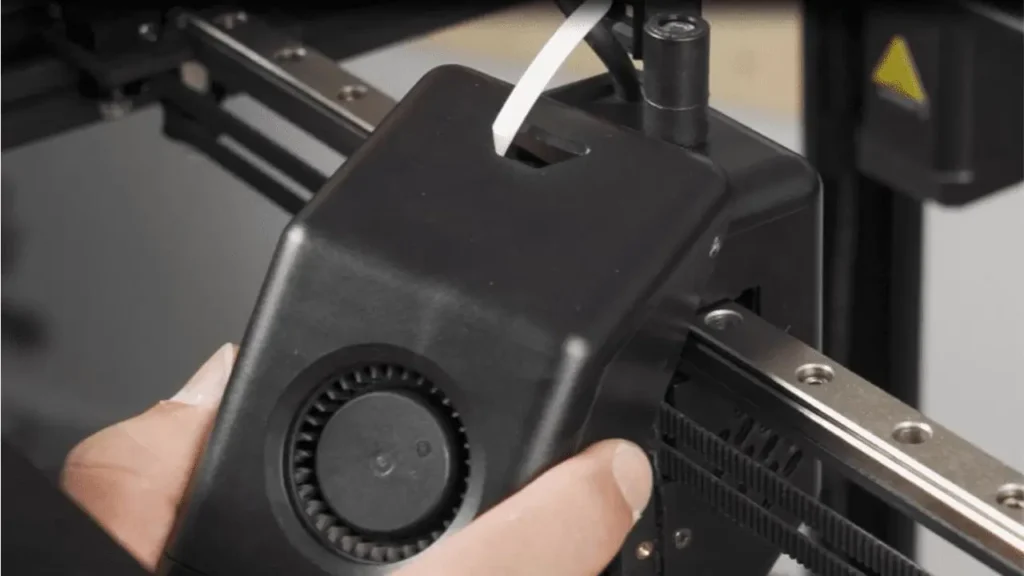
7. Printing Quality at High Speed
Speed numbers are exciting, but what everyone actually cares about is what comes off the build plate. The honest answer with the SK1 is: quite good, with some nuance depending on what you’re printing and at what speed.
At the recommended 300 mm/s print speed, the SK1 produces consistently clean results across standard geometries. Walls are smooth, overhangs are handled well by the cooling system, and dimensional accuracy is solid — real-world measurements from printing calibration cubes show dimensional error in the range of 0.4%, which is respectable for an out-of-box result before fine tuning.
The direct drive extruder, with its 9.5:1 gear ratio, delivers an extrusion rate of up to 32 mm³/s. This high volumetric flow is what makes 300–400 mm/s practical printing speeds achievable — the extruder can push enough material to keep up with the printhead’s movement at speed.
As you push beyond 300 mm/s toward the 500–700 mm/s range, quality trade-offs become more apparent. Fine details become softer, small features lose some crispness, and the input shaper has to work harder to suppress ringing artifacts. For functional prints, prototypes, and large flat-surfaced objects, higher speeds remain very usable. For detailed aesthetic prints or models with fine surface features, dialing back toward 200–250 mm/s gives noticeably better results.
The SK1 supports a broad range of materials: PLA, PETG, ABS, PC (polycarbonate), TPU, nylon, and more. The all-metal hotend’s 300°C ceiling opens the door to engineering-grade filaments that a PTFE-lined hotend simply cannot handle. The PEI bed surface accommodates most of these materials without adhesion issues.
One practical note for ABS and ASA users: the SK1 is not an enclosed printer by default. Printing warp-prone materials like ABS in an open frame machine can be challenging, particularly in drafty environments. TwoTrees does offer an optional enclosure kit as an add-on purchase, which is worth considering if your material lineup includes ABS regularly.
8. Price & Market Position
The budget CoreXY 3D printer segment has become genuinely competitive, and understanding where the SK1 sits in the landscape helps make sense of its value proposition.
At $499–$599 depending on the retailer and any ongoing promotions, the SK1 occupies a mid-budget position. It costs more than entry-level Cartesian machines like the Creality Ender 3 series (which typically start well under $200), but it’s a fraction of the price of premium CoreXY options.
The Bambu Lab X1 Carbon — one of the most discussed high-speed CoreXY printers on the market — retails for approximately $1,200. The Creality K1, another budget CoreXY competitor, sits slightly below the SK1 in price but comes with an enclosed frame as standard. The Bambu Lab P1P falls somewhere in between.
Compared to the Bambu Lab X1 Carbon, the SK1 gives up AI-assisted failure detection, a multi-material system (AMS), and Bambu’s polished proprietary ecosystem. In return, it offers the open-source flexibility of Klipper, full Fluidd/Mainsail compatibility, a larger active community of modification and tuning resources, and a price roughly 60% lower.
Compared to the Creality K1, the SK1’s Z-Tilt three-screw leveling system is more advanced than the K1’s bed leveling approach, and the open Klipper ecosystem gives technically inclined users more tuning headroom. However, the Creality community is significantly larger, meaning more tutorials, more pre-made profiles, and more easily sourced parts.
The honest market position of the SK1 is this: it’s a machine for someone who wants high-speed CoreXY performance, values open-source software, is comfortable doing some tuning, and doesn’t want to pay Bambu Lab prices.
Here is a comparison table of the SK1 against its closest competitors:
| Feature | TwoTrees SK1 | Creality K1 | Bambu Lab P1P |
|---|---|---|---|
| Price (approx.) | $499–$599 | $399–$499 | $699 |
| Motion System | CoreXY | CoreXY | CoreXY |
| Max Print Speed | 700 mm/s | 600 mm/s | 500 mm/s |
| Max Acceleration | 20,000 mm/s² | 20,000 mm/s² | 20,000 mm/s² |
| Build Volume | 256×256×256 mm | 220×220×250 mm | 256×256×256 mm |
| Auto Bed Leveling | Z-Tilt + 36-point mesh | Auto mesh | Auto mesh |
| Firmware | Klipper (open source) | Klipper (modified) | Proprietary |
| Enclosure | Optional (add-on) | Yes (included) | No (open frame) |
| Max Hotend Temp | 300°C | 300°C | 300°C |
| Touchscreen | 4.3″ color capacitive | 4.3″ color | None (app/web) |
9. Pros and Cons
Every machine has its strengths and its trade-offs, and the SK1 is no exception. Here’s an honest breakdown of what works well and what you should know going in.
Here is a clear summary table:
| Pros | Cons |
|---|---|
| Impressive 700 mm/s max speed for the price | Not enclosed by default (add-on required for ABS) |
| Advanced Z-Tilt + 36-point auto leveling | Fan noise is noticeable at operating speed |
| Open-source Klipper firmware with Fluidd UI | Smaller community than Creality or Bambu Lab |
| All-metal frame with linear rails on all axes | Spare parts availability can be limited |
| 300°C all-metal hotend with 30-second heat-up | Customer support response times inconsistent |
| WiFi + LAN connectivity and remote print control | Not ideal for total beginners without tuning patience |
| Supports PLA, PETG, ABS, PC, TPU, Nylon and more | 700 mm/s is travel speed; practical print speeds are lower |
| 4.3″ capacitive touchscreen with intuitive menus | OS is older Debian-based; update path is non-trivial |
| Almost fully assembled out of the box | Webcam integration not officially supported |
10. Final Verdict: Should You Buy the TwoTrees SK1?
After going through everything — the specs, the architecture, the real-world performance, and the competitive landscape — the TwoTrees SK1 emerges as a genuinely compelling machine for the right type of user.
Let’s break that down clearly.
The SK1 is an excellent choice if you are an intermediate to advanced hobbyist who has spent some time with 3D printers and understands that optimizing a machine for your specific workflow takes some effort. If you’re comfortable with Klipper, interested in the open-source ecosystem, want high-speed CoreXY performance without paying Bambu Lab prices, and are willing to spend an afternoon getting your slicer profiles dialed in — this machine will reward that investment handsomely.
The SK1 is also a strong choice for small creators, product designers, and prototype engineers who need meaningful throughput. If you’re running prints regularly and waiting is your biggest bottleneck, the jump from a Cartesian printer to the SK1’s 300 mm/s practical speed is transformative for productivity.
On the other hand, if you’re a complete beginner who wants a truly plug-and-play experience, the SK1 may test your patience. It’s not that it’s difficult — the auto leveling, remote control, and touchscreen all make things considerably easier than older-generation machines — but optimizing Klipper settings and fine-tuning profiles requires a learning curve that beginners should be aware of.
If you absolutely need ABS or ASA on a regular basis and don’t want to buy the optional enclosure, the Creality K1 (which includes an enclosure) might be a more complete out-of-box solution at a similar price. And if ecosystem polish and multi-material printing are your priorities, Bambu Lab remains the reference in that regard — at roughly double the price.
But for the user who wants serious hardware, an open software stack, genuinely fast printing, and a price that doesn’t require justifying to a partner or a budget spreadsheet, the TwoTrees SK1 makes a very persuasive case for itself. It’s not perfect — no machine at this price point is — but it represents exceptional value in the fast CoreXY 3D printer segment, and in 2026, that puts it firmly on the list of machines worth serious consideration.
Full TwoTrees SK1 Specifications at a Glance
| Specification | Detail |
|---|---|
| Motion System | CoreXY |
| Build Volume | 256 × 256 × 256 mm |
| Max Print Speed | 700 mm/s |
| Recommended Print Speed | 300 mm/s |
| Max Acceleration | 20,000 mm/s² |
| Extruder Type | Direct Drive, dual-gear, 9.5:1 ratio |
| Max Volumetric Flow | 32 mm³/s |
| Max Hotend Temp | 300°C |
| Hotend Heat-Up Time | ~30 seconds to 300°C |
| Max Bed Temp | 100°C |
| Bed Surface | PEI magnetic sheet |
| Auto Leveling | Z-Tilt (3 screws) + 36-point mesh ABL |
| Axes Rails | Linear rails on X, Y, and Z |
| Firmware | Klipper with Fluidd web interface |
| Display | 4.3″ capacitive color touchscreen |
| Connectivity | WiFi + LAN |
| Supported Materials | PLA, PETG, ABS, PC, TPU, Nylon and more |
| Frame | All-metal aluminum |
| Enclosure | Optional add-on kit |
| Price | $499–$599 |
The TwoTrees SK1 is a machine that punches well above its weight class. It won’t replace a premium closed-ecosystem printer for users who want total simplicity, and it will benefit enormously from a user who’s willing to learn and tune. But for the curious, capable, and cost-conscious 3D printing enthusiast, it represents one of the most interesting options available in the affordable high speed 3D printer market today.
🇬🇧 English
Great article! The review of the TwoTrees SK1 is clear, informative, and well-structured. I especially liked the breakdown of speed and CoreXY advantages. The site delivers solid, practical insights for anyone exploring high-speed 3D printers.
🇪🇸 Español
Excelente artículo. La revisión del TwoTrees SK1 es muy detallada y fácil de entender. Me gustó cómo explican el rendimiento y las ventajas del sistema CoreXY. El sitio ofrece contenido útil y bien organizado.
🇸🇦 العربية
مقال رائع ومفيد للغاية. مراجعة TwoTrees SK1 واضحة وتحتوي على معلومات قيمة، خاصة فيما يتعلق بالسرعة وتقنية CoreXY. الموقع يقدم محتوى احترافي ومناسب للمبتدئين والمحترفين.
🇨🇳 中文 (Chinese)
这篇文章非常专业!TwoTrees SK1 的评测内容清晰,重点突出,特别是对高速性能和 CoreXY 结构的分析很有价值。这个网站内容质量很高,值得关注。
🇫🇷 Français
Très bon article. L’analyse du TwoTrees SK1 est précise et bien expliquée. J’ai apprécié les détails sur la vitesse et la technologie CoreXY. Le site propose un contenu fiable et de qualité.
🇩🇪 Deutsch
Sehr informativer Beitrag. Der Testbericht zum TwoTrees SK1 ist gut strukturiert und verständlich. Besonders die Erklärung zur Geschwindigkeit und CoreXY-Technologie ist gelungen. Die Website wirkt professionell und hilfreich.
Anycubic
Shenzhen, China
3D Printers & Materials
Speed, stability, and modern electronics. Automatic calibration, high printing speed, well-designed mechanics, and multicolor support for FDM and resin printing.
Discover more from bestchina3dprinters.com
Subscribe to get the latest posts sent to your email.
