 Skip to content
 TwoTrees BLU-3 V2
If you’ve been looking for a capable, beginner-friendly 3D printer that doesn’t drain your wallet, the TwoTrees BLU-3 V2 deserves a serious spot on your shortlist. In a market flooded with cookie-cutter FDM machines, this printer from Chinese manufacturer TwoTrees manages to stand out — not by doing one thing brilliantly, but by doing nearly everything right at a price that frankly surprises you.
TwoTrees has been active in the 3D printing and laser engraving space since 2017, steadily growing its reputation among makers, educators, and hobbyists worldwide. The BLU-3 V2 — also referred to as the Bluer Pro V2 or Bluer 2 — is their flagship entry-level FDM (Fused Deposition Modeling) desktop machine. It targets the sweet spot between simplicity and feature depth: thoughtful enough for hobbyists who want reliability, yet approachable enough that a complete beginner won’t be overwhelmed on day one.
Who is this printer actually for? Think students working on design projects, makers who want to prototype ideas at home, teachers introducing 3D printing in classrooms, or anyone stepping into the hobby without wanting to spend $500 or more. The BLU-3 V2 brings together smart safety features, a solid metal frame, and quiet operation into a single package that positions it as one of the most compelling choices in the budget FDM segment heading into 2026. This TwoTrees BLU-3 V2 review breaks down everything you need to know, from hardware design and technical specs to real-world print quality and ease of use.
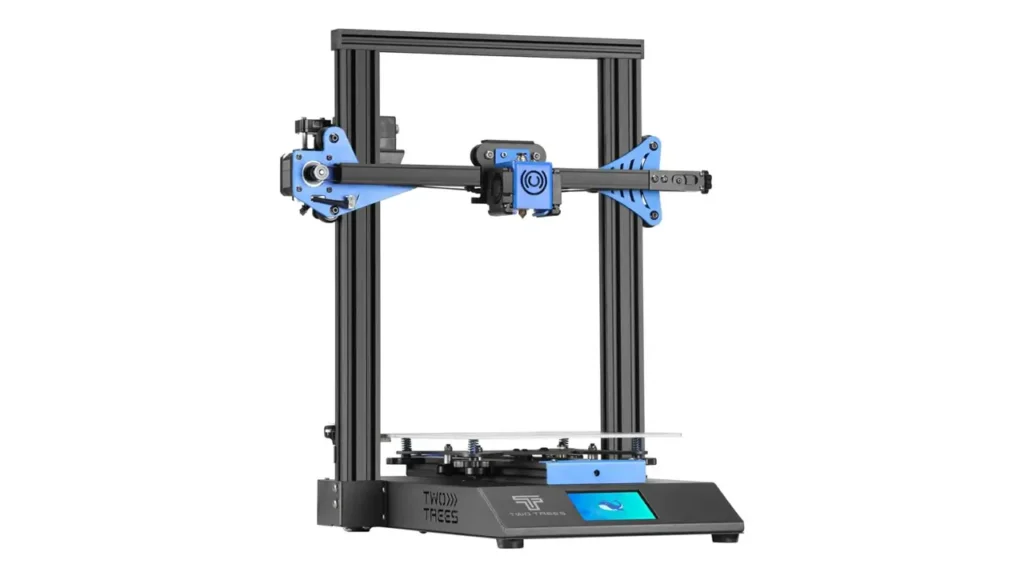
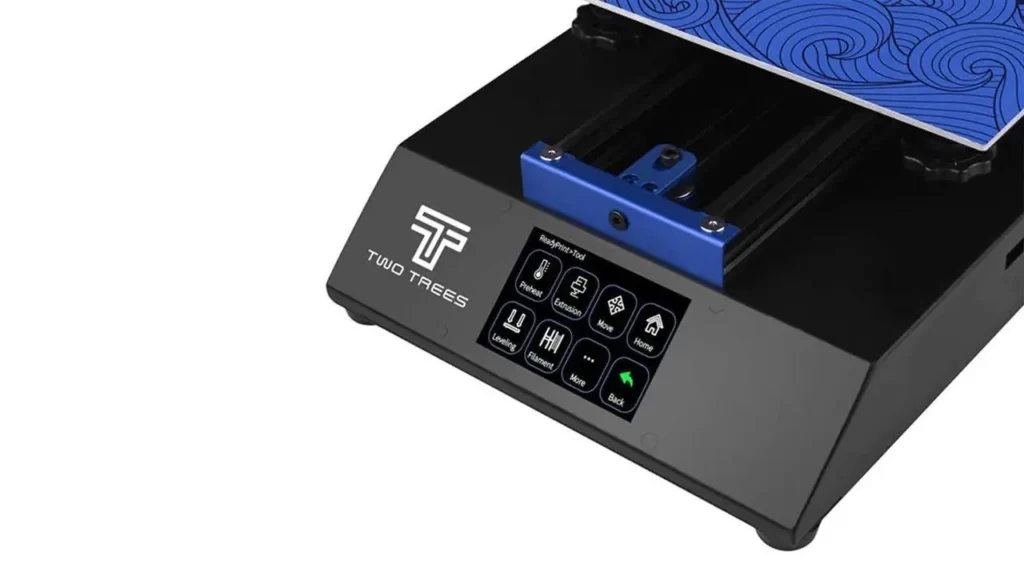
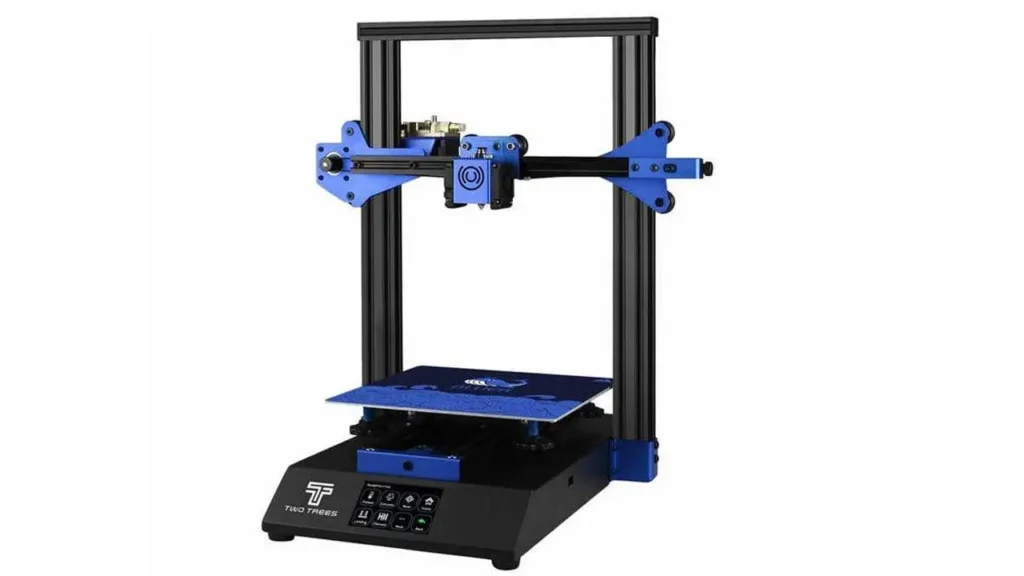
2. Key Features Overview
Before diving into the details, it helps to understand what the TwoTrees BLU-3 V2 brings to the table as a complete package. At first glance, the feature set is genuinely impressive for a machine in its price class.
The printer is built around a dual-gear extruder — a BMG-style mechanism that grips the filament firmly from both sides, delivering consistent feeding force and reducing the risk of slipping or grinding that can plague cheaper single-gear systems. Paired with that is a twin turbofan cooling arrangement that accelerates cooling of both the hotend and the printed model, improving surface quality and reducing the chance of heat-related print failures.
On the electronics side, TwoTrees fitted the BLU-3 V2 with TMC2208 stepper motor drivers operating at 256 microsteps — the same driver chips found in many more expensive machines. These are widely regarded as some of the quietest stepper drivers available, and their inclusion here is one of the printer’s most user-friendly decisions. The motherboard is the MKS Robin Nano V1.2, a well-established platform in the DIY printer community known for stability and firmware flexibility.
The 3.5-inch HD color touchscreen is a significant step up from the small monochrome LCD displays found on older budget printers. It supports multiple languages including English, French, Spanish, German, Korean, and Russian, making the printer genuinely accessible to a global audience. Control over print speed, temperature, material flow, and bed leveling is all handled through this interface with straightforward menu navigation.
Smart features round out the package: filament run-out detection, power loss recovery, optional Wi-Fi connectivity for remote control and monitoring, and belt tensioners on both the X and Y axes for easier mechanical calibration. A 24V, 360W power supply ensures the heated bed and hotend reach target temperatures quickly, cutting down on the waiting time before a print can start.
Tronxy 3D Printers
Shenzhen, China
Reliable FDM Printers
Affordable and reliable 3D printers from Tronxy. Wide range of models for beginners and enthusiasts, with sturdy construction and consistent performance for everyday printing.
3. Build Volume and Design
One of the first things any prospective buyer examines is build volume — how large of an object can the printer actually produce in a single run? The TwoTrees BLU-3 V2 offers a build area of 230 × 230 × 280 mm, which translates to approximately 9.0 × 9.0 × 11.0 inches. That places it comfortably in the mid-size category for desktop FDM printers and gives users a generous workspace for a broad range of projects.
The 280 mm Z-axis height is especially worth noting. Many competing budget machines cap out at 220–250 mm vertically, so the extra clearance here is a genuine practical advantage. You can print taller decorative models, functional enclosures, or layered mechanical assemblies without needing to split geometry across multiple print jobs and manually join the pieces afterward.
The machine’s footprint measures 410 × 400 × 520 mm and it weighs approximately 8 kg, making it compact enough to sit on a standard desk or workbench without dominating the space. The full metal sheet structure gives the frame real rigidity — far stiffer than the acrylic or partial-plastic frames seen on some competitors at a similar price. That rigidity matters more than it might seem: a stiffer frame means less vibration during printing, which directly translates to cleaner surface textures, sharper layer lines, and more dimensionally accurate parts, especially when printing at higher speeds.
The open-frame design is the standard Prusa i3-style layout, familiar to anyone who has spent time in the FDM community. It’s a well-understood, serviceable configuration that makes accessing every part of the printer straightforward. The printbed sits on a heated platform with leveling springs at each corner, giving the user tactile feedback during manual adjustment. CNC-machined XY axis mounting grooves ensure that the motion system is precisely seated, reducing positional error at the hardware level before any software calibration even comes into play.
4. Technical Specifications
Understanding the full specification sheet is essential for making an informed buying decision. Here is a complete breakdown of the TwoTrees BLU-3 V2’s technical data:
| Parameter | Value |
|---|---|
| Technology | FDM (Fused Deposition Modeling) |
| Build Volume | 230 × 230 × 280 mm |
| Layer Thickness | 0.1 – 0.4 mm (100–400 microns) |
| Nozzle Diameter | 0.4 mm (standard) |
| Filament Diameter | 1.75 mm |
| Max Hotend Temperature | 260°C (500°F) |
| Max Bed Temperature | 100°C (212°F) |
| Printing Speed | 20–200 mm/s |
| Print Accuracy | ±0.1–0.2 mm |
| XY Axis Positioning Accuracy | ±0.01 mm |
| Z Axis Positioning Accuracy | ±0.004 mm |
| Stepper Drivers | TMC2208 (256 microstep) |
| Motherboard | MKS Robin Nano V1.2 |
| Display | 3.5-inch HD color touchscreen |
| Connectivity | SD card, optional Wi-Fi module |
| Supported Materials | PLA, ABS, PETG, Wood-fill |
| Slicer Software | Cura, Repetier-Host |
| File Formats | STL, OBJ, G-code |
| Power Supply | 24V / 360W, 110–220V input |
| Machine Dimensions | 410 × 400 × 520 mm |
| Weight | 8.0 kg (17.6 lbs) |
| Operating Environment | 5–40°C, 20–60% humidity |
| Certification | CE certified |
| Warranty | 1 year |
The 260°C hotend maximum is particularly noteworthy. It means the BLU-3 V2 isn’t limited to just PLA — it can comfortably handle ABS and PETG, which require higher processing temperatures. The heated bed reaching 100°C adds further material flexibility, providing the surface warmth necessary to prevent warping on ABS parts.
5. Silent Printing Experience
One of the most immediately noticeable qualities of the TwoTrees BLU-3 V2 when you first power it on is just how quiet it runs. This is entirely thanks to the TMC2208 stepper motor drivers running at 256-microstep interpolation. Unlike older A4988 or DRV8825 drivers — which produce that characteristic grinding, buzzing mechanical noise associated with cheaper 3D printers — the TMC2208 chips use an interpolation technique that smooths out each motor step into 256 sub-steps. The result is dramatically reduced vibration and almost no perceptible motor noise during normal printing.
In practical terms, this means you can comfortably run the BLU-3 V2 in a home office, a bedroom workspace, a dorm room, or a classroom without disturbing anyone nearby. The dominant sound during a print session is the whirring of the cooling fans, which is an unavoidable byproduct of any FDM printer’s thermal management — not the motors themselves.
This feature has a quality benefit beyond comfort, too. Lower vibration during movement means less mechanical resonance transmitted through the frame to the print surface. Resonance is one of the causes of “ringing” or “ghosting” artifacts — wavy patterns that appear on the walls of printed objects near sharp corners or direction changes. By reducing motor-induced vibration at the source, the TMC2208 drivers contribute to cleaner prints in addition to a quieter working environment.
For anyone who remembers older printers that sounded like a fax machine inside a blender, using the BLU-3 V2 for the first time genuinely feels like a step into a different generation of desktop 3D printing.
6. Filament Sensor Functionality
The filament run-out detection sensor on the TwoTrees BLU-3 V2 is one of those features that seems minor until the day it saves you from a completely ruined print — and then you’ll wonder how you ever lived without it.
Here’s the problem it solves. A typical multi-hour print can consume a significant length of filament. If the spool runs out partway through — or if the filament snaps internally somewhere along its path — a printer without a sensor will simply keep running, moving the print head through empty air and depositing nothing. You come back after several hours to find the machine faithfully completing its motions over a half-finished object. All that time and material is wasted.
The BLU-3 V2’s filament sensor sits in the filament path before the extruder. It detects the presence or absence of filament passing through it. The moment material stops flowing — whether due to an empty spool, a snapped strand, or a severe tangle on the reel — the printer pauses automatically. It parks the print head in a safe position, alerts you through the touchscreen, and waits for you to load a new spool and resume from exactly where it stopped.
For budget-conscious users printing with moderately priced filament, this kind of material conservation is genuinely valuable. For anyone running longer prints — detailed architectural models, functional mechanical parts, large decorative pieces — it’s practically essential. The fact that this capability appears at the BLU-3 V2’s price point is one of the clearest indicators that TwoTrees designed this machine with real-world usability in mind, not just a competitive spec sheet.
7. Power Loss Recovery System
Power loss recovery is the second major reliability safeguard built into the TwoTrees BLU-3 V2, and it works hand-in-hand with the filament sensor to give users genuine confidence when running long print jobs.
FDM printing is a time-intensive process. A moderately complex object might take 4–8 hours to complete. A large, detailed model can run for 12–20 hours or more. During any of those hours, a power cut — whether from a grid failure, a tripped breaker, or someone accidentally unplugging the wrong socket — would ordinarily mean starting from zero. Everything printed so far, gone. All that time and filament, wasted.
The BLU-3 V2 addresses this with a power recovery module that continuously logs the printer’s current state to non-volatile memory as the print progresses. If power is suddenly cut, the system records the precise layer, position, temperature settings, and progress data at that moment. When power is restored, the printer reads that saved state, reheats the bed and nozzle to the correct temperatures, and offers to resume the print from the exact layer where it was interrupted.
In practice, the join between the interrupted layer and the resumed layers is occasionally visible on the finished object — a faint line or slight texture change — but the print is complete and functional rather than wasted. For most applications, that trade-off is entirely acceptable. For anyone who has lost a long print to an unexpected power interruption before, the difference between a recoverable print and a ruined one feels enormous.
This feature also reduces the stress of printing in environments where power reliability isn’t guaranteed — studio workshops, shared maker spaces, or regions with less stable electricity infrastructure.
8. Setup and Ease of Use
Assembling the TwoTrees BLU-3 V2 is a semi-assembled process, meaning the major sub-assemblies — the frame, the Z-axis gantry, the print head — arrive pre-built, and you connect them together following the included instructions. Most users report completing the mechanical assembly in 30–60 minutes. The pre-installed wiring harnesses reduce the chance of incorrect connections, and labeled cables make it clear what plugs where.
Once physically assembled, the printer is powered on and the first task is bed leveling. The BLU-3 V2 uses a manual leveling approach guided through the 3.5-inch touchscreen. The interface walks you through adjusting each of the four corner springs until the nozzle-to-bed gap is consistent across the surface — typically calibrated using a standard sheet of paper as a feeler gauge. Belt tensioners on the X and Y axes make it straightforward to dial in the correct belt tension without special tools.
The touchscreen itself deserves a mention for usability. It’s responsive, logically organized, and supports language switching for non-English speakers. Navigation through print settings, temperature controls, speed adjustments, and the leveling wizard is intuitive enough that a first-time user can explore the interface confidently without consulting the manual at every step.
Printing from an SD card is the primary workflow — you slice your model in Cura or Repetier-Host on a computer, export the G-code to the card, insert it into the printer, and select the file through the menu. The optional Wi-Fi module, if purchased separately, adds wireless file transfer and remote monitoring, which is a convenient upgrade for users who want to check print progress from another room or manage print queues remotely.
For absolute beginners, the learning curve is gentle. The machine doesn’t demand deep technical knowledge to produce good results from the first session. Experienced users who want to tune things further — adjusting retraction settings, experimenting with print speeds, exploring different slicer profiles — will find the open firmware architecture accommodating.
Polimerukr.com
Ukraine
3D Printing Materials & Supplies
Your trusted source for high-quality 3D printing materials in Ukraine. Wide selection of filaments, resins, and accessories for all printer types with fast local shipping.
9. Performance and Print Quality
When it comes to what actually matters most — the quality of the objects it produces — the TwoTrees BLU-3 V2 performs solidly for its category.
At standard print settings (50–80 mm/s, 0.2 mm layer height), the BLU-3 V2 delivers clean, well-defined layer lines with good dimensional accuracy in the ±0.1–0.2 mm range. Vertical walls are consistent. Overhangs up to about 45–50 degrees print cleanly without excessive drooping. Bridges across short spans are handled well thanks to the twin turbofan cooling system, which moves enough air to solidify deposited filament quickly before it can sag.
The dual-gear extruder is a meaningful upgrade over the single-drive wheel arrangements found on many machines at this price. Dual-drive extruders grip the filament from both sides simultaneously, which significantly reduces slippage under extrusion pressure. In practical terms, this produces more consistent extrusion width, better layer adhesion, and fewer under-extrusion artifacts on complex geometries or rapid direction changes.
PLA is the most natural material pairing and produces the best results — smooth surfaces, reliable first-layer adhesion on the heated bed, and a wide tolerance for varied print settings. PETG prints well with appropriate temperature calibration, showing good transparency and layer bonding. ABS is possible with the 100°C bed and 260°C hotend, though the open-frame design means some attention to draft-free environment is advisable to prevent warping on larger parts.
Compared to similarly priced alternatives, the BLU-3 V2 holds its own comfortably. The combination of the TMC2208 drivers, dual-gear extruder, and rigid metal frame gives it a meaningful edge over machines that cut corners on these components. The print quality ceiling for a well-tuned BLU-3 V2 is genuinely respectable — not at the level of an enclosed, high-speed CoreXY machine, but entirely appropriate for prototyping, hobbyist projects, and functional prints.
10. Final Verdict
So — is the TwoTrees BLU-3 V2 worth buying in 2026?
The answer, for the right user, is a confident yes.
What this printer offers is a well-rounded package of features that punch clearly above the typical budget FDM experience. Silent TMC2208 drivers make it genuinely livable in home environments. The filament run-out sensor and power loss recovery system turn it into a machine you can actually trust with long, unattended print jobs. The dual-gear extruder and rigid metal frame bring print quality up to a standard that would have required spending considerably more a few years ago. And the 3.5-inch color touchscreen makes daily operation pleasant rather than frustrating.
Where does it fall short? The open-frame design limits its ability to handle temperature-sensitive materials like ABS in environments with air movement. Manual bed leveling, while guided by the touchscreen, requires a little patience to master. The Wi-Fi module is an additional purchase rather than built-in. Customer service experiences from TwoTrees have been mixed based on user feedback, and sourcing replacement parts can take time depending on your region.
Here is a quick summary comparison of what the BLU-3 V2 offers across key user priorities:
| Category | Rating | Notes |
|---|---|---|
| Build Volume | ★★★★☆ | 230×230×280 mm — generous for the price |
| Print Quality | ★★★★☆ | Clean results with proper calibration |
| Noise Level | ★★★★★ | TMC2208 drivers — exceptionally quiet |
| Reliability Features | ★★★★★ | Filament sensor + power recovery |
| Ease of Use | ★★★★☆ | Good UI, manual leveling requires patience |
| Material Compatibility | ★★★★☆ | PLA, PETG, ABS, Wood-fill supported |
| Value for Money | ★★★★★ | Feature set far exceeds typical price expectations |
The TwoTrees BLU-3 V2 is best suited for: beginners who want a capable machine without a steep learning curve, home users who value quiet operation in shared living spaces, hobbyists who run longer prints and need the reassurance of filament sensing and power recovery, and educators looking for a reliable classroom machine that won’t break the budget.
It’s less ideal for: users who want to print engineering-grade materials requiring enclosures, those who need absolute plug-and-play simplicity with no calibration at all, or professional environments requiring the consistency and speed of a dedicated industrial machine.
As an entry-level FDM 3D printer in 2026, the TwoTrees BLU-3 V2 represents a thoughtfully engineered, genuinely reliable option that delivers features most beginners didn’t expect to find until they spent twice as much. It earns its place in the conversation as one of the best value propositions in affordable desktop 3D printing — and for the right user, it’s an easy recommendation.
🇬🇧 English
Great review of the TwoTrees BLU-3 V2! The article is well-structured, informative, and easy to follow. I especially liked the detailed breakdown of features like the filament sensor and silent drivers. This site consistently delivers high-quality 3D printer insights.
🇪🇸 Español
Excelente análisis del TwoTrees BLU-3 V2. El contenido es claro, bien organizado y muy útil tanto para principiantes como para usuarios avanzados. Me gustó mucho la explicación sobre la recuperación tras cortes de energía. Muy buen sitio web.
🇸🇦 العربية
مراجعة رائعة لطابعة TwoTrees BLU-3 V2. المقال منظم بشكل ممتاز ويحتوي على معلومات مفيدة ودقيقة. أعجبني شرح الميزات مثل مستشعر الفتيل والعمل الهادئ. الموقع موثوق ويقدم محتوى احترافي.
🇨🇳 中文
这篇关于TwoTrees BLU-3 V2的评测非常专业,结构清晰,信息详细。对功能的解释非常到位,尤其是断电恢复和静音驱动部分。这个网站内容质量很高,值得关注。
🇫🇷 Français
Très bon article sur la TwoTrees BLU-3 V2. Le contenu est clair, bien structuré et riche en informations utiles. J’ai particulièrement apprécié les détails techniques et les conseils pratiques. Site fiable et professionnel.
🇩🇪 Deutsch
Sehr guter Testbericht über den TwoTrees BLU-3 V2. Der Artikel ist übersichtlich, informativ und leicht verständlich. Besonders die Erklärung zu den leisen Treibern und der Filamentsensor-Funktion ist gelungen. Empfehlenswerte Website.
Discover more from bestchina3dprinters.com
Subscribe to get the latest posts sent to your email.
