 Skip to content
 Introduction
If you have ever wished a single desktop machine could 3D print your ideas, add a splash of color, and then burn a design into a piece of wood, the Tronxy XY-3 SE was built with exactly that daydream in mind. In a market crowded with single-purpose printers, this model stands out by folding three creative tools into one compact frame: standard FDM 3D printing, optional dual-color printing through a special toolhead, and laser engraving with a swappable module.
Even though it launched a few years ago, the XY-3 SE remains an interesting option for anyone who values flexibility over deep specialization. It occupies a friendly middle ground: affordable enough for beginners and hobbyists, yet capable enough to keep tinkerers busy for a long time. In this Tronxy XY-3 SE review, we will walk through its design, technical specifications, print quality, engraving abilities, dual-extrusion capability, software, and the honest pros and cons, so you can decide whether this multifunction machine belongs on your workbench. Everything here is drawn from Tronxy’s official product information and specifications.
Design and Build Quality
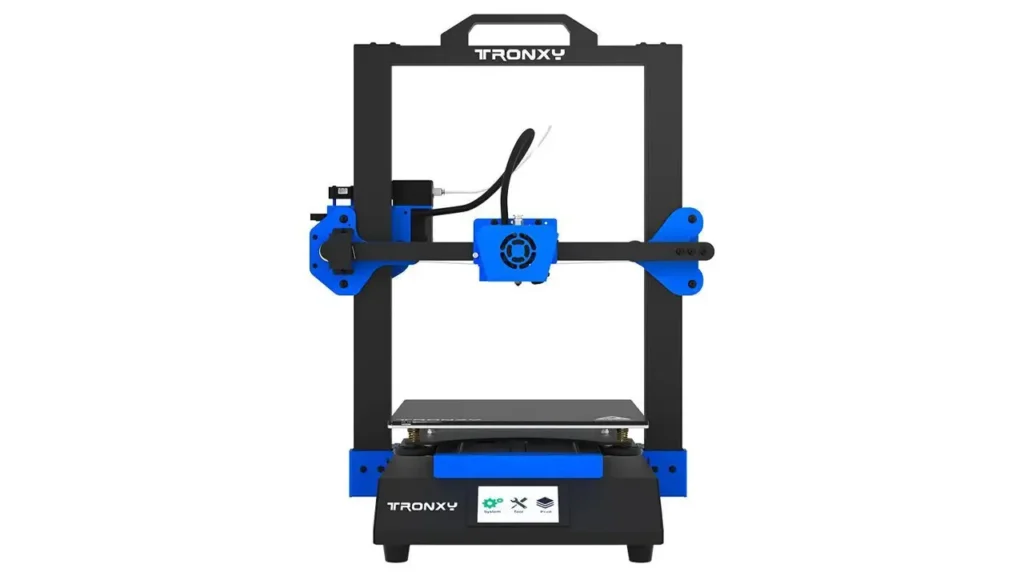
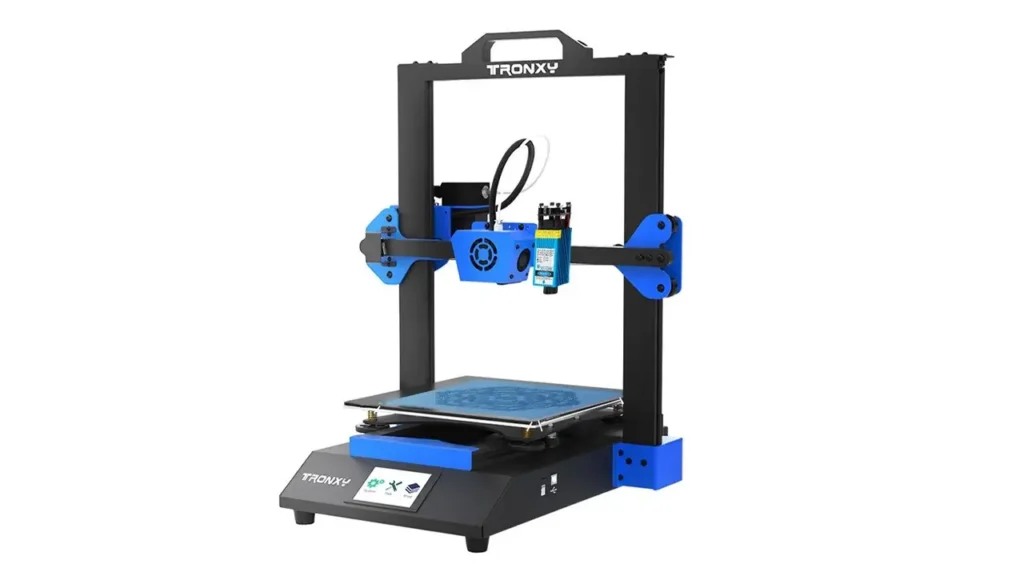
The first thing that strikes most people about the XY-3 SE is how solid it feels. According to Tronxy, the frame is built from aluminum profile combined with rigid sheet metal, which gives the machine a corrosion-resistant, water-repellent, and pleasantly stiff structure. That rigidity matters more than it sounds: a printer that flexes or wobbles during motion introduces artifacts into your prints, so a stable chassis is one of the quiet foundations of good output.
A key structural highlight is the dual Z-axis design. Instead of relying on a single lead screw to raise and lower the gantry, the XY-3 SE uses two Z-axis screws driven by dual motors, paired with a synchronous timing belt. Tronxy explains that this arrangement keeps the two sides moving together, reduces the risk of the gantry sagging or losing steps, and helps the printer maintain accuracy layer after layer. For a machine at this price, that is a genuinely welcome touch.
Interaction happens through a 3.5-inch full-color HMI touchscreen, which Tronxy describes as an interactive Human Machine Interface with an estimated print-time display so you are not constantly checking a progress bar. The screen sits front and center and makes menu navigation, preheating, leveling, and printing straightforward for newcomers.
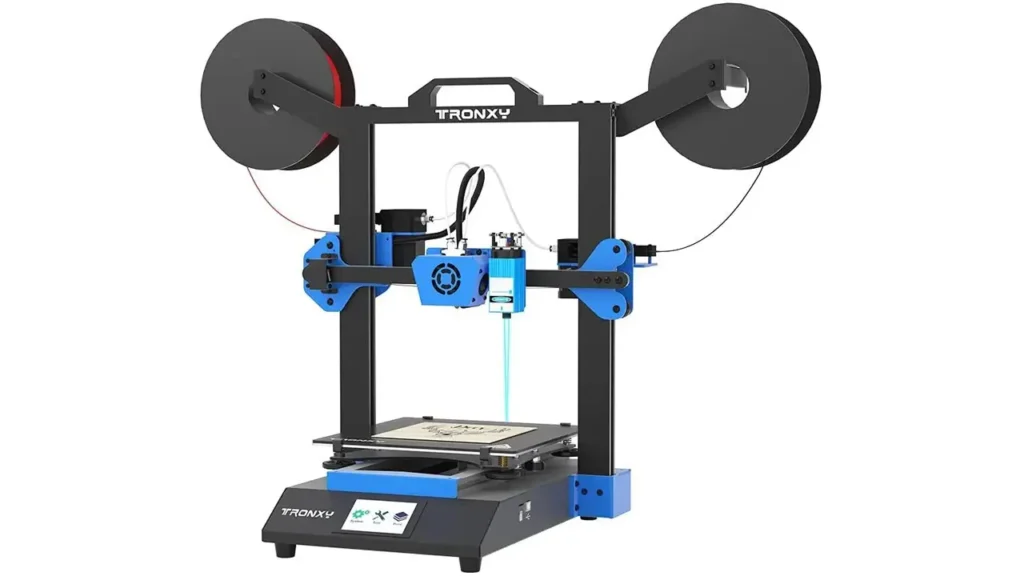
What truly defines this multifunction 3D printer is its modular toolhead concept. The same carriage can hold a single-filament print head, a dual-color extruder, or a 500mW laser module, letting you switch the machine’s personality depending on the project.
Assembly is refreshingly painless. Tronxy notes the printer arrives as two main modular parts that come together with roughly 10 screws, and that a typical build takes only a few minutes before you plug in and start. A carry handle at the top and tidy DuPont cable connections round out a design that clearly aims to lower the barrier to entry.
Technical Specifications
Before diving into performance, it helps to see the numbers in one place. The table below summarizes the core Tronxy XY-3 SE specs as published by Tronxy and its official listings. It is styled for easy reading on a phone.
| Feature | Specification |
| Technology | FDM (Fused Deposition Modeling) |
| Build volume | 255 × 255 × 260 mm |
| Laser engraving area | 190 × 255 mm |
| Layer thickness | 0.1 – 0.3 mm |
| Print speed | 20 – 150 mm/s (60 mm/s recommended) |
| Positioning accuracy | X/Y: 0.00625 mm · Z: 0.00125 mm |
| Nozzle diameter | 0.4 mm |
| Max nozzle temperature | 275 °C |
| Max heated bed temperature | 100 °C |
| Supported materials | PLA, ABS, PETG, TPU, Wood |
| Extruder | Titan extruder |
| Laser power | 500 mW (swappable module) |
| Display | 3.5-inch HD color touchscreen |
| Drivers | 32-bit TMC silent drivers (below 50 dB) |
| Build surface | Lattice (frosted) glass platform |
| Frame material | Aluminum profile + sheet metal |
| Machine dimensions | 420 × 440 × 510 mm |
| Power supply | Input 110/220V · Output 24V 360W |
| Certification | CE, FCC, RoHS |
Beyond the raw numbers, several convenience features deserve a mention. The XY-3 SE includes auto bed leveling via a TR sensor that Tronxy says can detect glass, metal, and opaque surfaces. It also offers power-off protection, which saves your progress during an outage and resumes once power returns, and a filament runout sensor that pauses printing when material runs out so you lose nothing. The frosted lattice glass bed is designed for strong adhesion during printing and easy model removal once cooled.
3D Printing Performance
At its heart, this is still a 3D printer, so print quality is where it earns most of its keep. The XY-3 SE uses a Titan-style extruder that Tronxy highlights for its compatibility with a broad range of filaments. In practice, that means you can move comfortably between the most common materials depending on your project’s needs.
Here is a quick overview of how the main filament families fit into the picture, based on the printer’s temperature range and Tronxy’s stated material support:
| Material | Best for | Notes |
| PLA | Beginners, detailed models | Easy to print, low warping |
| PETG | Functional, durable parts | Tougher and more flexible than PLA |
| TPU | Flexible objects | Print slowly for best results |
| ABS | Heat-resistant parts | Benefits from a warm, draft-free room |
| Wood-fill | Decorative pieces | Attractive natural finish |
When it comes to dimensional accuracy, the specifications are encouraging. Tronxy quotes positioning precision of 0.00625 mm on the X and Y axes and 0.00125 mm on the Z axis, and users testing calibration cubes have reported measurements landing very close to the target 20 mm on each side. That level of accuracy, combined with the stabilizing dual Z-axis and timing belt, helps the printer keep layers consistent and walls square.
On speed, the machine supports a range of 20 to 150 mm/s, with Tronxy recommending around 60 mm/s as the sweet spot. That is a sensible middle gear: fast enough to finish everyday prints in reasonable time, slow enough to preserve quality. Layer thickness runs from 0.1 to 0.3 mm, so you can dial in fine detail for display pieces or thicker, quicker layers for rough prototypes.
Layer consistency benefits from the heated glass bed and auto leveling, which together promote a clean first layer and reliable adhesion. As with most machines that use a longer filament path, complex prints with lots of retraction call for careful tuning, but for straightforward models the XY-3 SE delivers dependable, good-looking results.
Laser Engraving Features
The laser module is what turns this from a 3D printer with a laser engraver into a genuine hybrid creative tool. Tronxy ships a 500mW swappable laser head that mounts onto the toolhead area, and once installed it lets you burn designs into a variety of materials.
According to Tronxy, the laser can engrave on surfaces such as wood, plastic, fabric, leather, plywood, acrylic, and even steel, creating contrasting images and text. The engraving area is listed at 190 × 255 mm, slightly smaller than the full print bed but still generous for coasters, signs, gift tags, personalized tools, and decorative panels. This makes it a capable entry point into desktop laser engraving without buying a separate machine.
Switching into engraving mode involves attaching the laser module and connecting it so the printer’s fan control channel drives the laser instead. It is a modular swap rather than an instant toggle, so a little setup time is part of the routine.
Safety deserves real emphasis with any laser. Always wear the protective eyewear, work in a well-ventilated space so fumes and smoke can escape, and never engrave materials containing PVC, since burning PVC releases harmful chlorine gas. Treating the laser with respect keeps the experience both creative and safe.
In terms of results, a 500mW diode laser is best understood as an entry-level engraver. It handles surface engraving on softer materials nicely and produces satisfying contrast on wood and similar surfaces, though it is not intended for heavy cutting or dense industrial work. For hobby projects, personalization, and light craft work, the precision and workflow are perfectly enjoyable once you learn the basics.
Dual Extrusion Capability
One of the most eye-catching abilities of this Tronxy 3-in-1 printer is its optional dual-color toolhead. Rather than a traditional two-nozzle setup, Tronxy uses a clever single-nozzle “2-in-1-out” design: two filaments of different colors feed into one extruder and merge through a single nozzle without mixing into a muddy blend.
The appeal is obvious. With the dual-color toolhead installed, you can produce two-tone models, add contrasting text or logos, or combine colors in a single print without resorting to filament swaps mid-print or pausing at a set height. Tronxy positions this as a way to unlock multi-color creativity that single-extruder machines simply cannot match at this price.
The dual-extruder head also opens the door to multi-material combinations, provided the two filaments print well within compatible temperature ranges. Getting the loading sequence right is the main learning curve: you generally load the primary filament until it extrudes cleanly, then feed the secondary filament until it meets the first, and back it off slightly. Once that routine clicks, the dual head runs smoothly.
There are limitations worth setting expectations around. Because both filaments share one nozzle, true simultaneous dual-material printing works best when the materials are thermally similar. Color changes involve purging, and the setup demands more slicer configuration than single-color printing. Tronxy’s own bundled software profiles make this easier, though it remains a feature aimed at users willing to experiment rather than absolute beginners on day one.
Software Compatibility
Good hardware needs approachable software, and the XY-3 SE keeps things familiar. Tronxy supplies its own Tronxy Slicer, which is essentially a customized version of the widely used Cura slicer. If you have used Cura before, you will feel right at home; if you have not, it is a gentle place to learn the ropes.
The printer also works with mainstream slicers. Owners report using Cura and Simplify3D, and the machine accepts standard model formats. Your typical workflow looks like this: design or download a model in STL or OBJ format, slice it into G-code with your chosen slicer, transfer the file to the printer, and start the job from the touchscreen.
The table below lays out the everyday software workflow in plain terms:
| Step | What happens |
| Model file | Create or download an STL or OBJ file |
| Slicing | Convert to G-code in Tronxy Slicer, Cura, or Simplify3D |
| Transfer | Load the G-code via SD card |
| Start and monitor from the touchscreen |
Firmware plays a role too. Tronxy has released firmware updates over the machine’s life, and newer versions add helpful quality-of-life touches, such as adjustable Z height mid-setup and clearer highlighting of high and low points during bed leveling. One practical note from Tronxy: modifying the mainboard firmware yourself can affect warranty coverage, so it is wise to stick with official firmware unless you know exactly what you are doing.
Setting up the dual-color and laser workflows takes a little reading, since these advanced features require correct profiles. Tronxy includes PDF guides and sample files on the SD card to help you get started with two-color printing, laser engraving, and test prints.
Advantages and Disadvantages
No machine is perfect, and part of a fair Tronxy XY-3 SE review is being clear-eyed about where it shines and where it asks for patience. The strength of this multifunction 3D printer is versatility; the trade-offs mostly come from packing so much capability into one affordable package.
| Pros | Cons |
| Three machines in one: printing, dual color, and laser | Toolhead swapping takes time between modes |
| Affordable for the range of features offered | 500mW laser is entry-level, not for cutting |
| Modular, upgradeable design | Setup and calibration require some patience |
| Quiet TMC drivers (under 50 dB) | Dual-color mode has a learning curve |
| Generous 255 × 255 × 260 mm workspace | Advanced slicer profiles need manual setup |
On the positive side, the value proposition is hard to argue with. You get a capable printer, a color-mixing option, and an engraver in one purchase, all housed in a sturdy metal frame with silent motion and a comfortable build volume. The quiet 32-bit TMC drivers make it pleasant to run at home or in an office, since Tronxy rates operation below 50 dB.
The drawbacks are the natural cost of that ambition. Switching between printing, dual color, and laser engraving means physically changing toolheads, which is not instant. The laser is best treated as a fun bonus rather than a professional cutting tool. And like most machines in this category, getting truly excellent results, especially with the dual extruder, rewards those willing to spend time on calibration and slicer tuning.
Who Should Buy the Tronxy XY-3 SE?
The XY-3 SE is not trying to be the fastest printer or the most powerful engraver on the market. Its charm is breadth, and that makes it a strong match for specific kinds of users. Pricing varies by version and region, but the machine has historically been positioned as a budget-friendly bundle, with the standard single-head configuration sitting at the affordable end and the full 3-in-1 kit adding the dual-color and laser toolheads for more money.
Makers and hobbyists are the natural audience. If you love experimenting and want one machine that can pivot between prototyping, decorative color prints, and engraving personalized gifts, this printer keeps your options open without draining your budget. The modular design also rewards curious tinkerers who enjoy upgrading and customizing their gear over time.
Schools and educational settings are another good fit. A single desktop laser engraving machine that doubles as a 3D printer lets students explore multiple fabrication techniques, and the friendly touchscreen and quick assembly lower the intimidation factor for classrooms.
DIY creators and small workshops round out the list. For a maker space, a home studio, or a small business dabbling in custom products, the combination of a roomy build area, dual-color capability, and light engraving covers a surprising amount of creative ground from one footprint. Anyone who prioritizes cost-effective versatility over specialized peak performance will feel this machine was made for them.
AndreevWebStudio.com
Professional web development and design services. Custom WordPress sites, landing pages, e-commerce solutions, and 3D printing content creation for businesses and creators.
- • WordPress Development
- • Custom Web Design
- • E-Commerce Solutions
- • 3D Printing Content
Final Verdict
The Tronxy XY-3 SE succeeds at exactly what it sets out to do: bring three creative workflows into one approachable, affordable machine. Across FDM printing, dual-color output, and laser engraving, it delivers dependable, satisfying results, backed by thoughtful touches like a dual Z-axis, quiet TMC drivers, auto leveling, a heated glass bed, power-off protection, and a filament runout sensor.
It is important to frame expectations correctly. This is a jack-of-all-trades rather than a master of one. The 500mW laser is an entry-level engraver, the dual-color mode has a genuine learning curve, and swapping toolheads asks for a little patience. But none of that undercuts the core appeal. For the price, few machines offer this much range, and the interchangeable heads for FDM printing, laser engraving, and optional dual-extrusion workflows make it a legitimate 3-in-1 creative platform rather than a printer with gimmicks bolted on.
If you want a single specialized tool tuned to perfection, there are narrower machines to consider. But if you value versatility, enjoy learning, and want one desktop companion that can print, add color, and engrave, the Tronxy XY-3 SE earns a warm recommendation. It is a friendly, capable, and genuinely fun gateway into the wider world of digital making, and it remains a compelling choice for anyone chasing creative flexibility over maximum specialization.
James Carter 🇬🇧
Easily the most complete Tronxy XY-3 SE review I’ve come across. The breakdown of the 3-in-1 setup finally made sense to me, printing, dual-color, and the 500mW laser all explained clearly. The 255 × 255 × 260 mm build volume table and the pros/cons section were honest, not just marketing. Loved that the spec tables render perfectly on my phone. This site is now my go-to for budget 3D printer research!
↗ bestchina3dprinters.comLucía Martínez 🇪🇸
Un análisis excelente de la Tronxy XY-3 SE. La explicación de la máquina 3 en 1 (impresión FDM, doble color y grabado láser de 500 mW) es clarísima, incluso para principiantes. Me encantó el gran volumen de impresión de 255 × 255 × 260 mm y la sección de ventajas y desventajas, muy honesta. Las tablas de especificaciones se ven perfectas en el móvil. Sin duda, este sitio se ha convertido en mi referencia favorita para impresoras 3D económicas.
↗ bestchina3dprinters.comأحمد الحربي 🇸🇦
مراجعة رائعة وشاملة لطابعة Tronxy XY-3 SE ثلاثية الوظائف. أعجبني شرح نظام 3 في 1 الذي يجمع بين الطباعة ثلاثية الأبعاد والطباعة ثنائية اللون والنقش بالليزر بقوة 500 مللي واط، إضافة إلى حجم الطباعة الكبير 255 × 255 × 260 مم. المعلومات دقيقة ومأخوذة من مصادر رسمية، والجداول تظهر بشكل ممتاز على الهاتف. من أفضل المواقع المتخصصة في الطابعات ثلاثية الأبعاد الاقتصادية. أنصح بزيارته بشدة!
↗ bestchina3dprinters.com王芳 🇨🇳
对Tronxy XY-3 SE三合一3D打印机的评测非常专业、全面。文章详细介绍了三合一功能,包括FDM打印、双色打印和500mW激光雕刻,还有255 × 255 × 260毫米的大打印尺寸,内容来自官方资料,信息可靠。规格参数表格在手机上显示得非常清晰,优缺点分析也很客观,帮我轻松做出了选择。是入门级3D打印爱好者不可错过的宝贵资源!
↗ bestchina3dprinters.comCamille Dubois 🇫🇷
Un article remarquablement documenté sur la Tronxy XY-3 SE. Les explications sur la machine 3 en 1 (impression FDM, double couleur et gravure laser de 500 mW) ainsi que le grand volume d’impression de 255 × 255 × 260 mm sont parfaites. Le tableau des spécifications s’affiche très bien sur mobile et la section avantages/inconvénients est vraiment honnête. On sent une vraie expertise sur cette machine polyvalente. Ma référence pour les imprimantes 3D abordables !
↗ bestchina3dprinters.comLukas Schmidt 🇩🇪
Ein hervorragender Testbericht über die Tronxy XY-3 SE — sachlich, präzise und gut strukturiert. Besonders überzeugend sind die Erklärungen zum 3-in-1-Konzept (FDM-Druck, Zweifarbdruck und 500-mW-Lasergravur), das große Bauvolumen von 255 × 255 × 260 mm sowie die leisen TMC-Treiber. Die Tabellen sind auch auf dem Smartphone bestens lesbar, und der Vor- und Nachteile-Abschnitt ist ehrlich. Eine ausgezeichnete Ressource für alle Einsteiger im 3D-Druck. Absolute Empfehlung!
↗ bestchina3dprinters.com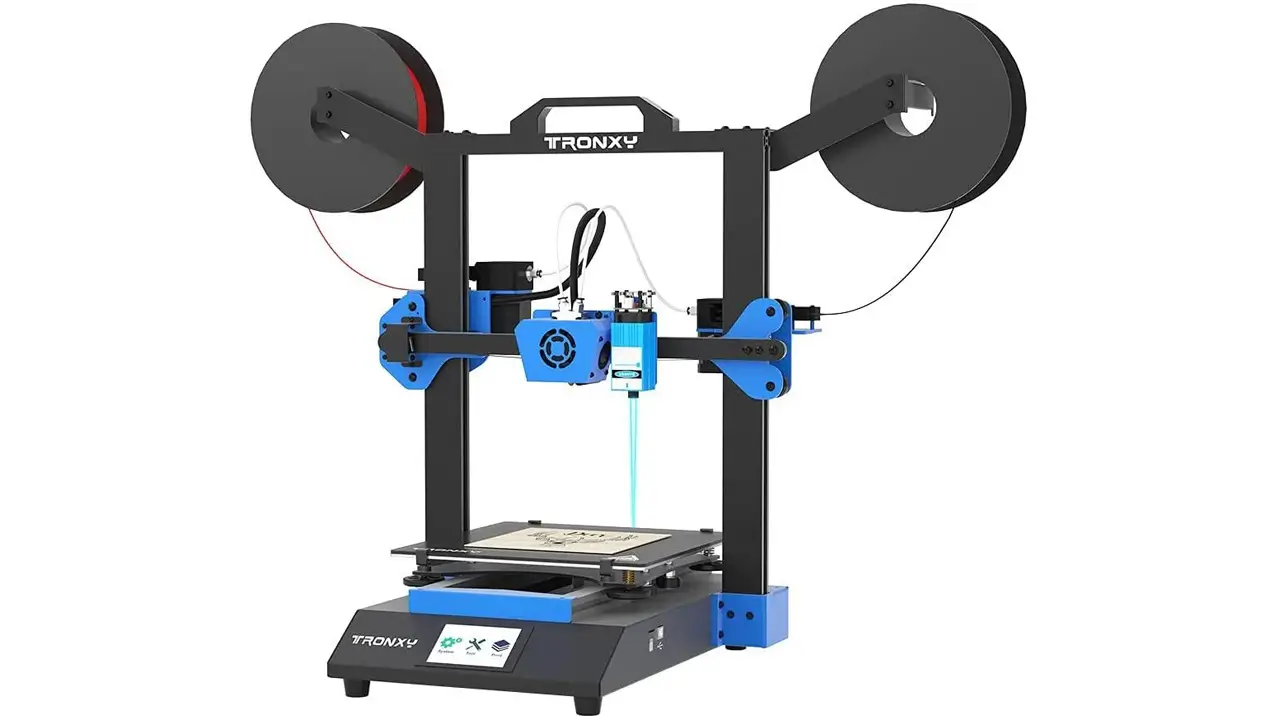
Tronxy XY-3 SE
Reliable entry-level 3D printer from Tronxy. Simple setup, stable printing, and affordable pricing perfect for beginners starting their 3D printing journey.
- • Beginner-Friendly Design
- • Easy Assembly
- • Stable Printing
- • Affordable Price
Discover more from bestchina3dprinters.com
Subscribe to get the latest posts sent to your email.
