 Skip to content
 Introduction to Flashforge Creator 5
Flashforge Creator 5 Review. If you’ve been keeping an eye on the 3D printing world lately, there’s a good chance you’ve already heard some buzz around the Flashforge Creator 5. And honestly? The buzz is well-earned. This machine has arrived at exactly the right moment — when the market for capable, multi-material 3D printers is growing fast, yet genuinely affordable options are still pretty rare.
The Flashforge Creator 5 3D printer represents a bold new direction from Flashforge, a company that has been building desktop 3D printers since 2011 and knows exactly what professionals need from a workhorse machine. Rather than sticking to the tried-and-tested dual-extrusion formula, they’ve gone all-in on a tool-changing architecture — four independent toolheads, high speed, and a workflow designed to minimize wasted filament and wasted time.
This printer is not aimed at the casual hobbyist tinkering on weekends. It’s built for engineers, designers, small studios, educators, and businesses who print frequently and care about results. It bridges the gap between consumer-grade desktop printers and expensive industrial systems, offering a genuinely compelling mix of capability and price. Let’s dig in and explore everything this machine brings to the table.


Flashforge Creator 5 Review Overview
Before we get into the details, here’s the honest summary: the Flashforge Creator 5 review picture is one of a machine that delivers impressive innovation at an aggressive price point, with a few things to keep in mind before committing.
What works brilliantly: The FlashSwap tool-changing system is genuinely fast — Flashforge demonstrated a 7-second toolhead swap at TCT Asia 2026, which is faster than competing systems. The four independent toolheads open up multi-material printing in a way that filament-switching systems simply cannot match for efficiency. The CoreXY motion system paired with 600 mm/s top-end print speed puts this printer in the performance tier you’d expect at a much higher price. And the early-bird pricing starting from $649 is eye-catching in a market where the closest competition (Prusa XL) starts at over $2,000.
What to keep in mind: At launch, independent reviews are still limited since the printer began shipping in early May 2026. The “zero purge waste” claim from Flashforge, while mostly accurate in spirit, still benefits from a small prime tower in practice — as is the case with all tool-changer systems. The open version (Creator 5) is not suitable for engineering-grade materials like ABS or Nylon without a stable ambient environment, which is why the Creator 5 Pro exists.
Who is this for? Makers and prosumers who want multi-color capability without the filament waste of AMS systems. Small studios and design agencies doing frequent color-rich prototyping. Businesses running small print farms who need consistent, efficient output.
Flashforge Creator 5
Professional 3D Printer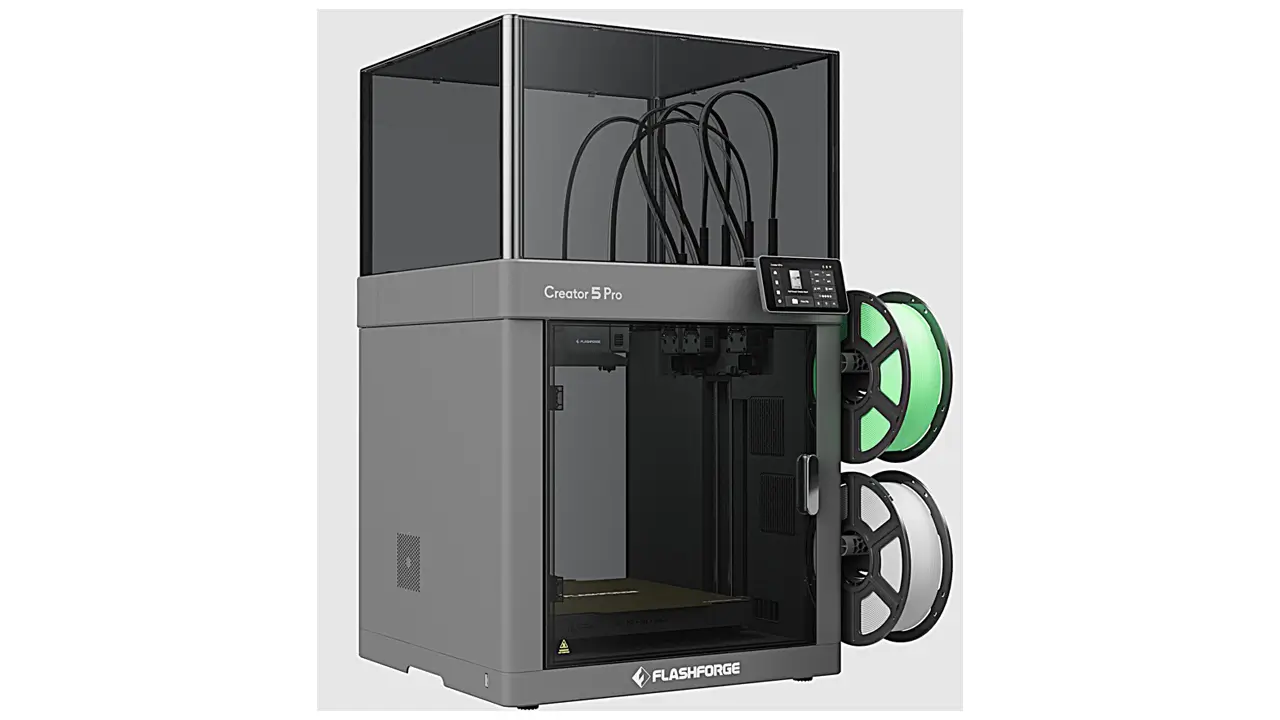
Professional FDM Printer
Next-generation professional 3D printer from Flashforge. Advanced CoreXY mechanics, independent dual extrusion, and intelligent features for education, business, and professional applications.
Key Features of the Flashforge Creator 5
The Flashforge Creator 5 features a genuinely impressive collection of capabilities that separate it from the standard desktop printing crowd. Here’s a breakdown of what makes this machine special.
FlashSwap Tool-Changing System This is the headline feature. Instead of switching filaments through a single nozzle (which requires purging, creates waste, and takes time), the Creator 5 physically swaps entire toolheads. Each toolhead has its own nozzle, extruder, and heater — which means there’s no cross-contamination between materials and switching is nearly instantaneous. Flashforge parks the four toolheads on the right-hand side of the printer, which is a unique design choice compared to systems like the Prusa XL that park tools at the rear. This makes servicing much easier in tight print-farm arrangements.
Up to 500% Faster Multi-Color Printing Flashforge’s claim of multi-color printing up to 500% faster compared to AMS-style systems isn’t hollow marketing. When you consider that a Bambu Lab AMS or Prusa MMU requires 30 to 90+ seconds per filament change — including retraction, loading, and purging — and multiply that by hundreds of color swaps in a complex model, the time savings of a tool-changer system become very real and very significant.
High-Speed CoreXY Motion The Creator 5 uses a CoreXY motion system capable of 600 mm/s print speed and acceleration up to 30,000 mm/s². These are specifications that put it firmly in high-performance territory for 2026.
Fully Automatic Calibration and Leveling The printer handles its own calibration automatically, including multi-point mesh bed leveling. This reduces setup time considerably and means you don’t need to re-calibrate before every print — only during initial setup, after nozzle replacement, or after a bed collision.
1080p Built-in Camera A 1080p camera at 30fps is built in for remote monitoring and print surveillance. This is a genuinely useful addition for anyone managing multiple machines or printing overnight.
Smart Compensation and Detection The Creator 5 series includes intelligent detection features for print quality assurance, helping to catch issues early rather than letting a failed print run for hours unattended.
Software Ecosystem The printer is compatible with Flash Studio (Flashforge’s own desktop slicer), Orca-Flashforge (a community-supported fork), and the Flash Maker mobile app. This gives users flexibility depending on their workflow preferences.
Technical Specifications
Understanding the full Flashforge Creator 5 specs is essential for evaluating whether this machine fits your needs. Here is a comprehensive breakdown based on official Flashforge documentation and verified sources:
| Specification | Flashforge Creator 5 |
|---|---|
| Print Technology | FDM (Fused Deposition Modeling) |
| Motion System | CoreXY |
| Build Volume | 256 × 256 × 256 mm |
| Number of Toolheads | 4 independent (FlashSwap) |
| Max Print Speed | 600 mm/s |
| Max Acceleration | 30,000 mm/s² |
| Nozzle Material | Hardened steel (standard) |
| Nozzle Sizes Available | 0.25 mm, 0.4 mm (standard), 0.6 mm, 0.8 mm |
| Nozzle Temperature | Estimated 320–350°C (PPS-CF support confirmed) |
| Max Bed Temperature | 120°C |
| Extruder Type | Direct-drive (per toolhead) |
| Camera | 1080p at 30fps |
| Connectivity | Dual-band Wi-Fi (2.4GHz + 5GHz), LAN, USB |
| Compatible Software | Flash Studio, Orca-Flashforge, Flash Maker (mobile) |
| Toolhead Swap Time | ~7 seconds (demonstrated at TCT Asia 2026) |
| Calibration | Fully automatic (mesh bed leveling) |
| Price (Early-Bird) | From $649 |
| Price (MSRP) | $799 |
| Shipping Start | Early May 2026 |
These numbers tell a clear story: this is a machine designed for performance. The nozzle temperature ceiling allows it to handle reinforced filaments without modification, and the dual-band Wi-Fi with LAN connectivity makes it practical for professional network environments.
Build Volume and Design
The Flashforge Creator 5 build volume sits at 256 × 256 × 256 mm — a cubic footprint that hits a practical sweet spot for professional desktop printing. It’s large enough to accommodate most engineering prototypes, functional parts, and detailed models, while remaining compact enough to sit on a workshop bench or fit neatly into a studio setup.
What makes this build volume particularly useful is the consistency of the print space. With a tool-changer system, the actual usable build area is determined differently than in IDEX or single-nozzle systems. Since the four toolheads park on the right-hand side of the printer (rather than occupying gantry space over the build plate), the full 256 × 256 mm footprint is available for printing — there’s no sacrifice of usable print area to accommodate a secondary extruder.
The open-frame design of the standard Creator 5 also means it’s easy to access the print mid-job for inspection, and the right-side tool parking area makes servicing individual toolheads straightforward even in tight spaces. This is a design consideration that Flashforge clearly thought through with print-farm users in mind.
For users who need an enclosed environment — for example when printing large ABS or ASA parts that require stable thermal conditions — the Creator 5 Pro variant offers a fully enclosed chamber with active heating up to 65°C. The standard Creator 5 is best suited to PLA, PETG, TPU, and similar materials that tolerate open printing conditions well.
Tool Changer Capabilities: The FlashSwap System
The FlashSwap system is the engineering centerpiece of the Flashforge Creator 5, and it’s worth understanding in detail because it fundamentally changes how multi-material printing works on this machine.
Traditional multi-material printing systems — whether they use an AMS (Automated Material System) like Bambu Lab’s, or an MMU (Multi-Material Upgrade) like Prusa’s — work by retracting and loading filament through a single shared nozzle. Every color or material change involves flushing the previous material out of the hot end, which takes time and wastes filament. On a complex multi-color model with hundreds of color transitions, this can add hours to a print and waste significant amounts of material.
A tool-changer sidesteps this entirely. The Creator 5 carries four independent toolheads, each with its own direct-drive extruder, hardened steel nozzle, and heating element. When the print needs to switch materials, the active toolhead parks itself in the right-side dock, and a new toolhead picks up exactly where it left off. The swap takes approximately 7 seconds — a figure Flashforge demonstrated live at TCT Asia 2026, and which compares favorably to the 10–12 seconds measured in independent reviews of the competing Snapmaker U1.
Each toolhead accepts nozzle sizes of 0.25 mm, 0.4 mm, 0.6 mm, and 0.8 mm. The toolheads themselves are described as “quick-swap” assemblies, meaning you can replace an entire toolhead unit without extensive disassembly — a practical feature for users who want to dedicate specific toolheads to specific materials (for example, one toolhead permanently loaded with a soluble support material like PVA).
Flashforge markets this system as delivering “zero purge waste during material switching.” In practice, a small prime tower is still recommended to clear any residual ooze from the nozzle tip between swaps — this is normal behavior for all tool-changer systems, and the waste involved is dramatically less than what AMS or MMU systems produce. The claim is accurate in spirit, even if not perfectly literal.
Filament Compatibility
One of the most important practical questions for any professional printer is what materials it can actually handle. The Flashforge Creator 5 filament compatibility covers a solid range for an open-frame machine.
| Material | Suitable for Creator 5? | Notes |
|---|---|---|
| PLA | Yes | Ideal material, excellent results |
| PETG | Yes | Good performance, standard open printing |
| TPU / Flexible | Yes | Direct-drive extrusion handles flexibles well |
| PLA-CF (Carbon Fiber) | Yes | Hardened steel nozzles handle abrasives |
| PETG-CF | Yes | Supported with hardened nozzles |
| PPS-CF | Yes (confirmed) | High-temp nozzle required; confirmed supported |
| ABS | Pro version recommended | Requires enclosed heated chamber |
| ASA | Pro version recommended | Warping risk in open environment |
| Nylon / PA | Pro version recommended | Moisture + temperature control needed |
| PAHT-CF | Pro version only | Engineering grade, needs 65°C chamber |
| PVA (soluble support) | Yes | Ideal use case for dedicated toolhead |
The hardened steel nozzles fitted as standard on every toolhead are a thoughtful design choice. Many printers ship with brass nozzles that wear quickly when used with abrasive filaments like carbon fiber or glass-fiber composites. With hardened steel as the default, the Creator 5 is genuinely ready for engineering-grade materials out of the box — you won’t need to immediately purchase replacement nozzles to print CF-blended materials.
The direct-drive extrusion setup on each toolhead is also beneficial for flexible filaments like TPU. Direct-drive systems provide much more precise filament control compared to Bowden setups, reducing the risk of under-extrusion or inconsistent flow when printing rubbers and elastomers.
Price and Value Proposition
Let’s talk money. The Flashforge Creator 5 price structure is one of the most compelling aspects of this machine, especially when you look at the competitive landscape.
| Printer | Toolheads | Price (approx.) | Enclosure |
|---|---|---|---|
| Flashforge Creator 5 | 4 | $649–$799 | No (open frame) |
| Flashforge Creator 5 Pro | 4 | $799–$949 | Yes (65°C active heating) |
| Snapmaker U1 | 4 | ~$999 | No |
| Prusa XL (5 head) | 5 | $2,299–$3,899 | No |
| Bambu Lab H2C | 2 (AMS) | ~$1,200+ | Yes |
The numbers speak clearly: the Creator 5 enters the four-toolhead market at a price that undercuts the Snapmaker U1 by 35% and the Prusa XL by more than $1,500. For the Creator 5 Pro with a fully enclosed chamber and active 65°C heating, the $799–$949 price makes it the first enclosed four-toolhead tool-changer priced below $1,000 — a genuinely significant milestone.
Flashforge uses a backer milestone pricing model for early orders, where the price decreases as more orders come in: starting at $749, dropping to $729 at 500 backers, $699 at 1,000 backers, and reaching the lowest price of $649 at 2,000 backers. Early-bird customers also benefit from a 180-day price guarantee, meaning if the official price drops within 180 days of purchase, Flashforge will refund the difference.
For businesses that regularly outsource prototype production, the return on investment can be rapid. Bringing production in-house with a Creator 5 can offset the purchase price within a relatively small number of projects, depending on the volume and complexity of your typical work.
Flashforge Creator 5 vs Creator 4
The Flashforge Creator 5 vs Creator 4 comparison reveals just how significant a generational leap this new machine represents. The Creator 4 was Flashforge’s flagship dual-extrusion industrial printer — a serious machine in its own right, but built around a fundamentally different architecture.
| Feature | Creator 4 | Creator 5 |
|---|---|---|
| Extruder System | IDEX (Independent Dual Extruder) | FlashSwap Tool Changer (4 heads) |
| Number of Materials | 2 simultaneously | Up to 4 simultaneously |
| Motion System | IDEX gantry | CoreXY |
| Max Print Speed | Up to 150–200 mm/s (typical) | 600 mm/s |
| Multi-Color Waste | Significant purge required | Near-zero (FlashSwap) |
| Target User | Professional/industrial | Professional, studio, prosumer |
| Enclosure | Fully enclosed with heated chamber | Open (Pro version enclosed) |
| Engineering Materials | ABS, ASA, Nylon, PC, composites | PLA, PETG, TPU, CF blends; Pro adds ABS/ASA/PA |
The Creator 4 remains a strong choice for users who specifically need a fully enclosed, heated-chamber machine for engineering materials in the standard configuration. Its IDEX system is mature and well-understood, with a proven track record. The Creator 5, by contrast, brings a dramatically more modern architecture to a lower price point, sacrificing some thermal engineering capability (in the open version) for speed, multi-material flexibility, and significantly reduced filament waste.
In terms of print speed alone, the leap from ~150–200 mm/s on the Creator 4 to 600 mm/s on the Creator 5 is substantial. For users doing high-volume print runs of multi-color models, the Creator 5 is clearly the more capable and efficient choice. For users focused on engineering-grade single or dual-material printing in a controlled thermal environment, the Creator 4 or Creator 5 Pro are likely better fits.
The two machines cannot be directly compared as simple upgrades of each other — they serve overlapping but distinct use cases, and the right choice depends on your material requirements and workflow priorities.
Industrial Applications and Final Verdict
Let’s look at where the Flashforge Creator 5 3D printer fits into real-world production environments — and what industries stand to benefit most from this machine.
Product Design and Prototyping This is perhaps the sweet spot for the Creator 5. Designers who need to produce multi-color, multi-material prototypes quickly and without excessive waste will find the FlashSwap system transformative. A product prototype that would previously require multiple print runs — or hours of purging cycles on an AMS system — can now be produced efficiently in a single job. The four independent toolheads allow you to print different colors alongside soluble support structures simultaneously, opening up geometry options that are impractical on simpler machines.
Education and Research Institutions Universities, engineering schools, and research labs benefit from the Creator 5’s ability to handle a wide range of materials without requiring constant nozzle swaps. The automated calibration reduces the technical overhead of maintaining the printer day-to-day, and the remote monitoring via the 1080p camera makes supervision easy across a busy lab environment.
Small Manufacturing and Print Farms The right-side tool-parking design of the FlashSwap system is specifically well-suited to print-farm use. Having filament, toolheads, and service access all on the same side of the machine makes it easier to arrange multiple units close together and manage them efficiently. For businesses producing small-batch end-use parts or customized components, the Creator 5 offers a compelling cost-per-part profile.
Architecture and Visual Communication Architectural models, presentation models, and visualization prototypes benefit directly from multi-color capability without the filament waste that eats into project budgets on AMS systems. The 256 × 256 × 256 mm build volume is adequate for most desktop architectural models.
Engineering and Functional Part Production With hardened steel nozzles as standard and confirmed support for PPS-CF (a high-performance engineering polymer), the Creator 5 can handle reinforced engineering materials in its open configuration. For ABS, ASA, and high-performance Nylon, the Creator 5 Pro with its active 65°C heated chamber is the appropriate choice.
Final Verdict
The industrial 3D printer Flashforge has built here is a genuinely impressive machine — not because it does everything, but because it does the right things for its target audience at a price point that hadn’t existed in this category before. The four-toolhead tool-changing system delivers on its core promise: faster multi-color printing, dramatically less material waste, and genuine multi-material flexibility in a single print job.
The FlashSwap system’s 7-second swap time, the CoreXY motion platform, and the 600 mm/s top speed combine to make this one of the most capable-on-paper tool-changers at any price, let alone below $800. The 180-day price guarantee and the thoughtful early-bird pricing structure also show a company that understands its potential customer base and is building community trust rather than just chasing a quick launch.
Is it perfect? Not quite. The open-frame standard version is not the right machine for engineering materials like ABS or Nylon — you’ll want the Pro for that. The “zero purge waste” claim is mostly accurate but benefits from nuance (a prime tower is still recommended). And independent real-world print reviews are still emerging given the May 2026 shipping timeline.
But for multi-color prototyping, flexible mixed-material printing, and efficient small-batch production at a budget that makes genuine sense, the Flashforge Creator 5 is a machine that deserves serious attention. It’s not just competing in its price tier — it’s redefining what that price tier can offer.
🇬🇧 English
Great article on the Flashforge Creator 5 — clear, detailed, and actually useful. The site bestchina3dprinters.com consistently delivers high-quality reviews that help make smart decisions.
🇪🇸 Español
Excelente artículo sobre la Flashforge Creator 5. La información es clara y bien estructurada. El sitio bestchina3dprinters.com es muy útil para comparar impresoras 3D.
🇸🇦 العربية
مقال رائع عن طابعة Flashforge Creator 5، الشرح واضح ومفصل. موقع bestchina3dprinters.com يقدم مراجعات مفيدة وموثوقة لعشاق الطباعة ثلاثية الأبعاد.
🇨🇳 中文
关于 Flashforge Creator 5 的文章非常专业且易于理解。bestchina3dprinters.com 提供了高质量的3D打印机评测内容,值得关注。
🇫🇷 Français
Très bon article sur la Flashforge Creator 5, bien structuré et informatif. Le site bestchina3dprinters.com propose des analyses fiables et pertinentes.
🇩🇪 Deutsch
Sehr informativer Artikel über den Flashforge Creator 5. Die Website bestchina3dprinters.com bietet hochwertige Inhalte und hilft bei der Auswahl der richtigen 3D-Drucker.
Polimerukr.com
Ukraine
3D Printing Materials & Supplies
Your trusted source for high-quality 3D printing materials in Ukraine. Wide selection of filaments, resins, and accessories for all printer types with fast local shipping.
Discover more from bestchina3dprinters.com
Subscribe to get the latest posts sent to your email.

This is very interesting, You’re a very skilled blogger. I’ve joined
your rss feed and look forward to seeking more of your wonderful post.
Also, I’ve shared your website in my social networks!
Hi everyone, it’s my first pay a visit at this site, and post is
in fact fruitful in support of me, keep up posting these types of articles or reviews.