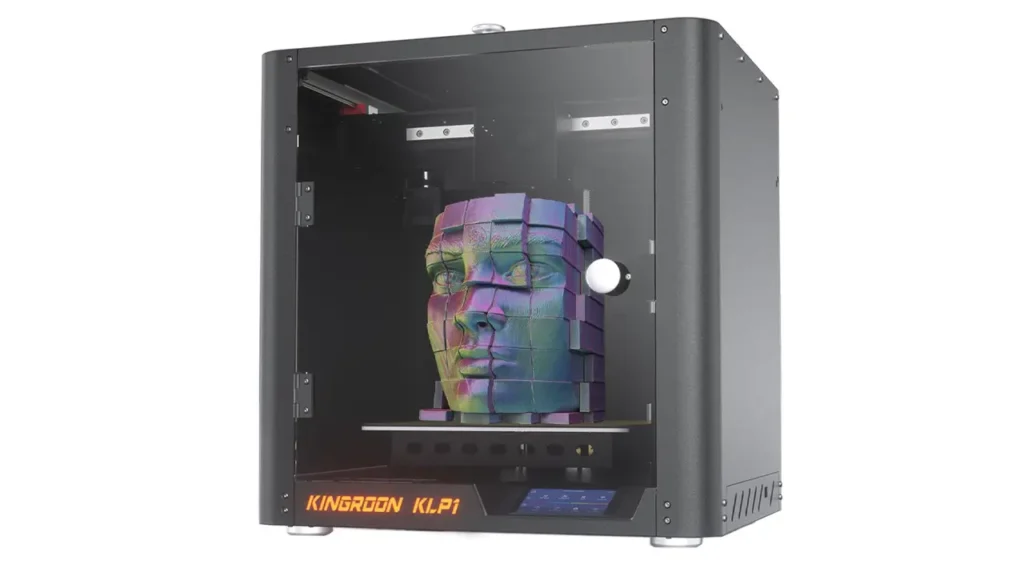
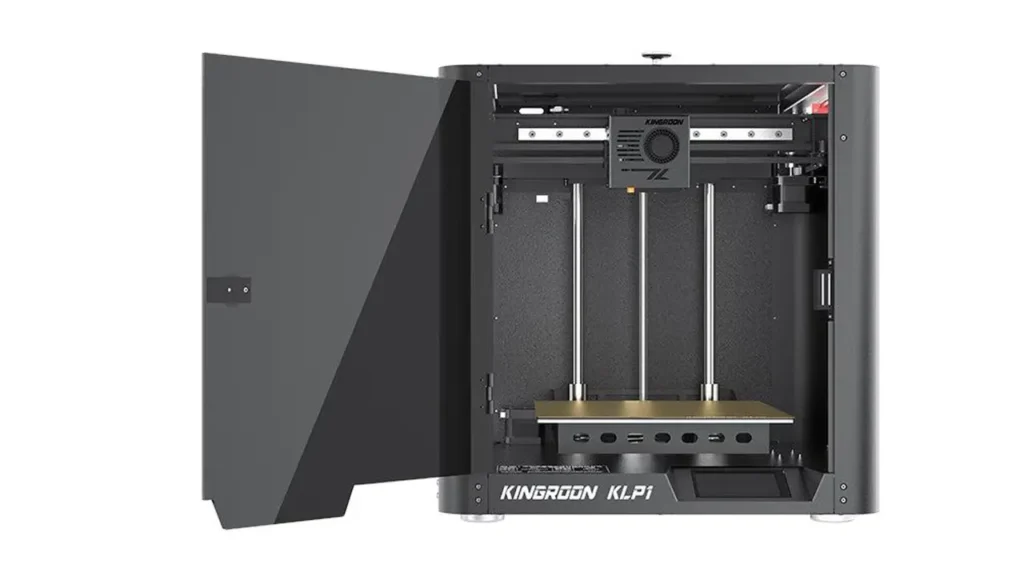
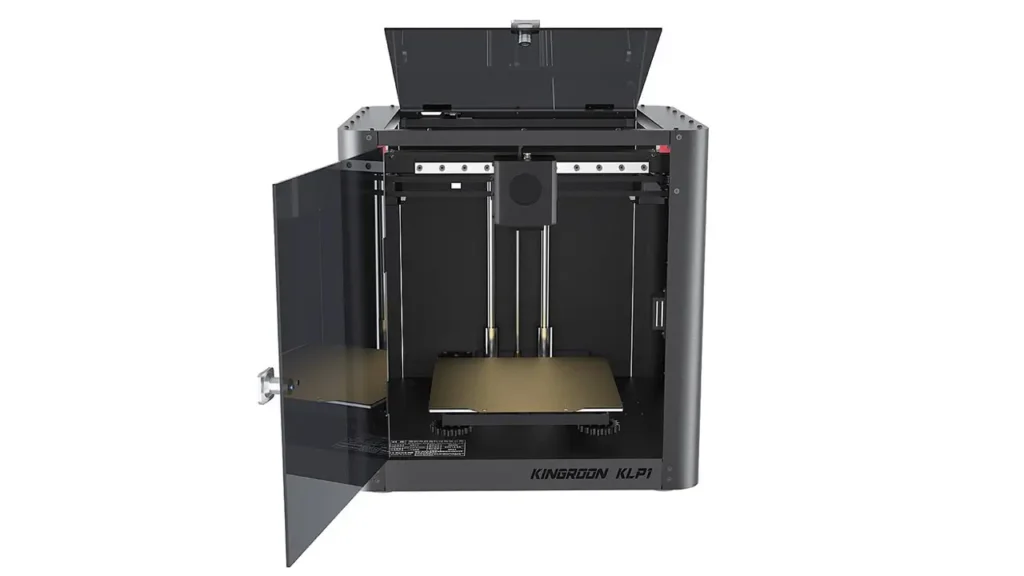
1. Introduction to Kingroon KLP1 Review
If you’ve been hunting for a budget CoreXY 3D printer that doesn’t make you cry every time you check the price tag, the Kingroon KLP1 review conversation starts and ends in a very interesting place. This little machine punches well above its weight class, offering a combination of modern firmware, a solid motion system, and impressive advertised speeds — all wrapped up in a package that won’t break the bank.
The KLP1 is Kingroon’s answer to the growing demand for affordable CoreXY machines that can actually keep up with enthusiast-level printing expectations. It’s designed for makers who want speed, reliability, and a familiar Klipper-based experience without having to spend the kind of money that high-end machines demand. Whether you’re a hobbyist looking to upgrade from a basic Cartesian printer, a tinkerer who loves fine-tuning firmware, or someone printing functional parts on a regular basis — this printer is worth your attention.
In this full Kingroon KLP1 review, we’ll walk through every major aspect of the machine: its CoreXY architecture, specs, Klipper firmware, high-speed performance, input shaping, extruder design, print quality, and ultimately whether it earns its place as one of the best budget CoreXY options available today.
2. Kingroon KLP1 CoreXY Architecture
One of the most immediately appealing things about the KLP1 is its CoreXY motion system — and if you’re new to this design, let’s talk about why that matters so much.
In a traditional Cartesian printer (the kind most beginners start with), the print bed moves along the Y-axis while the printhead moves along X and Z. This means you’re constantly accelerating and decelerating a relatively heavy print bed, which limits how fast you can go before print quality degrades. CoreXY flips this entirely: the bed only moves vertically (Z-axis), while two motors work in tandem to move the printhead across both X and Y simultaneously.
The result? Much lower moving mass on the toolhead, which means you can push acceleration much harder without the ringing artifacts and ghosting that plague bed-slinger designs at speed.
The KLP1 uses a well-implemented CoreXY layout with a rigid frame that helps maintain motion stability even when pushing toward its upper speed limits. The parallel belt paths are a core strength of this system — when tuned correctly, they deliver crisp, dimensionally accurate prints with minimal vibration bleed-through.
For anyone considering an affordable CoreXY 3D printer, this design philosophy is exactly what separates the KLP1 from cheaper Cartesian alternatives in the same price range. You’re getting a fundamentally more capable motion architecture, and that investment pays dividends in print quality and throughput.
Polimerukr.com
Ukraine
3D Printing Materials & Supplies
Your trusted source for high-quality 3D printing materials in Ukraine. Wide selection of filaments, resins, and accessories for all printer types with fast local shipping.
3. Kingroon KLP1 Specs Overview
Let’s get into the numbers. Here’s a full breakdown of the Kingroon KLP1 specs presented in a clean, mobile-friendly format:
| Specification | Details |
|---|---|
| Printer Type | CoreXY FDM |
| Build Volume | 200 × 200 × 200 mm |
| Max Print Speed | 350 mm/s |
| Max Acceleration | Up to 10,000 mm/s² |
| Firmware | Klipper (pre-installed) |
| Extruder Ratio | 5:1 gear ratio |
| Hotend Max Temp | 300°C |
| Heated Bed Max Temp | 110°C |
| Bed Surface | PEI Spring Steel Sheet |
| Auto Leveling | Yes (CR Touch / BLTouch compatible) |
| Input Shaping | Yes (ADXL345 accelerometer) |
| Linear Rails | MGN12 on X, Y, Z axes |
| Frame Material | Aluminum extrusion |
| Connectivity | Wi-Fi, USB |
| Display | Touchscreen (Fluidd/Mainsail web UI) |
| Filament Compatibility | PLA, PETG, TPU, ABS, ASA |
The build volume of 200 × 200 × 200 mm is modest but entirely practical for most hobby and functional printing use cases. The MGN12 linear rails on all axes are a particularly nice touch at this price point — they provide smooth, low-friction motion and are far more precise than V-slot wheel systems used on cheaper machines. Combined with the rigid aluminum frame, the KLP1 is built with a foundation that supports its speed ambitions.
4. Klipper Firmware & Performance
If there’s one software decision that defines the modern high-speed 3D printing experience, it’s Klipper — and the KLP1 ships with it pre-installed, which is a huge win for users who don’t want to go through the process of flashing custom firmware themselves.
Why does Klipper matter so much? Traditional 3D printer firmware like Marlin runs everything on the printer’s own microcontroller. Klipper offloads the heavy computational work to a separate single-board computer (like a Raspberry Pi or equivalent), which means it can perform far more complex real-time calculations — including the math behind input shaping and pressure advance — without choking the motion system.
For the Kingroon KLP1 Klipper setup, the interface is accessible through a web browser via either Fluidd or Mainsail — two popular Klipper front-ends that give you a clean dashboard for monitoring prints, adjusting parameters on the fly, and reviewing historical print data. Both are intuitive and well-supported by large communities, meaning help is never far away if you get stuck.
From a usability standpoint, Klipper’s configuration file system (using simple .cfg text files) is a blessing for tinkerers. You can adjust virtually every parameter — motor currents, PID tuning, input shaping profiles, pressure advance values — without touching a single line of compiled code. For a Klipper 3D printer review audience, this level of accessibility is genuinely exciting.
One practical benefit worth highlighting: Klipper supports real-time tuning during a print. If your first layer isn’t sticking quite right, you can dial in Z-offset adjustments live. If you want to see how a higher temperature affects surface finish mid-print, you can do it. This flexibility turns the KLP1 from a consumer appliance into a true maker’s tool.
5. 350mm/s High-Speed Printing Test
Now for the number everyone wants to talk about: 350mm/s. That’s the advertised top speed of the KLP1, and it sounds almost absurdly fast compared to the 50–80mm/s that most entry-level printers comfortably operate at. But what does it actually mean in the real world?
Let’s break it down.
Advertised vs Real-World Speed
The 350mm/s figure represents the maximum travel and print speed the printer is capable of reaching under optimal conditions. In practice, most real-world print jobs don’t sustain this speed across the entire print — acceleration and deceleration zones, perimeters, and fine details all require lower velocities to maintain quality.
That said, the KLP1 is genuinely quick. Even running at 150–200mm/s for perimeters and pushing infill to 300mm/s+, print times are dramatically shorter than on comparable Cartesian machines. A print that might take 2 hours on a standard entry-level machine can finish in under an hour on the KLP1 when sliced aggressively.
Acceleration and Jerk
The KLP1 supports accelerations up to 10,000 mm/s², which is where much of the actual speed benefit comes from in real-world use. High acceleration means the printer reaches its target speed quickly and doesn’t waste time ramping up and down constantly. Combined with Klipper’s smooth motion planning and input shaping (more on that shortly), the high speed 3D printer 350mm/s claim starts to feel very achievable for functional parts and draft-quality prints.
For comparison, here’s a quick look at how speed profiles translate to practical use:
| Print Mode | Recommended Speed | Best For |
|---|---|---|
| Quality Mode | 80–120 mm/s | Miniatures, detailed models |
| Balanced Mode | 150–200 mm/s | Everyday functional prints |
| Speed Mode | 250–350 mm/s | Draft parts, rapid prototyping |
6. Input Shaping Technology Explained
Input shaping is one of those features that sounds technical but has a very tangible, visible impact on print quality — especially when you’re running at high speeds. The Kingroon KLP1 input shaping implementation uses an ADXL345 accelerometer mounted directly on the toolhead to measure resonance frequencies in the frame and motion system.
What does it actually do?
When a 3D printer moves quickly and then changes direction, the momentum of the toolhead causes the frame to vibrate slightly. These vibrations get “printed into” your parts as wavy artifacts along the walls — a defect known as ringing or ghosting. At low speeds this is barely noticeable, but at 200mm/s+ it becomes a real problem if uncorrected.
Input shaping works by analyzing the resonance frequencies of your specific printer and then pre-compensating the motion commands so the vibrations cancel each other out. Klipper runs a resonance test (using the ADXL345 to measure actual vibration), calculates the optimal shaping filter (typically MZV or EI type), and applies it automatically. The result? Clean walls and sharp corners even at very high speeds.
For the KLP1, this feature transforms the machine from “fast but with visible artifacts” into “fast and actually good looking.” It’s the key that unlocks the full potential of the 350mm/s ceiling and is one of the standout features of this printer at its price point.
Practical Tips:
- Run the resonance test after any significant change to the printer (new printhead component, belt tension adjustment, relocation)
- Check both X and Y axes separately, as resonance frequencies differ between them
- Fine-tune acceleration limits based on the shaping results — Klipper will suggest safe maximums
7. 5:1 Extruder Performance
The Kingroon KLP1 extruder 5:1 ratio is another area where this printer differentiates itself meaningfully from budget competition.
A 5:1 gear ratio means the drive gear turns five full rotations for every one rotation of the motor shaft. This mechanical advantage does two important things:
1. Increased Torque More torque means the extruder can push filament through the hotend with significantly more force. This is critical at high speeds, where the hotend needs to melt and extrude filament faster than at normal print velocities. Without sufficient extruder torque, you get under-extrusion — thin, weak layers that look stringy and underfilled.
2. Improved Precision The gearing also means smaller motor steps translate to finer filament movement, improving the precision of extrusion starts and stops. This is directly observable in sharper corners, cleaner retractions, and less oozing on travel moves.
Flexible Filament (TPU) Capability
One of the traditional weak points of high-speed extruders is flexible filament handling. TPU and similar materials are prone to buckling in the extruder path if there’s too much gap between the drive gear and the hotend inlet. The KLP1’s extruder design keeps this path short and direct, making it one of the more capable budget options for flexible filament — though you’ll still want to reduce speed significantly (40–60mm/s) for best results with TPU.
Pressure Advance Integration
Paired with Klipper’s pressure advance feature, the 5:1 extruder becomes even more effective. Pressure advance compensates for the elasticity of filament in the hotend, further reducing corner blobs and improving overall print sharpness. Setting up pressure advance on the KLP1 is straightforward through the Klipper config file.
8. Print Quality Results
So after all the specs and features — how does the Kingroon KLP1 actually print?
The short answer: impressively well for a budget machine, with the right tuning.
Surface Quality
At balanced speeds (150–200mm/s) with input shaping enabled and pressure advance tuned, the KLP1 produces clean, smooth external surfaces on PLA and PETG. Wall lines are consistent, infill is well-bonded, and overhangs up to around 50° print cleanly with the stock cooling setup.
At maximum speed (300–350mm/s), surface quality degrades somewhat — you’ll see slightly less defined details and possible minor ringing on sharp corners if input shaping calibration isn’t perfect. For draft and functional parts this is perfectly acceptable. For display models or miniatures, you’ll want to drop speed to the quality range.
Layer Consistency
Layer-to-layer consistency is strong, thanks to the linear rail system and the rigid frame. Z-banding (the horizontal striping artifact common on printers with loose Z-axis motion) is minimal. The PEI spring steel bed provides excellent first-layer adhesion without glue sticks or hairspray, and the magnetic attachment makes removing finished prints satisfying and quick.
Material Results Overview:
| Material | Max Practical Speed | Quality Rating | Notes |
|---|---|---|---|
| PLA | 300 mm/s | Excellent | Best all-around performance |
| PETG | 200 mm/s | Very Good | Reduce speed for best surface |
| TPU | 50 mm/s | Good | Slow down significantly |
| ABS / ASA | 150 mm/s | Good | Enclosure recommended |
9. Pros and Cons of Kingroon KLP1
Every printer has its strengths and compromises. Here’s an honest, balanced look at where the KLP1 shines and where it shows its budget origins.
Strengths
The CoreXY motion system is the foundation that makes everything else possible. For the price, getting MGN12 linear rails on all axes is genuinely impressive — this is hardware you’d expect to find on printers costing significantly more. The pre-installed Klipper firmware with web interface access removes a major barrier to entry for users who want the features without the setup headache.
Input shaping via ADXL345 is fully implemented and works well, delivering noticeably cleaner prints at high speed compared to machines without vibration compensation. The 5:1 extruder provides meaningful real-world benefits in torque and precision, and the PEI spring steel bed is a quality-of-life upgrade over plain glass or painter’s tape setups.
Speed is genuinely impressive — even at 200mm/s, this printer is dramatically faster than the Cartesian competition at the same price point, and it shows in real-world print time savings.
Compromises
The build volume of 200 × 200 × 200 mm is on the smaller side. Users who regularly print large objects will feel constrained. The machine is also not enclosed by default, which means ABS and ASA printing is possible but requires either a DIY enclosure or careful environmental control to avoid warping.
Initial calibration takes time and some technical confidence. While Klipper is a wonderful firmware, it’s not as hand-holding as Marlin-based alternatives — new users may need to spend an afternoon reading documentation and running calibration macros before the printer is fully dialed in. This is a feature as much as a limitation, but it’s worth knowing going in.
Community support specifically for the KLP1 is growing but not yet as large as for more established brands like Bambu or Prusa. You’ll find answers to most questions in Klipper forums and CoreXY communities, but KLP1-specific resources are still building.
10. Final Verdict: Is It the Best Budget CoreXY?
After going through every aspect of the Kingroon KLP1, the verdict is clear: this is one of the most compelling budget CoreXY 3D printer options available in its price class today.
How does it compare to key competitors?
| Feature | Kingroon KLP1 | Typical Budget Cartesian | Mid-Range CoreXY |
|---|---|---|---|
| Motion System | CoreXY | Cartesian (bed slinger) | CoreXY |
| Max Speed | 350 mm/s | 100–150 mm/s | 250–500 mm/s |
| Firmware | Klipper | Marlin | Klipper / Proprietary |
| Input Shaping | Yes (ADXL345) | Rarely | Yes |
| Linear Rails | MGN12 all axes | V-slot wheels | MGN9 / MGN12 |
| Price Range | Budget | Budget | Mid-High |
Who should buy the Kingroon KLP1?
The KLP1 is an outstanding choice for makers who are ready to step beyond beginner-level printers and want the speed, precision, and firmware flexibility of a CoreXY system without committing to a premium price. If you’re comfortable spending a little time on initial setup and calibration — or excited to learn the process — you will be rewarded with a machine that consistently outperforms its price tag.
It’s particularly well-suited for:
- Experienced hobbyists upgrading from a bed-slinger
- Engineers and product developers who need fast draft iterations
- Klipper enthusiasts who want a capable platform to tune and experiment with
- Anyone who prints functional parts regularly and values speed + quality balance
Who might want to look elsewhere?
Complete beginners who want a truly plug-and-play experience might find the Klipper learning curve steep. Users who regularly print large-format objects will need to look at bigger-volume machines. And those printing engineering materials like ABS or ASA exclusively will want to budget for an enclosure solution alongside the printer.
Final Recommendation
The Kingroon KLP1 earns a strong recommendation as one of the best affordable CoreXY 3D printers currently available. It brings features — Klipper firmware, input shaping, MGN12 rails, 5:1 extruder, 350mm/s capability — that were firmly in mid-range territory just two years ago, down to a price point that’s genuinely accessible.
For makers who want to print fast, print well, and actually understand their machine: this is your printer.
🇺🇸 English
Great review of the Kingroon KLP1! The article is clear, well-structured, and actually useful — not just specs copy-paste. I especially liked the breakdown of speed and Klipper features. This site is becoming my go-to for 3D printer insights.
🇪🇸 Español
Excelente análisis del Kingroon KLP1. La información es clara y bien organizada, especialmente la parte sobre Klipper y la velocidad real. Se nota que el sitio ofrece contenido útil y no solo marketing. Muy recomendable.
🇸🇦 العربية
مراجعة رائعة لطابعة Kingroon KLP1. المقال منظم وسهل الفهم ويحتوي على معلومات حقيقية حول الأداء والسرعة. الموقع مفيد جدًا لكل من يهتم بالطباعة ثلاثية الأبعاد. استمروا بهذا المستوى!
🇨🇳 中文
这篇关于 Kingroon KLP1 的评测非常专业。内容详细,结构清晰,特别是对速度和 Klipper 的解释非常有帮助。这个网站对于了解3D打印机非常有价值。
🇫🇷 Français
Très bon article sur la Kingroon KLP1. Le contenu est précis, bien structuré et facile à comprendre. J’ai particulièrement apprécié les explications sur Klipper et les performances réelles. Site fiable et intéressant.
🇩🇪 Deutsch
Sehr guter Testbericht über den Kingroon KLP1. Die Informationen sind klar und gut erklärt, особенно скорость и Klipper функции. Die Website bietet echten Mehrwert für 3D-Druck-Fans.
Discover more from bestchina3dprinters.com
Subscribe to get the latest posts sent to your email.