to Tronxy XY-2 Pro Titan
If you’ve been exploring the world of FDM 3D printing and looking for a machine that punches well above its price point, the Tronxy XY-2 Pro Titan deserves a serious look. This is a dual extruder 3D printer that brings together a solid feature set — including a Titan extruder, auto leveling, a generous build volume, and multi-material support — all wrapped up in a budget-friendly package.
Whether you’re a curious beginner who wants to dip their toes into 3D printing, a hobbyist looking to upgrade from a bare-bones machine, or even a maker who wants reliable dual extrusion without spending a fortune, the Tronxy XY-2 Pro Titan positions itself as a genuinely compelling option.
In this review, we’re going to walk through everything you need to know — from hardware design and dual extrusion capabilities to real-world printing performance and value for money. Let’s get into it.
2. Tronxy XY-2 Pro Titan Overview
Tronxy, officially known as Shenzhen Tronxy Technology Co., Ltd., is a Chinese manufacturer that has been steadily building its reputation in the consumer 3D printing space. The company focuses on the research, development, and production of FDM 3D printers and printing materials, and the XY-2 Pro Titan is one of their most refined mid-range offerings.
This tronxy 3d printer review covers the Titan variant specifically, which is the upgraded version of the standard XY-2 Pro line. It follows the classic Prusa i3 structure — a well-proven, open-frame Cartesian design with a moving bed on the Y-axis and a moving toolhead on the X-axis. This architecture is familiar, easy to service, and very well understood by the maker community, which is a big plus.
The printer ships semi-assembled and can be put together in as few as three to five steps depending on which variant you purchase. Tronxy has made assembly remarkably straightforward — in many cases users report getting the machine up and running in under 15 minutes, which is impressive for a DIY kit.
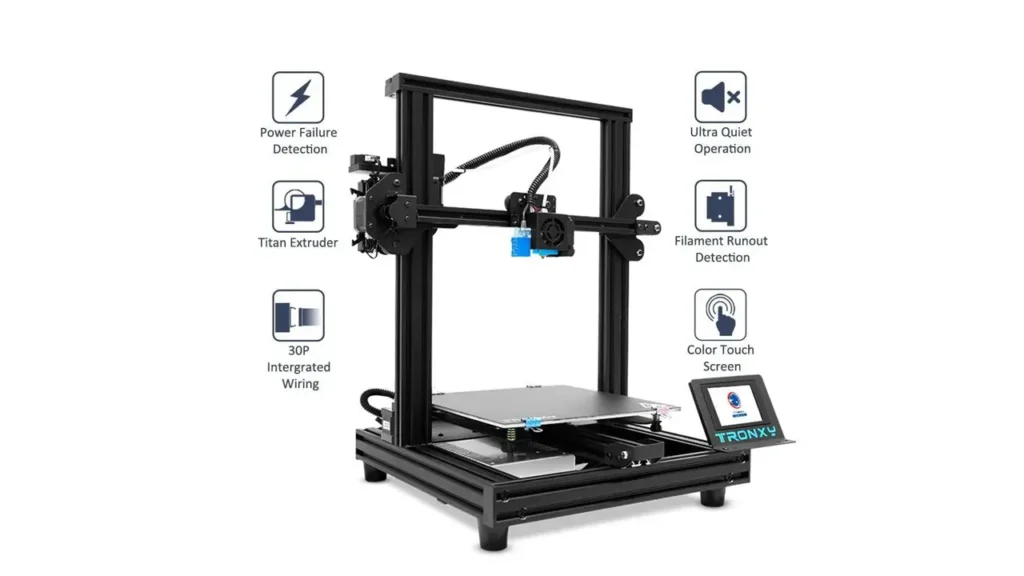
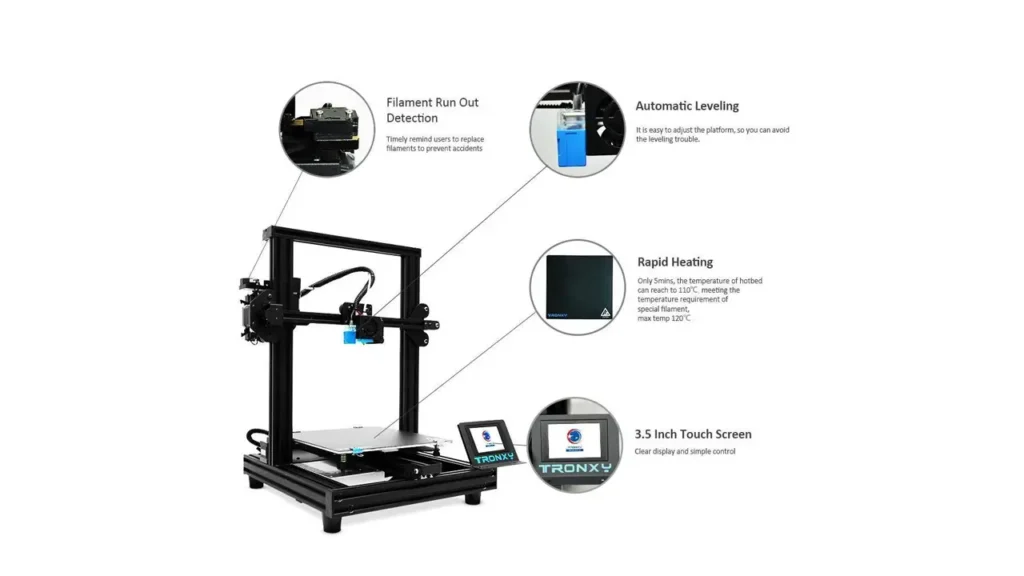
The XY-2 Pro Titan comes with a 3.5-inch full-color touchscreen, giving you an intuitive interface to control all print parameters, monitor temperatures, adjust speeds, and manage leveling routines. The overall footprint is compact enough for a desktop or home studio, and the 4040 aluminum profile frame gives the machine structural rigidity without unnecessary bulk.
Tronxy XY-2 Pro Titan
Budget Dual Extruder FDM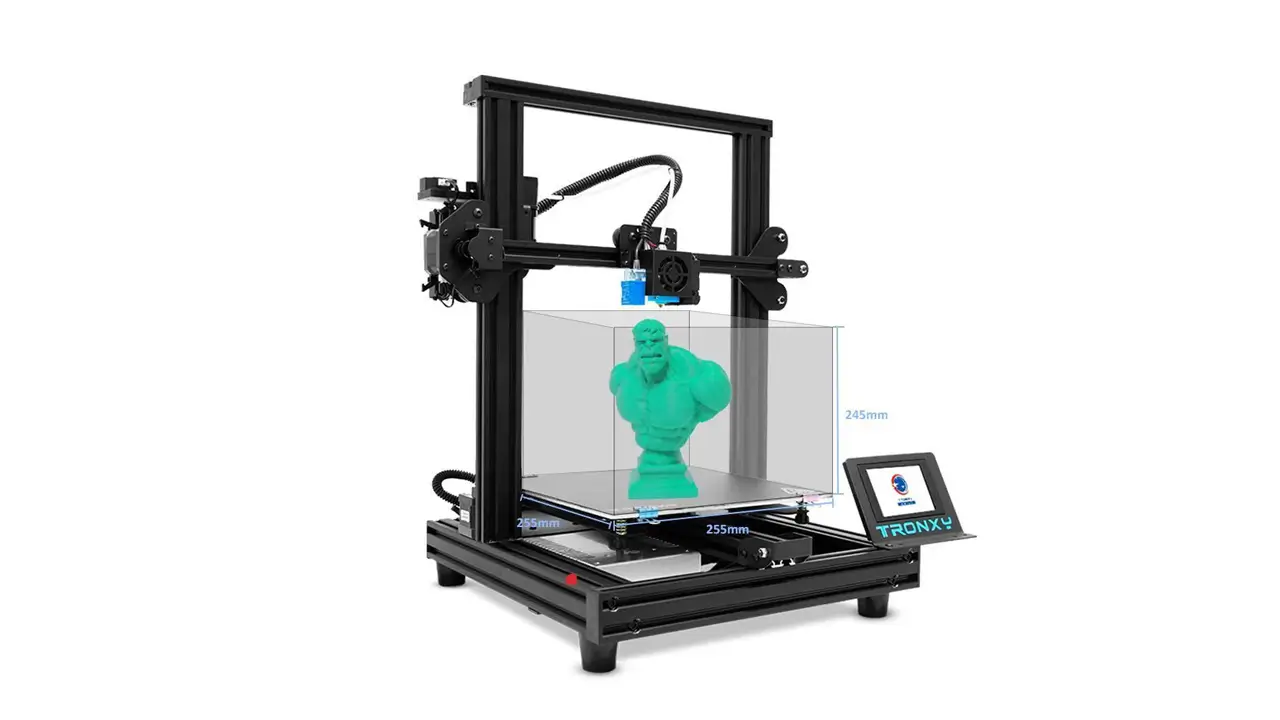
Dual Extrusion FDM Printer
Reliable dual extrusion 3D printer from Tronxy. Titan extruder for consistent filament feeding, auto-leveling, and spacious build volume for versatile printing projects.
3. Tronxy XY-2 Pro Titan Dual Extruder Capabilities Explained
The headline feature of this machine is undoubtedly its dual extruder setup, and it’s worth taking a moment to understand exactly how this works — because not all “dual extruder” systems are created equal.
The Tronxy XY-2 Pro Titan uses a 2-in-1-out (also called mixing or switching) extruder system. This means the printer has two filament inputs — two separate Titan extruders feeding filament — but they both route into a single nozzle. This design makes dual extrusion 3d printing more accessible and mechanically simpler than a traditional dual independent nozzle setup.
The practical benefit? You can load two different colored filaments, and the slicer software handles the automatic switching between them to produce two-color prints from a single nozzle. There’s no need to worry about nozzle height calibration between two separate hotends — which is notoriously fiddly on many printers.
According to the official product listing on the Tronxy store, users can combine filaments freely to create more creative dual or multicolor models. The switching is managed through slicer settings, and Tronxy recommends a retraction distance of at least 60 mm and a retraction speed of 70 mm/s when switching between colors to get clean transitions.
It’s important to be clear about what this system can and cannot do. Because it uses a single nozzle, you won’t get perfect color separation — there will be some mixing at transition points. However, for color gradient prints, decorative dual-color objects, or simply models that use two different materials in sequence, this system works very well. For true soluble support printing (where one material dissolves), you would typically need a fully independent dual nozzle system, which this printer does not have.
That said, for the price point, having any form of functional dual extrusion 3d printing capability is a significant advantage over competing single-extruder machines.
4. Titan Extruder Performance
One of the most talked-about upgrades in the “Titan” version of this machine is, unsurprisingly, the Titan extruder itself. So what makes it special?
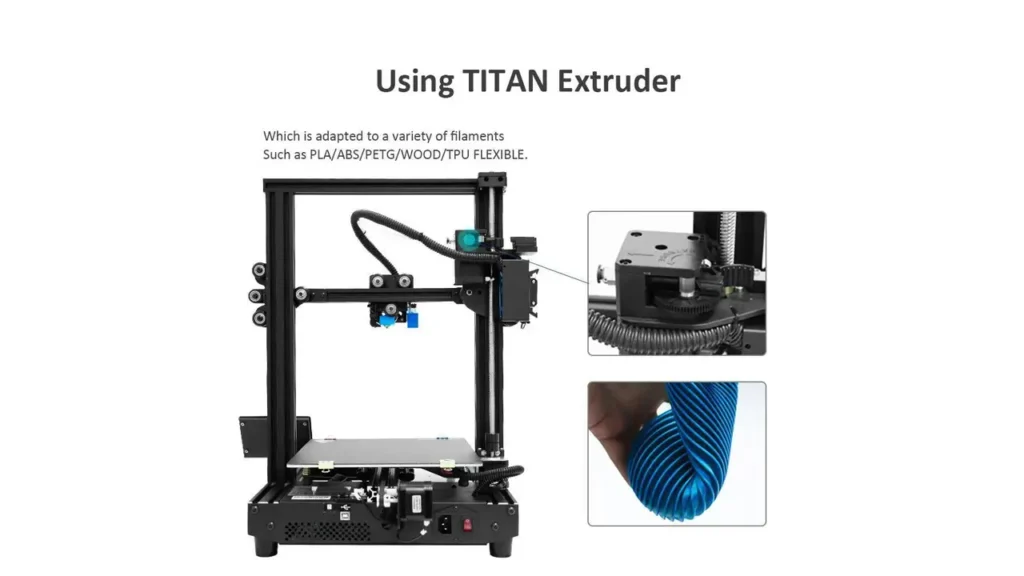
The Titan extruder is a dual-gear, high-precision extruder featuring a 3:1 gear reduction ratio. This means the motor effectively has three times more mechanical advantage when pushing filament, which translates into much more consistent and controlled filament feeding, especially at lower motor speeds.
This is hugely beneficial when printing flexible materials. Standard direct-drive or basic Bowden setups struggle with flexible filaments like TPU because the soft material tends to buckle or slip under pressure. The Titan’s gear reduction and precision milling allow it to grip and feed flexibles cleanly and reliably.
According to official Tronxy specifications, the printer supports PLA, ABS, TPU, and PETG — a solid range of common materials. The maximum nozzle temperature of 275°C gives enough headroom not only for these standard filaments but also for some engineering-grade materials.
Real-world users on the Tronxy product page report that the Titan extruder handles TPU very well right out of the box, with no modifications needed. One reviewer noted it worked flawlessly with TPU in black, blue, and yellow across multiple spools.
It’s worth noting that the Titan extruder included with the XY-2 Pro Titan is largely made from plastic — it is a clone/inspired design rather than the original E3D Titan. While this doesn’t necessarily harm performance significantly, it’s something to be aware of for long-term durability. Some experienced users opt to eventually upgrade to a more robust extruder body after extended use.
The printer is equipped with dual turbo cooling fans on the extruder assembly, which help cool the printed model rapidly after each layer is deposited. This is directly responsible for reducing warping and stringing, and it contributes to overall print quality.
5. Tronxy XY-2 Pro Titan. Build Volume and Printing Size
Let’s talk space. One of the most practical considerations for any 3D printer is how big a model you can actually print, and this is an area where the Tronxy XY-2 Pro Titan genuinely shines.
The official build volume is 255 × 255 × 245 mm (some variants and listings reference a slightly taller Z-axis of up to 260 mm). To put that in perspective, this is considerably larger than many competing machines in the same price bracket — most budget 3D printers in the sub-$300 range offer around 220 × 220 × 250 mm.
That extra width and depth on the X and Y axes makes a real difference when printing flat objects, large base plates, or multiple smaller items simultaneously. You have more flexibility in how you arrange your print bed, and you’re less likely to hit size restrictions on medium-sized projects.
| Specification | Tronxy XY-2 Pro Titan |
|---|---|
| Build Volume | 255 × 255 × 245 mm |
| Print Speed | 20–100 mm/s (60 mm/s recommended) |
| Layer Resolution | 0.1–0.3 mm |
| Nozzle Diameter | 0.4 mm |
| Positioning Accuracy X/Y | ±0.00625 mm |
| Positioning Accuracy Z | ±0.00125 mm |
| Max Nozzle Temperature | 275°C |
| Max Bed Temperature | 120°C |
| Supported Materials | PLA, ABS, TPU, PETG |
| Power Supply | DC 24V / 360W |
| Display | 3.5-inch full-color touchscreen |
| File Input | SD card / USB |
| Compatible Slicers | Tronxy Slicer, Cura, Simplify3D |
| Frame Material | 4040 aluminum profiles |
| Machine Weight | ~12 kg |
The heated bed reaches up to 120°C, which is more than adequate for printing ABS and PETG, both of which benefit from a warm build surface to reduce warping. The bed uses an aluminum substrate with a black adhesive surface that provides good adhesion for most filament types right out of the box — many users report prints sticking well and releasing cleanly after cooling.
The large build volume 3d printer advantage here is clear: you can go from miniatures to nearly desk-scale functional parts without swapping machines. That versatility is genuinely useful.
6. Auto Leveling and User Experience
Ask any 3D printing enthusiast what their biggest frustration is, and bed leveling will almost certainly come up. Getting the first layer right is absolutely critical to print success — too far from the bed and the filament won’t stick, too close and you’ll scratch the surface or clog the nozzle. It’s a fine balance that can feel like a dark art to newcomers.
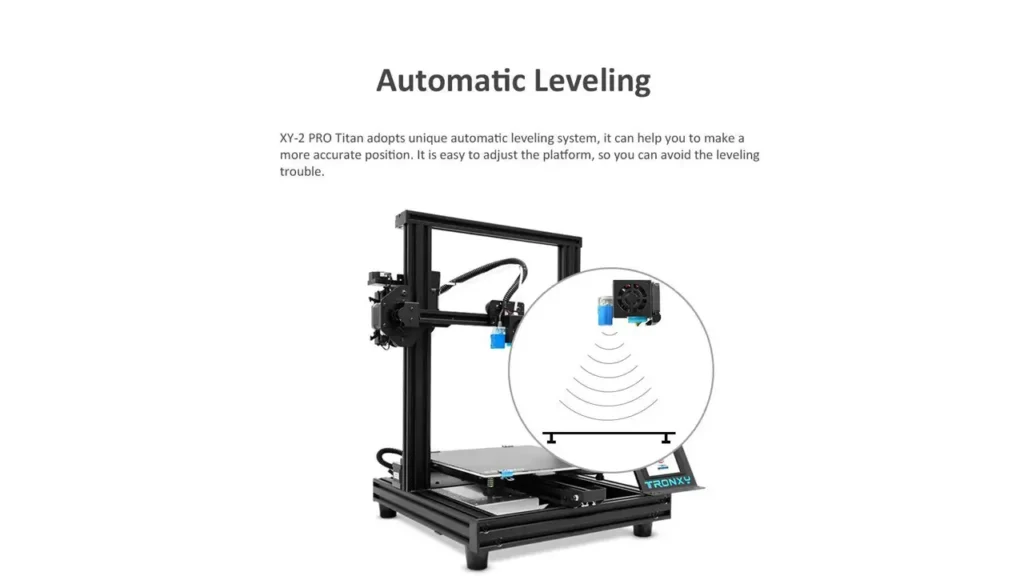
Tronxy addresses this with its built-in 3d printer auto leveling system. The XY-2 Pro Titan features a 16-point auto leveling routine that uses a sensor to probe the bed at multiple positions, building a compensation mesh. This mesh is then used to make micro-adjustments during printing, so even if your bed has slight warps or inconsistencies, the first layer is corrected in real time.
The process is simple: from the touchscreen menu, you navigate to the leveling section, run the auto-level routine, and the printer does the rest. After that, you set your Z-offset (the precise distance between the nozzle and bed surface at the starting point), and you’re ready to print.
One thing to keep in mind is that the auto leveling system on the XY-2 Pro Titan is technically a leveling measurement and compensation system rather than a full active bed leveling solution like the BLTouch or CR Touch found on higher-end machines. Practically speaking, for the vast majority of prints and users, the distinction won’t matter — the system works well and removes most of the frustration from the leveling process.
The touchscreen interface is a genuine quality-of-life improvement. From the 3.5-inch display you can monitor and adjust print speed, nozzle temperature, bed temperature, fan speed, flow rate, and Z-offset on the fly. Some users have noted the menu layout can take a little getting used to, but once you’re familiar with it, navigation is quick and logical.
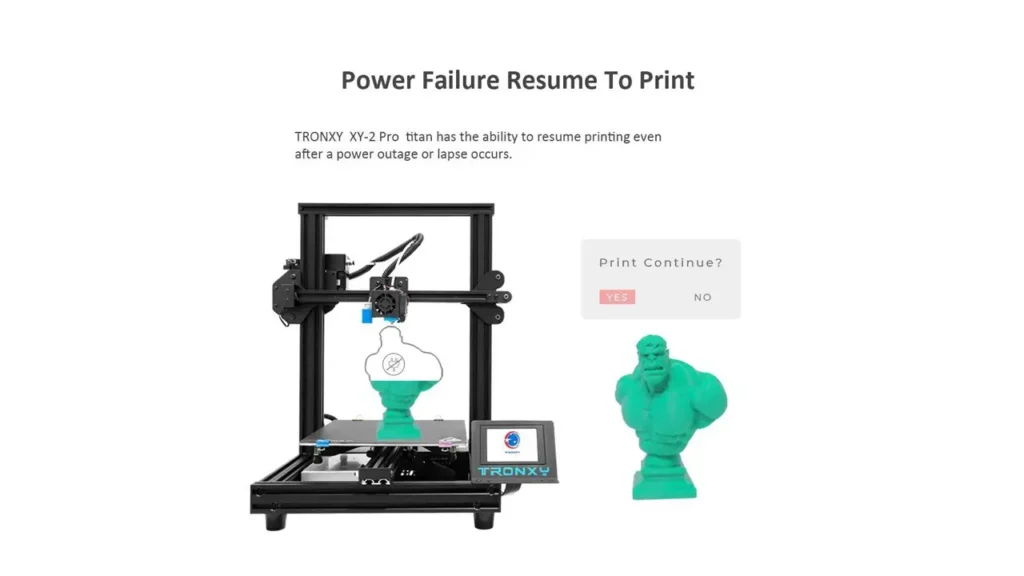
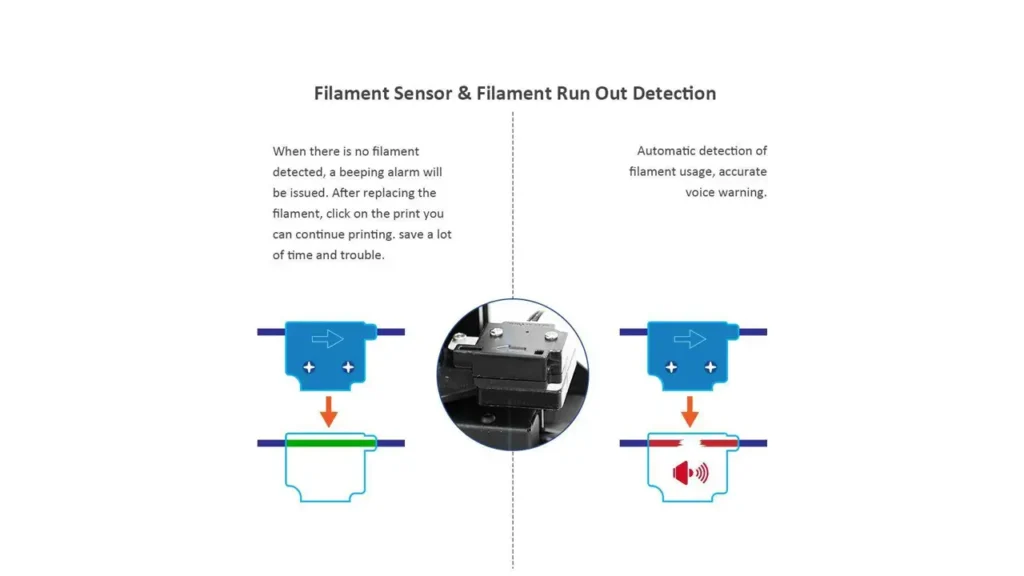
Additional quality-of-life features worth mentioning are the filament runout sensor and the power failure resume function. If your filament spool runs out mid-print, the sensor triggers an automatic pause, giving you time to swap spools and continue without losing the print. And if the power goes out unexpectedly, the printer saves its progress and resumes from where it left off when power is restored. These features are increasingly standard on modern machines, but having them both present at this price point is commendable.
7. Tronxy XY-2 Pro Titan. Multi-Material Printing Features
The Tronxy XY-2 Pro Titan’s approach to multi material 3d printer capability centers on its 2-in-1-out Titan extruder configuration. With two filament inputs converging into one hotend, the printer can handle color transitions within a single print, opening up a range of creative and practical possibilities.
Here’s how it works in practice: you load two different filament colors or types into the two Titan extruder units. In your slicer (Cura, Simplify3D, or Tronxy’s own slicer), you assign different sections or layers of the model to each extruder. The slicer generates the appropriate G-code, and when the printer reaches a transition point, it retracts one filament and advances the other before continuing.
Because both materials share the same nozzle, there will always be some color blending in the transition zone — this is a physical inevitability of the 2-in-1-out design. The amount of blending depends on the retraction settings and how much purging you configure between color changes. For decorative applications like figurines, logos, nameplates, or color-banded objects, the result is visually appealing and the blending can actually be part of the aesthetic.
For functional multi-material printing — like using a stiffer outer shell with a flexible inner core — this system also works, though material compatibility at the melting point is something to check before committing to a specific filament pairing.
The printer officially supports PLA, ABS, TPU, and PETG, which covers the most popular filament types used in both hobby and light professional applications. The 24V/360W power supply ensures the hot bed heats up quickly to about 120°C, reducing the waiting time before you can start a print. According to the official Amazon product listing, this quick heat-up is one of the practical advantages of the machine’s power delivery system.
Tronxy 3D Printers
Shenzhen, China
Reliable FDM Printers
Affordable and reliable 3D printers from Tronxy. Wide range of models for beginners and enthusiasts, with sturdy construction and consistent performance for everyday printing.
8. Is It a Budget Dual Extruder 3D Printer?
Let’s address the big question head-on: is the Tronxy XY-2 Pro Titan genuinely a budget dual extruder 3d printer, or is “budget” just clever marketing?
Based on pricing from official Tronxy channels and authorized resellers, the standard XY-2 Pro Titan comes in around the $215 range, while the 2E (dual extruder) variant runs approximately $253–$284 depending on the seller and configuration. In the context of 3D printers with dual extrusion capability, that is genuinely affordable.
To give you a sense of the landscape, here’s how it compares to other options in the market:
| Printer | Dual Extrusion | Build Volume | Approx. Price |
|---|---|---|---|
| Tronxy XY-2 Pro Titan | Yes (2-in-1-out) | 255×255×245 mm | ~$215–$284 |
| Creality Ender 3 Pro | No | 220×220×250 mm | ~$180–$220 |
| Flashforge AD5X (multi-color) | Yes (multi-material) | 220×220×220 mm | ~$500+ |
| Creality K2 Pro (multi-color) | Yes (with CFS) | 300×300×300 mm | ~$700+ |
The comparison makes it clear: for someone who specifically wants dual extrusion capability and a large build plate without spending $500 or more, the Tronxy XY-2 Pro Titan fills a very specific and underserved niche. It’s a genuinely affordable 3d printer in the dual-extrusion category.
That said, “budget” does come with trade-offs. Build quality on some components is plastic rather than metal. The slicer ecosystem, while compatible with Cura, requires some setup. And customer support, while reportedly responsive (within 24 hours per official policy), can be constrained by time zones and language differences. Tronxy offers a 1-year warranty on major components including the mainboard, motor, screen display, and hot bed, and a 30-day return policy — solid coverage for a machine in this price range.
If you go in with realistic expectations — understanding you’re getting an excellent feature set for the price, not necessarily the most premium build quality — the value proposition is very strong.
9. Beginner-Friendly or Not?
This is a nuanced question that deserves an honest answer, because the Tronxy XY-2 Pro Titan sits in an interesting position: it’s marketed as a machine suitable for beginners, and in many ways it genuinely is — but there are a few caveats worth knowing.
On the beginner-friendly side, the machine has a lot going for it. Assembly is genuinely fast. The official listings describe a 3-to-5-step installation process that most users complete in under 15 minutes, with only a ribbon cable and a single wire connector to connect. Tronxy provides instructional videos on their YouTube channel to guide you through the process visually, which is a big help for newcomers.
The auto leveling system also dramatically reduces the most frustrating part of first-time 3D printing setup. Rather than spending an hour manually tramming the bed with a piece of paper, you run the automated routine, set the Z-offset, and you’re printing. Many users report a successful first print within an hour of unboxing, which is a genuinely positive beginner experience.
The touchscreen interface, while not the most intuitive UI in the market, provides clear visual feedback and is accessible without needing to edit configuration files or use terminal commands.
For a 3d printer for beginners who are also DIY enthusiasts — people who enjoy tinkering, learning, and improving their machine over time — this printer is a great starting point. Tronxy itself notes on the official product page that the machine is more suitable for enthusiasts with some 3D printing experience, or beginners who are willing to invest time in learning the craft.
If you’re a complete beginner who expects a plug-and-play experience like a consumer inkjet printer, you’ll likely need some patience and willingness to learn. The Tronxy community on Facebook, forums, and Reddit is active and helpful — which goes a long way when you hit your first snag.
The compatible slicers (Tronxy’s own software, Cura, and Simplify3D) all have learning curves, particularly around dual-extrusion settings, but once configured, they open up the full capabilities of the machine. Print results from users show excellent quality — clean layer lines, good dimensional accuracy, and minimal stringing when settings are dialed in properly.
In summary: great for beginners who are curious and willing to learn. Less ideal for those expecting zero learning curve.
Polimerukr.com
Ukraine
3D Printing Materials & Supplies
Your trusted source for high-quality 3D printing materials in Ukraine. Wide selection of filaments, resins, and accessories for all printer types with fast local shipping.
10. Final Verdict on Tronxy XY-2 Pro Titan
After going through every aspect of this machine, here’s where we land.
The Tronxy XY-2 Pro Titan is a genuinely impressive printer for its price category. It delivers dual extrusion capability, a large 255 × 255 × 245 mm build volume, a capable Titan extruder with 3:1 gear reduction, 16-point auto leveling, a filament runout sensor, power failure recovery, and a color touchscreen — all in one package that costs a fraction of what comparable multi-material machines from premium brands command.
Is it perfect? No. The plastic Titan extruder body may need replacement after extended heavy use. The UI has a learning curve. The SD card slot placement at the rear is a minor inconvenience. And the 2-in-1-out dual extrusion design, while functional and clever, doesn’t offer the same precision as a true dual-nozzle independent system.
But here’s the thing — none of those limitations are dealbreakers for the target audience. If you’re a maker, a hobbyist, a student, a small business owner printing prototypes, or simply someone who wants to explore what 3D printing can do beyond single-color PLA prints, the Tronxy XY-2 Pro Titan is a fantastic entry point into the world of dual extrusion 3D printing.
| Category | Rating | Notes |
|---|---|---|
| Build Quality | ★★★★☆ | Solid aluminum frame; some plastic extruder parts |
| Print Quality | ★★★★☆ | Excellent for the price; clean layers when dialed in |
| Ease of Assembly | ★★★★★ | 3–5 step setup; fast and well-documented |
| Dual Extrusion | ★★★★☆ | 2-in-1-out; functional for color mixing; not full independence |
| Auto Leveling | ★★★★☆ | 16-point compensation; works well in practice |
| Value for Money | ★★★★★ | Exceptional feature set per dollar spent |
| Beginner Friendliness | ★★★★☆ | Great for curious learners; some patience required |
| Material Compatibility | ★★★★☆ | PLA, ABS, PETG, TPU — covers all common filaments |
Who should buy the Tronxy XY-2 Pro Titan? It’s ideal for makers and hobbyists who want to explore dual-color and multi-material printing without spending $500 or more. It’s also a great choice for educators, small maker spaces, and anyone upgrading from a basic single-extruder machine who wants more creative flexibility.
Who might want to look elsewhere? If you need truly independent dual nozzles for soluble support printing, or if you want a fully hands-free out-of-the-box experience with zero tinkering, you may want to explore higher-end alternatives.
But for the vast majority of 3D printing enthusiasts who want great output, genuine dual extrusion features, and a large build volume at a price that doesn’t require selling a kidney — the Tronxy XY-2 Pro Titan delivers. It’s one of the most feature-rich affordable 3D printers in its class, and that makes it very easy to recommend.
Discover more from bestchina3dprinters.com
Subscribe to get the latest posts sent to your email.